

Security Researcher Shows How Remote macOS Exploit Hoodwinks Safari Users With Custom URL Schemes - MacRumorsOpen MenuShow RoundupsShow Forums menuVisit ForumsOpen Sidebar
Skip to Content

Security Researcher Shows How Remote macOS Exploit Hoodwinks Safari Users With Custom URL Schemes

by

A security researcher has demonstrated how macOS users are vulnerable to remote infection through a malicious exploit involving the "Do you want to allow..." popup that can be encountered when visiting websites in Safari.

In a lengthy breakdown, Patrick Wardle explains how the exploit utilizes document handlers, which request permission to open a link or a file in another app – like a PDF in Preview, for example – and URL handlers, which work similarly in the way they notify macOS that they can accept certain file formats.
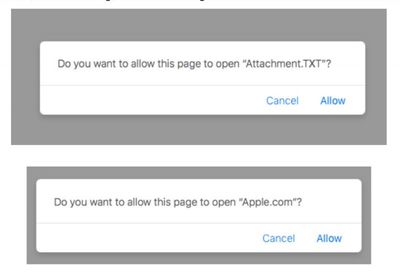
malicious attack safari
The exploit occurs when a user visits a malicious website and a ZIP file is downloaded and automatically unzipped by Safari, whereby the custom URL scheme is initially registered on the user's filesystem.

Once the target visits our malicious website, we trigger the download of an archive (.zip) file that contains our malicious application. If the Mac user is using Safari, the archive will be automatically unzipped, as Apple thinks it's wise to automatically open "safe" files. This fact is paramount, as it means the malicious application (vs. just a compressed zip archive) will now be on the user's filesystem, which will trigger the registration of any custom URL scheme handlers! Thanks Apple!

In the next stage, the malicious web page runs code that can load or "browse" to the custom URL scheme, which causes macOS to activate the URL handler and launch the malicious application.

This action is enabled through the Safari user prompt that includes options to "Allow" or "Cancel" the process, however the popup text and available options are controlled by the attacker, and are therefore easily changed to trick or deceive the user.
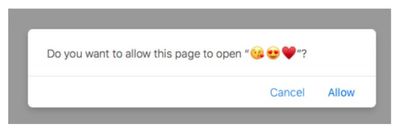
malicious exploit safari
The standard defenses built into macOS – Gatekeeper, for example – are said to be ineffective when it comes to the attack described above, and while Apple could always revoke the malicious app's signature, that course of action would obviously be too late for anyone who had already gone ahead and launched it.

Until then, turning off automatic unzipping of "safe" files should be enough to prevent the malicious procedure from ever occurring. Concerned users can do so by clicking the Safari menu bar, selecting Preferences..., and under the General tab, unchecking Open "safe" files after downloading.


Top Rated Comments

Kebabselector Avatar
106 months ago
Until then, turning off automatic unzipping of "safe" files should be enough to prevent the malicious procedure from ever occurring. Concerned users can do so by clicking the Safari menu bar, selecting Preferences..., and under the General tab, unchecking Open "safe" files after downloading.

Surely this should be the default position for any user regardless of the exploit or not.

Score: 9 Votes (Like | Disagree)
106 months ago
There have been a few previous security vulnerabilities relating to Safari on the Mac, where allowing Safari to open 'safe' files was the entry vector.

Ever since the first such vulnerability, it's been my opinion that the safest approach is to simply leave that option turned off permanently. Particularly as it doesn't really add much convenience. I very rarely want to open a file as soon as it's been downloaded. Also, opening a file manually involves two clicks at the very most.

Anyway, I feel this is one instance where security outweighs convenience by a very wide margin.
Score: 8 Votes (Like | Disagree)
Porco Avatar
106 months ago
I have always turned this option off for any mac I worked with. It should never have been a thing, and certainly never the default.
Score: 7 Votes (Like | Disagree)
twistedpixel8 Avatar
106 months ago
Surely this should be the default position for any user regardless of the exploit or not.
It shouldn’t even be a feature. How lazy do you have to be if you can’t double click an archive?!
Score: 6 Votes (Like | Disagree)
Justanotherfanboy Avatar
106 months ago
His snarky “thanks Apple!” comment seemed a bit unprofessional for a security researcher.
Surely he must be aware that all tech companies don’t try to have security holes... & if none existed whatsoever, he’d be out of a job.
Score: 5 Votes (Like | Disagree)
MrGimper Avatar
106 months ago
I only came here to doff my cap for the use of the word "hoodwinks"
Score: 4 Votes (Like | Disagree)

Popular Stories

Apple MacBook Pro with PROLED XDR Display family lineup feature

Apple Announces OLED MacBook Pro With Touch Display

Wednesday October 28, 2026 10:11 am PDT by
Apple today announced a new high-end MacBook Pro, which is available in 14-inch and 16-inch sizes. The new device has a PROLED XDR display that supports touch gestures, and a glowing rear Apple logo. Pricing on the MacBook Pro starts at $2,899 for the 14-inch model and $3,399 for the 16-inch model. Apple says the MacBook Pro has the "world's best display in a pro laptop." The PROLED...
iPad mini OLED feature 1

Apple Executive Comments on New iPad Mini Lacking 120Hz Display

Thursday October 29, 2026 1:47 pm PDT by
While the new iPad mini has an OLED display, the device does not support ProMotion, meaning the display's refresh rate is limited to 60Hz instead of 120Hz. ProMotion support would have allowed for the iPad mini's refresh rate to automatically adjust from 10Hz to 120Hz depending on the content being displayed, but evidently Apple has kept the feature exclusive to the iPad Pro among iPad...
apple pro tell logo

Apple Opened Pre-Orders for Five New Products This Week

Wednesday October 28, 2026 2:49 am PDT by
Apple opened pre-orders for five new products on Wednesday, October 28, including its first touchscreen MacBook Pro models. Pre-orders opened for the following new products: iPad mini with OLED display and A20 Pro chip iMac with M6 chip 14-inch MacBook Pro with M6 chip 14-inch MacBook Pro with OLED touchscreen 16-inch MacBook Pro with OLED touchscreen Pre-orders for the iPad mini,...
Latest Stories
'Pluribus' Season 2 Reportedly Starts Production Today
21 minutes ago
iPhone 18 Pro Sales Surge in China, Offsetting Decline in U.S. and Japan
1 hour ago
HomeView Software 27.2: Wallpapers, Control Center, and More
8 hours ago
Apple Alerts Stores to iPhone Duo's Display Cracking Issue
9 hours ago
iOS 27.3 Will Enable These Apple Intelligence Features in China
9 hours ago
Apple Says iOS 27.3 Beta Coming Next Week
9 hours ago
Apple's Flash Storage Suppliers Are Finally 'Getting Their Revenge'
11 hours ago
14 New Things Your iPhone Can Do in iOS 27.2
11 hours ago
iPhone Duo Review: One Week Later
12 hours ago
Samsung Mocks iPhone Duo Display Cracks in New Ad Campaign
14 hours ago
The MacRumors Show: OLED MacBook Pro, iPad Mini 8, and More
14 hours ago
MacBook Pro With Touch Display: 15 More Details Revealed
14 hours ago
Russia Places Apple on State Surveillance Registry
16 hours ago
Halloween Weekend Brings Discounts on Apple Accessories and Pre-Orders
17 hours ago
Apple Has Released More Than 25 New Products in the Past Two Months
17 hours ago
Local Code Launches as Free, Private AI Assistant Tool for Mac
17 hours ago
Apple Acquires Ascend.io
18 hours ago
HomePod Mini 2 Launches Today: All the New Features
18 hours ago
AirTag 2 4-Pack Drops to New Low Price of $69.99
18 hours ago
Rian Johnson's iPhone Camera App Goes Viral
19 hours ago
Where Did All the iPhone Duos Go? Mostly to Apple's Stores
21 hours ago
Apple's Touchscreen MacBook Pro Could Ship 1.5M Units in 2027
22 hours ago
New Apple TV 4K and iPad Mini: RAM Amounts Revealed
1 day ago
Apple Executive Comments on New iPad Mini Lacking 120Hz Display
1 day ago
Here's a Hands-On Look at HomePod Mini 2's New Two-Tone Colors
1 day ago
Apple Lowers App Store Fees in Taiwan Starting October 31
2 days ago
HomeView Pre-Order Returns to $289.99 on Amazon
2 days ago
Apple Avoids Showing Pinched Fingers on iPad Mini Page in South Korea
2 days ago
Old 'Popcorn Time' App Left Hundreds of Thousands of Macs at Risk
2 days ago
You Can Turn Off the New MacBook Pro's Touchscreen Functionality
2 days ago

🔗 Related Apple News & Rumors

Stay updated with the latest Apple ecosystem news and verified rumors










































