

Apple Seeds Sixth Beta of macOS Mojave to Developers [Update: Public Beta Available]

Apple today seeded the sixth beta of an upcoming macOS Mojave update to developers for testing purposes, one week after releasing the fifth beta and two months after introducing the software at the Worldwide Developers Conference.

macOS Mojave introduces a new method of installing software updates, so after you've installed the first beta using the appropriate profile from the Developer Center, additional betas can be downloaded through opening up System Preferences and choosing the "Software Update" icon.


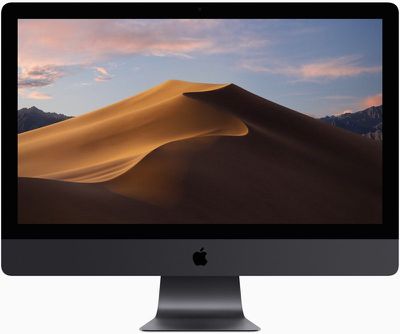
Apple's macOS Mojave update introduces a systemwide Dark Mode, with Mojave users able to choose between a light theme or the new dark theme, which changes the color of the dock, menu bar, apps, and other elements. Dark Mode is accompanied by Dynamic Desktops, aka wallpapers that subtly change throughout the day. Additional wallpapers were introduced in the fourth and fifth betas.

Stacks, a new desktop organization system, keeps all of your desktop files neat and organized, while Finder has been enhanced with a Gallery View, a Sidebar, a revamped Quick Look option and Quick Actions, so you can do more in the Finder window than ever before.

Screenshots can now be edited using Markup tools and a new management options that also allow for easy screen recording, while Continuity camera, a new feature, allows you to import photos and document scans directly from an iPhone or iPad to the Mac.
macosmojaveimac
The Apple News, Stocks, Home, and Voice Memos apps have been ported from iOS to macOS as part of a multiyear project Apple is working on to make it easier to bring iOS apps to Macs, and Apple has introduced several new privacy protections to keep your data safer than ever.

Apple is also making it harder for websites to track you with a range of new Safari tools, and it's also easier to make and store secure, hard-to-guess passwords for each and every website.

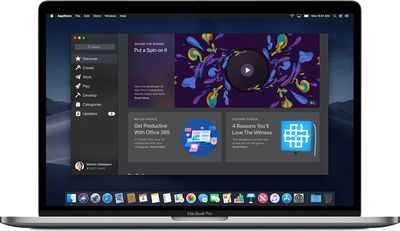
Apple has added an entirely revamped Mac App Store to macOS Mojave that makes it easier to discover apps with a featured section and specific categories for games, creative apps, productivity apps, apps for developers, and more.
macosmojavemacappstore
macOS Mojave is available to developers and public beta testers to work out bugs and other issues ahead of an upcoming fall public release.

Update: As noted on Twitter, an updated version of Windows Migration Assistant released today for macOS Mojave allows more data to be transferred to a Mac from a PC running Windows when using the Migration Assistant functionality.

You can transfer account data that includes documents, email, contacts, and calendar data from apps like Microsoft Outlook. Prior to this update, the Windows Migration Assistant was not able to import data from third-party apps. The Home app also introduces new solid-colored background options while removing previously available Home wallpapers.

Update 2: There is also a new version of macOS Mojave available for Apple's public beta testers.

Related Forum: macOS Mojave

Popular Stories

Aston Martin CarPlay Ultra Screen

Apple's CarPlay Ultra to Expand to These Vehicle Brands Later This Year

Sunday February 1, 2026 10:08 am PST by
Last year, Apple launched CarPlay Ultra, the long-awaited next-generation version of its CarPlay software system for vehicles. Nearly nine months later, CarPlay Ultra is still limited to Aston Martin's latest luxury vehicles, but that should change fairly soon. In May 2025, Apple said many other vehicle brands planned to offer CarPlay Ultra, including Hyundai, Kia, and Genesis. In his Powe...
Apple Logo Black

Apple's Next Launch is 'Imminent'

Sunday February 1, 2026 12:31 pm PST by
The calendar has turned to February, and a new report indicates that Apple's next product launch is "imminent," in the form of new MacBook Pro models. "All signs point to an imminent launch of next-generation MacBook Pros that retain the current form factor but deliver faster chips," Bloomberg's Mark Gurman said on Sunday. "I'm told the new models — code-named J714 and J716 — are slated...
Apple MacBook Pro M4 hero

New MacBook Pros Reportedly Launching Alongside macOS 26.3

Sunday February 1, 2026 5:42 am PST by
Apple is planning to launch new MacBook Pro models with M5 Pro and M5 Max chips alongside macOS 26.3, according to Bloomberg's Mark Gurman. "Apple's faster MacBook Pros are planned for the macOS 26.3 release cycle," wrote Gurman, in his Power On newsletter today. "I'm told the new models — code-named J714 and J716 — are slated for the macOS 26.3 software cycle, which runs from...
iOS 26

iOS 26.3 and iOS 26.4 Will Add These New Features to Your iPhone

Tuesday February 3, 2026 7:47 am PST by
We are still waiting for the iOS 26.3 Release Candidate to come out, so the first iOS 26.4 beta is likely still at least a week or two away. Following beta testing, iOS 26.4 will likely be released to the general public in March or April. Below, we have recapped known or rumored iOS 26.3 and iOS 26.4 features so far. iOS 26.3 iPhone to Android Transfer Tool iOS 26.3 makes it easier...
14 inch MacBook Pro Keyboard

Apple Changes How You Order a Mac

Saturday January 31, 2026 10:51 am PST by
Apple recently updated its online store with a new ordering process for Macs, including the MacBook Air, MacBook Pro, iMac, Mac mini, Mac Studio, and Mac Pro. There used to be a handful of standard configurations available for each Mac, but now you must configure a Mac entirely from scratch on a feature-by-feature basis. In other words, ordering a new Mac now works much like ordering an...

Top Rated Comments

Marx55 Avatar
98 months ago
Apple should release Time Machine 2 for APFS drives and disclose APFS specifications for developers to make utilities like DiskWarrior 6 to rebuild APFS directory. Until then, it is a deal breaker. Waiting stuck in macOS 10.12 Sierra just because of that. Hope for 2018, 2019, 2020, ever?
Score: 5 Votes (Like | Disagree)
caramelpolice Avatar
98 months ago
Can we assume you are aware of the fact that High Sierra DOES NOT SUPPORT APFS on Fusion drives so it would really be interesting to find out how you managed to format a Fusion drive APFS since it doesn’t work and never has. Nor does High Sierra support APFS for Time Machine and never has. Time Machine can backup an APFS volume but it cannot use an APFS volume as the destination. APFS is coming for Fusion drives and Time Machine with Mojave. I think you are majorly confused here. Meanwhile High sierra runs flawlessly for millions and millions of people.

https://support.apple.com/en-us/HT208018

https://support.apple.com/guide/mac-help/disks-you-can-use-with-time-machine-mh15139/10.13/mac/10.13
Early beta releases of High Sierra converted Fusion Drives to APFS, only to drop support later. If your drive was converted in this way you were stuck with an APFS Fusion Drive (which, of course, is unsupported and very buggy in 10.13) in later betas and the final release unless you completely reformatted your drive back to HFS+.
Score: 3 Votes (Like | Disagree)
StellarVixen Avatar
98 months ago
All good with Mojave so far. Just one thing the novelty of Dark Mode has worn off.
It looks horrible. Too dark.

But, let those who like it have it. At least Apple is giving you a choice, they do not force you to use it.

I wish they gave us same choice when they released the disgrace which was Yosemite. But no...
Score: 3 Votes (Like | Disagree)
Guy Clark Avatar
98 months ago
All good with Mojave so far. Just one thing the novelty of Dark Mode has worn off.
Score: 3 Votes (Like | Disagree)
benthewraith Avatar
98 months ago
Update weighs in at 3.5GB.
Score: 2 Votes (Like | Disagree)
ThunderSkunk Avatar
98 months ago
I didn’t expect this week any update.
I hope PB comes out tomorrow.

PB 4 was OK but each beta ends up slow and sluggish after 3 weeks - at least for me.
High Sierra was so unreliable I went back to Sierra. Second guessed it, tried upgrading it 3 more times and went back to Sierra each time. HS consumed memory the entire time it was running and never gave it back, bogged down, crashed, to the point that I never once successfully shut the machine down. Every session, it always ended with a hang and a hard reset. Mojave so far, has been great as a clean install on my personal current top-spec iMac, until update 4, which introduced some weird behavior in finder and beachballs here & there. Existing Win7 & Win10 VM's both broke, Wacom drivers are kaput as usual, but build a new VM, and FCP X, Logic have all been running smoothly, so no real complaints.
Score: 2 Votes (Like | Disagree)















