Just one week before Apple's annual Worldwide Developers Conference in San Jose, California, where the company is expected to introduce iOS 12, several graphic designers have created their own fanatical concepts.
The latest comes from Michael Calcada, a fourth-year design student at York University and Sheridan College in the Toronto, Canada area.
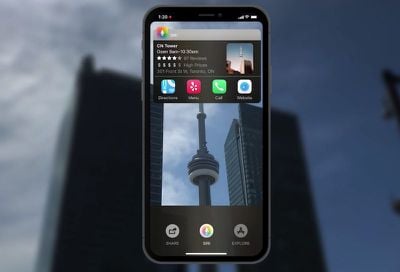
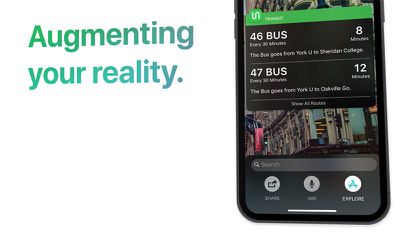
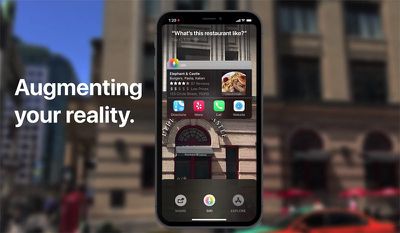
Calcada's concept envisions several changes and additions to iOS, including an all-new "Siri Sight" augmented reality mode with overlays of useful information on stores, restaurants, transit stops, landmarks, and other points of interest, in addition to timely information such as road closures.
"As I believe augmented reality is a technology that will be fundamental to the future of digital interaction, I integrated AR into the core of the iOS experience, providing new innovative and intuitive ways to interact with your digital and physical worlds at once," said Calcada, who shared his video with MacRumors.
Calcada's concept also envisions grouped notifications, a notification dot in the status bar, more granular controls in the default Camera app, a systemwide dark mode, FaceTime group chats, improved volume controls, and a general makeover to iOS that has some promise, even if it is not entirely realistic.
Any improvements to Siri would be welcomed, as multiple reports have suggested that Apple's assistant has fallen behind its rivals, including Amazon Alexa and Google Assistant. A recent survey also found early adopters of the iPhone X to be impressed with all of the device's major features, except Siri.
In terms of the expanded augmented reality capabilities, they could be be better suited for iOS 13, as rumors suggest Apple will release at least one iPhone with a triple-lens rear camera system in 2019. The triple-lens array would reportedly enable both expanded zoom and 3D sensing for augmented reality.
As with most concepts, this one is unlikely to look like Apple's actual version of iOS 12. But with only a week remaining until the WWDC keynote, which MacRumors will be attending, it's fun to look at fan-made mockups.
Stay tuned to MacRumors for live, on-scene coverage of the WWDC 2018 keynote on Monday, June 4, beginning around 8:30 a.m. Pacific Time.
Some of the ideas aren’t too bad. But it looks absolutely atrocious and some of the execution is just awful. Here’s a list of errors/questionable choices I was able to pick out:
* “The world’s most advanced operating system finally caught up.” So is it the most advanced or not? “Caught up” implies it’s even. * The skew animation at 0:11 looks beyond fake. You don’t want static items on-screen in a video usually, but it’d have been better off here. * Magic additional bezels appear at 0:13. * What’s up with the lock screen? Did we forget what padding is? * The padlock at 0:16 is unlocked but the text at the bottom says “Swipe up to unlock.” * The high and low temperatures in the weather widget to the left of the clock are next to unreadable even after we’re zoomed in closer to the phone. * Why should I have to tap a button to expand my notifications out of the “Notification Hub”? * What do we really get out of having notifications sent when an iMessage contact is typing? Snapchat does this (unreliably, I might add), and it’s obnoxious. * Letter spacing is different between the two Messages notifications at 0:28. * New gestures. What does swiping up from the center do that swiping up from the left or right bottom corners can’t? Are they combined into one? If so, why? * How are these new gestures communicated to the user? * Why is there a battery percentage icon right next to the battery in the status bar? * Why on Earth are the clock/weather/battery widgets arranged differently depending on which gesture is used? * No chance the camera would be in use constantly on the lock screen. It’d kill the battery in a heartbeat. * This matrix of controls at the bottom of the camera app is atrociously organized and, for most users, wildly unnecessary. * “Verticle” home screen? I get that not everyone’s a great speller, but this video was published with that mistake? * iOS isn’t going to allow users to change the app icon shape for myriad reasons, but if that did happen, why require users to enable it to get the slider? Why not just have the slider snap to the default? * What are the status bar customization options that also won’t happen? They’re never shown. * The waveform in Apple Music is hilariously bad. One of the core concepts in Apple’s HIG is deference, and that is not deferent. It draws my eyes away from the main content of the screen. * Dark mode looks…not that different from not-dark mode in the system UI except for the apps shown.
Yet some of the people complimenting this have almost certainly complained at some point about Apple not paying enough attention to detail in QC. Goodness.
Some of the ideas aren’t too bad. But it looks absolutely atrocious and some of the execution is just awful. Here’s a list of errors/questionable choices I was able to pick out:
* “The world’s most advanced operating system finally caught up.” So is it the most advanced or not? “Caught up” implies it’s even. * The skew animation at 0:11 looks beyond fake. You don’t want static items on-screen in a video usually, but it’d have been better off here. * Magic additional bezels appear at 0:13. * What’s up with the lock screen? Did we forget what padding is? * The padlock at 0:16 is unlocked but the text at the bottom says “Swipe up to unlock.” * The high and low temperatures in the weather widget to the left of the clock are next to unreadable even after we’re zoomed in closer to the phone. * Why should I have to tap a button to expand my notifications out of the “Notification Hub”? * What do we really get out of having notifications sent when an iMessage contact is typing? Snapchat does this (unreliably, I might add), and it’s obnoxious. * Letter spacing is different between the two Messages notifications at 0:28. * New gestures. What does swiping up from the center do that swiping up from the left or right bottom corners can’t? Are they combined into one? If so, why? * How are these new gestures communicated to the user? * Why is there a battery percentage icon right next to the battery in the status bar? * Why on Earth are the clock/weather/battery widgets arranged differently depending on which gesture is used? * No chance the camera would be in use constantly on the lock screen. It’d kill the battery in a heartbeat. * This matrix of controls at the bottom of the camera app is atrociously organized and, for most users, wildly unnecessary. * “Verticle” home screen? I get that not everyone’s a great speller, but this video was published with that mistake? * iOS isn’t going to allow users to change the app icon shape for myriad reasons, but if that did happen, why require users to enable it to get the slider? Why not just have the slider snap to the default? * What are the status bar customization options that also won’t happen? They’re never shown. * The waveform in Apple Music is hilariously bad. One of the core concepts in Apple’s HIG is deference, and that is not deferent. It draws my eyes away from the main content of the screen. * Dark mode looks…not that different from not-dark mode in the system UI except for the apps shown.
Yet some of the people complimenting this have almost certainly complained at some point about Apple not paying enough attention to detail in QC. Goodness.
It’s just a concept... and while it does has some flaws, It doesn’t merit the nit pickiness in your post.
The overall design change is very nice. Complaining about a specific gesture being used and widgets rearranged is ridiculous.
Awesome!!! [doublepost=1527544493][/doublepost]Dude, what is wrong with You? It is an imagined concept. If you think you can point out so many "errors" why don't you do something better?:rolleyes:
I think this is the best rendition I have seen. It takes what everyone has been asking about for years and also adds more. Plus it looks great without changing too much.
Wednesday October 28, 2026 10:11 am PDT by Juli Clover
Apple today announced a new high-end MacBook Pro, which is available in 14-inch and 16-inch sizes. The new device has a PROLED XDR display that supports touch gestures, and a glowing rear Apple logo.
Pricing on the MacBook Pro starts at $2,899 for the 14-inch model and $3,399 for the 16-inch model.
Apple says the MacBook Pro has the "world's best display in a pro laptop." The PROLED...
Thursday October 29, 2026 1:47 pm PDT by Joe Rossignol
While the new iPad mini has an OLED display, the device does not support ProMotion, meaning the display's refresh rate is limited to 60Hz instead of 120Hz.
ProMotion support would have allowed for the iPad mini's refresh rate to automatically adjust from 10Hz to 120Hz depending on the content being displayed, but evidently Apple has kept the feature exclusive to the iPad Pro among iPad...
Wednesday October 28, 2026 2:49 am PDT by Tim Hardwick
Apple opened pre-orders for five new products on Wednesday, October 28, including its first touchscreen MacBook Pro models.
Pre-orders opened for the following new products:
iPad mini with OLED display and A20 Pro chip
iMac with M6 chip
14-inch MacBook Pro with M6 chip
14-inch MacBook Pro with OLED touchscreen
16-inch MacBook Pro with OLED touchscreen
Pre-orders for the iPad mini,...




















































Top Rated Comments
* “The world’s most advanced operating system finally caught up.” So is it the most advanced or not? “Caught up” implies it’s even.
* The skew animation at 0:11 looks beyond fake. You don’t want static items on-screen in a video usually, but it’d have been better off here.
* Magic additional bezels appear at 0:13.
* What’s up with the lock screen? Did we forget what padding is?
* The padlock at 0:16 is unlocked but the text at the bottom says “Swipe up to unlock.”
* The high and low temperatures in the weather widget to the left of the clock are next to unreadable even after we’re zoomed in closer to the phone.
* Why should I have to tap a button to expand my notifications out of the “Notification Hub”?
* What do we really get out of having notifications sent when an iMessage contact is typing? Snapchat does this (unreliably, I might add), and it’s obnoxious.
* Letter spacing is different between the two Messages notifications at 0:28.
* New gestures. What does swiping up from the center do that swiping up from the left or right bottom corners can’t? Are they combined into one? If so, why?
* How are these new gestures communicated to the user?
* Why is there a battery percentage icon right next to the battery in the status bar?
* Why on Earth are the clock/weather/battery widgets arranged differently depending on which gesture is used?
* No chance the camera would be in use constantly on the lock screen. It’d kill the battery in a heartbeat.
* This matrix of controls at the bottom of the camera app is atrociously organized and, for most users, wildly unnecessary.
* “Verticle” home screen? I get that not everyone’s a great speller, but this video was published with that mistake?
* iOS isn’t going to allow users to change the app icon shape for myriad reasons, but if that did happen, why require users to enable it to get the slider? Why not just have the slider snap to the default?
* What are the status bar customization options that also won’t happen? They’re never shown.
* The waveform in Apple Music is hilariously bad. One of the core concepts in Apple’s HIG is deference, and that is not deferent. It draws my eyes away from the main content of the screen.
* Dark mode looks…not that different from not-dark mode in the system UI except for the apps shown.
Yet some of the people complimenting this have almost certainly complained at some point about Apple not paying enough attention to detail in QC. Goodness.
The overall design change is very nice. Complaining about a specific gesture being used and widgets rearranged is ridiculous.
[doublepost=1527544493][/doublepost]Dude, what is wrong with You? It is an imagined concept. If you think you can point out so many "errors" why don't you do something better?:rolleyes: