

Apple-Owned Workflow App Updated With New 'Mask Image' Action - MacRumorsOpen MenuShow RoundupsShow Forums menuVisit ForumsOpen Sidebar
Skip to Content

Apple-Owned Workflow App Updated With New 'Mask Image' Action

by

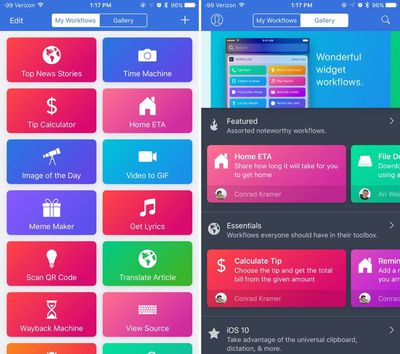
Workflow, the automation app that Apple acquired back in March of 2017, was today updated to version 1.7.8, introducing a new Mask Image action, and a long list of other bug fixes and improvements.

As MacStories points out, the Mask Image action added in today's update is a feature Workflow users have been wanting for several years. The new action, which applies a mask to an image and cuts it into any desired shape, is designed to make it easier to simplify image editing workflows that require image masking features.
workflowforios
By default, the masking feature offers rounded rectangle, ellipse, and icon masking options, but custom masks can also be used.

The new Workflow update also introduces new fields for the Add Things To-Do action, it makes items reorderable in the dictionary action, and it adds support for opening workflows to the URL scheme. Extracting text from PDFs has also been improved, as has drag and drop handling. Multiple bug fixes are included, as outlined before:

  • Workflow names are now case-insensitive
  • Fixed a crash when running the Edit Image action
  • Fixed Todoist and Slack authentication when using a Google account
  • Fixed an issue where icons from Search App Store and Get My Workflows were saved as JPEG, not PNG
  • Fixed an issue where the Encode Media action may not delete temporary files properly when encoding to MP3
  • Fixed an issue where the Custom X-Success URL parameter of the Open X-Callback-URL action did not work
  • Fixed an issue where variables could not be added to arrays in the Dictionary action
  • Fixed an issue where booleans could not be added to dictionaries inside dictionaries in the Dictionary action
  • Fixed an issue where a duplicate workflow could appear after searching for a workflow
  • Fixed an issue where Workflow could crash when deleting many workflows at once
  • Fixed an issue where double-tapping a variable button cleared the variable
  • Fixed an issue where the Tweet and Post on Facebook actions did not work from the Today Widget or Apple Watch
  • Fixed an issue where passing the output of Scan QR Code to Open URL did not work properly
  • Fixed an issue where workflows could not be edited after being opened via 3D Touch
  • Performance improvements to workflow running
  • VoiceOver improvements
  • Other bug fixes and minor additions

Since purchasing Workflow in March of 2017, Apple has continued to provide regular updates to the Workflow app, allaying fears that it would be discontinued and abandoned.

The last update to the app, introduced a long list of bug fixes for third-party app actions, was released in November of 2017.

Workflow can be downloaded from the App Store for free. [Direct Link]

Top Rated Comments

dannys1 Avatar
110 months ago
Every time an update comes out for this i’m reminded that it’s a brilliant app I still haven’t found a use for.

Then people post their ideas in replies and I think they’re great. Try a few out, totally forget about them and never use it again.

I dunno, I guess I’ll just never get Workflow to work in my “workflow” and probably because I use iOS as little as I can.
Score: 6 Votes (Like | Disagree)
Stella Avatar
110 months ago
Workflow is screaming to have integration with Siri. Must be coming soon.

Create easily your own Siri workflows
Score: 6 Votes (Like | Disagree)
110 months ago
Every time an update comes out for this i’m reminded that it’s a brilliant app I still haven’t found a use for.

Then people post their ideas in replies and I think they’re great. Try a few out, totally forget about them and never use it again.

I dunno, I guess I’ll just never get Workflow to work in my “workflow” and probably because I use iOS as little as I can.
That's pretty much me right now as well. My work is done on my Mac. I use iOS for focused tasks that can be completed by one app. I transfer stuff between apps sometimes, but generally if I have a more complex task it's quicker to just open my Mac. If I was able to use an iPad for what I do, maybe I'd find it useful there.

In a perfect world where Siri wasn't terrible and it was connected to Workflow, we could say something like, "Siri, translate this PDF into French and send that in an email to Julie at Apple" and it would chain together its own workflow to try to act on requests. That would be very compelling, but I fear we're a long way away from that day.
Score: 5 Votes (Like | Disagree)
MrGimper Avatar
110 months ago
That's pretty much me right now as well. My work is done on my Mac. I use iOS for focused tasks that can be completed by one app. I transfer stuff between apps sometimes, but generally if I have a more complex task it's quicker to just open my Mac. If I was able to use an iPad for what I do, maybe I'd find it useful there.

In a perfect world where Siri wasn't terrible and it was connected to Workflow, we could say something like, "Siri, translate this PDF into French and send that in an email to Julie at Apple" and it would chain together its own workflow to try to act on requests. That would be very compelling, but I fear we're a long way away from that day.
"Here's a list of french paedophiles called Julie who like Apples I found on the web", replies Siri.
Score: 3 Votes (Like | Disagree)
Apple_Robert Avatar
110 months ago
I need to spend some quality time with this app. It is very intriguing.
Score: 2 Votes (Like | Disagree)
smirking Avatar
110 months ago
I dunno, I guess I’ll just never get Workflow to work in my “workflow” and probably because I use iOS as little as I can.
I completely concur. I had Workflow on my phone for like three years and I finally accepted that I'd never find a practical use for it and deleted it last year. If I'm doing something that requires a complex workflow, I'll pull out my laptop. My idea of workflow on an iOS device, is limited to "swipe, tap, press."
Score: 1 Votes (Like | Disagree)

Popular Stories

Apple Event Logo

Apple Working on All-New Operating System

Wednesday July 29, 2026 11:39 am PDT by
Apple is developing an all-new operating system that is essentially a mix of tvOS, watchOS, and iOS, according to Bloomberg's Mark Gurman. In a report this week, he said the operating system will feature a grid of icons, widgets, and apps, along with customizable clock faces. The new software platform is intended for Apple's long-rumored smart home hub. With built-in facial recognition,...
imac video apple feature

Apple Made Its Second-Biggest Acquisition Ever This Year

Wednesday July 29, 2026 12:03 pm PDT by
Apple this year acquired Israeli startup Q.ai for close to $2 billion, according to the Financial Times. That would make this Apple's second-biggest acquisition ever, after it paid $3 billion for the popular headphone maker Beats in 2014. This is also the largest known Apple acquisition since the company purchased Intel's smartphone modem business and patents for $1 billion in 2019. Q.ai...
Dynamic Island iPhone 18 Pro Feature

iPhone 18 Pro: Twelve Changes Coming to Apple's Next Flagship

Thursday July 30, 2026 3:43 am PDT by
We're less than two months out from the launch of Apple's premium next-generation smartphone lineup, and while we're not expecting a dramatic change in terms of functionality, there are still several enhancements rumored to be coming to the iPhone 18 Pro and iPhone 18 Pro Max. One thing worth noting is that Apple is reportedly planning a major change to its iPhone release cycle this year,...

🔗 Related Apple News & Rumors

Stay updated with the latest Apple ecosystem news and verified rumors













































