Apple Shares Tips on Avoiding App Store and iTunes Phishing Emails - MacRumorsOpen MenuShow RoundupsShow Forums menuVisit ForumsOpen Sidebar
Skip to Content

Apple Shares Tips on Avoiding App Store and iTunes Phishing Emails

Apple last week shared a new support document that's designed to help App Store and iTunes users avoid phishing emails that mimic legitimate emails from Apple.

In the document, Apple outlines techniques to identify an actual App Store or iTunes email, which the company says will always include a current billing address, something scammers are unlikely to have access to.
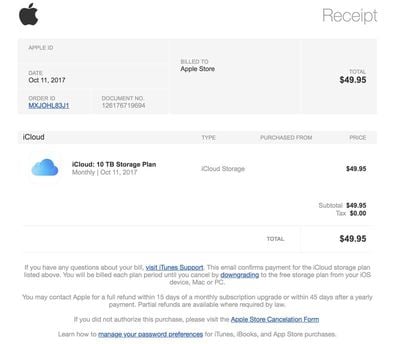
applescamemail

An example of a well-crafted phishing email

Apple also says that emails from the App Store, iBooks Store, iTunes Store, or Apple Music will never ask customers to provide details like a Social Security Number, mother's maiden name, a credit card number, or a credit card CCV code.

Apple recommends that customers who receive emails asking them to update their account or payment information do so directly in the Settings app on an iPhone, iPad, or iPod touch, in iTunes or the App Store on a Mac, or in iTunes on a PC rather than through any kind of web interface.

Customers who receive a suspicious email can forward it to reportphishing@apple.com, and any customer who may have entered personal information on a scam website should update their Apple ID password immediately.

Scam and phishing emails like those Apple describes in this support document are not new, but at the current time, there's a new wave of legitimate-looking emails going around that look much like Apple emails that can easily fool customers who don't know what to look for.

Related Forum: Mac Apps

Popular Stories

app store blue banner epic 1

Apple Asks Supreme Court to Pause Epic Games Case Ahead of App Store Fee Ruling

Monday May 4, 2026 4:08 pm PDT by
Apple today filed an emergency application with the Supreme Court, asking for a stay on App Store fee calculations while it waits to hear whether the Supreme Court will weigh in on the latest developments in its legal battle with Epic Games. Apple argues that without a stay, it will face irreparable harm. Apple says it will have to litigate the fundamentals of its business model with the...

rave app

Apple Sued for Pulling Co-Viewing App Rave From the App Store

Thursday May 7, 2026 10:41 am PDT by
Rave, a cross-platform service that lets users watch movies and TV shows together, today filed a series of antitrust lawsuits against Apple after Apple removed the Rave app from the App Store in August 2025. According to Rave, Apple cited "unspecified allegations of fraud and vague concerns about content moderation" when pulling the app. Rave alleges Apple targeted the service because Rave...
Liquid Glass App Store Feature

Apple Working on Plan to Allow AI Agent Apps on the App Store

Wednesday May 13, 2026 11:02 am PDT by
Apple is looking into ways to better support apps that include AI agents and AI coding capabilities in the App Store, reports The Information. Apple is designing a system that would maintain its security and privacy standards while allowing for AI app features, but details on how the system will work are unavailable. Apple started blocking updates for some popular vibe coding apps in March...

Top Rated Comments

108 months ago
PROTIP: disable html in your mail client, it's harder to phish when you can see the links that will be used are not what the text claims they are.

Bonus: tell anyone sending html only to not be a muppet, helping the phishers by conditioning users to accepts such emails. Ask them to include the regular plain text body for those who are trying to not be phished.
Score: 6 Votes (Like | Disagree)
iModFrenzy Avatar
108 months ago
How about tips for recognizing battery throttling scams?
How much longer are we gonna beat a dead horse?
Score: 4 Votes (Like | Disagree)
fastasleep Avatar
108 months ago
I think the current app store's "Today" section design is kind of phishing too.
If you hold the phone with your right hand and scroll through the Today's stories with your right thumb, you can so easily touch the "GET" or "purchase" buttons by mistake, and when that happens some people's first reaction is to press the home button to quit the app store app, but if you do that and if you are using touch ID to approve purchases, the purchase gets approved.
That's not what phishing means.
[doublepost=1519875375][/doublepost]
You’d think they could use their fancy smancy machine learning to stop these from coming through for all sorts of major companies. I know companies like PayPal have trouble with this all the time. Even if you can’t cover everything it’s better to get at least 90% of them.

Heck, you could probably just regex to match certain strings like their footer or other common phrases used in Apple emails. Then check the sender against official Apple email addresses and if it doesn’t check out, send it to the spam folder or put a big red warning at the top saying the email seems suspicious and might be a phishing attempt. This seems like a solvable problem in 2018.
They often do. My spam filter (ASSP) correctly flag all the phishing emails I get as spam. When reviewing stuff in my spambox for false positives, I often take a second look at things that look like they came from Netflix or Apple, only to realize they were correctly flagged. But remember there are a ton of email providers out there with various types and qualities of spam filters.
Score: 3 Votes (Like | Disagree)
Apple_Robert Avatar
108 months ago
Good move on Apple for doing what they can to inform people about phishing.
Score: 3 Votes (Like | Disagree)
AndyUnderscoreR Avatar
108 months ago
Well, you SAY that's an Apple support document....
Score: 3 Votes (Like | Disagree)
dannyyankou Avatar
108 months ago
These are actually good tips. I didn’t realize Apple emails have your mailing address on them.
Score: 2 Votes (Like | Disagree)

🔗 Related Apple News & Rumors

Stay updated with the latest Apple ecosystem news and verified rumors