Apple today previewed what to expect in iOS 11.3, including new Animoji, health records, ARKit improvements, the ability to turn off Apple's power management feature on iPhone 6 and newer, and much more.
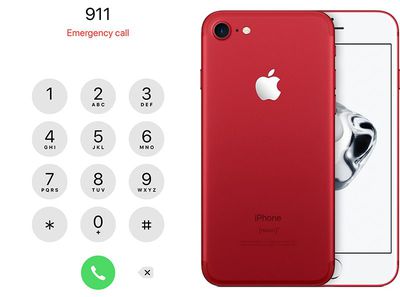
emergency iphone
At the very bottom of its press release, Apple also briefly mentioned a potentially life saving feature coming in iOS 11.3: support for Advanced Mobile Location [PDF] in countries where it is supported.

Additional iOS 11.3 Features: Support for Advanced Mobile Location (AML) to automatically send a user's current location when making a call to emergency services in countries where AML is supported.

Advanced Mobile Location will recognize when an emergency call is made and, if not already activated, activate an iPhone's GPS or Wi-Fi to collect the caller's precise location information. The device then sends an automatic SMS to the emergency services with the caller's location, before turning the GPS off again.


Advanced Mobile Location is allegedly up to 4,000 times more accurate than current emergency systems, which rely on cell tower location with a radius of up to several miles, or assisted GPS, which can fail indoors.

Advanced Mobile Location must be supported by carriers. EENA, short for the European Emergency Number Association, said the service is fully operational in several European countries, including the United Kingdom, Estonia, Lithuania, Austria, and Iceland, as well as New Zealand, on all mobile networks.

EENA said AML has saved many lives by more accurately pinpointing a person's position. Accordingly, several minutes of time can be saved, according to the European Telecommunications Standards Institute:

Ambulance Service measurements show that, on average, 30 seconds per call can be saved if a precise location is automatically provided, and several minutes can be saved where callers are unable to verbally describe their location due to stress, injury, language or simple unfamiliarity with an area.

A few years ago, Google implemented a similar AML-based solution called Emergency Location Service into Google Play services that automatically works on Android devices running its Gingerbread operating system or newer.

EENA called on Apple to support Advanced Mobile Location last August, and starting with iOS 11.3 this spring, its wish will be fulfilled.
Related Forum: iOS 11

Top Rated Comments

oneMadRssn Avatar
101 months ago
This is a good feature. Though the existing one is already pretty good.

Wife and I were skiing one time at a ski area we had never been to and were not familiar with, super icy day, terrible conditions. We happen upon this guy in the ditch on an empty trail, nobody else around. He looks unconscious and is bleeding from his thigh. Looked like he fell on the ice, lost his skis, slid towards a tree, and a low tree branch poked a hole in his leg.

We had no idea who to call*, so I sent my wife down to tell ski patrol while I stayed with the guy and called 911, and the operator asked if I knew what trail I was on so she could radio the ski area, but I didn't. So the 911 dispatcher CB radioed the local fire department, who then connected to the CB radio or channel of the ski area. I could hear all these conversations going on over the phone, as the 911 operator read off to the fire department and ski area my GPS coordinates that she obtained through my phone, and the ski area guy was able to pinpoint it to the trail I was on. I was pretty amazed.

Ski patrol arrived pretty soon after that. Turns out my wife didn't run into a ski patroller until she got all the way down, which took a while due to the ice, so calling actually was the faster way to get help. I don't know exactly how it turned out for the guy, but I know he lived.

* Later, when the adrenaline wore off, I saw that the back of my lift ticket had the ski area's ski patrol phone number. If this ever happens again, I'll check my ski ticket for a phone number before calling 911.
Score: 10 Votes (Like | Disagree)
TonyC28 Avatar
101 months ago
Nice feature. Will there be a way to turn it off though?
Just curious, why would you want to turn it off?
Score: 8 Votes (Like | Disagree)
oneMadRssn Avatar
101 months ago
You came upon a bleeding unconscious man and you weren't sure you should call 911? And next time you plan NOT to call 911? What do you think 911 is for?
While on a remote ski area, yes. Having gone through the experience, I know personally that calling the ski patrol directly would have saved about 2-3 minutes. Like I said, I called 911, who then spoke to the fire department, who then relayed everything to the ski patrol. It was an unnecessary game of telephone that delayed getting help a bit. I learned there is a good reason they print the ski patrol number on the lift tickets now - if you have cell service, it is by far the quickest way to get help.

911 is good when the emergency is on a public road, or in a house or business with an actual address. When on a mountain, very far from any kind of road or address, 911 isn't that helpful. They did a great job connecting to the people that actually would be helpful, but I now know I could have short-circuited the whole thing and connected with those people directly anyway.
Score: 7 Votes (Like | Disagree)
zahuh Avatar
101 months ago
Thank you Apple!
Score: 4 Votes (Like | Disagree)
NightFox Avatar
101 months ago
I do a lot of cycling round country lanes and I've often thought how if I was involved in, or came across an accident, I would struggle to give my location to the emergency services with any accuracy, so this is a welcome service. Also, theses days with so many people using GPS for road journeys, I think people are less aware of where they actually are so this should be useful here too.
Score: 4 Votes (Like | Disagree)
macduke Avatar
101 months ago
4,000 times more accurate than current emergency systems
Holy crap.
Score: 3 Votes (Like | Disagree)

Popular Stories

iOS 26 Feature

iOS 26.1 to iOS 26.4 Will Add These New Features to Your iPhone

Saturday October 18, 2025 11:00 am PDT by
iOS 26 was released last month, but the software train never stops, and iOS 26.1 beta testing is already underway. So far, iOS 26.1 makes both Apple Intelligence and Live Translation on compatible AirPods available in additional languages, and it includes some other minor changes across the Apple Music, Calendar, Photos, Clock, and Safari apps. More features and changes will follow in future ...
ios 26 1 liquid glass opaque

iOS 26.1 Beta 4 Lets Users Control Liquid Glass Transparency with New Toggle

Monday October 20, 2025 10:57 am PDT by
With the fourth betas of iOS 26.1, iPadOS 26.1, and macOS 26.1, Apple has introduced a new setting that's designed to allow users to customize the look of Liquid Glass. The toggle lets users select from a clear look for Liquid Glass, or a tinted look. Clear is the current Liquid Glass design, which is more transparent and shows the background underneath buttons, bars, and menus, while tinted ...
iphone air thickness

Apple Said to Cut iPhone Air Production Amid Underwhelming Sales

Friday October 17, 2025 8:29 am PDT by
Apple plans to cut production of the iPhone Air amid underwhelming sales performance, Japan's Mizuho Securities believes (via The Elec). The Japanese investment banking and securities firm claims that the iPhone 17 Pro and iPhone 17 Pro Max are seeing higher sales than their predecessors during the same period last year, while the standard iPhone 17 is a major success, performing...
iOS 26

iOS 26.0.2 Update for iPhones Coming Soon

Friday October 17, 2025 7:35 am PDT by
Apple's software engineers continue to internally test iOS 26.0.2, according to MacRumors logs, which have been a reliable indicator of upcoming iOS versions. iOS 26.0.2 will be a minor update that addresses bugs and/or security vulnerabilities, but we do not know any specific details yet. The update will likely be released by the end of next week. Last month, Apple released iOS 26.0.1,...
Apple iPad Pro hero M5

New iPad Pro Has Six Key Upgrades Beyond M5 Chip

Saturday October 18, 2025 10:57 am PDT by
While the new iPad Pro's headline feature is the M5 chip, the device has some other changes, including N1 and C1X chips, faster storage speeds, and more. With the M5 chip, the new iPad Pro has up to a 20% faster CPU and up to a 40% faster GPU compared to the previous model with the M4 chip, according to Geekbench 6 results. Keep in mind that 256GB and 512GB configurations have a 9-core CPU,...
iPhone Siri Glow

Some Apple Employees Have 'Concerns' About iOS 26.4's Revamped Siri

Sunday October 19, 2025 7:39 am PDT by
iOS 26.4 is expected to introduce a revamped version of Siri powered by Apple Intelligence, but not everyone is satisfied with how well it works. In his Power On newsletter today, Bloomberg's Mark Gurman said some of Apple's software engineers have "concerns" about the overhauled Siri's performance. However, he did not provide any specific details about the shortcomings. iOS 26.4 will...
HomePod mini and Apple TV

Apple's Next Rumored Products: New HomePod Mini, Apple TV, and More

Thursday October 16, 2025 9:13 am PDT by
Apple on Wednesday updated the 14-inch MacBook Pro, iPad Pro, and Vision Pro with its next-generation M5 chip, but previous rumors have indicated that the company still plans to announce at least a few additional products before the end of the year. The following Apple products have at one point been rumored to be updated in 2025, although it is unclear if the timeframe for any of them has...
m4 macbook air blue

M5 MacBook Air Coming Spring 2026 With M5 Mac Studio and Mac Mini in Development

Thursday October 16, 2025 3:57 pm PDT by
Apple plans to launch MacBook Air models equipped with the new M5 chip in spring 2026, according to Bloomberg's Mark Gurman. Apple is also working on M5 Pro and M5 Max MacBook Pro models that will come early in the year. Neither the MacBook Pro models nor the MacBook Air models are expected to get design changes, with Apple focusing on simple chip upgrades. In the case of the MacBook Pro, a m...
maxresdefault

Here's How the iOS 26.1 Transparency Toggle Changes Liquid Glass

Monday October 20, 2025 1:55 pm PDT by
With the fourth beta of iOS 26.1, Apple added a toggle that makes Liquid Glass more opaque and reduces transparency. We tested the beta to see where the toggle works and what it looks like. Subscribe to the MacRumors YouTube channel for more videos. If you have the latest iOS 26.1 beta, you can go to Settings > Display and Brightness to get to the new option. Tap on Liquid Glass, then...