Lifeprint, known for its photo printers that come equipped with augmented reality technology, today announced the launch of its latest printer, which is larger than the original version to let iPhone users print bigger pictures.
lifeprintmain
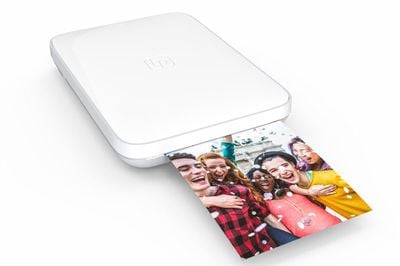
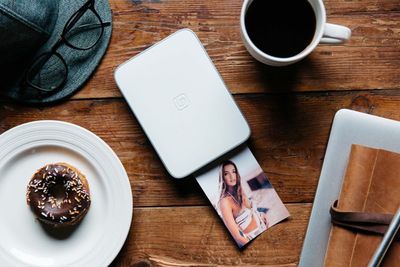
The new Lifeprint photo printer can print images that are 3 by 4.5 inches, up from 2 by 3 inches. WiFi is new to this version of the printer, which means you can print to a Lifeprint printer from anywhere in the world and send photos to printers owned by friends and family. Bluetooth is also available for local printing.
lifeprint2
With Lifeprint printers, you also can print a still of a video or a Live Photo and then use the Lifeprint app to see an augmented reality version of the video, essentially bringing your photos to life. It's a little bit gimmicky, but it can be a fun way to share videos with friends. It's also a neat way to print and share Live Photos.


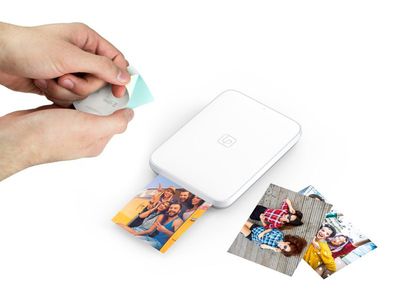
Like many of the miniature iPhone printers on the market, Lifeprint printers use ZINK paper, which allows for color images without ink cartridges. ZINK also has a sticky back, so all of your printed photos double as stickers. On the downside, ZINK is expensive at over $1 per photo when using the Lifeprint-branded paper in the new size.
lifeprintpaper
You can print photos, videos, Live Photos, GIFs, Snaps, and more with Lifeprint, and the Lifeprint app has built-in tools for editing your images and adding stickers, filters, and captions. There's also integration with Instagram and Facebook so you can print directly from your social network.

"For our second printer, we wanted to go bigger and broader. The larger film is classic instant camera size and really captures that retro look and feel. Perfect for decorating your walls. But more importantly the WiFi capability means you're always connected. This allows users to print to and from anywhere in the world. No matter where you are, you're connected and ready to print. And of course, the magical Harry Potter-like Hyperphotos still bring those videos to life in your hands. Super cool."

Lifeprint's new 3x4.5 printer is available exclusively from Apple.com and Apple retail stores for $149.99 starting today. Film is priced at $50 for a pack of 40 and $30 for a pack of 20.


Top Rated Comments

jackth29 Avatar
107 months ago
Tim: What's the most common complaint for that demographic?
Craig: Customers over 65 years old?
Tim: Yes, Craig.
Craig: they're by and large upset that the "Live Photos are printing as regular photos"
Tim:


And that kids, is the beginning of the story of how we increased the Genius Bar efficiency by 70%.
Score: 2 Votes (Like | Disagree)
cerote Avatar
107 months ago
So does the images just move for the phone that took them or any phone with app able to see the moving image? Because if not then why even print it when you can just view on phone since you are doing that anyway?
Score: 2 Votes (Like | Disagree)
justperry Avatar
107 months ago
1. Device is too expensive.

2. Photopaper is way too expensive.

3. Who prints photo's nowadays.

4. Oh Wow, it prints photo's over WiFi.
Score: 1 Votes (Like | Disagree)
guzhogi Avatar
107 months ago
I don't have walls, I don't have a house, I don't have children, I do have a girl and family, photo's on iPhone.
Umm, sorry if this is rude, but where do you live that doesn't have walls? Or, where do you work? Are you allowed to decorate your work area? Just asking out of curiosity. I and a lot of people I know like putting up pictures of themselves, family & friends. If you don't, that fine. Different strokes for different folks.
Score: 1 Votes (Like | Disagree)
guzhogi Avatar
107 months ago
3. Who prints foto's nowadays.
I occasionally print photos. A little something to put on the wall. Out of curiosity, how are your walls decorated, or are they bare?
[doublepost=1512500750][/doublepost]

Like many of the miniature iPhone printers on the market, Lifeprint printers use ZINK paper, which allows for color images without ink cartridges.
I've never used one of these kinds of printers. How does it print without ink cartridges? Is it in the paper? Or is it the kind of thing where when you finish a particular color (red, yellow, blue or black), you have to throw away the whole printer and get a totally new one? Seems kind of wasteful if you have to throw the whole thing out if you finish just one color.
Score: 1 Votes (Like | Disagree)

Popular Stories

Aston Martin CarPlay Ultra Screen

Apple's CarPlay Ultra to Expand to These Vehicle Brands Later This Year

Sunday February 1, 2026 10:08 am PST by
Last year, Apple launched CarPlay Ultra, the long-awaited next-generation version of its CarPlay software system for vehicles. Nearly nine months later, CarPlay Ultra is still limited to Aston Martin's latest luxury vehicles, but that should change fairly soon. In May 2025, Apple said many other vehicle brands planned to offer CarPlay Ultra, including Hyundai, Kia, and Genesis. In his Powe...
Apple Logo Black

Apple Just Made Its Second-Biggest Acquisition Ever After Beats

Thursday January 29, 2026 10:07 am PST by
Apple today confirmed to Reuters that it has acquired Q.ai, an Israeli startup that is working on artificial intelligence technology for audio. Apple paid close to $2 billion for Q.ai, according to sources cited by the Financial Times. That would make this Apple's second-biggest acquisition ever, after it paid $3 billion for the popular headphone and audio brand Beats in 2014. Q.ai has...
Apple Logo Black

Apple's Next Launch is 'Imminent'

Sunday February 1, 2026 12:31 pm PST by
The calendar has turned to February, and a new report indicates that Apple's next product launch is "imminent," in the form of new MacBook Pro models. "All signs point to an imminent launch of next-generation MacBook Pros that retain the current form factor but deliver faster chips," Bloomberg's Mark Gurman said on Sunday. "I'm told the new models — code-named J714 and J716 — are slated...
14 inch MacBook Pro Keyboard

Apple Changes How You Order a Mac

Saturday January 31, 2026 10:51 am PST by
Apple recently updated its online store with a new ordering process for Macs, including the MacBook Air, MacBook Pro, iMac, Mac mini, Mac Studio, and Mac Pro. There used to be a handful of standard configurations available for each Mac, but now you must configure a Mac entirely from scratch on a feature-by-feature basis. In other words, ordering a new Mac now works much like ordering an...
Apple MacBook Pro M4 hero

New MacBook Pros Reportedly Launching Alongside macOS 26.3

Sunday February 1, 2026 5:42 am PST by
Apple is planning to launch new MacBook Pro models with M5 Pro and M5 Max chips alongside macOS 26.3, according to Bloomberg's Mark Gurman. "Apple's faster MacBook Pros are planned for the macOS 26.3 release cycle," wrote Gurman, in his Power On newsletter today. "I'm told the new models — code-named J714 and J716 — are slated for the macOS 26.3 software cycle, which runs from...