

iPhone X Will Default to Hiding Text Previews of Your Notifications on the Lock Screen - MacRumorsOpen MenuShow RoundupsShow Forums menuVisit ForumsOpen Sidebar
Skip to Content

iPhone X Will Default to Hiding Text Previews of Your Notifications on the Lock Screen

by

As we get closer to the iPhone X's launch on Friday, November 3, more tidbits about the device are beginning to emerge thanks to the first wave of impressions, reviews, and hands-on coverage that hit this morning. Within his first impressions, Steven Levy shared an interesting aspect of the iPhone X's software, which turns on hiding text previews for your notifications by default instead of making you turn this privacy feature on yourself.

As an explanation, with the launch of iOS 11 Apple introduced a way for you to hide text previews of all apps at once within Settings. With this turned on, you'll notice when you have a notification for apps like Messages and Snapchat, but the actual content of the notification is hidden until you "unlock" the iPhone with Touch ID or a passcode. Then, you can read the content, and tap the Home Button to enter your iPhone. This feature has to be turned on manually on current iPhones.
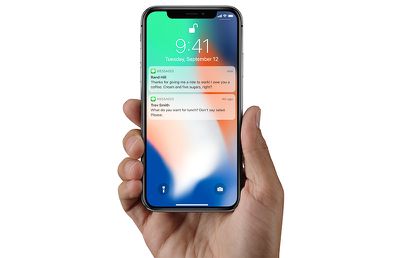
faceidmessagesunlock

After Face ID unlock, iPhone X will show text previews in notifications

According to Levy, iOS 11 on the iPhone X defaults to hiding text previews for all of your apps, automatically providing an extra bit of privacy for users on the new smartphone. So, when you raise the iPhone X in front of you, it'll unlock with Face ID, and any notifications will then be filled out to show the full content of each message. This way, if someone picks up your iPhone and looks at it, Face ID won't unlock and show notification previews. Of course, you can revert to the traditional text previews functionality in Settings.

Levy said that he used this feature as a way to confirm that Face ID had unlocked the iPhone X. Here's the part from his review concerning text previews on the iPhone X Lock Screen:

I then see if the little lock icon on the screen has released its latch. Alternatively, a good way to see when you’ve been recognized is to notice the generic messages on the lock screen saying “you have a notification” from Facebook, Gmail, or wherever. When you and your iPhone X make that turn-on connection, those flesh out with the actual content of the message. (This feature—withholding potentially private alerts until the phone was unlocked—had previously been available as an option but now is the default.)

It's also worth noting that sometimes the iPhone X review unit would unlock with Face ID and go "straight to where [Levy] left off," while other times the UI asked him to swipe up to unlock the iPhone X, as has been showcased in marketing for the smartphone. Levy didn't have an explanation for this part of his experience with the new iPhone, further stating that he was "mystified" as to why it would sometimes say swipe up after Face ID unlock, and other times simply open the iPhone.

Check out more information on the iPhone X in our Roundup.

Related Forum: iPhone

Top Rated Comments

offdutyrockstar Avatar
118 months ago
If the phone autolocked, it goes straight to where it was.

If it was manually locked with the side button, you swipe up.

It's really not that difficult, this geezer must get mystified often.

Score: 8 Votes (Like | Disagree)
jonnysods Avatar
118 months ago
It makes sense. I like this feature as it's currently easy for anyone to preview my messages
Score: 4 Votes (Like | Disagree)
dannyyankou Avatar
118 months ago
This is clever, I didn’t even know it was a feature on iOS 11. Just enabled it.
Score: 3 Votes (Like | Disagree)
118 months ago
Thank you. I’m assuming the one iPhone X is using here is ‘When Unlocked?’
Yep, and it works the exact same way on my 7+.

As long as you don’t change the accessibility option for the home button to “rest finger to open”, the notification will change to displaying the contents once you authenticate with Touch ID. Works well.
Score: 2 Votes (Like | Disagree)
OldSchoolMacGuy Avatar
118 months ago
Don't see why this is an issue. I wouldn't want them visible by default.
Score: 2 Votes (Like | Disagree)
118 months ago
I have this turned off on my phone too. I'd recommend it, especially if your phone is left where other people may have access to it.
Also I have turned off the ability for messages to even show on the lockscreen.
Agreed. Especially if your iPhone is left away,
You don't someone glancing over who might be curious to see what notifications are lighting up your display.
Score: 1 Votes (Like | Disagree)

Popular Stories

Apple MacBook Pro with PROLED XDR Display family lineup feature

Apple Announces OLED MacBook Pro With Touch Display

Wednesday October 28, 2026 10:11 am PDT by
Apple today announced a new high-end MacBook Pro, which is available in 14-inch and 16-inch sizes. The new device has a PROLED XDR display that supports touch gestures, and a glowing rear Apple logo. Pricing on the MacBook Pro starts at $2,899 for the 14-inch model and $3,399 for the 16-inch model. Apple says the MacBook Pro has the "world's best display in a pro laptop." The PROLED...
iPhone Duo Display Cracking

Apple Alerts Stores to iPhone Duo's Display Cracking Issue

Friday October 30, 2026 3:20 pm PDT by
In a memo shared with Apple Stores and Apple Authorized Service Providers this week, and later obtained by MacRumors, Apple provided technicians with guidance on how to diagnose and address the iPhone Duo's inner display cracking issue. If a customer reports the issue, Apple advised technicians to inspect the iPhone Duo and repair or replace it in accordance with their standard procedures....
iPad mini OLED feature 1

Apple Executive Comments on New iPad Mini Lacking 120Hz Display

Thursday October 29, 2026 1:47 pm PDT by
While the new iPad mini has an OLED display, the device does not support ProMotion, meaning the display's refresh rate is limited to 60Hz instead of 120Hz. ProMotion support would have allowed for the iPad mini's refresh rate to automatically adjust from 10Hz to 120Hz depending on the content being displayed, but evidently Apple has kept the feature exclusive to the iPad Pro among iPad...
Latest Stories
Apple Watch Ultra 4 Hits All-Time Low Price With Amazon's $99 Discount
4 hours ago
Reminder: Apple's Big Discount on Beats 360 Ear Cushions Ends Today
4 hours ago
Here's a New Tour of Apple's HomeView Software
4 hours ago
Apple Reveals New iPad Mini's Battery Capacity
5 hours ago
Top Stories: Apple's Big MacBook Pro, iPad mini and iMac Updates
7 hours ago
'Pluribus' Season 2 Reportedly Starts Production Today
13 hours ago
iPhone 18 Pro Sales Surge in China, Offsetting Decline in U.S. and Japan
14 hours ago
HomeView Software 27.2: Wallpapers, Control Center, and More
20 hours ago
Apple Alerts Stores to iPhone Duo's Display Cracking Issue
21 hours ago
iOS 27.3 Will Enable These Apple Intelligence Features in China
22 hours ago
Apple Says iOS 27.3 Beta Coming Next Week
22 hours ago
Apple's Flash Storage Suppliers Are Finally 'Getting Their Revenge'
23 hours ago
14 New Things Your iPhone Can Do in iOS 27.2
1 day ago
iPhone Duo Review: One Week Later
1 day ago
Samsung Mocks iPhone Duo Display Cracks in New Ad Campaign
1 day ago
The MacRumors Show: OLED MacBook Pro, iPad Mini 8, and More
1 day ago
MacBook Pro With Touch Display: 15 More Details Revealed
1 day ago
Russia Places Apple on State Surveillance Registry
1 day ago
Halloween Weekend Brings Discounts on Apple Accessories and Pre-Orders
1 day ago
Apple Has Released More Than 25 New Products in the Past Two Months
1 day ago
Local Code Launches as Free, Private AI Assistant Tool for Mac
1 day ago
Apple Acquires Ascend.io
1 day ago
HomePod Mini 2 Launches Today: All the New Features
1 day ago
AirTag 2 4-Pack Drops to New Low Price of $69.99
1 day ago
Rian Johnson's iPhone Camera App Goes Viral
1 day ago
Where Did All the iPhone Duos Go? Mostly to Apple's Stores
1 day ago
Apple's Touchscreen MacBook Pro Could Ship 1.5M Units in 2027
1 day ago
New Apple TV 4K and iPad Mini: RAM Amounts Revealed
2 days ago
Apple Executive Comments on New iPad Mini Lacking 120Hz Display
2 days ago
Here's a Hands-On Look at HomePod Mini 2's New Two-Tone Colors
2 days ago

🔗 Related Apple News & Rumors

Stay updated with the latest Apple ecosystem news and verified rumors











































