

Procreate 4 for iPad Offers New Painting Engine, Layer Masks, Drag and Drop, and More - MacRumorsOpen MenuShow RoundupsShow Forums menuVisit ForumsOpen Sidebar
Skip to Content

Procreate 4 for iPad Offers New Painting Engine, Layer Masks, Drag and Drop, and More

by

Popular iPad painting and sketching app Procreate was today updated to version 4, offering an overhauled experience that provides improvements to the app's core elements and introduces support for iOS 11.

Procreate 4 adopts support for Metal 2, Swift 4, and Core Video, introducing a new Silica M painting engine that's been engineered with better color depth, more fluid and accurate painting, and faster performance.

procreate4
A new brush engine and interface allows for new effects and settings, and there's a new, faster smudge tool for smudging and mixing paint along with a new wet painting experience. Blending colors in Procreate 4 is 250 times more accurate than in the previous-generation Procreate app.
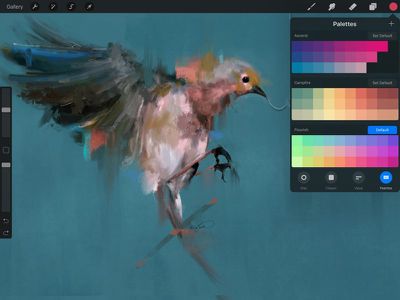
procreate4wetpainting
Layer Masks have been added in Procreate 4 for non-destructive image modifications, and there are new Brush Blend Modes, with support for applying existing blend modes to any brush.

When using the Apple Pencil, there's a new Bleed setting, and the Tilt and Sketching brushes available with the accessory offer better realism and responsiveness.

With Drag and Drop support, multiple paintings can be dragged out of the app into another for sharing, and brushes and palettes can be dragged in. Layers can be dragged as individual images, and images taken directly from the web browser can be quickly dragged into Procreate for faster editing.
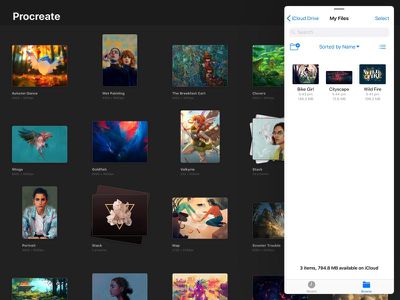
procreate4files
Other improvements include P3 Wide Color support, a new color interface to make it easier to switch between colors, a new interface for image adjustments, and a new gallery for managing artwork and interacting with the Files app.

Procreate 4 can be downloaded from the App Store for $9.99. [Direct Link]

Top Rated Comments

trusso Avatar
116 months ago
Whether it's an iPad or a Mac OS app, whenever I see the beautiful art done in the PR photos for programs like this, I half-convince myself that if only I bought that piece of software, I, too, could be a wonderfully talented artiste. Alas, my homemade scribbles and lightly-used Wacom attest to the true caliber of my oeuvre.

Looks like a nice piece of software, though.
Score: 3 Votes (Like | Disagree)
116 months ago
App Store pet peeve. That it won't just show you the darn store item on an iPhone if it's iPad only. I understand I can't download it, so take away the download button.. but it's stupid to have to put down my iphone and wait til I have my iPad handy to even LOOK at the entry on the App Store.

This goes for Mac App Store entries too. That I can't display Mac Store results on my iOS devices. Again, if I'm cruising Macrumors for cool stuff half the links are broken depending on what device I'm on. Worse, if I'm looking for Apps from the same company that work with all my devices I can be required to go to THREE different devices just to see what they are.
Score: 2 Votes (Like | Disagree)
canadianreader Avatar
116 months ago
It’s a free update for those who have the v2 knowing that they could have launched a new app with those feature they’re not greedy and I like it.
Score: 1 Votes (Like | Disagree)
116 months ago
Two strange things.
1) My Procreate is on version 3.2.4 and the App Store doesn't show that there's an update available.
2) In the App Store it says Procreate version 4 was released two and a half months ago on June 26.
[doublepost=1505860333][/doublepost]Procreate is a great app. I'm really hoping they make a better gallery though. It's kind of a pain only being able to browse thumbnails and not full size drawings. Also the pressure sensitivity when the pencil is tilted is quite off. Other than that it's great.
Score: 1 Votes (Like | Disagree)
AstroRob Avatar
116 months ago
This is such a well-designed app. Of the many paint programs I've tried for the iPad this one is just the most fluid for letting you draw without the UI getting in the way. Looking forward to the new features!
Score: 1 Votes (Like | Disagree)

Popular Stories

Apple Event Logo

Apple Working on All-New Operating System

Wednesday July 29, 2026 11:39 am PDT by
Apple is developing an all-new operating system that is essentially a mix of tvOS, watchOS, and iOS, according to Bloomberg's Mark Gurman. In a report this week, he said the operating system will feature a grid of icons, widgets, and apps, along with customizable clock faces. The new software platform is intended for Apple's long-rumored smart home hub. With built-in facial recognition,...
imac video apple feature

Apple Made Its Second-Biggest Acquisition Ever This Year

Wednesday July 29, 2026 12:03 pm PDT by
Apple this year acquired Israeli startup Q.ai for close to $2 billion, according to the Financial Times. That would make this Apple's second-biggest acquisition ever, after it paid $3 billion for the popular headphone maker Beats in 2014. This is also the largest known Apple acquisition since the company purchased Intel's smartphone modem business and patents for $1 billion in 2019. Q.ai...
Dynamic Island iPhone 18 Pro Feature

iPhone 18 Pro: Twelve Changes Coming to Apple's Next Flagship

Thursday July 30, 2026 3:43 am PDT by
We're less than two months out from the launch of Apple's premium next-generation smartphone lineup, and while we're not expecting a dramatic change in terms of functionality, there are still several enhancements rumored to be coming to the iPhone 18 Pro and iPhone 18 Pro Max. One thing worth noting is that Apple is reportedly planning a major change to its iPhone release cycle this year,...

🔗 Related Apple News & Rumors

Stay updated with the latest Apple ecosystem news and verified rumors













































