

Adobe Unveils Photoshop and Premiere Elements 15 for Mac - MacRumorsOpen MenuShow RoundupsShow Forums menuVisit ForumsOpen Sidebar
Skip to Content

Adobe Unveils Photoshop and Premiere Elements 15 for Mac

by

Adobe today released new versions of Photoshop Elements and Premiere Elements, its affordable photo and video editing software aimed at consumers. Both Photoshop and Premiere Elements include new tools and enhancements to existing capabilities to make the photo and video editing experience even more streamlined and simple.

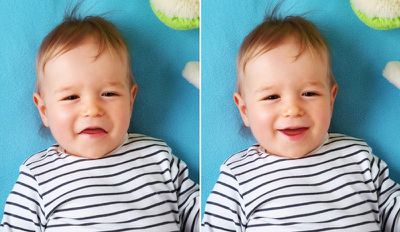
Photoshop Elements includes a new Transform tool that's able to turn frowns into smiles, adjust squinting eyes, and make other quick, easy adjustments to photos in a matter of minutes. Filters have been improved and can be layered and edited more simply, and there's a new Smart Tags system that scans images for content and makes it easier to find them based on subjects like cats, dogs, sunsets, birthdays, people, and more. Search using multiple terms is also available.
Selfie family
For those who are new to the photo editing process, Photoshop Elements has a range of new Guided Edits to do things like add text elements to photos, layer multiple effects, add motion blur behind subjects, turn photos into paintings with texture and color, and create custom frames.

photoshopelementsmotionblur
On touch screen devices, which pertains to Windows machines, there are new options for using the Organizer and Quick Edit with touch-based gestures, an improvement also included in Premiere Elements. Both Premiere and Photoshop Elements also include integration with Facebook, YouTube, and other social networks to make it faster to share videos and photos.

Premiere Elements features a simplified search tool to quickly locate video content you want to work with, and there's a new tool for clearing haze from landscape shots for clearer video. As with Photoshop Elements, Premiere Elements includes new Guided Edits, including one that allows users to apply effects across multiple clips or an entire movie.

Selfie family
Face detection allows Favorite Moments to automatically locate the people in your videos to bring them to the front and center, a feature that's also new to Pan and Zoom and Smart Trim, enhancing the functionality of these tools. A new music remix feature lets users pick a music file that can be automatically rematched to the length of the movie, and there's a tool for creating dynamic collages from photos and videos.

premierelements15videocollage
Photoshop Elements 15 and Premiere Elements 15 for Mac and Windows can be purchased from Adobe's website for $99.99 each. Bundles are available for $149.99, and existing users can upgrade for $79.99 for one product or $119 for the bundle.


Tag: Adobe

Top Rated Comments

keysofanxiety Avatar
128 months ago
Is it just me, or does the baby on the left look like it had its smile turned upside down? Rather than it frowning in the first instance and then turned into a smile?

Maybe it's just me. I tend to avoid babies. :confused:


Score: 16 Votes (Like | Disagree)
BornAgainMac Avatar
128 months ago
That is awesome. Photoshop your kids into being happy.
Score: 9 Votes (Like | Disagree)
macduke Avatar
128 months ago
That is awesome. Photoshop your kids into being happy.
I had a happy childhood, apparently. I never frowned, dad drove a Bugatti Veyron, and mom looked like a supermodel. I was also quite the baseball player—as evidenced by the vapor cone shock wave surrounding me as I broke the sound barrier just before sliding into home plate. Life was so good back then. What happened?
Score: 6 Votes (Like | Disagree)
MonkeySee.... Avatar
128 months ago
Thats kids face is wrong.

The right picture is the image shot as the first pic isn't a natural facial expression. Looks like a terrible Photoshop.
Score: 6 Votes (Like | Disagree)
powaking Avatar
128 months ago
The kids face on the left is Robert Di Nero's baby picture.
Score: 5 Votes (Like | Disagree)
mcdj Avatar
128 months ago
My thoughts exactly. What a great new feature, that they can't even provide an example of.

As a retoucher by trade, I can say from experience that turning a frown into a smile convincingly is harder than it sounds. So hard, even Adobe had to cheat to get it done.
Score: 3 Votes (Like | Disagree)

Popular Stories

Apple Event Logo

Apple Working on All-New Operating System

Wednesday July 29, 2026 11:39 am PDT by
Apple is developing an all-new operating system that is essentially a mix of tvOS, watchOS, and iOS, according to Bloomberg's Mark Gurman. In a report this week, he said the operating system will feature a grid of icons, widgets, and apps, along with customizable clock faces. The new software platform is intended for Apple's long-rumored smart home hub. With built-in facial recognition,...
imac video apple feature

Apple Made Its Second-Biggest Acquisition Ever This Year

Wednesday July 29, 2026 12:03 pm PDT by
Apple this year acquired Israeli startup Q.ai for close to $2 billion, according to the Financial Times. That would make this Apple's second-biggest acquisition ever, after it paid $3 billion for the popular headphone maker Beats in 2014. This is also the largest known Apple acquisition since the company purchased Intel's smartphone modem business and patents for $1 billion in 2019. Q.ai...
Four iPhone 18 Pro Colors Mock Feature

iPhone 18 Pro and iPhone Ultra: Pre-Orders and Release Date

Thursday July 30, 2026 6:12 am PDT by
Apple has yet to reveal when the iPhone 18 Pro and iPhone Ultra will be announced and released, but the dates usually follow a familiar pattern. Labor Day is September 7 this year. The last time the holiday fell on that day was in 2020, but the iPhone event that year was delayed until October due to the COVID-19 pandemic. So, the last time Labor Day was on September 7 in a normal year was in ...

🔗 Related Apple News & Rumors

Stay updated with the latest Apple ecosystem news and verified rumors










































