

macOS Sierra: Save Disk Space With the New 'Optimize Storage' Option - MacRumorsOpen MenuShow RoundupsShow Forums menuVisit ForumsOpen Sidebar
Skip to Content

macOS Sierra: Save Disk Space With the New 'Optimize Storage' Option

by

macOS Sierra, available today, includes a built-in storage optimization feature that's designed to free up storage space on a Mac by storing rarely used files in iCloud, regularly emptying the trash, removing unnecessary files, and more.

It's a handy feature that can give you a good amount of additional storage space with a set of tools that you normally had to download a third-party storage optimization app to use. Here's how to take advantage of Sierra's Optimize Storage feature:

  1. Click on the Apple logo at the top of the menubar and select "About This Mac" from the list of options.
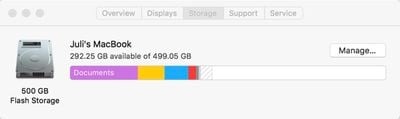
  2. Choose the "Storage" tab at the top to see an overview of how much storage you're using on your Mac.
    optimizestoragemanage

  3. Click on "Manage" to open up the optimization options.

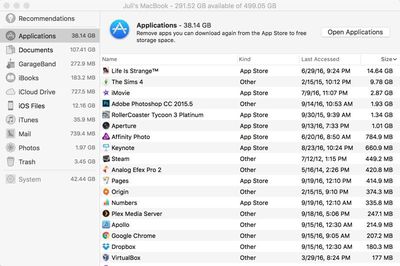
When you open up Optimize Storage, there's a breakdown of where your files are stored and a list of recommended actions you can take to free up space, all of which is new.
appsizeoptimizestorage
File storage on the Mac is broken down into the following categories: Applications, Documents, GarageBand, iBooks, iCloud Drive, iOS Files, iTunes, Mail, Photos, and Trash. Files can be organized by date, size, and type, so it's easy to see what's taking up a lot of space. Clicking on any file in a list will let you open the folder it's located in on the Mac, so it can be deleted.

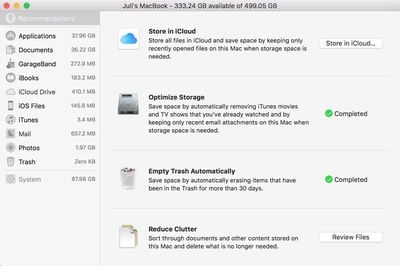
In the "Recommendations" section of the Optimize Storage feature, there are a list of actions Apple thinks you should take to preserve space. For me, these recommendations suggested storing my files in iCloud, optimizing photo sizes, keeping only recent email attachments and removing iTunes movies and shows I've watched, emptying the trash automatically, and reducing clutter by finding files that don't need to be stored on my Mac. Depending on your usage habits, recommendations may vary.
optimizestoragerecommendations
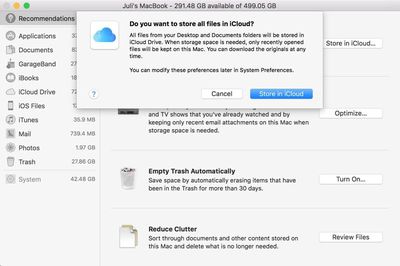
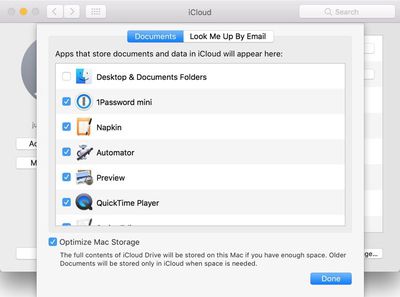
The "Store in iCloud" feature is linked to another new macOS Sierra function, which makes all documents stored on the desktop or in the Documents folder available across all devices. This can take up a lot of iCloud storage space (more than 50GB in my case) so it should be used with caution.
storeallfilesinicloud
"Optimize Storage" offers preferences for automatically removing watched iTunes movies and TV shows (they're still available via iCloud) and downloading only recent attachments in Mail, features Apple said would save me a few hundred megabytes of space.

"Reduce Clutter" is a review of all documents on the Mac sorted by size, while "Empty Trash Automatically" is self-explanatory. An unmentioned feature makes sure there's space for all documents stored in iCloud Drive before downloading them onto a Mac. If there's not, older files will be kept in iCloud, while only the most recent files will be stored on the Mac itself.
icloudoptions
A quick run through all of the storage optimization features netted me more than 40GB of space, but your mileage may vary based on how often you delete older files and empty the trash. It's fast, easy to use, and has some good storage saving tips that weren't previously available, so it's definitely worth checking out Optimize Storage after you install Sierra.


Related Forum: macOS Sierra

Top Rated Comments

131 months ago
Such a feature is laughable when you only are provided 5 GB of iCloud storage.

It's a dollar a month for 10x that capacity. Don't be cheap.
Score: 13 Votes (Like | Disagree)
131 months ago
Such a feature is laughable when you only are provided 5 GB of iCloud storage.
Score: 10 Votes (Like | Disagree)
131 months ago
Such a feature is laughable when you only are provided 5 GB of iCloud storage.
*for free
Score: 8 Votes (Like | Disagree)
131 months ago
I don't want iCloud. I need a 3TB SSD.
Score: 6 Votes (Like | Disagree)
MacsRgr8 Avatar
131 months ago
Cool this.

But, can someone explain what this "Purgeable Storage" is...?
I understand what it means literally, but what does macOS Sierra believe is "Purgeable"?
Score: 4 Votes (Like | Disagree)
131 months ago
It's a dollar a month for 10x that capacity. Don't be cheap.
Presumably this person owns an apple device, and is therefore not cheap.
Score: 4 Votes (Like | Disagree)

Popular Stories

Home Hub Command Center with Dome Base Feature

Apple Smart Home Hub to Feature iMac G4-Style Design

Wednesday September 30, 2026 4:36 am PDT by
Apple's long-rumored smart home hub will have an iMac G4-style design and a host of unique features, Bloomberg's Mark Gurman reports. The smart home hub is said to feature a square 6-inch display, with variants that can be placed on a countertop or mounted on a wall. It features a single FaceTime camera on the front, with microphones and speakers in its connected base. Gurman described the...
HomePod minis on gradient feature 1 1

Three New Apple Smart Home Products Coming on October 13

Wednesday September 30, 2026 4:04 am PDT by
Apple plans to introduce a series of new smart home products on Tuesday, October 13, according to Bloomberg's Mark Gurman. Apple reportedly plans to debut its long-awaited smart home hub device, a new HomePod mini, and a new Apple TV on the date. The new HomePod mini and Apple TV are set to retain their existing designs, but tout faster chips to support Siri AI. The new HomePod mini will...
Apple TV Sans Remote Feature

New Apple TV 4K Leaked

Friday September 25, 2026 8:16 am PDT by
MacRumors contributor Aaron Perris has uncovered an image file from Apple for an unreleased Apple TV 4K, suggesting that a new model will finally be released soon. The image is specifically for an "Apple TV 4K (4th generation)" model. Apple TV 4K (4th generation) image (on a gradient) The image reveals that the Apple TV will have the same external design as the current model, with all of its...
Latest Stories
Apple Stores Receive 'Do Not Open' Boxes Ahead of Smart Home Products Launch
5 minutes ago
iPhone 18 Pro Sales Jump in China Ahead of iPhone Duo Launch
27 minutes ago
Apple TV Still Down for Some Users Following Apple Services Outage
1 hour ago
PSA: Apple Mail on Mac May Stop Syncing Microsoft 365 Accounts Today
2 hours ago
Apple's Smart Home Hub: Everything We Know So Far
12 hours ago
Apple's Home Hub Borrows From the iPhone Duo's StandBy Mode
13 hours ago
Apple Invites App Updated With Three New Features
17 hours ago
Apple Event on October 13?
18 hours ago
Apple Watch SE 3 vs. Series 12 Buyer's Guide: Which Should You Buy?
20 hours ago
iPad Mini 8 to Offer These 10 New Features
20 hours ago
DoorDash Unveils AI Food Ordering Through Apple's Messages App
22 hours ago
Amazon Takes Up to $150 Off Select M5 MacBook Air Models
22 hours ago
Apple Still Plans to Release a New Full-Sized HomePod
23 hours ago
Apple Working to Expand HomeKit
1 day ago
Apple Smart Home Hub to Feature iMac G4-Style Design
1 day ago
Three New Apple Smart Home Products Coming on October 13
1 day ago
Apple Pay Now Available in India With Axis Bank Cards
2 days ago
OpenAI Launches Always-On 'Dots' Agents to Rival Meta's Muse
2 days ago
AirPods 5 Teardown: Batteries Removable, Case Still Tough
2 days ago
iPhone 18 Pro Owners Complain of Speaker Crackling or Popping
2 days ago
You Can 'Get Ready' for iPhone Duo Pre-Orders on October 12
2 days ago
Apple Pay Reportedly Launching in India Today
2 days ago
Apple Releases New AirPods Beta Firmware
2 days ago
Apple Shares New Guide for Using iOS 27 Parental Controls
2 days ago
Apple Creator Studio and Final Cut Camera Get New Features
2 days ago
Apple Explains Why It Removed ICE Tracking Apps Last Year
2 days ago
Amazon Expands $779.99 Apple Watch Ultra 4 Deal to More Models
2 days ago
Switch Siri AI for ChatGPT on Your Mac
2 days ago
Apple Says Emergency SOS via Satellite Now Available in Norway
2 days ago
AppleCare Guide: Is it Worth Paying For?
2 days ago

🔗 Related Apple News & Rumors

Stay updated with the latest Apple ecosystem news and verified rumors











































