

Apple Releases watchOS 3 With App Dock, Instant Launching, New Watch Faces, Breathe, and More - MacRumorsOpen MenuShow RoundupsShow Forums menuVisit ForumsOpen Sidebar
Skip to Content

Apple Releases watchOS 3 With App Dock, Instant Launching, New Watch Faces, Breathe, and More

Apple today released watchOS 3, the newest version of the operating system that runs on the Apple Watch. watchOS 3 is a significant update to the watchOS operating system, introducing an overhauled interface, new apps, new watch faces, and impressive performance improvements.

watchOS 3 can be downloaded through the dedicated Apple Watch app on the iPhone by going to General -> Software Update. To install the update, the Apple Watch must have 50 percent battery, it must be placed on the charger, and it must be in range of the iPhone. watchOS 3 is available for all Apple Watch models, but requires an iPhone running iOS 10 to install, which was also released today.
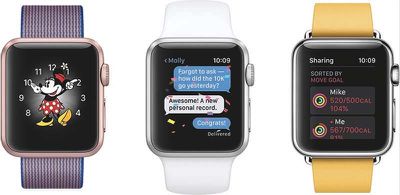
WatchOS3_trio
watchOS 3 features a new dock that houses your favorite and recently used apps so they're quicker to access. Up to 10 apps saved to the dock are kept up to date at all times and are able to launch instantly, cutting down on app loading times.

Navigation is improved in watchOS 3, with left and right swipes able to change the watch face. Upward swipes bring up the Control Center, while a downward swipe opens the Notification Center. Pressing the side button brings up the new dock.


There are new Activity sharing features in watchOS 3, along with workouts and activities for wheelchair users. A new "Breathe" app guides you through daily deep breathing sessions to cut down on stress, and there are new Reminders, Find My Friends, and Heart Rate apps.

Three new watch faces are available, an SOS feature can automatically call emergency services, and an Apple Watch can be used to unlock a password protected Mac with new Continuity functionality. A revamped Messages app makes it easier to reply to incoming texts, plus there's a new "Scribble" feature for writing replies on the Apple Watch face with a finger.

For more details on what's new in watchOS 3, make sure to check out our full watchOS 3 roundup.

Related Roundup: Apple Watch 11

Popular Stories

3 4 24 Sport Band Refresh Feature

Sketchy Rumor Claims Apple Watch Series 12 Could Introduce Sensor in Band

Friday July 3, 2026 8:54 am PDT by
The Apple Watch Series 12 could ship with a new health sensor built directly into one of its bands, according to a sketchy rumor from a known leaker. The leaker known as "Kosutami" says the sensor will be injection-molded into a silicone band, and only a silicone band, apparently because Apple has not yet solved how to embed similar hardware in bands made from other materials. No detail was...

watchos 27

Siri AI Comes to Apple Watch in watchOS 27 Beta 3

Monday July 6, 2026 1:24 pm PDT by
With watchOS 27 beta 3, Apple added support for Siri AI and the Siri app, so Apple Watch users can now use the features right from their wrist. Apple said Siri AI would be coming to the watch back when watchOS 27 was first introduced, but the feature wasn't live until now. The Dynamic App Grid that pops up when the Digital Crown is pressed displays the Siri app in the center, and the...
Apple Watch Series 10 Jet Black

Apple Watch Series 13 Rumored to Mark the End of an Era

Wednesday July 8, 2026 1:29 pm PDT by
While the Apple Watch Series 12 is still a few months away, a new rumor suggests that next year's Apple Watch Series 13 will mark the end of an era. According to a recent post from a known leaker on the Chinese social media platform Weibo, the Apple Watch will be receiving a major redesign next year, and this will apparently include a new way of attaching bands to the watch. As a result, the ...

Top Rated Comments

macduke Avatar
129 months ago
I like this update. I hardly ever used that side button for contacts. This app drawer concept makes a lot more sense. It seems to work well, but some existing third party apps need to be updated to support it, I think?

WARNING: If you work a lot with your Apple Watch on, especially if you wear gloves, turn off the 911 S.O.S. feature, or at least set it to swipe to confirm you want to call. I changed mine right away because I was worried about accidentally setting it off (especially since I have a toddler), and when I was framing a wall the other night wearing my leather work gloves, it set off the S.O.S. 6-7 times from accidental "holding" of the side button. Like I said, I was lucky I had turned on the "swipe to confirm" functionality or the police would have made an unpleasant visit.
Score: 7 Votes (Like | Disagree)
mdelvecchio Avatar
129 months ago
Why does one have to update to iOS 10 to get WatchOS 3?

From what I've heard iOS 10 slows down the iPhone 6. So I'm basically stuck with WatchOS 2...

Well done Apple.

I very much regret having bought this overpriced, slow piece of rubbish.
what childish nonsense. iOS 10 is fine on a 6. not updating on a 6 because you're afraid of a slowdown is insane....you'll be missing out on actual value you could have now, today.
Score: 7 Votes (Like | Disagree)
xraydoc Avatar
129 months ago
Why does one have to update to iOS 10 to get WatchOS 3?

iOS 10 would slow down my iPhone 6. So I'm basically stuck with WatchOS 2...

Well done Apple.

I very much regret having bought this overpriced, slow piece of rubbish.
It's dependent on the watch.app for the iPhone, so they need to be updated together.

iOS 10 won't slow down your iP6.
Score: 6 Votes (Like | Disagree)
CrazyDaveinNeb Avatar
129 months ago
apparently I still had the beta profile on watch. removed and rebooted the watch and got the download
Score: 3 Votes (Like | Disagree)
129 months ago
Why does one have to update to iOS 10 to get WatchOS 3?

From what I've heard iOS 10 slows down the iPhone 6. So I'm basically stuck with WatchOS 2...

Well done Apple.

I very much regret having bought this overpriced, slow piece of rubbish.
Not slowing my 6 down at all. (Unnecessary Snark Deleted)
Score: 3 Votes (Like | Disagree)
jtropeano Avatar
129 months ago
Why does one have to update to iOS 10 to get WatchOS 3?

iOS 10 would slow down my iPhone 6. So I'm basically stuck with WatchOS 2...

Well done Apple.

I very much regret having bought this overpriced, slow piece of rubbish.
Nah. You'll be good on iOS 10 w your iPhone 6. Check geekbench scores here:
Score: 3 Votes (Like | Disagree)

🔗 Related Apple News & Rumors

Stay updated with the latest Apple ecosystem news and verified rumors












































