'Stranger Things' Poster Began as Sketch Created With iPad Pro and Apple Pencil - MacRumorsOpen MenuShow RoundupsShow Forums menuVisit ForumsOpen Sidebar
Skip to Content

'Stranger Things' Poster Began as Sketch Created With iPad Pro and Apple Pencil

by

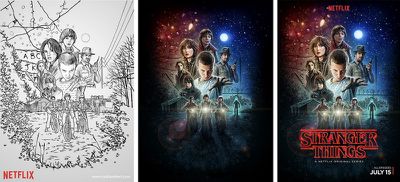
In a recent interview with Mashable, an artist based in the United Kingdom, Kyle Lambert, divulged his process of creating the memorable poster art for Netflix's science fiction series Stranger Things. Netflix asked the artist to keep with the 80's theme of the show, and provided him with a vague plot outline, rough cuts of only the first few episodes, and some still shots "to communicate the story in a single image."

Ultimately, Lambert said he decided on the iPad Pro for the project because the tablet lets him "sketch in a very natural way," especially when used in conjunction with the Apple Pencil. He used the Apple device in the sketching process of the main poster art that has gained fame online in the weeks since Stranger Things launched in July, but Lambert has also been known to create impressive art on iPads over the years, particularly in a photorealistic representation of Morgan Freeman he created on an iPad Air in 2013.
Stranger Things ipad pro 1

"This was a very exciting project for me, as an artist that trained with oil paints, I really enjoyed the challenge of reproducing this traditional painting style using digital tools," Lambert told Mashable.

"I used the iPad Pro to do the preliminary composition ideas and the sketch that became the final Stranger Things poster. I chose to use the iPad Pro for the drawing stage of the poster because I find that I am able to sketch in a very natural way on the device using the Apple Pencil. The device in general is nice to hold for long periods of time, it is really portable and Procreate, the app that I used, has some really great Pencil brushes for drawing with."

Specifically, on the iPad Pro Lambert used the iOS app Procreate to assist in his drawing process, and then he transitioned to Photoshop on the Mac to upscale the image to a higher resolution so he could "paint small elements at the best possible resolution." During the coloring process, the artist used an Intuos Wacom tablet -- which connects to a Mac to act as a sketch pad -- so he could "focus on as much of the image" as he needed, without his hand obscuring a piece of the artwork like it does when using the iPad Pro/Apple Pencil combo.

Stranger Things ipad pro 3

The original sketch that eventually became the final Stranger Things poster

The process wasn't particularly straightforward, however, as Lambert describes moving back to the iPad Pro to "add layers of detail to areas" that he thought needed "a more fluid sketch style" that the desktop didn't grant. He went back and forth between the two devices and applications several times to ultimately give the Stranger Things poster its finished, recognizable look. Lambert was also commissioned to work on several character portraits to serve as gifts for actors, specifically those of Sheriff Hopper, Eleven and Dr. Brenner, and various still shots from iconic moments in the 8-episode series.

Ever since early adopters began getting their hands on the iPad Pro and its companion stylus, the Apple Pencil, talented artists have shared what they can do with the technology in MacRumors' own discussion forums. Apple has remained adamant that the Apple Pencil is a drawing-enhancement tool, and "will absolutely not replace the finger as a point of interface" on the tablet, so it's interesting to see how much the technology has grown and been used, and on such a highly professional level, in under a year of its availability.
Related Roundup: iPad Pro
Buyer's Guide: iPad Pro (Neutral)
Related Forum: iPad Accessories

Top Rated Comments

130 months ago
stranger things poster ipad pro image
Score: 11 Votes (Like | Disagree)
130 months ago
Yeah but mostly a Xerox!
You do realize that this an homage to classic movie posters right? And that the layout of The Force Awakens poster was a throwback vintage Star Wars artwork?
Score: 5 Votes (Like | Disagree)
130 months ago

Couldn't is a strong word. It was better to do it on the Mac. Just like some aspects were better on the iPad Pro "as Lambert describes moving back to the iPad Pro to "add layers of detail to areas" that he thought needed "a more fluid sketch style" that the desktop didn't grant". Always smart to use the best tool for the job. Which is why I'm glad Apple haven't tried to shoehorn desktop and touch interfaces into each other. Macs for pointers and iOS for touch.
This so much. Every so often, I'm tempted to get a SurfaceBook. Then, I realize, it's just a bunch of compromises. Using it as at tablet, the battery life sucks. You have a confusing mix of input methods. It's relatively heavy. I mean, it's a great 2-in-1 but at the end of the day, I'd honestly rather have two devices. Plus, that is a huge deal break, and your point exactly: what if I want to use a tablet AND have access to a desktop.


I'm so thankful Apple has kept these two devices separate. There's a way to integrate them better into a work flow, and I think that's the future: integrations. Convergence is stupid, integration is the key. Have the iPP and Mac work together seamlessly, so work can transition from one device to the other depending on which input method is best for the task at hand.

Apple is heading this direction, as can be seen with the 'copy and paste from an iDevice to macOS'.
Score: 4 Votes (Like | Disagree)
Keane16 Avatar
130 months ago
Pretty cool. Flies in the face of the all the naysayers on this forum telling me the iPad is nothing but a glorified consumption device.

I can't draw to save my life, but the iPad Pro and Pencil combo has changed my working life - all my notes/sketches/scribbles/ideas are now taken on the device and it's glorious. No more paper notepads and everything is searchable as well as available in my bag at all times.

So the iPP couldn't do it alone? Other devices involved: Mac & Wacom tablet. Bolsters the point that for serious work, iPP is a great companion device to a Mac or PC, not a replacement for them.
Couldn't is a strong word. It was better to do it on the Mac. Just like some aspects were better on the iPad Pro "as Lambert describes moving back to the iPad Pro to "add layers of detail to areas" that he thought needed "a more fluid sketch style" that the desktop didn't grant". Always smart to use the best tool for the job. Which is why I'm glad Apple haven't tried to shoehorn desktop and touch interfaces into each other. Macs for pointers and iOS for touch.
Score: 4 Votes (Like | Disagree)
Chupa Chupa Avatar
130 months ago


During the coloring process, the artist used an Intuos Wacom tablet ('https://www.wacom.com/en-kr/products/pen-tablets/intuos') -- which connects to a Mac to act as a sketch pad -- so he could "focus on as much of the image" as he needed, without his hand obscuring a piece of the artwork like it does when using the iPad Pro/Apple Pencil combo.


The process wasn't particularly straightforward, however, as Lambert describes moving back to the iPad Pro to "add layers of detail to areas" that he thought needed "a more fluid sketch style" that the desktop didn't grant. He went back and forth between the two devices and applications several times to ultimately give the Stranger Things poster its finished, recognizable look.
So the iPP couldn't do it alone? Other devices involved: Mac & Wacom tablet. Bolsters the point that for serious work, iPP is a great companion device to a Mac or PC, not a replacement for them.
Score: 4 Votes (Like | Disagree)
earthTOmitchel Avatar
130 months ago
That looks a lot like the Force Awakens poster from last year... o_O

stranger things poster ipad pro image
Well Netflix did want Lambert to be inspired by pop culture of the 80's ;)
Score: 4 Votes (Like | Disagree)

Popular Stories

Apple Pencil USB C sliding cap feature

Two New Apple Pencils Reportedly Launching Next Year

Sunday July 12, 2026 8:45 am PDT by
Two new Apple Pencil models are in development for release alongside next-generation iPad Pro models next year, according to Bloomberg's Mark Gurman. Specifically, he said new versions of the lower-end Apple Pencil with a USB-C port and the higher-end Apple Pencil Pro are in the works. Apple is working to satisfy upcoming EU requirements related to making batteries more replaceable,...
m3 ipad air mint

Apple Adds 36-Month Carrier Financing for Cellular iPads

Wednesday July 15, 2026 7:41 am PDT by
Apple has introduced 36-month financing for cellular iPad purchases through AT&T and Verizon, adding to the 12-month option previously available via Apple Card. The new financing, first reported by 9to5Mac, replaces Apple Card Monthly Installments as the sole route to spreading out a cellular iPad purchase. That plan paid off the balance interest-free over 12 months; the new carrier options...
Apple Event Logo

Apple Working on All-New Operating System

Wednesday July 29, 2026 11:39 am PDT by
Apple is developing an all-new operating system that is essentially a mix of tvOS, watchOS, and iOS, according to Bloomberg's Mark Gurman. In a report this week, he said the operating system will feature a grid of icons, widgets, and apps, along with customizable clock faces. The new software platform is intended for Apple's long-rumored smart home hub. With built-in facial recognition,...

🔗 Related Apple News & Rumors

Stay updated with the latest Apple ecosystem news and verified rumors