macOS Sierra Tidbits: Apple File System, RAID Support, and More - MacRumorsOpen MenuShow RoundupsShow Forums menuVisit ForumsOpen Sidebar
Skip to Content

macOS Sierra Tidbits: Apple File System, RAID Support, and More

Apple yesterday announced macOS Sierra, the latest version of its Mac software platform and renamed successor to OS X El Capitan. The first beta was released to developers following yesterday's keynote, providing early adopters with a closer look at what's new.

Apple File System

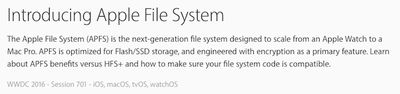
Apple File System, or APFS, is a next-generation file system for Apple products based upon the iOS, macOS, tvOS, and watchOS software platforms, ranging from the Apple Watch to a Mac Pro.
macOS-Sierra-Apple-File-System
APFS, which supports nearly all of the features of HFS+, is optimized for Flash/SSD storage and features strong encryption, copy-on-write metadata, space sharing, cloning for files and directories, snapshots, fast directory sizing, atomic safe-save primitives, and improved file system fundamentals.

Apple has posted an Apple File System Guide on its Developer Portal with technical details and other documentation.

The file system is available in pre-release beta for Apple developers on macOS Sierra and is scheduled to ship in 2017.

RAID Support
RAID-Assistant-macOS-Sierra
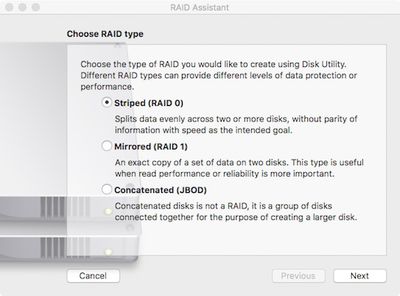
Apple has reintroduced the ability to create and manage RAID volumes in Disk Utility on macOS Sierra, pleasing a number of Mac users who were left disappointed when the functionality disappeared in OS X El Capitan.

"Anywhere" Dropped From Gatekeeper

Apple has removed the Gatekeeper option to allow apps to be downloaded from "anywhere" by default in System Preferences > Security & Privacy, resulting in a warning dialog when you attempt to open an app from an unidentified developer. "Mac App Store" and "Mac App Store and identified developers" remain selectable.

Apps from unidentified developers can normally be opened by clicking the "Open Anyway" button in System Preferences > Security & Privacy, but the macOS Sierra release notes indicate that this button does not work in the first beta. A workaround solution is to hold down the Control key, click on an application, and choose "open."

Default Text Size in Notes

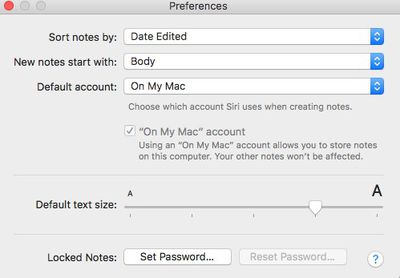
Notes-Default-Text-Size
Optimized Storage

macOS Sierra has a new optimized storage function that frees disk space on your Mac by automatically storing rarely used files in the cloud and keeping them available on demand. It can also help you find and remove old files you no longer use.

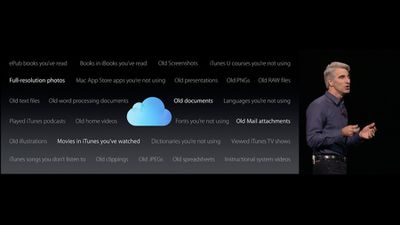
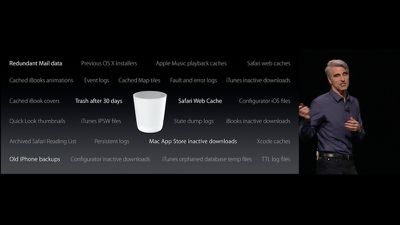
During its WWDC 2016 keynote, Apple briefly showed slides that indicate which types of files are stored or deleted.
iCloud-1
Old files that are backed up to iCloud include ePub books you've read, books in iBooks you've read, old screenshots, iTunes U courses you're not using, full-resolution photos, Mac App Store apps you're not using, old presentations, old PNGs and JPEGs, old RAW files, old text files, old word processing documents, old documents, languages you're not using, played iTunes podcasts, old home videos, fonts you're not using, old Mail attachments, old illustrations, movies in iTunes you've watched, dictionaries you're not using, viewed iTunes TV shows, iTunes songs you don't listen to, old clippings, old spreadsheets, and instructional system videos.
iCloud-2
Old files that can be found and removed include redundant Mail data, previous OS X installers, Apple Music playback caches, Safari web caches, cached iBooks animations, event logs, cached Map tiles, fault and error logs, iTunes inactive downloads, cached iBooks covers, trash after 30 days, Safari Web Cache, Configurator iOS files, Quick Look thumbnails, iTunes IPSW files, state dump logs, iBooks inactive downloads, archived Safari Reading List, persistent logs, Mac App Store inactive downloads, Xcode caches, old iPhone backups, Configurator inactive downloads, iTunes orphaned database temporary files, and TTL log files.

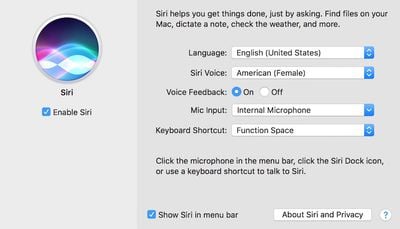
Siri Preferences
Siri
Share your own tidbits in our macOS Sierra: All The Little Things discussion thread.

Related Forum: macOS Sierra

Popular Stories

Apple MacBook Pro with PROLED XDR Display family lineup feature

Apple Announces OLED MacBook Pro With Touch Display

Wednesday October 28, 2026 10:11 am PDT by
Apple today announced a new high-end MacBook Pro, which is available in 14-inch and 16-inch sizes. The new device has a PROLED XDR display that supports touch gestures, and a glowing rear Apple logo. Pricing on the MacBook Pro starts at $2,899 for the 14-inch model and $3,399 for the 16-inch model. Apple says the MacBook Pro has the "world's best display in a pro laptop." The PROLED...
iPad mini OLED feature 1

Apple Executive Comments on New iPad Mini Lacking 120Hz Display

Thursday October 29, 2026 1:47 pm PDT by
While the new iPad mini has an OLED display, the device does not support ProMotion, meaning the display's refresh rate is limited to 60Hz instead of 120Hz. ProMotion support would have allowed for the iPad mini's refresh rate to automatically adjust from 10Hz to 120Hz depending on the content being displayed, but evidently Apple has kept the feature exclusive to the iPad Pro among iPad...
apple pro tell logo

Apple Opened Pre-Orders for Five New Products This Week

Wednesday October 28, 2026 2:49 am PDT by
Apple opened pre-orders for five new products on Wednesday, October 28, including its first touchscreen MacBook Pro models. Pre-orders opened for the following new products: iPad mini with OLED display and A20 Pro chip iMac with M6 chip 14-inch MacBook Pro with M6 chip 14-inch MacBook Pro with OLED touchscreen 16-inch MacBook Pro with OLED touchscreen Pre-orders for the iPad mini,...

Top Rated Comments

SeaFox Avatar
136 months ago
Hmmm, I assume there will be an easy way to disable these "optimized storage" functions. I don't want stuff being uploaded to the cloud and removed from local copy on the OS's whims really.

Also, regarding that new synchronized Documents, etc folders, not sure if that's gonna work without Apple beefing up the free iCloud storage -- and I mean at least four fold.

Score: 40 Votes (Like | Disagree)
Markoth Avatar
136 months ago
Is it strange that the most exciting thing for me up there is Apple File System? This is seriously going to help fix a ton of the more... questionable parts of OS X erm... excuse me: macOS. Time Machine should benefit tremendously from filesystem-provided snapshots. Exciting times. :)

Score: 36 Votes (Like | Disagree)
Markoth Avatar
136 months ago
Can someone tell an average person like me the advantages of the new file system?? Thanks
Well, for one thing, your data should be a lot safer with this new filesystem. Also, the ability to clone files and directories will let you instantaneously make copies of files. Those copies will appear to be completely separate files, but thanks to this new filesystem, the copy won't take up any additional space until you actually make edits, and even then, the space taken should be roughly equal to the space of the edits you made, and not the entire file. This is a huge win for many workflows.

Snapshots will allow for time machine to operate much more efficiently. Assuming the snapshots work as they do on other filesystems, it will allow Time Machine to basically tell the filesystem to "remember the data as it is now", without taking any additional space until data is added or modified. This will be a much better way to implement snapshots than the current method..

Fast directory sizing will allow OS X to compute the size of the data in a folder MUCH faster! As many of us know, large folders can take OS X awhile to compute... Always been a pet peeve of mine. :)

There are other great additions, but these are the ones I thought I could explain simply. Hope I did a decent job... :)
Score: 32 Votes (Like | Disagree)
136 months ago
Euhm.. could you like, not touch my files and move them elsewhere? Okay? Thanks.
Score: 31 Votes (Like | Disagree)
Markoth Avatar
136 months ago
Time machine backups not supported.

Incompatible with fusion drives.

Incompatible with startup disks.

Files cannot be used with FileVault.

Case-sensitive only file names.

But wait! Nano-second time stamping, and it works with your Apple Watch!

Remember if you synced your iPhone to a Windows device, you'd have to erase everything to format for PC use? Is this what will happen with files created under APFS?

"Send over that session!"

"Sorry, Patrick. You have to buy a new Mac to open it!"
They're not allowing it to do a whole lot, simply due to the fact that this is a very early version, and the filesystem is a very fundamental part of an OS. Beta filesystems are never fun to use (especially as a boot partition), and I'm betting this is no exception. Apple is smart playing it safe, especially given the wave of users coming in July to the beta.
Score: 23 Votes (Like | Disagree)
136 months ago
.
Score: 17 Votes (Like | Disagree)
Latest Stories
'Pluribus' Season 2 Reportedly Starts Production Today
2 hours ago
iPhone 18 Pro Sales Surge in China, Offsetting Decline in U.S. and Japan
3 hours ago
HomeView Software 27.2: Wallpapers, Control Center, and More
9 hours ago
Apple Alerts Stores to iPhone Duo's Display Cracking Issue
10 hours ago
iOS 27.3 Will Enable These Apple Intelligence Features in China
11 hours ago
Apple Says iOS 27.3 Beta Coming Next Week
11 hours ago
Apple's Flash Storage Suppliers Are Finally 'Getting Their Revenge'
12 hours ago
14 New Things Your iPhone Can Do in iOS 27.2
13 hours ago
iPhone Duo Review: One Week Later
14 hours ago
Samsung Mocks iPhone Duo Display Cracks in New Ad Campaign
15 hours ago
The MacRumors Show: OLED MacBook Pro, iPad Mini 8, and More
16 hours ago
MacBook Pro With Touch Display: 15 More Details Revealed
16 hours ago
Russia Places Apple on State Surveillance Registry
18 hours ago
Halloween Weekend Brings Discounts on Apple Accessories and Pre-Orders
18 hours ago
Apple Has Released More Than 25 New Products in the Past Two Months
18 hours ago
Local Code Launches as Free, Private AI Assistant Tool for Mac
19 hours ago
Apple Acquires Ascend.io
19 hours ago
HomePod Mini 2 Launches Today: All the New Features
20 hours ago
AirTag 2 4-Pack Drops to New Low Price of $69.99
20 hours ago
Rian Johnson's iPhone Camera App Goes Viral
20 hours ago
Where Did All the iPhone Duos Go? Mostly to Apple's Stores
22 hours ago
Apple's Touchscreen MacBook Pro Could Ship 1.5M Units in 2027
23 hours ago
New Apple TV 4K and iPad Mini: RAM Amounts Revealed
1 day ago
Apple Executive Comments on New iPad Mini Lacking 120Hz Display
2 days ago
Here's a Hands-On Look at HomePod Mini 2's New Two-Tone Colors
2 days ago
Apple Lowers App Store Fees in Taiwan Starting October 31
2 days ago
HomeView Pre-Order Returns to $289.99 on Amazon
2 days ago
Apple Avoids Showing Pinched Fingers on iPad Mini Page in South Korea
2 days ago
Old 'Popcorn Time' App Left Hundreds of Thousands of Macs at Risk
2 days ago
You Can Turn Off the New MacBook Pro's Touchscreen Functionality
2 days ago

🔗 Related Apple News & Rumors

Stay updated with the latest Apple ecosystem news and verified rumors