

Apple Reiterates: Force Quitting iOS Apps Doesn’t Help Battery Life - MacRumorsOpen MenuShow RoundupsShow Forums menuVisit ForumsOpen Sidebar
Skip to Content

Apple Reiterates: Force Quitting iOS Apps Doesn’t Help Battery Life

It's been a long-standing belief in some circles that using the multitasking feature of iOS to force quit apps can help save an iPhone's battery life, or improve the speediness of the software when the smartphone becomes slow. Earlier in the week, an iPhone user decided to email Apple CEO Tim Cook to put the issue to bed once and for all, and instead got a reply from Craig Federighi, Apple's senior VP of Software Engineering (via 9to5Mac).

Asked specifically whether Cook quits apps to save battery and if it's truly "necessary for battery life," Federighi jumped in with a concise "no and no." Although far from an official condemnation of the force quit belief by Apple, it is the most the company has directly said about the myth in the six years since multitasking became available in iOS 4.
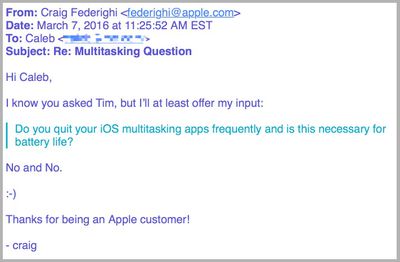
multitasking battery email

Image via 9to5Mac

The simplistic nature of swiping apps off of the multitasking landing pad, and subsequently "quitting" them, helped create a widespread belief that an iPhone's battery could be preserved for a little longer. But as many have pointed out over the years, doing so could in fact do the complete opposite: you could be shortening the battery life of your iPhone.

A few exceptions can be made to certain processes, but for the most part when an app is pushed into the background it becomes completely frozen and ceases to use any of an iPhone's battery power. As relayed by a former Genius Bar technician, Scotty Loveless, force quitting an app purges all of its code from the RAM of the iPhone, requiring it to be re-loaded upon the next time you visit the app.

If it's an app you're going to often -- a weather or traffic experience, for example -- all of the forced closing and re-opening actually can worsen the life of an iPhone. Exceptions can be made by toggling off a feature called "Background App Refresh," which the Facebook app was found to be suspiciously circumventing in recent months, but in all other occurrences the process of force quitting each app to prolong battery life is erroneous.

Plus, iOS closes apps automatically as it needs more memory, so you're doing something your device is already doing for you. You are meant to be the user of your device, not the janitor. The truth is, those apps in your multitasking menu are not running in the background at all: iOS freezes them where you last left the app so that it's ready to go if you go back.

Unless you have enabled Background App Refresh, your apps are not allowed to run in the background unless they are playing music, using location services, recording audio, or the sneakiest of them all: checking for incoming VOIP calls , like Skype. All of these exceptions, besides the latter, will put an icon next to your battery icon to alert you it is running in the background.

In the case of the Facebook app, the company's mobile app was discovered to be the cause behind cases of dramatic battery drain, even when Background App Refresh was turned completely off. The social network site eventually implemented a fix for the problem, citing the major culprits as "CPU spin" in the app's code and silent background audio continuing to emanate from the service's auto-play videos after the app was closed.

That was a rare case, however, and users should stick closer to Federighi's succinct advice today instead of continuing to put long-term strain on the smartphone. If you're ever really concerned about daily battery usage, Apple offers a simple but useful tool to keep on top of things. Go to Settings > Battery > and scroll down to Battery Usage. "Last 24 Hours" and "Last 7 Days" can give you a full picture at where the heaviest-hitting battery life apps are coming from.

You can also restrict specific app access to Background App Refresh -- or turn it off altogether, although that can drastically hinder certain apps' key features -- in Settings > General > Background App Refresh.


Related Forum: iOS 9

Popular Stories

iPhone Duo Display Cracking

Apple Alerts Stores to iPhone Duo's Display Cracking Issue

Friday October 30, 2026 3:20 pm PDT by
In a memo shared with Apple Stores and Apple Authorized Service Providers this week, and later obtained by MacRumors, Apple provided technicians with guidance on how to diagnose and address the iPhone Duo's inner display cracking issue. If a customer reports the issue, Apple advised technicians to inspect the iPhone Duo and repair or replace it in accordance with their standard procedures....

iPad mini OLED feature 1

Apple Executive Comments on New iPad Mini Lacking 120Hz Display

Thursday October 29, 2026 1:47 pm PDT by
While the new iPad mini has an OLED display, the device does not support ProMotion, meaning the display's refresh rate is limited to 60Hz instead of 120Hz. ProMotion support would have allowed for the iPad mini's refresh rate to automatically adjust from 10Hz to 120Hz depending on the content being displayed, but evidently Apple has kept the feature exclusive to the iPad Pro among iPad...
Pinched iPad Mini

Apple Avoids Showing Pinched Fingers on iPad Mini Page in South Korea

Thursday October 29, 2026 11:52 am PDT by
In the U.S. and most other countries, Apple's website shows the new iPad mini being held by pinched fingers, but this is not the case in South Korea. The new iPad mini shown with pinched fingers on Apple's website in the U.S. On its South Korean website, Apple simply shows an image of the iPad mini on its own. The new iPad mini shown without pinched fingers on Apple's website in South Korea ...

Top Rated Comments

139 months ago
I'm going to email him and ask him what hair product he recommends.
Score: 18 Votes (Like | Disagree)
139 months ago
In my experience quitting apps that are running in the backdrop absolutely improves battery life...
Score: 16 Votes (Like | Disagree)
139 months ago
Better answer would be: No and no, unless the app you are closing is Facebook.

Killing facebook is the only known way how to avoid it sucking battery in the background. (turning off background refresh won't help)
Score: 12 Votes (Like | Disagree)
139 months ago
My Facebook battery stats are:
8 minutes on screen, 3 hours in the background.

Federighi is wrong. Killing apps that would otherwise run in the background absolutely helps with battery life.
Score: 11 Votes (Like | Disagree)
139 months ago
My Facebook battery stats are:
8 minutes on screen, 3 hours in the background.

Federighi is wrong. Killing apps that would otherwise run in the background absolutely helps with battery life.
As such I have uninstalled Facebook. Apple should mark the Facebook app as malware at this point since it is behaving like one, and Facebook's refusal to actually do anything about it.
Score: 10 Votes (Like | Disagree)
139 months ago
This is one feature I can't stand about iOS. While I am confident that apps suspended in the background are not necessarily consuming battery life I can't stand the idea of going to the app switcher view and seeing every app that I have ever used on iOS hanging out there. Seriously some app that I used once 6 months ago should not be shown in the app switcher even if it not going to consume even one tiny fraction of extra battery. Having to sit there an swipe shut every suspended app that I have ever used is absolutely ridiculous.

Simply put a time and count limit on the apps shown in the app switcher. Only show the last X apps used in the last Y amount of time. If I open up more than X apps, then the least accessed and oldest app is removed from the app switcher view. This doesn't mean the app loses its current state, just that you have to access it by "launching" from its icon. Any open app that hasn't been used after Y amount of time should just disappear from the app switcher.

NOBODY uses the app switcher to go back to an app they suspect they used once a year ago possibly sometime, they simply relaunch the app from its icon. Just restore its previous state and end this ******** by keeping it shown indefinitely on the app switcher.

I think fixing this stupid concept this will address a lot of the FUD around the app switcher and people thinking all these apps are consuming battery in the background. Personally the idea of having to "manage" the app switcher is one of the dumbest features that Apple ever implemented and someone with half a brain at Apple needs to re-engineer this feature as they have done it WRONG on iOS and now TVOS and OS X.
Score: 8 Votes (Like | Disagree)
Latest Stories
Apple Watch Ultra 4 Hits All-Time Low Price With Amazon's $99 Discount
16 hours ago
Reminder: Apple's Big Discount on Beats 360 Ear Cushions Ends Today
16 hours ago
Here's a New Tour of Apple's HomeView Software
16 hours ago
Apple Reveals New iPad Mini's Battery Capacity
17 hours ago
Top Stories: Apple's Big MacBook Pro, iPad mini and iMac Updates
19 hours ago
'Pluribus' Season 2 Reportedly Starts Production Today
1 day ago
iPhone 18 Pro Sales Surge in China, Offsetting Decline in U.S. and Japan
1 day ago
HomeView Software 27.2: Wallpapers, Control Center, and More
1 day ago
Apple Alerts Stores to iPhone Duo's Display Cracking Issue
1 day ago
iOS 27.3 Will Enable These Apple Intelligence Features in China
1 day ago
Apple Says iOS 27.3 Beta Coming Next Week
1 day ago
Apple's Flash Storage Suppliers Are Finally 'Getting Their Revenge'
1 day ago
14 New Things Your iPhone Can Do in iOS 27.2
2 days ago
iPhone Duo Review: One Week Later
2 days ago
Samsung Mocks iPhone Duo Display Cracks in New Ad Campaign
2 days ago
The MacRumors Show: OLED MacBook Pro, iPad Mini 8, and More
2 days ago
MacBook Pro With Touch Display: 15 More Details Revealed
2 days ago
Russia Places Apple on State Surveillance Registry
2 days ago
Halloween Weekend Brings Discounts on Apple Accessories and Pre-Orders
2 days ago
Apple Has Released More Than 25 New Products in the Past Two Months
2 days ago
Local Code Launches as Free, Private AI Assistant Tool for Mac
2 days ago
Apple Acquires Ascend.io
2 days ago
HomePod Mini 2 Launches Today: All the New Features
2 days ago
AirTag 2 4-Pack Drops to New Low Price of $69.99
2 days ago
Rian Johnson's iPhone Camera App Goes Viral
2 days ago
Where Did All the iPhone Duos Go? Mostly to Apple's Stores
2 days ago
Apple's Touchscreen MacBook Pro Could Ship 1.5M Units in 2027
2 days ago
New Apple TV 4K and iPad Mini: RAM Amounts Revealed
2 days ago
Apple Executive Comments on New iPad Mini Lacking 120Hz Display
2 days ago
Here's a Hands-On Look at HomePod Mini 2's New Two-Tone Colors
3 days ago

🔗 Related Apple News & Rumors

Stay updated with the latest Apple ecosystem news and verified rumors











































