

Night Shift Beta Tidbits: Disabled in Low Power Mode, Control Center Changes - MacRumorsOpen MenuShow RoundupsShow Forums menuVisit ForumsOpen Sidebar
Skip to Content

Night Shift Beta Tidbits: Disabled in Low Power Mode, Control Center Changes

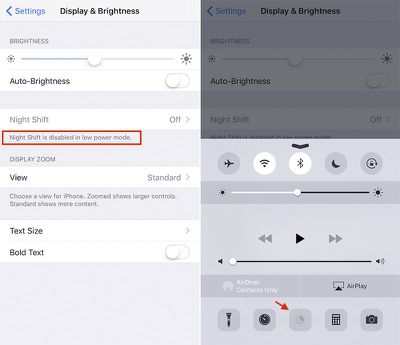
Apple has made some changes to Night Shift in iOS 9.3 betas 4 and 5. The most notable change is the disabling of the feature when in Low Power Mode. The toggle switch in both the Night Shift settings and Control Center are now grayed out in Low Power Mode.

The new change has generated some complaints since it seems that users will want to use both features in the evening hours.
night-shift-ios9

Night Shift is now disabled in Low Power Mode on iOS 9.3 betas

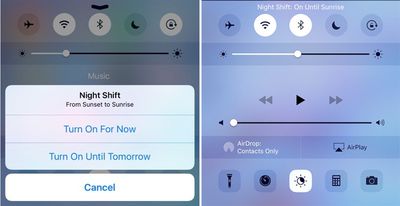
Meanwhile, tapping the Night Shift icon in Control Center no longer brings up a contextual menu with "Turn On For Now" and "Turn On Until Tomorrow" options. Instead, the toggle now manually activates Night Shift until the next trigger in your automatic schedule, such as sunset, sunrise, or a specific time.
night_shift_cc_before_after

Night Shift no longer has a contextual menu in Control Center (right)

Similarly, there is a new "Manually Enable Until Tomorrow" toggle in the Night Shift settings that keeps the feature turned on until the following morning's sunrise, or another specified time. This means the toggles in Settings and Control Center, which can also disable Night Shift, are essentially the same in this beta.

Also in the settings, the color temperature slider has also been moved to the bottom of the menu. The "Cooler" and "Warmer" labels have been changed to "Less Warm" and "More Warm," while the small blue and orange circle markers have been removed. New fine print says "warmer temperatures can reduce eye strain."

Night Shift is a major new feature in iOS 9.3 that, when enabled, automatically changes the color temperature of an iOS device's display to reflect the time of day. The feature helps to limit your exposure to blue light in the morning and night, which makes the display easier on your eyes and can improve your circadian rhythm.

Apple seeded the fifth beta of iOS 9.3 to developers and public testers on Tuesday. The software update will likely be public released this month. To read about and share other changes, head over to our iOS 9.3 Beta 5 Bug Fixes, Improvements, and Changes topic in our community discussion forums.


Popular Stories

Apple MacBook Pro with PROLED XDR Display family lineup feature

Apple Announces OLED MacBook Pro With Touch Display

Wednesday October 28, 2026 10:11 am PDT by
Apple today announced a new high-end MacBook Pro, which is available in 14-inch and 16-inch sizes. The new device has a PROLED XDR display that supports touch gestures, and a glowing rear Apple logo. Pricing on the MacBook Pro starts at $2,899 for the 14-inch model and $3,399 for the 16-inch model. Apple says the MacBook Pro has the "world's best display in a pro laptop." The PROLED...


iPad mini OLED feature 1

Apple Executive Comments on New iPad Mini Lacking 120Hz Display

Thursday October 29, 2026 1:47 pm PDT by
While the new iPad mini has an OLED display, the device does not support ProMotion, meaning the display's refresh rate is limited to 60Hz instead of 120Hz. ProMotion support would have allowed for the iPad mini's refresh rate to automatically adjust from 10Hz to 120Hz depending on the content being displayed, but evidently Apple has kept the feature exclusive to the iPad Pro among iPad...
apple pro tell logo

Apple Opened Pre-Orders for Five New Products This Week

Wednesday October 28, 2026 2:49 am PDT by
Apple opened pre-orders for five new products on Wednesday, October 28, including its first touchscreen MacBook Pro models. Pre-orders opened for the following new products: iPad mini with OLED display and A20 Pro chip iMac with M6 chip 14-inch MacBook Pro with M6 chip 14-inch MacBook Pro with OLED touchscreen 16-inch MacBook Pro with OLED touchscreen Pre-orders for the iPad mini,...

Top Rated Comments

139 months ago
Does that mean Night Shift uses more power than normal mode?
Score: 19 Votes (Like | Disagree)
longofest Avatar
139 months ago
being disabled in low power mode is a real bummer. My battery is going under 20% at night, precisely when I need both options available to me.
Score: 15 Votes (Like | Disagree)
Rychiar Avatar
139 months ago
I still wish nightshift mode meant the dark mode interface i've been hoping for since iOS7 debuted
Score: 12 Votes (Like | Disagree)
Mad Mac Maniac Avatar
139 months ago
Removing the contextual menu is the right call. I'm not running the beta, but I honestly still don't understand the difference between what the two options meant. That's not a good sign.
Score: 12 Votes (Like | Disagree)
Manderby Avatar
139 months ago
I'd be interested to learn the reason behind disabling Night Shift in Low Power mode. Does it drain the battery excessively? Ive been running the betas, but haven't noticed my phone battery level dropping that much while night shift was running.
NightShift is probably done using ColorSync. When slowly transitioning from day to night, the whole color transformation tables need to be updated over and over again and the cocoa change notification need to be transported to all active applications during the time of the change which in turn would again change their appearance over and over again. Even if this notification will not be parsed, all application need nontheless be woken up for a short period of time. To make the change not noticeable, there would be several iterations, draining unnecessary power. As we all know, the low power mode is here for precisely hindering that. Therefore disabled. They could theoretically not fire a notification during low power mode, but therefore creating the need for cached notifications getting active as soon as an application gets active. But this - to my knowledge - does not exist in the cocoa framework. Maybe in a later version but it looks like they are not there yet. That's my guess.
Score: 9 Votes (Like | Disagree)
139 months ago
Is this a feature appropriate for Control Center? I'm guessing I'll turn it on and never touch it again.
Score: 8 Votes (Like | Disagree)
Latest Stories
'Pluribus' Season 2 Reportedly Starts Production Today
2 hours ago
iPhone 18 Pro Sales Surge in China, Offsetting Decline in U.S. and Japan
3 hours ago
HomeView Software 27.2: Wallpapers, Control Center, and More
9 hours ago
Apple Alerts Stores to iPhone Duo's Display Cracking Issue
10 hours ago
iOS 27.3 Will Enable These Apple Intelligence Features in China
11 hours ago
Apple Says iOS 27.3 Beta Coming Next Week
11 hours ago
Apple's Flash Storage Suppliers Are Finally 'Getting Their Revenge'
12 hours ago
14 New Things Your iPhone Can Do in iOS 27.2
13 hours ago
iPhone Duo Review: One Week Later
14 hours ago
Samsung Mocks iPhone Duo Display Cracks in New Ad Campaign
15 hours ago
The MacRumors Show: OLED MacBook Pro, iPad Mini 8, and More
16 hours ago
MacBook Pro With Touch Display: 15 More Details Revealed
16 hours ago
Russia Places Apple on State Surveillance Registry
18 hours ago
Halloween Weekend Brings Discounts on Apple Accessories and Pre-Orders
18 hours ago
Apple Has Released More Than 25 New Products in the Past Two Months
18 hours ago
Local Code Launches as Free, Private AI Assistant Tool for Mac
19 hours ago
Apple Acquires Ascend.io
20 hours ago
HomePod Mini 2 Launches Today: All the New Features
20 hours ago
AirTag 2 4-Pack Drops to New Low Price of $69.99
20 hours ago
Rian Johnson's iPhone Camera App Goes Viral
20 hours ago
Where Did All the iPhone Duos Go? Mostly to Apple's Stores
23 hours ago
Apple's Touchscreen MacBook Pro Could Ship 1.5M Units in 2027
23 hours ago
New Apple TV 4K and iPad Mini: RAM Amounts Revealed
1 day ago
Apple Executive Comments on New iPad Mini Lacking 120Hz Display
2 days ago
Here's a Hands-On Look at HomePod Mini 2's New Two-Tone Colors
2 days ago
Apple Lowers App Store Fees in Taiwan Starting October 31
2 days ago
HomeView Pre-Order Returns to $289.99 on Amazon
2 days ago
Apple Avoids Showing Pinched Fingers on iPad Mini Page in South Korea
2 days ago
Old 'Popcorn Time' App Left Hundreds of Thousands of Macs at Risk
2 days ago
You Can Turn Off the New MacBook Pro's Touchscreen Functionality
2 days ago

🔗 Related Apple News & Rumors

Stay updated with the latest Apple ecosystem news and verified rumors










































