

iOS 9.3 Displays Exact Wi-Fi Assist Data Usage Numbers - MacRumorsOpen MenuShow RoundupsShow Forums menuVisit ForumsOpen Sidebar
Skip to Content

iOS 9.3 Displays Exact Wi-Fi Assist Data Usage Numbers

Apple's iOS 9.3 beta introduces major new features like Night Shift, but there are also dozens of little tweaks to be discovered in the operating system update. It appears that one of those minor changes applies to Wi-Fi Assist, adding a much-needed feature that allows users to see just how much data it's using.

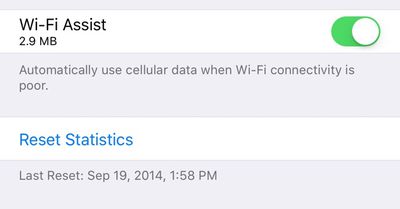
Wi-Fi Assist data usage can be checked within the Settings app by choosing the Cellular section and scrolling down to the Wi-Fi Assist option. Next to the toggle that turns the feature on and off, there's now a data usage number that displays how much data has been consumed when it is in use.
wifiassistnewios9datafeature
Wi-Fi Assist was first introduced with iOS 9. It's a feature that allows an iPhone to seamlessly switch over to a cellular connection whenever a local Wi-Fi connection is weak. Enabled automatically when updating to iOS 9, Wi-Fi Assist proved to be unpopular with users who claimed it was eating up a lot of data. One recent news story even accused Wi-Fi Assist of causing a teenager to receive a cell phone bill for upwards of $2,000.

Concerns about Wi-Fi Assist led Apple to publish a support document on the feature, explaining how it works and assuring users that data usage should only be a "small percentage higher" than previous usage. Wi-Fi Assist only turns on in a limited number of circumstances and won't activate when data roaming, when apps are downloading background content, or when using third-party apps that stream audio or video.

Despite Apple's reassurances about Wi-Fi Assist, unhappy customers filed a $5 million class action lawsuit over the feature, with the plaintiffs claiming they were subjected to overage charges on their iPhones after updating to iOS 9. The lawsuit also claims Apple did not do an adequate job explaining the feature when iOS 9 was released.

Wi-Fi Assist is available on any iOS device running iOS 9 or later, with the exception of the iPhone 4s, the iPad 2, the third-generation iPad, and the original iPad mini. Wi-Fi Assist can be turned off using the Settings app for those who don't want to risk using extra data.


Popular Stories

iOS 27 Next to iPhone

Here's When iOS 27 Rolls Out Today in Every Time Zone [Update: It's Out]

Sunday September 13, 2026 3:00 am PDT by
Update 10:04 a.m.: iOS 27 is rolling out now, though it may take a bit for all users to see it, so keep checking! Apple is about to release iOS 27, which will finally deliver more advanced Siri AI capabilities as well as a variety of other refinements, improvements, and new features to iPhones. It's Apple's biggest software update of the year, and Apple announced at Wednesday's iPhone event...

iOS 27 Icon iPhone

iOS 27 Available Today With These 8 New Features

Monday September 14, 2026 9:00 am PDT by
Update: Apple has released iOS 27. During its iPhone 18 Pro and iPhone Duo event last week, Apple announced that iOS 27 will be released widely on Monday, September 14. iOS 27 should be available around 10 a.m. Pacific Time / 1 p.m. Eastern Time today via the Settings app, under General → Software Update. Below, we have highlighted eight new features and changes coming with iOS...
deep black iphone 18 pro

Apple Says iPhone 18 Pro Max Sold in U.S. Differs in One Way

Saturday September 12, 2026 3:27 pm PDT by
As noted by Nicolas Lellouche, who writes for the French tech website Numerama, Apple has updated its tech specs pages for the iPhone 18 Pro and iPhone 18 Pro Max to clarify which models are equipped with its new C2 cellular modem and where. Apple now says the iPhone 18 Pro has a C2 modem worldwide, while the iPhone 18 Pro Max uses the chip in every country except for the U.S. According...

Top Rated Comments

D.T. Avatar
139 months ago
I thought Wi-Fi assist was when my Mom calls me because she can't connect to the internet with her iPad ...
Score: 36 Votes (Like | Disagree)
139 months ago
And yet as I drive away from WiFi and my phone pretends to still be connected, the data activity indicator just goes round and round and nothing loads until the phone finally accepts defeat and switches to cellular.
Score: 17 Votes (Like | Disagree)
139 months ago
Useless to me, I have unlimited data..
Yeah! What where they thinking making a feature you dont need?! What a bunch of morons!
Score: 10 Votes (Like | Disagree)
btrach144 Avatar
139 months ago
Wifi assist should have been turned off by default and this whole thing could have been avoided.
Score: 10 Votes (Like | Disagree)
FSMBP Avatar
139 months ago
Would be nice if iOS quickly showed my monthly data-usage (that reset automatically) and would give me notifications when I'm X% close to my data cap.
Score: 8 Votes (Like | Disagree)
cableguy84 Avatar
139 months ago
Useless to me, I have unlimited data..
Score: 5 Votes (Like | Disagree)

🔗 Related Apple News & Rumors

Stay updated with the latest Apple ecosystem news and verified rumors











































