

iOS 9.3 Displays Exact Wi-Fi Assist Data Usage Numbers

Apple's iOS 9.3 beta introduces major new features like Night Shift, but there are also dozens of little tweaks to be discovered in the operating system update. It appears that one of those minor changes applies to Wi-Fi Assist, adding a much-needed feature that allows users to see just how much data it's using.

Wi-Fi Assist data usage can be checked within the Settings app by choosing the Cellular section and scrolling down to the Wi-Fi Assist option. Next to the toggle that turns the feature on and off, there's now a data usage number that displays how much data has been consumed when it is in use.
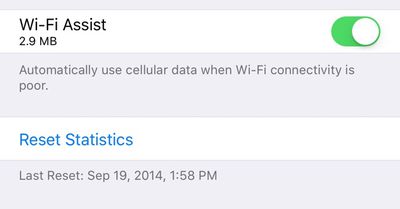
wifiassistnewios9datafeature
Wi-Fi Assist was first introduced with iOS 9. It's a feature that allows an iPhone to seamlessly switch over to a cellular connection whenever a local Wi-Fi connection is weak. Enabled automatically when updating to iOS 9, Wi-Fi Assist proved to be unpopular with users who claimed it was eating up a lot of data. One recent news story even accused Wi-Fi Assist of causing a teenager to receive a cell phone bill for upwards of $2,000.

Concerns about Wi-Fi Assist led Apple to publish a support document on the feature, explaining how it works and assuring users that data usage should only be a "small percentage higher" than previous usage. Wi-Fi Assist only turns on in a limited number of circumstances and won't activate when data roaming, when apps are downloading background content, or when using third-party apps that stream audio or video.

Despite Apple's reassurances about Wi-Fi Assist, unhappy customers filed a $5 million class action lawsuit over the feature, with the plaintiffs claiming they were subjected to overage charges on their iPhones after updating to iOS 9. The lawsuit also claims Apple did not do an adequate job explaining the feature when iOS 9 was released.

Wi-Fi Assist is available on any iOS device running iOS 9 or later, with the exception of the iPhone 4s, the iPad 2, the third-generation iPad, and the original iPad mini. Wi-Fi Assist can be turned off using the Settings app for those who don't want to risk using extra data.


Popular Stories

Aston Martin CarPlay Ultra Screen

Apple's CarPlay Ultra to Expand to These Vehicle Brands Later This Year

Sunday February 1, 2026 10:08 am PST by
Last year, Apple launched CarPlay Ultra, the long-awaited next-generation version of its CarPlay software system for vehicles. Nearly nine months later, CarPlay Ultra is still limited to Aston Martin's latest luxury vehicles, but that should change fairly soon. In May 2025, Apple said many other vehicle brands planned to offer CarPlay Ultra, including Hyundai, Kia, and Genesis. In his Powe...
Apple Logo Black

Apple's Next Launch is 'Imminent'

Sunday February 1, 2026 12:31 pm PST by
The calendar has turned to February, and a new report indicates that Apple's next product launch is "imminent," in the form of new MacBook Pro models. "All signs point to an imminent launch of next-generation MacBook Pros that retain the current form factor but deliver faster chips," Bloomberg's Mark Gurman said on Sunday. "I'm told the new models — code-named J714 and J716 — are slated...
iOS 26

iOS 26.3 and iOS 26.4 Will Add These New Features to Your iPhone

Tuesday February 3, 2026 7:47 am PST by
We are still waiting for the iOS 26.3 Release Candidate to come out, so the first iOS 26.4 beta is likely still at least a week or two away. Following beta testing, iOS 26.4 will likely be released to the general public in March or April. Below, we have recapped known or rumored iOS 26.3 and iOS 26.4 features so far. iOS 26.3 iPhone to Android Transfer Tool iOS 26.3 makes it easier...
Apple MacBook Pro M4 hero

New MacBook Pros Reportedly Launching Alongside macOS 26.3

Sunday February 1, 2026 5:42 am PST by
Apple is planning to launch new MacBook Pro models with M5 Pro and M5 Max chips alongside macOS 26.3, according to Bloomberg's Mark Gurman. "Apple's faster MacBook Pros are planned for the macOS 26.3 release cycle," wrote Gurman, in his Power On newsletter today. "I'm told the new models — code-named J714 and J716 — are slated for the macOS 26.3 software cycle, which runs from...
iOS 26 Home Feature

Apple Gives Final Warning to Home App Users

Tuesday February 3, 2026 8:55 am PST by
In 2022, Apple introduced a new Apple Home architecture that is "more reliable and efficient," and the deadline to upgrade and avoid issues is fast approaching. In an email this week, Apple gave customers a final reminder to upgrade their Home app by February 10, 2026. Apple says users who do not upgrade may experience issues with accessories and automations, or lose access to their smart...

Top Rated Comments

D.T. Avatar
131 months ago
I thought Wi-Fi assist was when my Mom calls me because she can't connect to the internet with her iPad ...
Score: 36 Votes (Like | Disagree)
gretafour Avatar
131 months ago
And yet as I drive away from WiFi and my phone pretends to still be connected, the data activity indicator just goes round and round and nothing loads until the phone finally accepts defeat and switches to cellular.
Score: 17 Votes (Like | Disagree)
Ballis Avatar
131 months ago
Useless to me, I have unlimited data..
Yeah! What where they thinking making a feature you dont need?! What a bunch of morons!
Score: 10 Votes (Like | Disagree)
btrach144 Avatar
131 months ago
Wifi assist should have been turned off by default and this whole thing could have been avoided.
Score: 10 Votes (Like | Disagree)
FSMBP Avatar
131 months ago
Would be nice if iOS quickly showed my monthly data-usage (that reset automatically) and would give me notifications when I'm X% close to my data cap.
Score: 8 Votes (Like | Disagree)
taptic Avatar
131 months ago
I really like this thing where Apple adds functionality to an OS without having to make a big show about it and increase the first number by 1.
Score: 5 Votes (Like | Disagree)














