What's New in iOS 9.3: Night Shift, New Quick Actions, Improvements to Apple News, Notes, CarPlay and Health

Apple's iOS 9.2.1 update is still in testing, but that didn't stop the company from surprising us with an iOS 9.3 beta this morning. The iOS 9.3 beta is one of the biggest updates to iOS 9 yet, introducing a new Night Shift feature and improving several existing apps, including Notes, Apple News, Health, CarPlay, and more.

We've gathered up a full list of the changes and new features in iOS 9.3, to give MacRumors readers a clear picture of what they can expect to see when iOS 9.3 is released to the public.


Night Shift - Night Shift is a new feature that's designed to automatically cut down on the amount of blue light an iOS user is exposed to at night by shifting to more yellow tones for the iPhone or iPad's display. Studies have suggested blue light exposure at night can disrupt the circadian rhythm, making it more difficult to fall asleep.
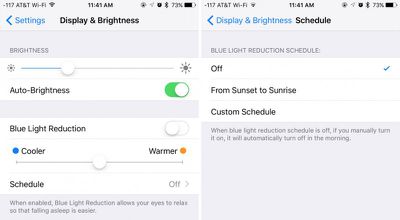
nightshiftmodeios93
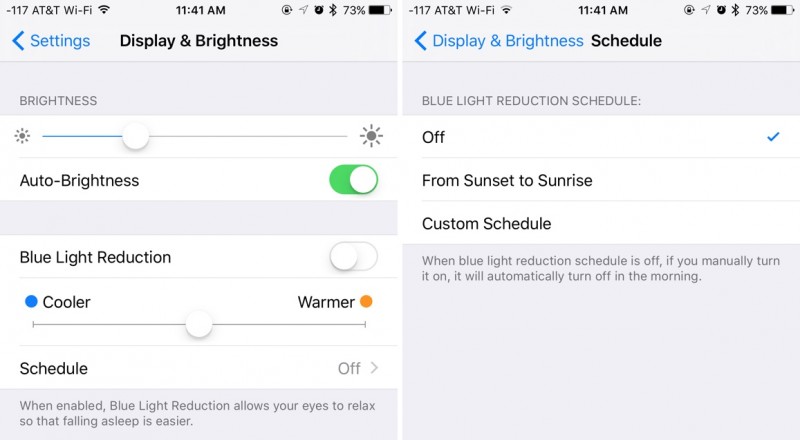
Night Shift settings are available in the "Display & Brightness" section of the Settings app. In this section, there's a new option to toggle on Night Shift and set the display to be Less Warm or More Warm. A Schedule option lets users set a custom schedule or choose to turn on Night Shift from sunset to sunrise.

iOS 9.3 beta 2 included a Night Shift Control Center option, which was refined over the course of the beta testing period. Night Shift is denoted by an icon featuring a moon inside of a sun, and tapping on the icon turns Night Shift on until sunrise or turns it off until sunset. Night Shift does not work with Low Power Mode.
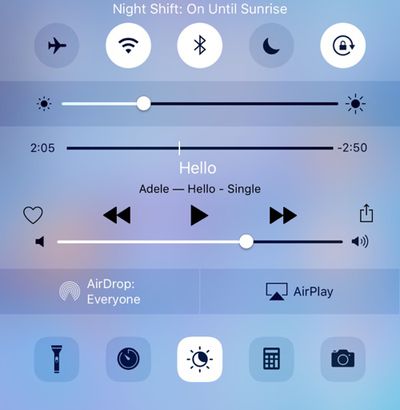
nightshiftcontrolcentertoggle
Verizon Wi-Fi Calling - iOS 9.3 includes Wi-Fi calling support for Verizon users, allowing them to place calls over Wi-Fi when cellular connectivity is poor.

iBooks - The purchased tab within the iBooks app has been revamped, including a deeper breakdown of books between different genres. It also now supports audiobooks, and purchased audiobooks are included alongside standard e-books in the "Automatic Download" section of the Settings app.
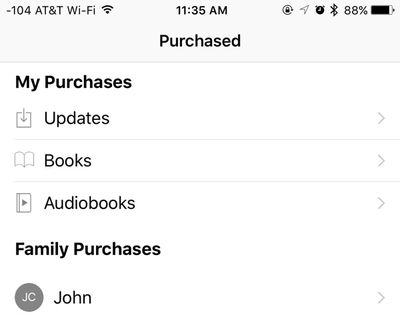
ibookspurchasedios93
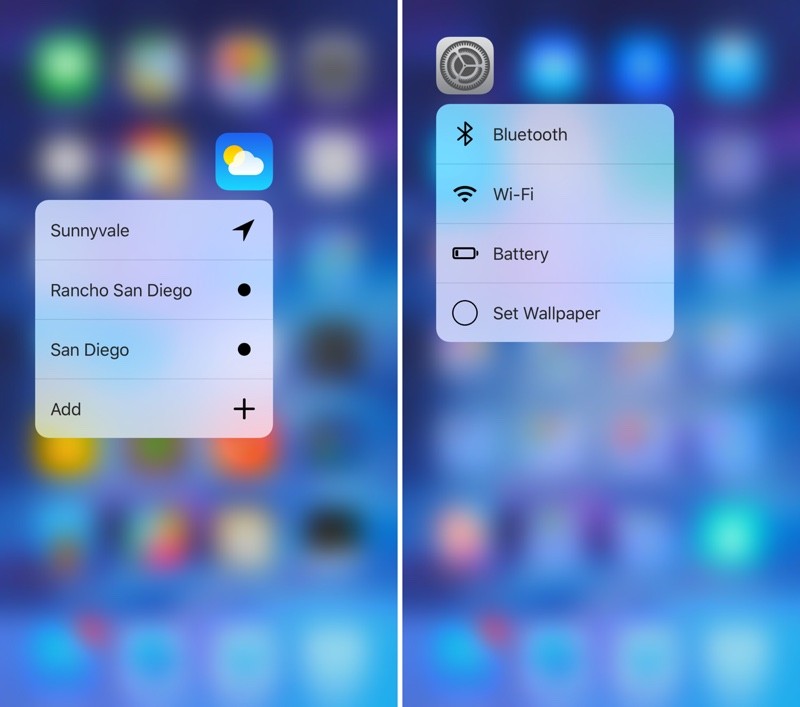
Quick Actions - On the iPhone 6s and 6s Plus, there are new 3D Touch Quick Actions for several of the stock apps, including Weather, Settings, Compass, and Health. Weather's Quick Actions allow you to see the weather at your current location or for saved locations in the app. Settings includes useful shortcuts for accessing Bluetooth, Wi-Fi, Battery, and Wallpaper options. Health's Quick Actions provide access to the Medical ID or a user's dashboard, while Compass now features options to open directly to the compass or the level.
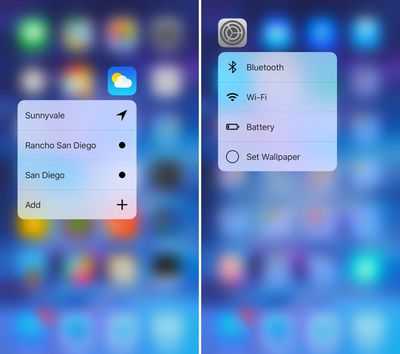
weathersettingsquickactions
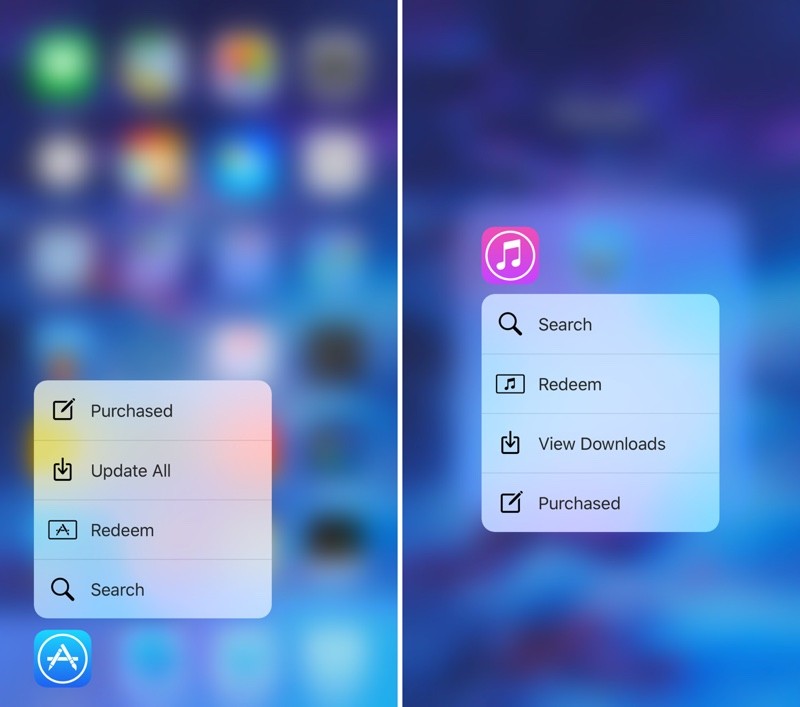
There are also new Quick Action options for the App Store and iTunes Store apps. For the App Store app, Quick Actions now include "Update All" to update all apps at once from the Home screen, and "Purchased" for opening up to a list of all purchased apps. For the iTunes Store, new options include "View Downloads" and "Purchased."
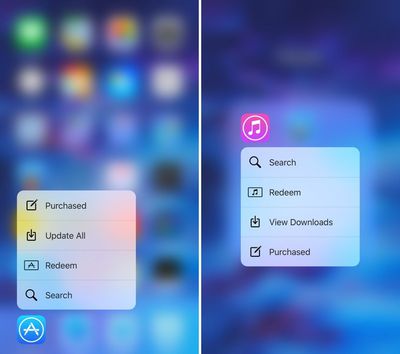
appstoreitunesquickactions
In the App Store app, there are Peek and Pop gestures that can be used to preview apps from the main App Store view. Using a Peek gesture on an app in the Featured, Top Charts, or Explore section brings up a preview of the app and a full Pop gesture will open the app preview page.

Notes - There's a new option to use Touch ID or a password to protect notes within the Notes app. With this enabled, Notes will ask for either the user's password or a fingerprint when opening Notes that have been protected with a password. Password Protection for Notes can be set on a note-by-note basis within the Notes app. There are also new options in Settings to organize notes by Date Edited, Date Created, or Title.
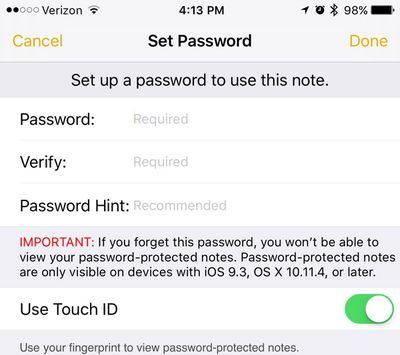
notespasswordprotection
News - Apple has improved the news app in iOS 9.3 to make it more tailored to each person's interests. The For You section is also incorporating trending topics and specific picks from Apple editors to help users better discover content. Other new features include a new landscape view for News on the iPhone, in-line video playback for videos in news stories, and faster content updating when opening the news app.
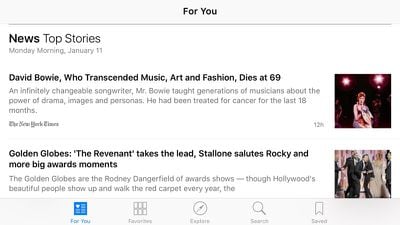
newsapplandscape
Health - In the Health app, when viewing the Weight, Workouts, and Sleep categories, Health now links to apps you can download that will allow you to collect this data. Health also mirrors the Apple Watch move, exercise, and stand data in a new "Activity" interface, and it displays your goals. The new Health features in iOS 9.3 may not be functional yet, as the new interface and the app suggestions were not available on our iOS devices running iOS 9.3.
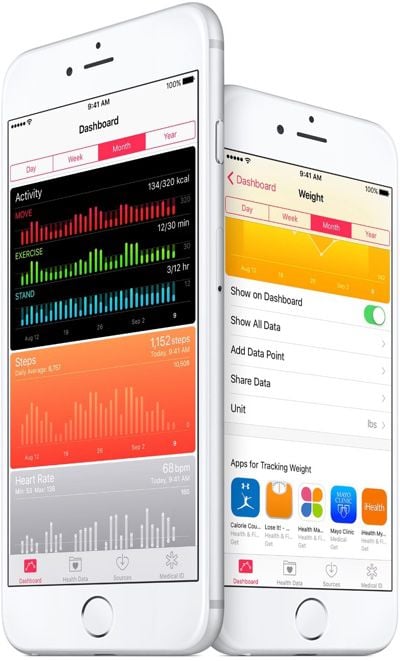
healthappupdate
CarPlay - Several CarPlay apps have been updated to bring them in line with iOS apps on iOS 9. The Apple Music CarPlay app now includes New and For You sections for better music discovery, and a Nearby feature in Maps offers better access to information about what's close by, providing suggestions for local gas stations, restaurants, coffee shops, and more.

Alongside iOS 9.3, Apple's also provided a comprehensive list of all the cars in the United States and other countries that offer CarPlay support. Apple's list includes more than 100 2016 and 2017 models from 22 auto manufacturers like Audi, Buick, Cadillac, Chevrolet, Citroën, DS Automobiles, Ferrari, Ford, GMC, Honda, Hyundai, Mercedes-Benz, Mitsubishi, Opel, Porsche, Peugeot, Seat, Škoda, Suzuki, Volkswagen and Volvo.

Education - iOS 9.3 includes multiple Education-oriented features including shared iPads for students, a new Classroom app, an Apple School Manager, and improved Apple ID management features.

Apple Watch - With iOS 9.3 and watchOS 2.2, the iPhone is able to pair with more than one Apple Watch. Both updates are required, with each watch running watchOS 2.2 and the iPhone running iOS 9.3. WatchOS 2.2 was seeded to developers alongside iOS 9.3.
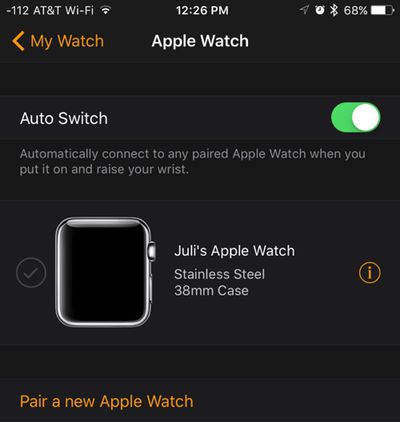
applewatchios93
Live Photos - On the iPhone 6s, there's a new option to save a full resolution photo from a Live Photo. When using the Share Sheet, choosing "Duplicate" now gives an option to create a Still Photo duplicate of a Live Photo.
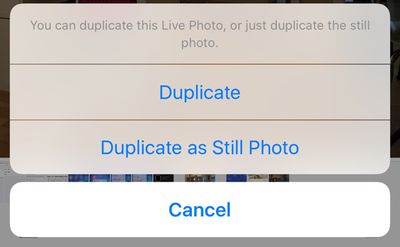
livephotosstillphotoios93
Wallet/Apple Pay - In Wallet and when using Apple Pay, there's now an option to open an app that's linked to a pass or credit card. For example, on a Southwest boarding pass, there's a new icon that will open the Southwest app when tapped.
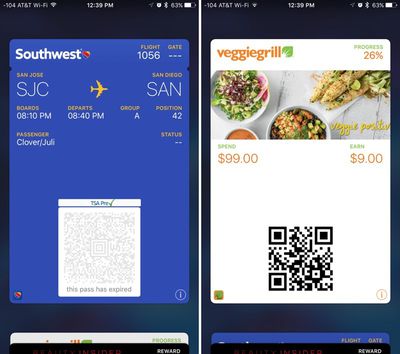
walletios93
Siri - Siri has been updated in iOS 9.3 to include the following languages: Malay (Malaysia), Finnish (Finland), and Hebrew (Israel).

App Switcher - iOS 9.3 includes haptic feedback when using the Force Touch app switcher on an iPhone 6s or 6s Plus. "Peek" feedback is provided when first opening the app switcher, and a full "Pop" feedback is given when pressing further to open it fully.


Popular Stories

iphone air thickness

Apple Said to Cut iPhone Air Production Amid Underwhelming Sales

Friday October 17, 2025 8:29 am PDT by
Apple plans to cut production of the iPhone Air amid underwhelming sales performance, Japan's Mizuho Securities believes (via The Elec). The Japanese investment banking and securities firm claims that the iPhone 17 Pro and iPhone 17 Pro Max are seeing higher sales than their predecessors during the same period last year, while the standard iPhone 17 is a major success, performing...
iOS 26 Feature

iOS 26.1 to iOS 26.4 Will Add These New Features to Your iPhone

Saturday October 18, 2025 11:00 am PDT by
iOS 26 was released last month, but the software train never stops, and iOS 26.1 beta testing is already underway. So far, iOS 26.1 makes both Apple Intelligence and Live Translation on compatible AirPods available in additional languages, and it includes some other minor changes across the Apple Music, Calendar, Photos, Clock, and Safari apps. More features and changes will follow in future ...
iOS 26

iOS 26.0.2 Update for iPhones Coming Soon

Friday October 17, 2025 7:35 am PDT by
Apple's software engineers continue to internally test iOS 26.0.2, according to MacRumors logs, which have been a reliable indicator of upcoming iOS versions. iOS 26.0.2 will be a minor update that addresses bugs and/or security vulnerabilities, but we do not know any specific details yet. The update will likely be released by the end of next week. Last month, Apple released iOS 26.0.1,...
HomePod mini and Apple TV

Apple's Next Rumored Products: New HomePod Mini, Apple TV, and More

Thursday October 16, 2025 9:13 am PDT by
Apple on Wednesday updated the 14-inch MacBook Pro, iPad Pro, and Vision Pro with its next-generation M5 chip, but previous rumors have indicated that the company still plans to announce at least a few additional products before the end of the year. The following Apple products have at one point been rumored to be updated in 2025, although it is unclear if the timeframe for any of them has...
14 inch MacBook Pro Keyboard

New 14-Inch MacBook Pro Has Two Key Upgrades Beyond the M5 Chip

Thursday October 16, 2025 8:31 am PDT by
Apple on Wednesday updated the 14-inch MacBook Pro base model with an M5 chip, and there are two key storage-related upgrades beyond that chip bump. First, Apple says the new 14-inch MacBook Pro offers up to 2× faster SSD performance than the equivalent previous-generation model, so read and write speeds should get a significant boost. Apple says it is using "the latest storage technology," ...
Apple iPad Pro hero M5

New iPad Pro Has Six Key Upgrades Beyond M5 Chip

Saturday October 18, 2025 10:57 am PDT by
While the new iPad Pro's headline feature is the M5 chip, the device has some other changes, including N1 and C1X chips, faster storage speeds, and more. With the M5 chip, the new iPad Pro has up to a 20% faster CPU and up to a 40% faster GPU compared to the previous model with the M4 chip, according to Geekbench 6 results. Keep in mind that 256GB and 512GB configurations have a 9-core CPU,...
iPhone Siri Glow

Some Apple Employees Have 'Concerns' About iOS 26.4's Revamped Siri

Sunday October 19, 2025 7:39 am PDT by
iOS 26.4 is expected to introduce a revamped version of Siri powered by Apple Intelligence, but not everyone is satisfied with how well it works. In his Power On newsletter today, Bloomberg's Mark Gurman said some of Apple's software engineers have "concerns" about the overhauled Siri's performance. However, he did not provide any specific details about the shortcomings. iOS 26.4 will...
m4 macbook air blue

M5 MacBook Air Coming Spring 2026 With M5 Mac Studio and Mac Mini in Development

Thursday October 16, 2025 3:57 pm PDT by
Apple plans to launch MacBook Air models equipped with the new M5 chip in spring 2026, according to Bloomberg's Mark Gurman. Apple is also working on M5 Pro and M5 Max MacBook Pro models that will come early in the year. Neither the MacBook Pro models nor the MacBook Air models are expected to get design changes, with Apple focusing on simple chip upgrades. In the case of the MacBook Pro, a m...
14 inch MacBook Pro Keyboard

M5 Chip Achieves Impressive Feat in 14-Inch MacBook Pro Speed Test

Friday October 17, 2025 7:10 am PDT by
The first alleged benchmark result for the M5 chip in the new 14-inch MacBook Pro has surfaced, allowing for some performance comparisons. Based on a single unconfirmed result uploaded to the Geekbench 6 database today, the M5 chip has pulled off an impressive feat. Specifically, the chip achieved a score of 4,263 for single-core CPU performance, which is the highest single-core score that...

Top Rated Comments

serrharry Avatar
128 months ago
Yes !! finally a built in F.lux app, no need for me to jailbreak anymore
Score: 21 Votes (Like | Disagree)
Thunderhawks Avatar
128 months ago
Still adding crap we don't need but not getting rid of crap that we don't use. When is someone Apple going to wake up from their drunken party and smell the coffee.
Glad to see someone graciously appreciates FREE iOS updates and the work that goes into them continuously.
Score: 17 Votes (Like | Disagree)
PowerBook-G5 Avatar
128 months ago
Nooice update, especially for a point update.
Score: 17 Votes (Like | Disagree)
Oblivious.Robot Avatar
128 months ago
I gotta say, this update is pretty exciting! :D
Score: 16 Votes (Like | Disagree)
MAOmagic Avatar
128 months ago
whats new in ios 9 3 image ('https://www.macrumors.com/2016/01/11/whats-new-in-ios-9-3/')

Apple's iOS 9.2.1 update ('https://www.macrumors.com/2016/01/04/apple-seeds-second-beta-of-ios-9-2-1/') is still in testing, but that didn't stop the company from surprising us with an iOS 9.3 beta ('https://www.macrumors.com/2016/01/11/apple-ios-9-3-first-beta/') this morning. The iOS 9.3 beta is one of the biggest updates ('http://www.apple.com/ios/preview/') to iOS 9 yet, introducing a new Night Shift feature and improving several existing apps, including Notes, Apple News, Health, CarPlay, and more.

We've gathered up a full list of the changes and new features in iOS 9.3, to give MacRumors readers a clear picture of what they can expect to see when iOS 9.3 is released to the public.

Night Shift - Night Shift is a new feature ('https://www.macrumors.com/2016/01/11/apple-ios-9-3-night-shift/') that's designed to automatically cut down on the amount of blue light an iOS user is exposed to at night by shifting to more yellow tones for the iPhone or iPad's display. Studies have suggested blue light exposure at night can disrupt the circadian rhythm, making it more difficult to fall asleep.

whats new in ios 9 3 image

Night Shift settings are available in the "Display & Brightness" section of the Settings app. In this section, there's a new option to toggle on "Blue Light Reduction" and set the display to be Cooler or Warmer. A Schedule option lets users set a custom schedule or choose to turn on Night Shift from sunset to sunrise.

Quick Actions - On the iPhone 6s and 6s Plus, there are new 3D Touch Quick Actions for several of the stock apps, including Weather, Settings, Compass, and Health. Weather's Quick Actions allow you to see the weather at your current location or for saved locations in the app. Settings includes useful shortcuts for accessing Bluetooth, Wi-Fi, Battery, and Wallpaper options. Health's Quick Actions provide access to the Medical ID or a user's dashboard, while Compass now features options to open directly to the compass or the level.

whats new in ios 9 3 image

There are also new Quick Action options for the App Store and iTunes Store apps. For the App Store app, Quick Actions now include "Update All" to update all apps at once from the Home screen, and "Purchased" for opening up to a list of all purchased apps. For the iTunes Store, new options include "View Downloads" and "Purchased."

whats new in ios 9 3 image

Notes - There's a new option to use Touch ID or a password to protect the Notes app. With this enabled, Notes will ask for either the user's PIN or a fingerprint when opening the Notes app. Password Protection for Notes is available in the Settings app, but it appears that the feature may be non-functional at the current time. There are also new options in Settings to organize notes by Date Edited, Date Created, or Title.


Click here to read rest of article... ('https://www.macrumors.com/2016/01/11/whats-new-in-ios-9-3/')
Article Link: What's New in iOS 9.3: Night Shift, New Quick Actions, Improvements to Apple News, Notes, CarPlay and Health ('https://www.macrumors.com/2016/01/11/whats-new-in-ios-9-3/')
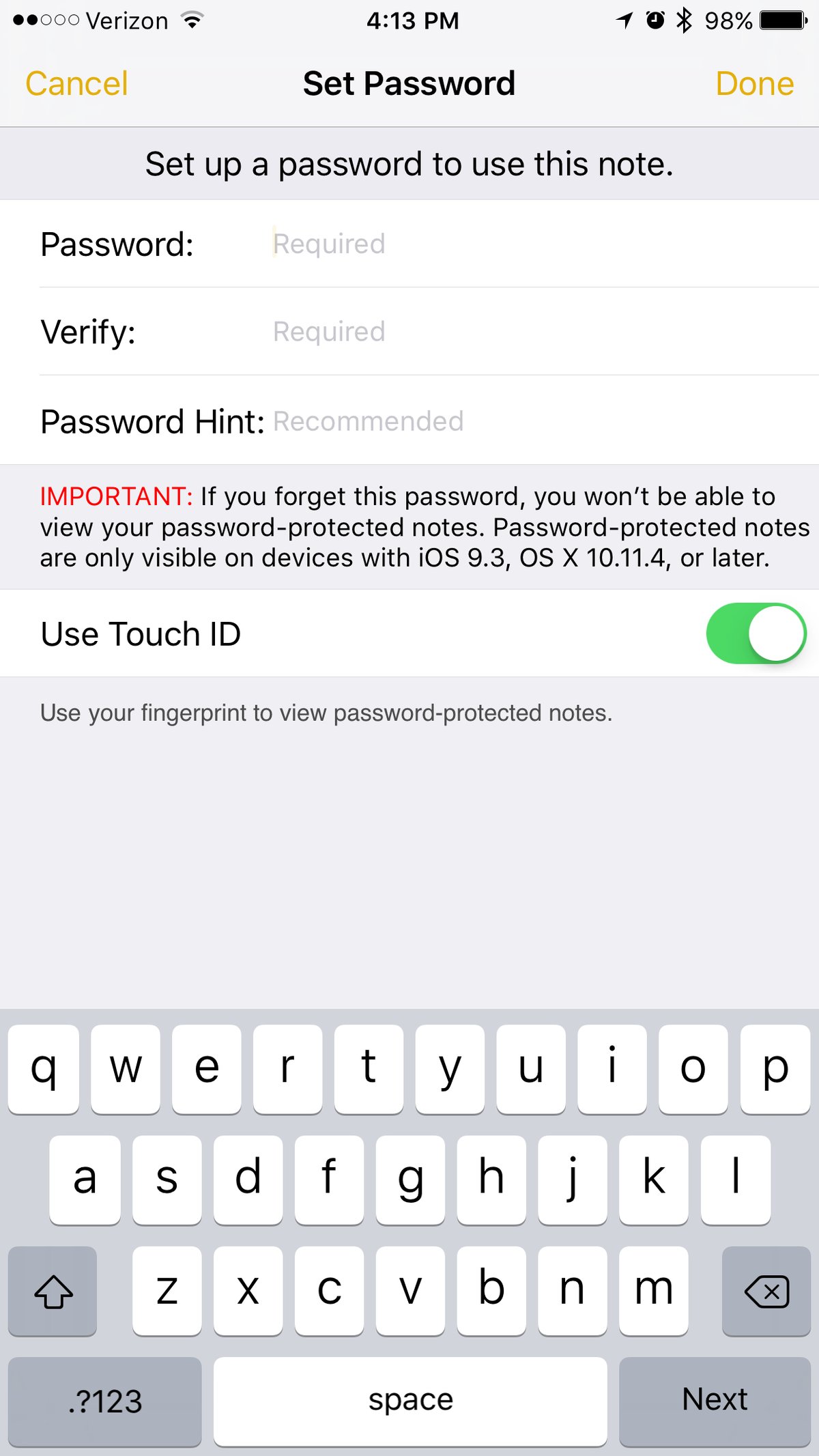
You can actually add the password to Notes. It is on a note-by-note basis! Simply go to an existing note, tape the share sheet, and hit password protect note.

This lets you choose a password, a hint, and enable Touch ID.

whats new in ios 9 3 image
Score: 14 Votes (Like | Disagree)
SteveJobs2.0 Avatar
128 months ago
Set wallpaper is very low list on my priorities for what I would want a settings icon quick action to be used for. I would rather have it activate the personal hotspot.
Score: 13 Votes (Like | Disagree)