

Apple Releases iOS 9.2 With Safari View Controller Improvements, AT&T NumberSync Support and Bug Fixes - MacRumorsOpen MenuShow RoundupsShow Forums menuVisit ForumsOpen Sidebar
Skip to Content

Apple Releases iOS 9.2 With Safari View Controller Improvements, AT&T NumberSync Support and Bug Fixes

ios_9_iconApple today released iOS 9.2 to the public, marking the second major update to the iOS 9 operating system since its September launch. Prior to being released, iOS 9.2 was in testing since late October after being seeded to developers and public beta testers one week after the launch of iOS 9.1.

Today's iOS 9.2 release is available as an over-the-air update to all iOS 9 users. Though it is the second major update, iOS 9.2 is actually the fourth update to iOS 9 in total, following the launches of iOS 9.0.1, iOS 9.0.2, and iOS 9.1. Xcode 7.2 is also available today.

iOS 9.2 includes a huge list of bug fixes, which we've outlined below.

This update contains improvements and bug fixes including:

- Apple Music improvements
--You can now create a new playlist when adding a song to a playlist
--Your most recently changed playlist is now listed at the top when adding songs to playlists
--Download albums or playlists from your iCloud Music Library by tapping the iCloud download button
--See which songs have been downloaded with the new download indicator next to each song in My Music and Playlists
--See works, composers, and performers while browsing Classical music in the Apple Music catalog
- A new Top Stories section in News so you can stay up to date with the most important news of the day (available in the United States, United Kingdom, and Australia)
- Mail Drop in Mail for sending large attachments
- iBooks now supports 3D Touch to peek and pop pages from the table of contents, your notes and bookmarks, or from search results inside a book
- iBooks now supports listening to an audiobook while you browse your library, read other books, or explore the iBooks Store
- iPhone support for the USB Camera Adapter to import photos and videos
- Improved stability of Safari
- Improved stability of Podcasts
- Fixing an issue that caused mail attachments to be inaccessible for some users with POP email accounts
- Resolving an issue for some users that caused attachments to overlap text in mail
- Fixing an issue where Live Photos could have turned off after restoring from a previous iCloud backup
- Addressing an issue that could cause search in Contacts to display no results
- Resolving an issue that could have prevented Calendar from displaying all seven days in week view
- Fixing an issue where Camera screen on iPad could be black when attempting to capture video
- Addressing an issue that could cause instability in the Activity app when viewing the day of Daylight Savings Time transition
- Fixing an issue that could prevent data from appearing in Health
- Fixing an issue that could prevent Wallet updates and Lock screen alerts from displaying
- Addressing an issue where updating iOS could prevent an alarm from going off
- Fixing an issue where some users were unable to login to Find my iPhone
- Fixing an issue that prevented some manual iCloud Backups from completing
- Addressing an issue where using the iPad keyboard could unintentionally trigger text selection mode
- Improved keyboard responsiveness when using Quick Reply
- Improved punctuation input on the 10-key Chinese (Pinyin & Stroke) keyboards with new expanded view of punctuation symbols and better predictions
- Fixing an issue on Cyrillic keyboards where caps lock would be enabled when typing in URL or email fields
- Siri support for Arabic (Saudi Arabia, United Arab Emirates)
- Accessibility improvements
--Fixing issues with VoiceOver when using Camera face detection
--Adding support for VoiceOver to wake up the screen
--Adding support for VoiceOver to invoke app switcher with 3D Touch gesture
--Fixing an issue with Guided Access when trying to end phone calls
--Improved functionality for Switch Control users when using 3D Touch
--Fixing an issue with speech rate of Speak Screen

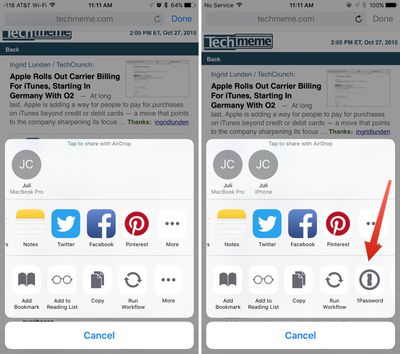
Beyond bug fixes, iOS 9.2's biggest change is a tweak to the way the Safari View Controller works within third-party apps. The Safari View controller is what allows a pop-up Safari window to be used within third-party apps, and with iOS 9.2, the Safari View Controller supports third-party Action Extensions, letting apps like 1Password to be accessed in the Safari view of other apps like Tweetbot.
safariviewcontroller

In the Hipchat app for iOS, clicking a link brings up an in-app browser. In iOS 9.1, seen on the left, there's no option for third-party extensions. In iOS 9.2, seen on the right, there's support for third-party extensions like 1Password.

The Safari View Controller has also been updated with the ability to long tap on the Reload button to reload content without content blockers and it now supports the request desktop site function and an edge swipe to dismiss the Safari window.

iOS 9.2 also includes support for AT&T's NumberSync Wi-Fi calling feature, allowing AT&T users to accept calls on any device even when their phone is not nearby.


Tag: iOS 9.2
Related Forum: iOS 9

Popular Stories

Apple MacBook Pro with PROLED XDR Display family lineup feature

Apple Announces OLED MacBook Pro With Touch Display

Wednesday October 28, 2026 10:11 am PDT by
Apple today announced a new high-end MacBook Pro, which is available in 14-inch and 16-inch sizes. The new device has a PROLED XDR display that supports touch gestures, and a glowing rear Apple logo. Pricing on the MacBook Pro starts at $2,899 for the 14-inch model and $3,399 for the 16-inch model. Apple says the MacBook Pro has the "world's best display in a pro laptop." The PROLED...
iPad mini OLED feature 1

Apple Executive Comments on New iPad Mini Lacking 120Hz Display

Thursday October 29, 2026 1:47 pm PDT by
While the new iPad mini has an OLED display, the device does not support ProMotion, meaning the display's refresh rate is limited to 60Hz instead of 120Hz. ProMotion support would have allowed for the iPad mini's refresh rate to automatically adjust from 10Hz to 120Hz depending on the content being displayed, but evidently Apple has kept the feature exclusive to the iPad Pro among iPad...
apple pro tell logo

Apple Opened Pre-Orders for Five New Products This Week

Wednesday October 28, 2026 2:49 am PDT by
Apple opened pre-orders for five new products on Wednesday, October 28, including its first touchscreen MacBook Pro models. Pre-orders opened for the following new products: iPad mini with OLED display and A20 Pro chip iMac with M6 chip 14-inch MacBook Pro with M6 chip 14-inch MacBook Pro with OLED touchscreen 16-inch MacBook Pro with OLED touchscreen Pre-orders for the iPad mini,...

Top Rated Comments

Jambalaya Avatar
142 months ago
Please fix the lag and unresponsivness on my 6+... Also the screen glitches.
Thanks to the vagueness of your responce I imagine they'll be onto that immediately
Score: 13 Votes (Like | Disagree)
gpsouza Avatar
142 months ago
Now let's wait for 9.3!!
Score: 13 Votes (Like | Disagree)
Goaliegeek Avatar
142 months ago
Please fix the lag and unresponsivness on my 6+... Also the screen glitches.
Score: 7 Votes (Like | Disagree)
142 months ago
Build number is the same as the last beta: 13C75.
Score: 6 Votes (Like | Disagree)
142 months ago
I hope they made the podcasts.app fullscreen on iPad.

EDIT: No. Is nobody at Apple watching video podcasts on an iPad? The white bars on the top and bottom are stupid!
Score: 6 Votes (Like | Disagree)
avanpelt Avatar
142 months ago
Here's how you turn on AT&T NumberSync. It wasn't readily apparent after updating to 9.2:

- Update to 9.2
- Go to Settings --> General --> About and you will be prompted to install a carrier update. That took my 6 from 23.0 to 23.1.
- After installing the carrier update, go to Settings --> Phone --> Calls on Other Devices
- You'll have the option in there to activate AT&T NumberSync.

I just activated it and I got a pop up on my Mac and iPhone within about 30 seconds of activating it saying it was ready to use. Now on my iPhone under Settings --> Phone, instead of saying "When Nearby" next to Allow Calls on Other Devices, it simply says "On".

Finally, when I went into FaceTime on my Mac, I was asked if I wanted to enable Wi-Fi calling on this Mac. Also, in FaceTime Preferences on the Mac, there is now the option to update the address used for emergency services.

I just tried it and it seems to work flawlessly. Turned my iPhone off, called my cell number from another phone, and my Mac rang. Kudos to AT&T and Apple!


Score: 5 Votes (Like | Disagree)
Latest Stories
'Pluribus' Season 2 Reportedly Starts Production Today
2 hours ago
iPhone 18 Pro Sales Surge in China, Offsetting Decline in U.S. and Japan
3 hours ago
HomeView Software 27.2: Wallpapers, Control Center, and More
10 hours ago
Apple Alerts Stores to iPhone Duo's Display Cracking Issue
10 hours ago
iOS 27.3 Will Enable These Apple Intelligence Features in China
11 hours ago
Apple Says iOS 27.3 Beta Coming Next Week
11 hours ago
Apple's Flash Storage Suppliers Are Finally 'Getting Their Revenge'
12 hours ago
14 New Things Your iPhone Can Do in iOS 27.2
13 hours ago
iPhone Duo Review: One Week Later
14 hours ago
Samsung Mocks iPhone Duo Display Cracks in New Ad Campaign
15 hours ago
The MacRumors Show: OLED MacBook Pro, iPad Mini 8, and More
16 hours ago
MacBook Pro With Touch Display: 15 More Details Revealed
16 hours ago
Russia Places Apple on State Surveillance Registry
18 hours ago
Halloween Weekend Brings Discounts on Apple Accessories and Pre-Orders
18 hours ago
Apple Has Released More Than 25 New Products in the Past Two Months
19 hours ago
Local Code Launches as Free, Private AI Assistant Tool for Mac
19 hours ago
Apple Acquires Ascend.io
20 hours ago
HomePod Mini 2 Launches Today: All the New Features
20 hours ago
AirTag 2 4-Pack Drops to New Low Price of $69.99
20 hours ago
Rian Johnson's iPhone Camera App Goes Viral
20 hours ago
Where Did All the iPhone Duos Go? Mostly to Apple's Stores
23 hours ago
Apple's Touchscreen MacBook Pro Could Ship 1.5M Units in 2027
23 hours ago
New Apple TV 4K and iPad Mini: RAM Amounts Revealed
1 day ago
Apple Executive Comments on New iPad Mini Lacking 120Hz Display
2 days ago
Here's a Hands-On Look at HomePod Mini 2's New Two-Tone Colors
2 days ago
Apple Lowers App Store Fees in Taiwan Starting October 31
2 days ago
HomeView Pre-Order Returns to $289.99 on Amazon
2 days ago
Apple Avoids Showing Pinched Fingers on iPad Mini Page in South Korea
2 days ago
Old 'Popcorn Time' App Left Hundreds of Thousands of Macs at Risk
2 days ago
You Can Turn Off the New MacBook Pro's Touchscreen Functionality
2 days ago

🔗 Related Apple News & Rumors

Stay updated with the latest Apple ecosystem news and verified rumors










































