

Many of us keep backups of our data on hard drives, using Apple's Time Machine, but how many of us keep multiple copies? And copies that are protected from not only disk failures, but also natural disaster? Estimates suggest 30 percent of people have never backed up their data, and the number of people who keep multiple backups is even lower.
With World Backup Day coming up, we teamed up with ioSafe and Synology to explore the consumer-oriented backup options they offer and to demonstrate the importance of keeping several copies of your data by simulating the effects of a house fire on the hardware.
If you're not familiar with ioSafe and Synology, ioSafe is best known for its disaster proof solutions, producing a range of hard drives that can withstand fire and water damage. Synology is known for its line of DiskStation NAS devices and for its DiskStation Manager software, which can be used for hassle-free backups, personal cloud storage, and more.
We traveled to Seattle to meet up with ioSafe and Synology to test out a Synology BeyondCloud NAS paired with an ioSafe Solo G3, a multi-backup solution that protects data from all kinds of damage, from hard drive failures to a house fire. We checked out some of the things you can do with the setup and then we set it all on fire.
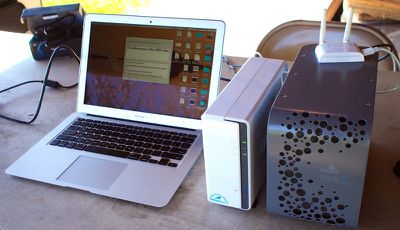
If you want to jump right to the good stuff, aka the fire, watch the video below. We filmed everything so you could see how the ioSafe G3 held up and watch the data recovery process. After watching the video, you can read on for more details on how the Synology BeyondCloud and ioSafe G3 work together and what you can do with them.
Make sure to scroll down to the bottom of the post -- we're going to be giving away a complete backup solution consisting of a 3TB Synology DiskStation BeyondCloud NAS and a 3TB ioSafe Solo G3.
Watch on YouTubeSetting up the Fire
The video we shared is only a small portion of the more than an hour of footage we shot ahead of the fire. We wanted to show that the ioSafe Solo G3 could keep data safe from a fire, so to begin with, we shot a series of photos on a DSLR camera, which were stored on an SD card.
From the SD card, we transferred the files to the Synology BeyondCloud NAS. The ioSafe G3 was plugged into the back of the NAS, and using Synology's browser-based DiskStation software, we scheduled a backup that automatically transferred the photos we took from the NAS to the ioSafe Solo G3. At that point, copies of the photo were stored on the NAS (making them accessible remotely as a NAS serves as a private cloud) and on the ioSafe Solo G3, where they were protected from disaster.
The Fire
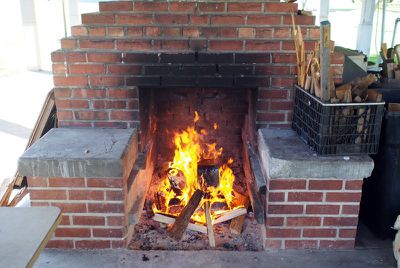
With our photos safely stored on both devices, we were ready to simulate a disaster – a house fire. Both the Synology BeyondCloud and the ioSafe G3 were placed in a fire pit, where we doused them with lighter fluid and set them on fire. Both of the hard drives burned, but the Synology began melting after just a few minutes, fueling the fire and causing it to burn even brighter.
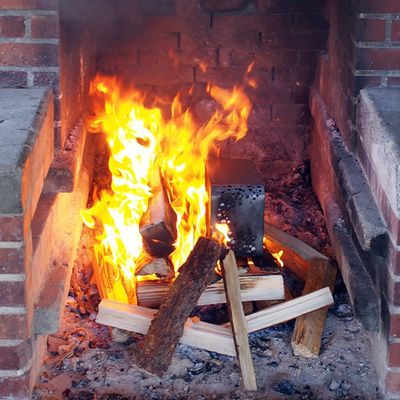
As the BeyondCloud melted and filled the air with noxious fumes, the ioSafe G3 largely maintained its shape amid the flames, though it did become significantly charred. The ioSafe G3 is able to withstand temperatures up to 1500 degrees for 30 minutes. Our fire did not reach 1500 degrees, but neither does the average house fire. We burned the hard drives for approximately 10 minutes, the average length of time that it takes firefighters to respond to a house fire. Then we doused them in water to put out the flames, simulating a firefighter's hose.
When pulled from the fire, the Synology BeyondCloud was all but destroyed, a melted hunk of plastic and metal. According to ioSafe CEO Robb Moore, it was very unlikely data could be pulled from the device, even by data recovery experts.
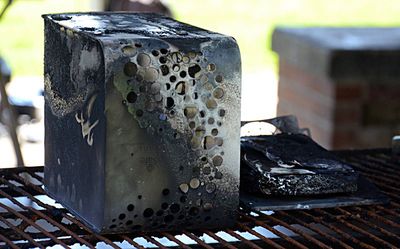
The ioSafe Solo G3 was charred and its ports melted, but the metal exterior was intact. We had to wait awhile for the drives to cool off enough for us to open them up, but when we dug into the G3, we came out with a Toshiba hard drive that didn't have a mark on it.
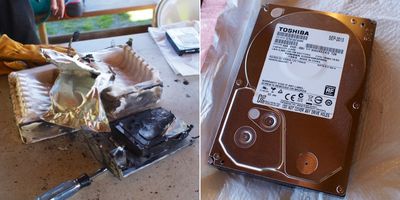
Though Moore warned us that the drive might need to be sent to ioSafe's data recovery partner DriveSavers, we connected the hard drive to an adapter, plugged it into a MacBook Air, and all of the photos we had taken that day were available and safe despite the fact that the hard drive had been in a fire just 30 minutes before.
More on ioSafe
The ioSafe Solo G3 is a rugged, heavy 3TB hard drive that also manages to look nice on a desk. It's actually one of the hard drive options Apple offers in its online store, where it's got a five star rating. Weighing in at 15 pounds because of the equipment inside it (which we go over in detail in the video), the Solo G3 is large but not so much so that it doesn't fit on a table – it's 7.1 inches tall, 5 inches wide, and 11 inches long.
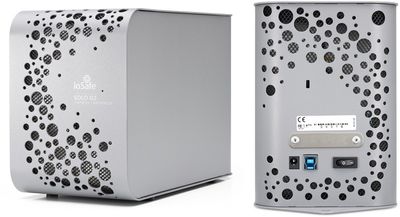
It doesn't have a fan so it operates silently, and it has USB 2.0 and 3.0 connections. It ships with a USB 3.0 cable, a power supply, and it's Time Machine compatible.
The Solo G3 is able to protect data from loss for up to a half hour in a fire that’s up to 1550 degrees Fahrenheit. It's also waterproof at up to 10 feet for 72 hours, so it's going to stay safe in the average fire or flash flood. ioSafe also offers a year of data recovery service and will spend up to $2,500 per terabyte recovering data if your hard drive is damaged for any reason, not just natural disasters.
ioSafe also sells several other fireproof storage solutions for home and office use and at the higher end, its NAS Raid options come equipped with Synology's DiskStation software.
More on Synology
The Synology BeyondCloud solution may not be able to hold up in a fire, but it's the driving force behind a hassle-free backup system, and a BeyondCloud NAS can do a lot more, too. Synology has a lot of different NAS options for both home and office use, but its BeyondCloud lineup is aimed a those who are new to NAS devices.
For those unfamiliar with what a NAS is, it's essentially a hard drive with a built in computer, designed to operate as a file server. It can connect to a home WiFi network, allowing it to serve as a private cloud where all users in a household can upload and share files. Because it can be configured to connected to the Internet, files are also accessible remotely. A simplified way to describe it to a home user is as a personal, private version of Dropbox that also has several other useful features – you can use it for automatic backups, media storage, file sharing, website hosting, and a lot more.
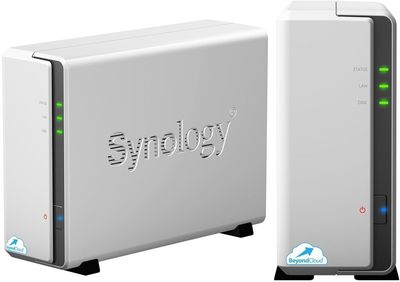
The BC115j 1300 NAS, which is what Synology is giving away, comes with a pre-installed Seagate NAS HDD, and it has the DiskStation software preloaded on it. The NAS itself features the aforementioned hard drives, plus an 800MHz Marvell Armada 370 CPU, 256MB DDR3 RAM, and 2 USB 2.0 ports. It weighs just over a pound and a half, fits well on any desk, and matches most decor with its white finish.
DiskStation
DiskStation Manager (DSM) 5.1 is the software that comes pre-installed on the BeyondCloud, and with it, you can configure the NAS to perform a variety of different functions. Once a Synology NAS is connected to the Internet (via ethernet or a WiFi dongle) the DiskStation software installed on the NAS is accessed through a browser.
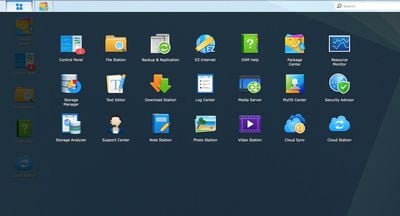
DSM looks a lot like a mini operating system within a browser, with access to features like a control panel, user settings, apps, and a Package Center where new content can be added. The layout will be somewhat foreign to Mac users as it more closely resembles a Windows operating system, but DiskStation is relatively easy to navigate. Synology also has multiple iOS apps, which work with the DSM software to enable your iOS device to access files, play media, and more.
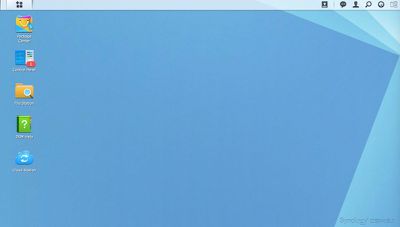
We should say up front that using the BeyondCloud NAS is not entirely intuitive, especially for someone who has never used a NAS before. Setting up features like Time Machine backups on the device is going to require some Googling and following directions, but Synology has a solid knowledge base and its software is popular enough that you can get the answers you need from various forums with a quick search. You're not going to want to buy a NAS for grandma, but the average MacRumors reader is likely savvy enough to figure things out. We'd also like to point out that the Synology iOS apps aren't the best we've seen, so expect to spend some time figuring those out as well.
We'll cover a few of the most useful things you can do with a NAS as a home user, but keep in mind that we're only scratching the surface. First and foremost, it can be used for automatic over-the-air Time Machine backups. Once configured, Time Machine backups will happen automatically, much like with an AirPort Time Capsule or an AirPort Extreme with an attached hard drive.
One benefit to the NAS over another solution like a Time Capsule is that it can automatically backup to another attached hard drive (like the ioSafe G3) or it can backup to an online service like CrashPlan, providing multiple backups with no effort. Another benefit is that your backups are accessible remotely (because your NAS is connected to the internet), and a third benefit is the expanded feature set of the NAS.
With different DSM apps like Cloud Station, Download Station, Photo Station, and Video Station, the NAS can act as a personal cloud, download files from websites automatically and store them, backup photos, and play media stored media files directly on iOS devices or the Apple TV.
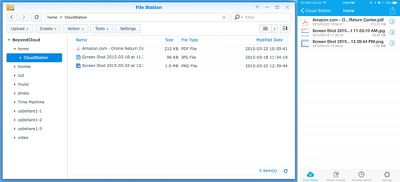
Cloud Station, for example, installs an app on the Mac where you can drag files to be uploaded to the cloud, just like Dropbox. Your files are accessible both at home and remotely, synced to your Mac via the Cloud Station folder, available on iOS devices via the DS Cloud app, and shareable with other people. It's also possible to set up multiple users that can upload files via Cloud Station. A personal cloud like this has the benefit of keeping your files on your own machine and it offers more storage space than online solutions, but it does leave your files vulnerable to hard drive failures so secondary backups and/or a RAID setup should be used.
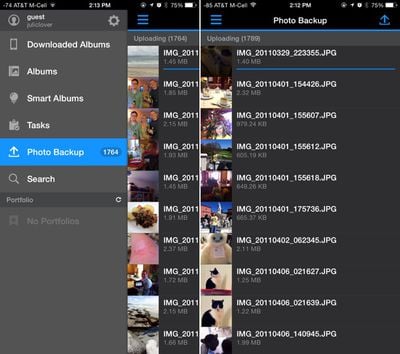
With Photo Station installed on the NAS and on your iPhone, you can set it up so all of the photos on your device will be automatically uploaded and backed up whenever the app is opened. You can also share photos and videos with others, create slideshows, and edit photo information. Audio Station is for managing audio, and you can upload songs, stream them directly from the NAS, and share playlists. There's also an iTunes Server DSM package for letting everyone on a local network access music stored on the NAS.
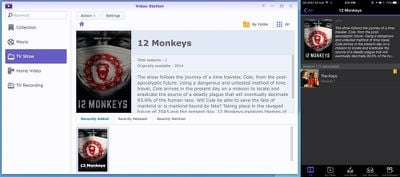
Video Station is for managing video files. A movie or a television show uploaded to a NAS can be played directly to an iOS device or to an Apple TV with AirPlay using the DS Video app. There are also apps that let content be streamed to Samsung Smart TVs, Google Chromecast, and Roku players. As with all of the apps, Video Station content can be accessed remotely too.
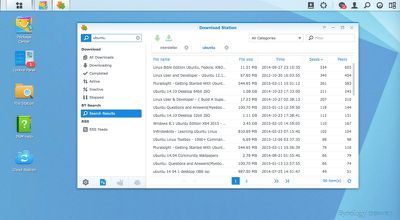
File Station (and the DS File app) gives access to the complete list of files on the NAS, and Download Station is a download center that supports multiple file sharing protocols like BitTorrent, FTP, HTTP, and more. It has a built-in torrent search engine and will automatically download torrent files and other types of content directly to the NAS. The accompanying DS Download app lets you monitor downloads and set the NAS to download files even when you're away from home.
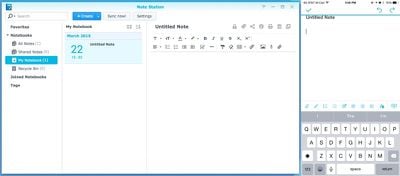
Note Station is a writing app that lets you create documents and notes that are accessible anywhere, including Macs via the DSM and iOS devices through DS Note. It supports file attachments, photos, lists, text formatting, and can encrypt files.
Some of the other things the NAS can do via installed packages: operate as a voice communication server, host websites, host Wordpress blogs, serve as a mail server, host bulletin boards, and manage security cameras. There are a lot of apps in the built-in Package Center, but it's also possible to install other packages through third-party sources. For example, Plex Media Server is available for Synology devices, but keep in mind lower-powered NAS options, like the BeyondCloud, have ARM processors that don't support transcoding.
Like computers, there are many different options when picking a NAS, with more processing power available at a higher cost. Along with the BeyondCloud, Synology has a whole range of NAS options available for business and home users. Prices range from a few hundred dollars for the BeyondCloud to in the thousands, depending on whether you supply your own hard drives.
Using ioSafe and Synology Together
We touched on this above, but Synology's DiskStation Manager has a built-in package called “Time Backup,” which is a lot like a Time Machine backup. You can use Time Backup to back up all data on the NAS to either another external hard drive like the ioSafe Solo G3, or a cloud service. Whether backing up to another hard drive or to a cloud service (these will require a subscription), it's a good step to take to make sure files stored on the NAS are kept safe.
Since we've been talking about a paired ioSafe Solo G3 and a Synology NAS, we'll use that as an example. Backing up is as simple as plugging the Solo G3 into a power strip, connecting it to the BeyondCloud via USB, and creating a backup task in Time Backup. Smart Recycle, a built in feature, will maintain hourly backups to the ioSafe, with several backup versions available like in Time Machine.
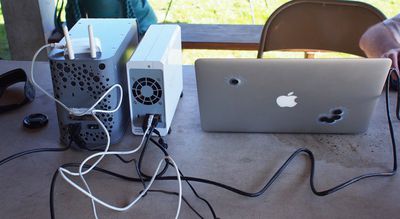
With data from a Mac backed up to a Synology NAS and backed up again to an ioSafe Solo G3, photos, important documents, and files are protected from hard drive failures and other disasters. ioSafe CEO Rob Moore describes the ioSafe philosophy as a three backup system:
At a minimum, at ioSafe, we always talk about three-two-one backups. So you keep three complete backup copies of your data on at least two different devices, and one of them should be protected against disaster. So either offsite, in the cloud, or on an ioSafe device. Whatever it takes to protect yourself against fires and floods and tornados and what not.
Other Backup Solutions
An ioSafe hard drive paired with a Synology NAS is just one of many ways you can keep your data safe in any situation. Another solution might involve multiple Time Machine backups that are stored on different hard drives and backed up the cloud, to ensure your data isn't lost in a fire or other disaster.
A lot of online services are available that will let you upload all of your data for a fee. CrashPlan, for example, lets you back up a computer for $59.99 per year, and BackBlaze works in the same way, charging $50/year.
No matter which method you use, you should try to back up your computer on a regular basis. Over the years, we at MacRumors have had emails and have seen forum posts from hundreds of users who have lost data in hard drive failures and other disasters.
How to Buy
The ioSafe Solo G3 can be purchased from Apple.com, directly from ioSafe.com, or from Amazon.com. It's available in 2TB to 4TB capacities, with prices that start at $349.
Synology's BeyondCloud products and its other NAS devices can be purchased from a wide range of retailers like Amazon.com, MacMall, and Newegg. The BeyondCloud, which is pre-configured with hard drives and the DiskStation software, comes in 2TB, 3TB, and 3TB Mirrored options. Prices start at $180, but the 3TB version in the post is $240.
Giveaway
As we mentioned up top, Synology and ioSafe are each planning to give away the products that we burned (fresh products, not the charred ones), so one lucky MacRumors reader will be able to get a complete backup system for free. Here's what's included in the giveaway:
– 3TB ioSafe Solo G3 fireproof waterproof external hard drive
– 3TB Synology DiskStation BeyondCloud NAS, model number BC115j 1300
To enter to win, use the Rafflecopter widget below. You can earn additional entries by subscribing to our weekly newsletter, subscribing to our YouTube Channel, or visiting the MacRumors Facebook page. Due to the intricacies of international law regarding giveaways, this giveaway is open only to U.S. residents who are 18 years of age or older.
The giveaway will run from today March 23 at 11:30 a.m. Pacific Time through March 30 at 11:30 a.m. Pacific Time. The winner will be chosen randomly on March 30 and will be contacted through email. A response to our email is required within 48 hours or the winner will forfeit the prize and we will pick a new winner.Note: MacRumors received no monetary compensation from ioSafe or Synology for this post and the accompanying giveaway. MacRumors' travel expenses to Seattle were covered.



















































