

Dropbox for iOS Gains File Renaming Capabilities - MacRumorsOpen MenuShow RoundupsShow Forums menuVisit ForumsOpen Sidebar
Skip to Content

Dropbox for iOS Gains File Renaming Capabilities

by

Dropbox for iOS has been updated to version 3.6 today, adding the ability to rename files and folders. Navigating to an individual file and then tapping on the new "more" action button next to the share sheet button will reveal a set of file management options that includes renaming capabilities.

Along with files, folders can also be renamed directly within the Dropbox app for iOS, with a quick swipe to the right to reveal the new renaming function.
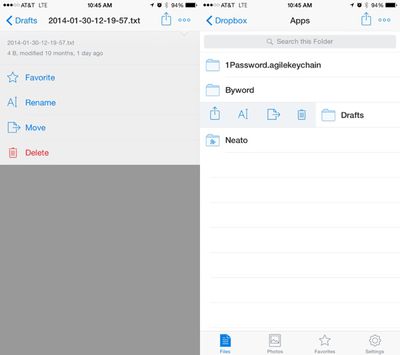
dropboxappupdate
The addition of file renaming functionality follows a recent update that saw Microsoft and Dropbox partnering up to add Dropbox support to Microsoft's suite of Office apps, allowing documents in Word, PowerPoint, and Excel to be saved to a user's Dropbox account.

- You can now rename your files and folders!
- Swipe right on a folder to see more actions, including rename.
- We've moved a few things around - there's a new more actions button (⋯) when viewing files
- On iPhones, the more actions button (⋯) also includes the full file name, size and other details.
- Edit Office documents and save them back to your Dropbox

Dropbox can be downloaded from the App Store for free. [Direct Link]

Top Rated Comments

152 months ago
yet another thing iCloud Drive cant do properly :D

iCloud Drive is so disappointing. I was very excited about it, was happy to purchase the 200GB plan; it sits there empty because it's just useless. Guess I'll cancel at some point.

I have no idea who thought it'd be a good idea to have to cache the same amount of storage locally as in the cloud - multiplied by how many devices you have using the iCloud account. Worthless and doesn't scale.

Oh well, good job Dropbox.
Score: 11 Votes (Like | Disagree)
bushido Avatar
152 months ago
iCloud Drive is so disappointing. I was very excited about it, was happy to purchase the 200GB plan; it sits there empty because it's just useless. Guess I'll cancel at some point.

I have no idea who thought it'd be a good idea to have to cache the same amount of storage locally as in the cloud - multiplied by how many devices you have using the iCloud account. Worthless and doesn't scale.

Oh well, good job Dropbox.

Apples cloud is the worst thing they have ever done.

iCloud pre-iOS7 that doesn't work well together with ios 8 devices, Photostream that's not part of the iCloud space, iCloud Photos that's part of iCloud, iCloud Drive for iOS 8. iCloud Photo Library that's part of iOS8 with an mac app that's not due til 2015, iPhoto that doesn't work properly with iCloud Photo. Then there's Photostream Sharing but also iCloud Photo Sharing. We also have the stuff like contacts that get synced but what is it actually called? "iCloud too?" Oh and then we also got iTunes Match that's for music like wtf apple. Apps need to be updated to gain access to your iCloud Drive files and you have to know what app may be able to open certain types instead of giving me an app like Dropbox with the files where I can PICK the app to open it with instead of guessing which one has been updated and can actually support the type. So confusing and I am a computer science / online marketing student. How are regular people like my family supposed to understand that lol

Oh and like you said it takes up local space which makes the whole purpose of a cloud redundant and if you just want to get rid of a picture to save some local space it gets deleted eeeeverywheeeere
Score: 9 Votes (Like | Disagree)
bushido Avatar
152 months ago
yet another thing iCloud Drive cant do properly :D
Score: 7 Votes (Like | Disagree)
Agent-P Avatar
152 months ago
People complain when Apple copies stuff from other companies, but for the love of everything Apple really needs to take some hints from Dropbox/OneDrive to make iCloud Drive a worthwhile alternative. As of now it's only useful for device backups.
Score: 4 Votes (Like | Disagree)
pdaholic Avatar
152 months ago
About time! I had to use another app to rename Dropbox files on my phone, amazing it took this long to add that feature.
Score: 4 Votes (Like | Disagree)
152 months ago
I use it for device backups, app data sync, and syncing of Contacts and Calendars. I don't trust it for anything else.
Score: 3 Votes (Like | Disagree)

Popular Stories

Apple Event Logo

Apple Working on All-New Operating System

Wednesday July 29, 2026 11:39 am PDT by
Apple is developing an all-new operating system that is essentially a mix of tvOS, watchOS, and iOS, according to Bloomberg's Mark Gurman. In a report this week, he said the operating system will feature a grid of icons, widgets, and apps, along with customizable clock faces. The new software platform is intended for Apple's long-rumored smart home hub. With built-in facial recognition,...
imac video apple feature

Apple Made Its Second-Biggest Acquisition Ever This Year

Wednesday July 29, 2026 12:03 pm PDT by
Apple this year acquired Israeli startup Q.ai for close to $2 billion, according to the Financial Times. That would make this Apple's second-biggest acquisition ever, after it paid $3 billion for the popular headphone maker Beats in 2014. This is also the largest known Apple acquisition since the company purchased Intel's smartphone modem business and patents for $1 billion in 2019. Q.ai...
Dynamic Island iPhone 18 Pro Feature

iPhone 18 Pro: Twelve Changes Coming to Apple's Next Flagship

Thursday July 30, 2026 3:43 am PDT by
We're less than two months out from the launch of Apple's premium next-generation smartphone lineup, and while we're not expecting a dramatic change in terms of functionality, there are still several enhancements rumored to be coming to the iPhone 18 Pro and iPhone 18 Pro Max. One thing worth noting is that Apple is reportedly planning a major change to its iPhone release cycle this year,...

🔗 Related Apple News & Rumors

Stay updated with the latest Apple ecosystem news and verified rumors













































