

Whenever Apple talks about the Mac mini—like at the October event in Cupertino—the company always mentions how the Mac mini is a favorite with first-time Mac users. While that may be true, the Mac mini isn't just a computer for newbies. Its combination of affordability, compactness, and performance makes the Mac mini an ideal computer for new and experienced users alike.
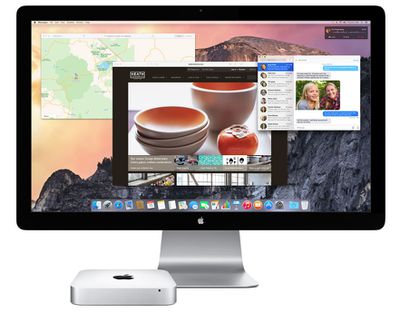
Apple offers three models of the Mac mini. When shopping the Apple Store, it helps to understand the differences of all three models in the Mac mini line and how they compare to Apple's other Mac offerings, and to know what you're getting for your money. In this guide, we'll go over the key decisions you'll need to make when shopping for a Mac mini.
Why a Mac mini?
 The main reason why you would consider a Mac mini is its price. The most affordable Mac mini is $499, and there are two other models, priced at $699 and $999. By comparison, Apple's lowest-priced iMac is $1099, the lowest-priced MacBook Air is $899, and the lowest-priced MacBook Pro (non-Retina) is $1099.
Another reason to consider about the Mac mini is its size. Measuring 7.7 by 7.7 by 1.4 inches, the Mac mini's small size allows it to fit in almost anywhere, which can lead to some unique uses besides desktop computing, such as a server or home entertainment component.
However, the small size and the low prices come with compromises in performance and your ability to upgrade the computer in a couple of years.
Performance
The $499 Mac mini has a 1.4GHz Core i5 processor, 4GB of RAM, and a 500GB hard drive. The $699 Mac mini has a 2.6GHz Core i5 processor, 8GB of RAM, and a 1TB hard drive. The $999 Mac mini has a 2.8GHz Core i5 processor, 8GB of RAM, and a 1TB Fusion Drive. All the 2014 Mac mini models have dual-core processors.
The Mac mini isn't among the fastest Macs Apple offers, but it has enough power for people who use consumer-level software everyday. For web access, email, Pages, Numbers, Keynote, iMovie, iPhoto, iTunes, and most apps you use, the Mac mini works well.
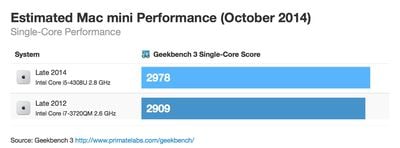
A deeper look at performance using the GeekBench benchmark tool shows that in single-core performance—most consumer apps are single-core apps, meaning they use one processing core on a computer's CPU—the new $999 2.8GHz Core i5 Mac mini performs slightly better than the previous 2012 high-end 2.6GHz Core i7 Mac mini.
However, if you're using high-end professional-level software that uses more than one processing core, the new Mac mini takes a big performance hit. The reason why is simple: It doesn't have as many processing cores as before. If you work in professional-grade apps that can take advantage of multiple processing cores—video editors, audio editors, 3D animation, Mathematica, for example—skip the Mac mini and get a quad-core iMac or make the investment into a Mac Pro.
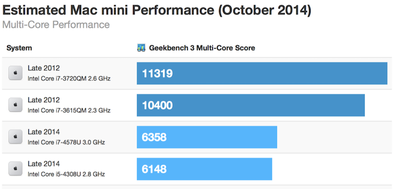
The two 2012 Mac mini standard configurations also had a dual-core processor in the low-end models, but a quad-core processor in the high end 2012 Core i7 model. With the new 2014 Mac mini, Apple decided to use dual-core processors in all three models.
If you like to play games, you'll find better video performance from the Intel Iris Graphics used in the $699 and $999 Mac minis. The $499 Mac mini uses the Intel HD Graphics 5000 integrated graphics processor, which is slightly better than the Intel HD Graphics 4000 found in the previous Mac mini, but it's not as good as Iris Graphics.
The $499 Mac mini actually has the same processor, RAM setup, and graphics subsystem as the MacBook Air, so you might expect the $499 Mac mini and the MacBook Air to perform similarly. The Mac mini, however, uses a standard hard drive, while the MacBook Air has speedy flash memory. This could help the MacBook Air outperform the Mac mini.
Upgrades
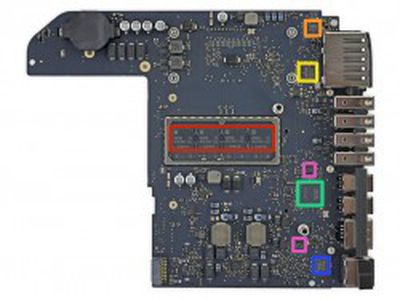
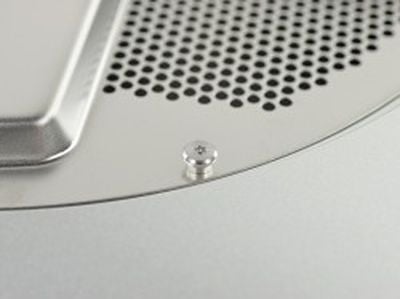 With the new Mac mini, Apple continues the trend of limiting the user's ability to perform do-it-yourself upgrades. When iFixIt did a teardown of the new Mac mini, the site found that the RAM is soldered to the motherboard, preventing the user from adding more. You could potentially upgrade the hard drive with a new 2.5-inch, 7-mm storage device, but Apple also made the Mac mini more difficult to open, and you have to remove several components from the case before you can get to the Mac mini's hard drive tray.
Most Mac mini users, however, aren't interested in upgrading the computer as it gets older. It's quite possible that the standard configurations offer the performance you need three or four years later—and by then, you can simply buy a new Mac mini when you need more speed. So the ability to do your own upgrades isn't an issue for you.
But it's worth considering the options Apple has available when you buy a Mac mini. Look at Apple's Mac mini specifications, and you'll notice that the processor, storage, and RAM say that they are "Configurable" to a higher specification than the standard for each price point. The future is now—if you think you'll want to upgrade a component in a year or two, consider buying that upgrade now by customizing your order. The upgrades will increase the price of your order, but you save yourself some hassle down the road.
 For the 1.4GHz Mac mini, consider configuring the RAM from the standard 4GB to 8GB. That pushes the price up from $499 to $599, but the additional RAM will help performance.
If you want the faster Fusion Drive, Apple offers it as a $250 Fusion Drive upgrade for this machine, but that makes the price of the entry-level Mac mini $749 with 4GB of RAM. You're better off paying a little more money for a Mac mini with both a Fusion Drive and a faster processor. You'll pay $899 for a 2.6GHz Mac mini configured with a 1TB Fusion Drive, or $999 for a 2.8GHz Mac mini that comes standard with Fusion Drive.
Other cost considerations
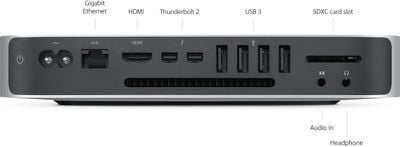
The Mac mini doesn't come with a display. If you already have one, or if you decide to buy a non-Apple display, you'll connect it to one of the Mac mini's Thunderbolt 2 ports, which can accept mini DisplayPort video connectors. Chances are, you'll need an adapter, such as a Mini DisplayPort to DVI Adapter, a Mini DisplayPort to VGA Adapter, both of which Apple sells for $29. If the display you want to use has HDMI, and you connect using the Mac mini's HDMI port.
The Mac mini also doesn't include a keyboard or an input device such as a mouse or trackpad. Apple's Magic Mouse and Magic Trackpad, and Wirelesss Keyboard are $69 each, but you can use just about any USB or wireless keyboard and mouse.
Which Mac mini?
The $499 Mac mini is attractively priced, and it's a good everyday computer with enough power for email, web, iWork and iLife apps, and iTunes. It's also good for students who need an affordable desktop computer. Consider spending the extra $100 for 8GB of RAM—$599 is still a good deal for a Mac.
The $699 Mac mini offers a nice boost in performance from the entry-level model, so consider it if you are a little more demanding of your computer—you work a lot in iPhoto, iMovie, or similar apps. Games will benefit from the Iris Graphics in the $699 and $999 models.
If you're a professional who makes things or does deep research on a Mac, the $999 Mac mini can serve as a cheap workstation for professionals who are budget-minded and use apps like Final Cut, Logic, Photoshop, Mathematica, or FileMaker. But you'll be better served by spending a few more dollars on a $1299 21.5-inch iMac with a quad-core 2.7GHz Core i5 processor.
As for owners of the older Mac mini that was released in October 2012, the only reasons for you to upgrade to the new Mac mini are the two Thunderbolt 2 ports and 802.11ac Wi-Fi. The new Mac mini doesn't offer a boost in the apps that you use everyday, and you'll actually see a performance slowdown with high-end software. To get more speed out of your Late 2012 Mac mini, consider upgrading the hard drive to a SSD or adding more RAM. Owners of the Mac mini released before 2012 will benefit from a new Mac mini, which offers a good speed boost. However, Thunderbolt replaces FireWire, so you may need a FireWire adapter or connect by USB, instead.














































Top Rated Comments
I hope we see a redesigned Mini next year...
2012
/article
Worst Upgrade Ever