

How to Use 'Instant Hotspot' On a Mac with OS X Yosemite - MacRumorsOpen MenuShow RoundupsShow Forums menuVisit ForumsOpen Sidebar
Skip to Content

How to Use 'Instant Hotspot' On a Mac with OS X Yosemite

by

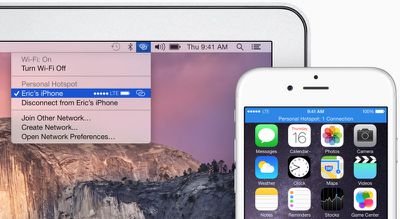
With OS X Yosemite, Apple has included a number of Continuity features that improve the integration between iOS and Mac devices. OS X Yosemite includes a feature called Instant Hotspot which allows users to more easily use their iPhone's wireless cellular data connection from their Mac or iPad.
instanthotspot
With Instant Hotspot, there is no longer a need to enter a password to connect as security is handled through a common iCloud account. An iPhone can even be in sleep mode and allow your Mac to initiate Instant Hotspot, with no additional settings needing to be enabled aside from Wi-Fi and Bluetooth.

Before you Start

You need iOS 8.1 and OS X Yosemite in order to use Instant Hotspot. You also need to ensure that your data plan with your wireless carrier allows for internet hotspot capabilities. In the United States, AT&T, Verizon, and T-Mobile, allow phones to be used as hotspots with select data plans. Sprint offers mobile hotspot capabilities with a monthly add-on plan.

Also, make sure both your Mac and iPhone are logged into the same iCloud account, and check that your Mac supports Instant Hotspot. This can be done by clicking the  symbol in the top left-hand side of the Menu bar, navigating to About This Mac, clicking on System Report and clicking on the Bluetooth listing. You should see information about whether your system is compatible with Instant Hotspot and Handoff.

instanthotspot1
After you ensure that you have a compatible Mac and data plan, follow the instructions below to turn on Instant Hotspot:

Steps

1. Turn on Wi-Fi on your iPhone (Settings -> Wi-Fi) and Mac (Menu Bar -> wifi -> Turn Wi-Fi On.

2. Turn on Bluetooth on your iPhone (Settings -> Bluetooth) and Mac (Menu Bar -> Apple -> System Preferences -> Bluetooth -> Turn Bluetooth On).
wifi
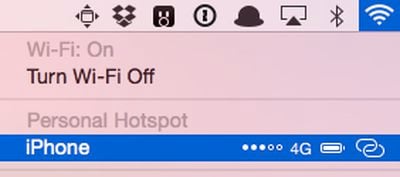
3. On your Mac, click the Wi-Fi symbol wifi in the menu bar. A new "Personal Hotspot" heading now appears near the top, and will be followed by the name of your iPhone. On the right side of your iPhone's name, signal strength, network type, and available battery life are displayed. Click on your device's name to begin using it as an Instant Hotspot for your Mac.

personalhotspot5
4. You may now begin using the Internet on your Mac with your iPhone acting as an Instant Hotspot. On the Mac, the Instant Hotspot connection between both devices is represented by a special icon that shows a link over the traditional Wi-Fi symbol. On the iPhone, the connection is represented by a blinking blue bar that shows that a Personal Hotspot is active.

When a tethered Mac or iPad switches to a Wi-Fi connection or is no longer connected to an iPhone, Instant Hotspot automatically turns off. This feature is designed to save battery on the iPhone, because tethering can use a significant amount of battery life.

Troubleshooting

While we had few issues with Instant Hotspot, several members of our forum have had more inconsistent results. Several people have had to try logging out and back into iCloud on their devices, turning Wi-Fi off and then back on, or even rebooting their devices. These steps may help if you are having trouble turning using Instant Hotspot.


Related Forums: iOS 8, OS X Yosemite

Top Rated Comments

156 months ago
how to run out of cellular bandwidth on a mac with OS X Yosemite
Score: 8 Votes (Like | Disagree)
156 months ago
I think a necessary step is missing from this guide.

On iPhone: Settings > Personal Hotspot > On

No.
Score: 6 Votes (Like | Disagree)
156 months ago
I dont understand why cover the name of the phone and network?
Because it's my real name (ok part of) and my real nickname. :o Kind of personal.
Score: 5 Votes (Like | Disagree)
156 months ago
Well this is just stupid and pointless if I have to pay extra just to use this feature with my carrier. If it eats up my bandwidth, so be it because that is my decision, but it should not cost extra to use it.
Score: 5 Votes (Like | Disagree)
156 months ago
It works as reliably as al the Handoff features, which is, not at all - probably 30% of the time.

I've seen it appear. It doesn't appear right now though.

I'll usually get Handoff working between iPhone and Macbook and not the other way around. Then i'll reboot the Macbook and it'll work from Macbook to iPhone and not the other round.

It's one of the buggiest features Apple has have made...a theme of the times lately unfortunately.

When's the Yosemite update coming?
I agree, I was pulling my hair out trying to get this to work consistently last night. At first my mac found the iPhone hotspot and tethered with no problems. Then I tried with my iPad and it would find the hotspot but not connect. Then it wouldn't find it at all. Then the mac couldn't connect to it anymore either, but still find it. Then the iPad could connect but the mac still couldn't. Tried resetting all 3 devices and resetting network settings. It just doesn't work consistently.

The big irony is of course that it was supposed to replace the old hotspot method and make it less clunckly and more streamlined, yet it's done the exact opposite, for me anyway.
Score: 2 Votes (Like | Disagree)
PowerBook-G5 Avatar
156 months ago
not live in sovjet USA where you get shafted by the cell carriers...

seriously, needing to pay the carrier to allow hot spots is something totally unheard of in europe...

Welcome to 'Merica, the land of liberals, infinite taxes, and idiocracy. If I have a 4GB data plan, then I should not have to pay extra to use it for a hotspot.


EDIT: After trying what was stated in the above article, I got it to work when trying the "Troubleshooting" tips. I first connected to the same WiFi network, turned on Bluetooth, then I signed out of iCloud on both my iPhone and my MBP. Then I restarted each device, and then signed back into iCloud and it "just work[ed]." If you click on the WiFi icon in the menu bar and don't see it at first, wait a few seconds and it will appear (If everything else is done correctly).

Score: 2 Votes (Like | Disagree)

Popular Stories

Home Hub Command Center with Dome Base Feature

Apple Smart Home Hub to Feature iMac G4-Style Design

Wednesday September 30, 2026 4:36 am PDT by
Apple's long-rumored smart home hub will have an iMac G4-style design and a host of unique features, Bloomberg's Mark Gurman reports. The smart home hub is said to feature a square 6-inch display, with variants that can be placed on a countertop or mounted on a wall. It features a single FaceTime camera on the front, with microphones and speakers in its connected base. Gurman described the...
HomePod minis on gradient feature 1 1

Three New Apple Smart Home Products Coming on October 13

Wednesday September 30, 2026 4:04 am PDT by
Apple plans to introduce a series of new smart home products on Tuesday, October 13, according to Bloomberg's Mark Gurman. Apple reportedly plans to debut its long-awaited smart home hub device, a new HomePod mini, and a new Apple TV on the date. The new HomePod mini and Apple TV are set to retain their existing designs, but tout faster chips to support Siri AI. The new HomePod mini will...
Apple TV Sans Remote Feature

New Apple TV 4K Leaked

Friday September 25, 2026 8:16 am PDT by
MacRumors contributor Aaron Perris has uncovered an image file from Apple for an unreleased Apple TV 4K, suggesting that a new model will finally be released soon. The image is specifically for an "Apple TV 4K (4th generation)" model. Apple TV 4K (4th generation) image (on a gradient) The image reveals that the Apple TV will have the same external design as the current model, with all of its...
Latest Stories
iPhone 18 Pro Aperture Control Goes Fully Manual in Halide 3.2
24 minutes ago
Apple Stores Receive 'Do Not Open' Boxes Ahead of Smart Home Products Launch
1 hour ago
iPhone 18 Pro Sales Jump in China Ahead of iPhone Duo Launch
1 hour ago
Apple TV Still Down for Some Users Following Apple Services Outage
2 hours ago
PSA: Apple Mail on Mac May Stop Syncing Microsoft 365 Accounts Today
3 hours ago
Apple's Smart Home Hub: Everything We Know So Far
13 hours ago
Apple's Home Hub Borrows From the iPhone Duo's StandBy Mode
14 hours ago
Apple Invites App Updated With Three New Features
18 hours ago
Apple Event on October 13?
19 hours ago
Apple Watch SE 3 vs. Series 12 Buyer's Guide: Which Should You Buy?
21 hours ago
iPad Mini 8 to Offer These 10 New Features
21 hours ago
DoorDash Unveils AI Food Ordering Through Apple's Messages App
23 hours ago
Amazon Takes Up to $150 Off Select M5 MacBook Air Models
23 hours ago
Apple Still Plans to Release a New Full-Sized HomePod
1 day ago
Apple Working to Expand HomeKit
1 day ago
Apple Smart Home Hub to Feature iMac G4-Style Design
1 day ago
Three New Apple Smart Home Products Coming on October 13
1 day ago
Apple Pay Now Available in India With Axis Bank Cards
2 days ago
OpenAI Launches Always-On 'Dots' Agents to Rival Meta's Muse
2 days ago
AirPods 5 Teardown: Batteries Removable, Case Still Tough
2 days ago
iPhone 18 Pro Owners Complain of Speaker Crackling or Popping
2 days ago
You Can 'Get Ready' for iPhone Duo Pre-Orders on October 12
2 days ago
Apple Pay Reportedly Launching in India Today
2 days ago
Apple Releases New AirPods Beta Firmware
2 days ago
Apple Shares New Guide for Using iOS 27 Parental Controls
2 days ago
Apple Creator Studio and Final Cut Camera Get New Features
2 days ago
Apple Explains Why It Removed ICE Tracking Apps Last Year
2 days ago
Amazon Expands $779.99 Apple Watch Ultra 4 Deal to More Models
2 days ago
Switch Siri AI for ChatGPT on Your Mac
2 days ago
Apple Says Emergency SOS via Satellite Now Available in Norway
2 days ago

🔗 Related Apple News & Rumors

Stay updated with the latest Apple ecosystem news and verified rumors










































