

Apple has added two new locations to its Maps Flyover feature in iOS, including Yosemite National Park in California and Wellington, New Zealand. The new additions to Flyover allow users to take a close 3D look at the areas, zooming in on important buildings and landmarks.
Flyover data for Yosemite National Park comes as Apple prepares to launch OS X Yosemite, the newest version of its Mac operating system. As of OS X 10.9 Mavericks, Apple began naming its operating system updates after major California landmarks and with OS X Yosemite set to be released to the public later this year, it makes sense to add Yosemite's Flyover data to Maps.
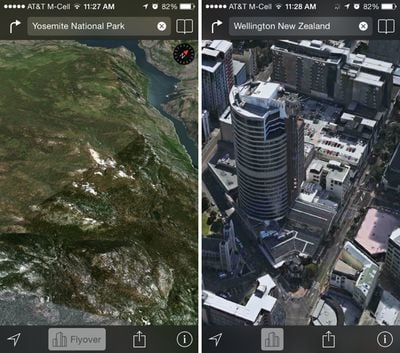
With the addition of two new locations, Apple now provides Flyover data on more than 90 parks and cities around the world, with a full list available on its iOS 7 Feature website.
Over the last several months, Apple has been hard at work improving its Maps app. Users have reported significant improvements in Apple Maps data, with errors being fixed quickly and new Points of Interest popping up. Apple also made notable updates to Maps in China, Japan, and other countries earlier this year.

















































Top Rated Comments
If you zoom in far enough with FlyOver you get a much better understanding of the area your looking and it is easier to look at.
StreetView is only nice for seeing the name of stores/numbers etc.
Street View - very useful
Flyover - gimmicky.
I originally though Street View was great for figuring out super-local details like which driveway goes with which building, or which doorway goes into which business. And I thought Flyover was just a super-cool gimmick that I'd play with and forget.
In reality--since my city DOES have flyover (and I appreciate that that doesn't help everyone) I use it all the time, and it does what street view used to do, only MUCH BETTER.
Street view: your view is directly at the familiar street level perspective, and will look just the way you expect when you're there in person. Nice!
But...
- Your view is often in the wrong lane, taking the "familiar" advantage away.
- It's often blurred and smeared beyond recognition, noisy, poor contrast, and obscured by lens flares, so you can't read most of the signs you need anyway. I was just trying to use it again this morning and gave up in disgust. What a mess (not always but FAR too often).
And...
Flyover view is WAY FASTER and WAY EASIER TO NAVIGATE.
Street View is such an awful experience (including terrible desktop navigation controls). Turn... turn some more... adjust... click to move forward... wait for loading... look around... oops, went down the wrong way... turn around again... turn some more... tap back where you came from... loading delay... turn again... click again... loading delay... can't quite see what I want... try a little farther ahead... loading delay... wish I could back up just a little... but I can't, I'm stuck with nodes 40 feet apart... give up.
Compare to Flyover: you can navigate instantly and smoothly using the SAME panning/zooming controls as 2D maps. It's not a separatre, awkward mode. It just works.
And you can easlly see the lay of the land, the driveways, etc. that Street View could show you. Not perfectly, but not worse either--just different. It turns out that the human brain actually has no trouble recognizing a place from an angle 50 feet in the air.
Try this experiment: find a square block of your city, and pretend you know a restaurant is in that area, and you know what it looks like but you don't remember the name. Now take a "walk" around that block, all the way around and back, four turns, in Street View. Now try it in Flyover.
No contest. You can spot the place in a few seconds in Flyover. With Street View you will spend minutes, and that's not counting the time you need to go get a shot of whisky to survive the hassle.
I hope Apple keeps bringing Flyover to more and more urban areas. For a landmark, it’s a gimmick. For a neighborhood, it’s awesome.
Not true. I use Flyover extensively to plan my cityscapes photoshoot.
Street View is way better for pedestrians and cyclists - you can actually see some real detail. FlyOver is of course somwhat useful for drivers (I suspect Apple is being US-centric again) and also a great visual candy for advertising / new product introductions.