Apple Expanding Two-Step Verification to iCloud.com
Apple appears to be testing its two-factor authentication system on some iCloud.com accounts, asking for a verification code before allowing users with two-factor verification enabled to access various iCloud.com apps.
First noticed by AppleInsider, the two-factor verification system for iCloud.com requires users to enter a verification code sent via SMS or to a trusted iOS device before the iCloud.com versions of Mail, Contacts, Calendar, Reminders, Pages, Numbers, and Keynote can be used.
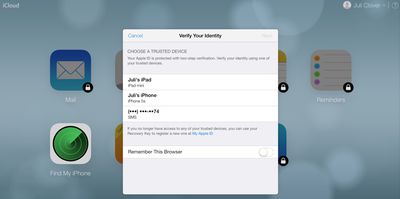
Previously, accessing these apps only required an Apple ID password, but now "Find My iPhone" is the only app that remains accessible without a two-factor verification code. Computers used to access iCloud.com have a "Remember This Browser" option, requiring a verification code to be entered only once.
Originally implemented back in March of 2013, two-factor verification is an opt-in system designed to increase Apple ID account security by requiring identity verification before allowing users to make account changes or purchase content on new devices. It replaces standard security questions with a security code delivered to a trusted device.
At this time, it is unknown if Apple is simply testing the feature with some users or working on a wider rollout for all iCloud.com users with two-factor verification enabled.
Update 3:30 PM PT: Apple appears to have disabled two-factor verification for some iCloud.com accounts that previously had access to the feature, suggesting it may have seen an accidental early launch.
Popular Stories
Last year, Apple launched CarPlay Ultra, the long-awaited next-generation version of its CarPlay software system for vehicles. Nearly nine months later, CarPlay Ultra is still limited to Aston Martin's latest luxury vehicles, but that should change fairly soon.
In May 2025, Apple said many other vehicle brands planned to offer CarPlay Ultra, including Hyundai, Kia, and Genesis.
In his Powe...
Apple today confirmed to Reuters that it has acquired Q.ai, an Israeli startup that is working on artificial intelligence technology for audio.
Apple paid close to $2 billion for Q.ai, according to sources cited by the Financial Times. That would make this Apple's second-biggest acquisition ever, after it paid $3 billion for the popular headphone and audio brand Beats in 2014.
Q.ai has...
The calendar has turned to February, and a new report indicates that Apple's next product launch is "imminent," in the form of new MacBook Pro models.
"All signs point to an imminent launch of next-generation MacBook Pros that retain the current form factor but deliver faster chips," Bloomberg's Mark Gurman said on Sunday. "I'm told the new models — code-named J714 and J716 — are slated...
Apple recently updated its online store with a new ordering process for Macs, including the MacBook Air, MacBook Pro, iMac, Mac mini, Mac Studio, and Mac Pro.
There used to be a handful of standard configurations available for each Mac, but now you must configure a Mac entirely from scratch on a feature-by-feature basis. In other words, ordering a new Mac now works much like ordering an...
Apple is planning to launch new MacBook Pro models with M5 Pro and M5 Max chips alongside macOS 26.3, according to Bloomberg's Mark Gurman.
"Apple's faster MacBook Pros are planned for the macOS 26.3 release cycle," wrote Gurman, in his Power On newsletter today.
"I'm told the new models — code-named J714 and J716 — are slated for the macOS 26.3 software cycle, which runs from...






















