

Adobe Announces 'Lightroom Mobile' for iPad, Enabling Editing On-the-Go - MacRumorsOpen MenuShow RoundupsShow Forums menuVisit ForumsOpen Sidebar
Skip to Content

Adobe Announces 'Lightroom Mobile' for iPad, Enabling Editing On-the-Go

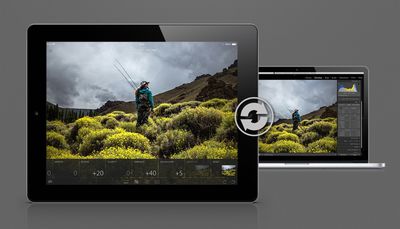
Adobe's professional photo editing software Lightroom has finally made its way to iOS devices with Adobe's new Lightroom mobile app for the iPad, allowing photographers who use the desktop version of Lightroom to edit and organize photos from anywhere. Lightroom mobile is not a standalone app, requiring both a subscription to Adobe's Creative Cloud and Lightroom 5 to function.

Integrating seamlessly with the full version of Lightroom 5 for PCs and Macs, Lightroom mobile allows users to log in to the app with an Adobe ID to access the library of content stored in a desktop version of Lightroom. The app downloads Smart Previews of files from the desktop app, allowing for very fast content transfers between the desktop and the mobile app.

The new Lightroom mobile app brings powerful Lightroom tools to the iPad, delivering photography essentials – such as non-destructive processing of files – and utilizing new Smart Preview technologies to free professional-class photo editing from the confines of the desktop. Lightroom mobile is built on a powerful synchronization architecture, designed specifically for photos, and provides the most efficient way to manage and edit images across desktops, mobile devices and the Web.

Smart Previews do require an ongoing Internet connection to sync back and forth between Adobe's servers to prevent iPad users from having to download huge files, but files can also be downloaded in full for offline editing if preferred.
lightroomdesktopsync
Lightroom mobile supports much of the same functionality as the desktop version of Lightroom, offering users access to metadata and a basic editing toolbar that contains desktop presets (except for custom presets) and adjustment tools for altering shadows, clarity, contrast, and more. There are also crop and rotate tools for manipulating photos, and a simple three finger tap on the screen displays the before and after when editing.

All of the adjustments made within Lightroom mobile are automatic and sync to Lightroom on the desktop, with history states saved as well, making all iterations of a final image visible at a glance.

Adobe's new app has been designed with mobile productivity in mind and it is not, at this time, designed to replace the desktop version of Lightroom for editing. Adobe envisions it as more of a quick-use tool, allowing users to sort through images and make quick edits on files to determine what might need further editing via the desktop.

Swiping through a huge number of images and using quick touch gestures to mark favorites can be done somewhat more quickly on a tablet, for example. Adobe's Lightroom mobile has intuitive gestures that include a two-finger tap as an app-wide gesture that controls a number of different functions, including toggling metadata, turning on the histogram, and more.

Watch on YouTube

Images are grouped by folders specified in Lightroom and displayed in a grid gallery. Tapping an image allows it to be viewed full screen and a simple swipe up or down allows it to be flagged for editing or rejected. Lightroom mobile also has some powerful organizational capabilities, letting users sort images by different aspects like capture time, file name, modification time, and more.

Photos in Lightroom mobile can be saved to the camera roll or shared via social networking sites and images taken with the iPad can also be set to import directly into the app – and the desktop version of Lightroom via syncing. The app also contains built-in slideshow functionality, allowing users to use their Lightroom photos in presentations.

lightroomcameraroll
Adobe purposefully left some features out of Lightroom mobile so the simple touch experience wouldn't be overwhelmed with a glut of unnecessary functions. Custom created presets are not available, for example, nor are star labels. The company did make it clear, however, that it is open to adding additional features that its customers want in Lightroom mobile in the future.

With Lightroom mobile, photos will also be viewable and shareable on Lightroom.Adobe.com. While Lightroom mobile is limited to the iPad 2 or later at this time, Adobe does has plans for an iPhone version later this year.

Lightroom mobile for the iPad is available as a free download [Direct Link] but using it will require an Adobe Creative Cloud subscription. Access to the app is included with following plans: Creative Cloud Complete ($49.99/month), the Photoshop Photography Program ($9.99/month), which includes access to both Photoshop and Lightroom, Creative Cloud Student and Teacher Edition ($29.99/month) and Creative Cloud for teams ($69.99/month/user).


Popular Stories

Home Hub Command Center with Dome Base Feature

Apple Smart Home Hub to Feature iMac G4-Style Design

Wednesday September 30, 2026 4:36 am PDT by
Apple's long-rumored smart home hub will have an iMac G4-style design and a host of unique features, Bloomberg's Mark Gurman reports. The smart home hub is said to feature a square 6-inch display, with variants that can be placed on a countertop or mounted on a wall. It features a single FaceTime camera on the front, with microphones and speakers in its connected base. Gurman described the...

HomePod minis on gradient feature 1 1

Three New Apple Smart Home Products Coming on October 13

Wednesday September 30, 2026 4:04 am PDT by
Apple plans to introduce a series of new smart home products on Tuesday, October 13, according to Bloomberg's Mark Gurman. Apple reportedly plans to debut its long-awaited smart home hub device, a new HomePod mini, and a new Apple TV on the date. The new HomePod mini and Apple TV are set to retain their existing designs, but tout faster chips to support Siri AI. The new HomePod mini will...
Apple TV Sans Remote Feature

New Apple TV 4K Leaked

Friday September 25, 2026 8:16 am PDT by
MacRumors contributor Aaron Perris has uncovered an image file from Apple for an unreleased Apple TV 4K, suggesting that a new model will finally be released soon. The image is specifically for an "Apple TV 4K (4th generation)" model. Apple TV 4K (4th generation) image (on a gradient) The image reveals that the Apple TV will have the same external design as the current model, with all of its...

Top Rated Comments

163 months ago
Finally! Been waiting for this so long, it's fantastic. And thank god that earlier report was false that it would require a separate subscription from Creative Cloud.

Umm...the bottom of the article said that it would be a free download but requires CC to work.

Yet another way for Adobe to suck customers' money.
Score: 11 Votes (Like | Disagree)
163 months ago
Sooo im confused. Why is this good? The ipad takes terrible photos in comparison to a DSLR. So there is no reason to use anything other than instagram to edit photos that are taken with the ipad lol .. Then your telling me I should plug my camera into the computer and unload all of my photos (RAW and JPEGS) and separate them to upload them on to my ipad. Then edit it with possible limited features and access.. Then I am supposed to re load them back on to my computer?

Wait, where do I plug my full frame nikon into the ipad again?


Just another reason for me to see people calling themselves photographers while editing stuff on an ipad lol

Wow. You completely missed...everything.

The iPad has been able to accept DSLR files since iPad first launched.

You can use the Camera connection get to get the photos from your DSLR to your iPad. You can also use the Mac/iOS app called Photo Transfer to do it wirelessly, which is what I do. The best thing is you can transfer CHOICE photos from your DSLR. You DON'T have to transfer all of them.

Know what you're talking about first before resorting to saracsm. Adobe's bread and butter is image processing software, hence why they do everything they can do be the first thing you think about when processing images on your desktop or iOS device.

More than I can say for Apple, who's probably scrambling to add features back to the release of Aperture 4, which I'm sure they stripped beyond reason, before they feel the heat of user feedback. Pro software is no longer Apple's bread and butter. Accept it.
Score: 10 Votes (Like | Disagree)
Singin Hobo Avatar
163 months ago
I'll go ahead and jump in with the necessary meat of the discussion.

Screw Adobe and their software rental programs.
Score: 9 Votes (Like | Disagree)
163 months ago
Sweet!

...and the Aperture 4 people are still waiting on their updates.
Score: 7 Votes (Like | Disagree)
John.B Avatar
163 months ago
I already own Lr5, I'm sure as hell not buying an extra Creative Cloud subscription in order to get Lr for iPad.

I think I need a Lr replacement. Too bad Apple has all but abandoned Aperture...

:mad:
Score: 6 Votes (Like | Disagree)
163 months ago
I'm not sure apple will come up with a workable alternative:
- they messed up iPhoto for Mac with a heavy skeuomorphism focused GUI while basic functions to group, manage and edit photos require more work. The app crashes a lot and is unresponsive. Photo streams are not synced in the background when the app is not running. And sharing libraries is gone too.
- iPhoto for iOS does not sync albums and photo edits seamlessly with iCloud or Mac. You have to deal with exports and streams.
- the whole photo stream paradigm is broken. You get copies of photos that are synced, but not all of them because there are quota, the originals remain in your camera roll, ... For instance: take a picture on iOS and you want to delete it? Hurry because once it syncs you have to delete it in two places on your device: the camera roll and the photo stream.
- aperture: is it still alive?

It's all just a big mess. Hopefully they come up with something that allows you to edit and organize your photos on your iOS device and seamlessly sync those as albums to iPhoto or aperture. It sounds so trivial, but today it's impossible unless you have way too much time on your hands.
Score: 5 Votes (Like | Disagree)
Latest Stories
iPhone 18 Pro Aperture Control Goes Fully Manual in Halide 3.2
40 minutes ago
Apple Stores Receive 'Do Not Open' Boxes Ahead of Smart Home Products Launch
1 hour ago
iPhone 18 Pro Sales Jump in China Ahead of iPhone Duo Launch
2 hours ago
Apple TV Still Down for Some Users Following Apple Services Outage
2 hours ago
PSA: Apple Mail on Mac May Stop Syncing Microsoft 365 Accounts Today
3 hours ago
Apple's Smart Home Hub: Everything We Know So Far
13 hours ago
Apple's Home Hub Borrows From the iPhone Duo's StandBy Mode
14 hours ago
Apple Invites App Updated With Three New Features
18 hours ago
Apple Event on October 13?
19 hours ago
Apple Watch SE 3 vs. Series 12 Buyer's Guide: Which Should You Buy?
21 hours ago
iPad Mini 8 to Offer These 10 New Features
21 hours ago
DoorDash Unveils AI Food Ordering Through Apple's Messages App
23 hours ago
Amazon Takes Up to $150 Off Select M5 MacBook Air Models
23 hours ago
Apple Still Plans to Release a New Full-Sized HomePod
1 day ago
Apple Working to Expand HomeKit
1 day ago
Apple Smart Home Hub to Feature iMac G4-Style Design
1 day ago
Three New Apple Smart Home Products Coming on October 13
1 day ago
Apple Pay Now Available in India With Axis Bank Cards
2 days ago
OpenAI Launches Always-On 'Dots' Agents to Rival Meta's Muse
2 days ago
AirPods 5 Teardown: Batteries Removable, Case Still Tough
2 days ago
iPhone 18 Pro Owners Complain of Speaker Crackling or Popping
2 days ago
You Can 'Get Ready' for iPhone Duo Pre-Orders on October 12
2 days ago
Apple Pay Reportedly Launching in India Today
2 days ago
Apple Releases New AirPods Beta Firmware
2 days ago
Apple Shares New Guide for Using iOS 27 Parental Controls
2 days ago
Apple Creator Studio and Final Cut Camera Get New Features
2 days ago
Apple Explains Why It Removed ICE Tracking Apps Last Year
2 days ago
Amazon Expands $779.99 Apple Watch Ultra 4 Deal to More Models
2 days ago
Switch Siri AI for ChatGPT on Your Mac
2 days ago
Apple Says Emergency SOS via Satellite Now Available in Norway
2 days ago

🔗 Related Apple News & Rumors

Stay updated with the latest Apple ecosystem news and verified rumors











































