

Nest Mobile Gets Update With Redesign, Nest Protect Compatibility - MacRumorsOpen MenuShow RoundupsShow Forums menuVisit ForumsOpen Sidebar
Skip to Content

Nest Mobile Gets Update With Redesign, Nest Protect Compatibility

by

nestlogoNest has updated its Nest Mobile app to version 4.0, adding a brand new design, new features for Nest Thermostat management and compatibility with the Nest Protect smoke detector.

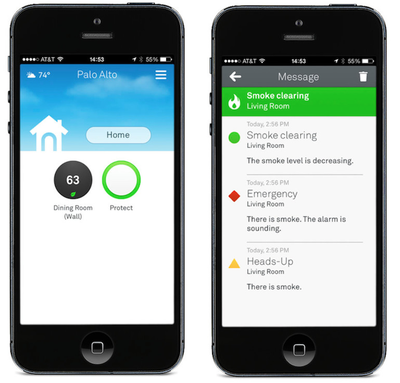
The app is getting a full redesign: since you control both Nest Protect and the Nest Learning Thermostat from one place, we updated the mobile app to fit—and work better—for both. You won’t have to turn the phone sideways to set your Thermostat to Away or view settings and things will get a lot more interesting when you connect a Nest Protect.

The interface of the app has been updated to give users all the information they need at a quick glance, including weather, the ability to change a user's status from "home" to "away" without putting the phone into landscape mode, a dynamic Nest thermostat icon and a dynamic Nest Protect icon.

The Thermostat icon turns black if a room is cooling or isn't heating and will turn orange if it's heating and blue if the AC is on. The Protect icon is green if everything in the home is OK and will turn yellow or red if there's a Heads Up or Emergency Alarm notification respectively.
nest40
The Protect section of the app allows users to see the status of all their installed Protect smoke detectors in their home on a single page listed by room name. The app also alerts users as danger escalates or subsides with messages and push notifications.

Users with dual fuel or heat pumps get new features as well, including Quiet Time to silence stand-alone humidifiers and dehumidifiers at certain times, and, if users have both Thermostat and Protect, shut down the heating system if there's a CO emergency.

The 4.0 update is being pushed to Thermostats automatically over the next couple of days. Nest notes that users should check "Technical Info" within "Settings" to see if their Thermostat has received the update. The app update is available now.

Nest Mobile is a free download on the App Store. [Direct Link]

Top Rated Comments

ebika Avatar
166 months ago
The new design is nice. Setting away is easy which is the main thing I ever use. I can't find the schedule settings though. I got a preorder in for a smoke alarm too. Love my nest.

When you touch the circle with the temperature, touch the lines in the upper right corner. It gives the schedule and other info for the thermostat. I like that they put the humidity reading right there.
Score: 4 Votes (Like | Disagree)
166 months ago
The fact that they did the smoke detector before even getting close on good thermostat operation tells you all you need to know about Nest.

If you want a real thermostat that works, buy anything other than Nest (yes, I still have mine until I can afford to replace it), unless image is all that matters, then yes, the Nest is the best looking thermostat you can buy. Just don't expect it to be easily used, with a good UI, and work reliably.

As for the smoke detector, it should be hooked to your security system and monitored by a real security company. No way would I trust Nest to monitor for fire after my experience with the Nest thermostat.
You almost sound like a plant from another company trying to downplay the Nest.

I've had nothing but good experiences with the Nest. With that said I don't really know if its the BEST out there but it's definitely not bad. It works as advertised and the developers are constantly improving the software.
Score: 3 Votes (Like | Disagree)
166 months ago
The fact that they did the smoke detector before even getting close on good thermostat operation tells you all you need to know about Nest.

If you want a real thermostat that works, buy anything other than Nest (yes, I still have mine until I can afford to replace it), unless image is all that matters, then yes, the Nest is the best looking thermostat you can buy. Just don't expect it to be easily used, with a good UI, and work reliably.
Wow, I have three in two different homes, and have had zero issues. Works as advertised and their phone support was great when I was doing the installs. Maybe you have a defective unit, or otherwise a general ID10T error. :rolleyes:
Score: 3 Votes (Like | Disagree)
bacaramac Avatar
166 months ago
The fact that they did the smoke detector before even getting close on good thermostat operation tells you all you need to know about Nest.

If you want a real thermostat that works, buy anything other than Nest (yes, I still have mine until I can afford to replace it), unless image is all that matters, then yes, the Nest is the best looking thermostat you can buy. Just don't expect it to be easily used, with a good UI, and work reliably.

As for the smoke detector, it should be hooked to your security system and monitored by a real security company. No way would I trust Nest to monitor for fire after my experience with the Nest thermostat.

I'm so confused by your comment. Nest is by far the absolutely best thermostat out there. Can it be improved, sure, but I would love to hear how Nest is the worst one out there and which model comes even close to Nest.

The app update was very easy for me to figure out, yes it has changed but I logically figured out where everything was in a matter of a few trial and error selections.
Score: 3 Votes (Like | Disagree)
Jaro65 Avatar
166 months ago
Wow, I have three in two different homes, and have had zero issues. Works as advertised and their phone support was great when I was doing the installs. Maybe you have a defective unit, or otherwise a general ID10T error. :rolleyes:
ID-10-T ... I really enjoyed that. :)
Score: 1 Votes (Like | Disagree)
166 months ago
Now if only they would update the software on the thermostat itself to allow you to adjust the ambient temp setting that would be great. Mine is constantly reading anywhere from 2 - 5 degrees warmer than it really is.
Score: 1 Votes (Like | Disagree)

Popular Stories

Four iPhone 18 Pro Colors Mock Feature

iPhone 18 Pro and iPhone Ultra: Pre-Orders and Release Date

Thursday July 30, 2026 6:12 am PDT by
Apple has yet to reveal when the iPhone 18 Pro and iPhone Ultra will be announced and released, but the dates usually follow a familiar pattern. Labor Day is September 7 this year. The last time the holiday fell on that day was in 2020, but the iPhone event that year was delayed until October due to the COVID-19 pandemic. So, the last time Labor Day was on September 7 in a normal year was in ...
Apple Event Logo

Apple Working on All-New Operating System

Wednesday July 29, 2026 11:39 am PDT by
Apple is developing an all-new operating system that is essentially a mix of tvOS, watchOS, and iOS, according to Bloomberg's Mark Gurman. In a report this week, he said the operating system will feature a grid of icons, widgets, and apps, along with customizable clock faces. The new software platform is intended for Apple's long-rumored smart home hub. With built-in facial recognition,...
Dynamic Island iPhone 18 Pro Feature

iPhone 18 Pro: Twelve Changes Coming to Apple's Next Flagship

Thursday July 30, 2026 3:43 am PDT by
We're less than two months out from the launch of Apple's premium next-generation smartphone lineup, and while we're not expecting a dramatic change in terms of functionality, there are still several enhancements rumored to be coming to the iPhone 18 Pro and iPhone 18 Pro Max. One thing worth noting is that Apple is reportedly planning a major change to its iPhone release cycle this year,...

🔗 Related Apple News & Rumors

Stay updated with the latest Apple ecosystem news and verified rumors













































