

Calibration on iPhone 5s Compass and Level Appears Incorrect - MacRumorsOpen MenuShow RoundupsShow Forums menuVisit ForumsOpen Sidebar
Skip to Content

Calibration on iPhone 5s Compass and Level Appears Incorrect

iPhone 5s devices appear to be reporting inaccurate information through the compass and inclinometer apps, reports Gizmodo and Cult of Mac.

The compass appears to be off by 8-10 degrees, while the inclinometer is consistently incorrect by 2 degrees on level services.
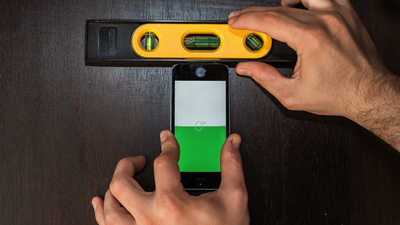
Incorrect iPhone 5s Level

iPhone 5s and level, courtesy Gizmodo

You see a pretty dramatic illustration of the difference between the iPhone 5S internal inclinometer readings and a real measurement of inclination. A simple Stanley spirit level tells the whole story: The iPhone 5S level readout in the iOS 7 compass software read 2-3 degrees off in our tests, while other users are reporting that the level is off by as many as 4-6 degrees. We performed the same test with an iPhone 5, and readout was almost perfect, indicating that hardware is at least partly the culprit. That also means a fix might not be as easy as an OTA firmware update.

There is a twenty-page thread on the MacRumors forums with readers reporting similar experiences with the compass and level on the iPhone 5s, as well as a number of threads on the Apple Support website.

It's unclear whether the motion sensors themselves are incorrect, or if it is just a calibration issue with the software interpreting the data and displaying it to the user. Apple has not commented on the problems. It's likely that a software update could fix the issues as the numbers appears to be fairly consistent across all iPhone 5s devices.

The M7 motion coprocessor is a big selling point of the iPhone 5s; it is supposed to act as a health and fitness tracker to measure steps and motion of the device with very little battery loss.


Popular Stories

iCloud iPhone 17 Pro

iPhone Users Who Pay for iCloud Storage Get Two New Perks on iOS 27

Thursday July 2, 2026 6:10 am PDT by
If you pay for certain iCloud+ storage plans beyond the 5GB that Apple offers for free, you will receive two more perks on iOS 27 at no additional cost. A summary of the two new iCloud+ perks on iOS 27:Increased daily usage limits for some new Apple Intelligence features, including image generation in the revamped Image Playground app. HomeKit Secure Video cameras receive generated video...
American Express Gold Apple Pay Feature

American Express Announces New Apple Pay Feature

Tuesday June 30, 2026 10:27 am PDT by
American Express today announced that you can now redeem Membership Rewards points when checking out with Apple Pay on the web and in apps on the iPhone and iPad. When checking out with Apple Pay on iOS 18 or iPadOS 18 or later, tap on your eligible American Express card (Platinum, Gold, Green, and others) and select the Membership Rewards points option. You can use points to cover all or...
series 10 apple watch titanium digital crown

Report: Apple Watch Redesign Coming Next Year With New Band System

Tuesday June 30, 2026 8:45 am PDT by
A "major overhaul" of the Apple Watch's design is due to arrive next year with a new system for connecting bands, according to a known Weibo leaker. In a set of recent posts, the leaker known as "Instant Digital" linked the new claim to older rumors about an "Apple Watch X" model, which was said to introduce a fresh design and break compatibility with the existing watch band system. Citing...

Top Rated Comments

Plutonius Avatar
166 months ago
It's calibrated for Apple maps :D.
Score: 50 Votes (Like | Disagree)
166 months ago
just tested mine, off by 2 degrees... Luckily i never plan on using my smartphone as a level.
Score: 32 Votes (Like | Disagree)
baryon Avatar
166 months ago
Uhm, can't you just calibrate it by double tapping the screen or something similar? That's why you have calibration, because these things tend to be off by default. How could there not be software fix? Even if the accelerometer is mounted wrong inside the device, all you need to do is add or subtract a few degrees from it via software and it should be fine.
Score: 27 Votes (Like | Disagree)
166 months ago
First world problems
List yours that aren't. Or stop whining about people.
Score: 15 Votes (Like | Disagree)
jrswizzle Avatar
166 months ago
That is how other level apps worked that I have used on the iPhone. I don't believe the one that comes with the iPhone (the compass/level app) allows you to do that. Unless there is a bigger issue.
No, it does.....set the 5S on the table and tap. It will zero out to whatever the table is at. Essentially, just take a level (like they do in this picture) - put your phone up to it and make it its level, then tap to set 0.

This isn't an issue, and honestly I'm surprised its a story on Macrumors.....unless I'm completely missing something.

The other side is that how do you know - if the level is user "settable" - that its inherently wrong? Doesn't mean something is wrong with the internal hardware.....
Score: 14 Votes (Like | Disagree)
Sodner Avatar
166 months ago
20 pages late MacRumors. Nice job!

And yes people this is a real problem. It can affect the sports/exercise functionality (M7 Chip), many games, panoramic photos, etc. The phone does not know what level is, where north is. And they are all off to varying degrees. This is not a "your holding it wrong" fix. Its a potential recall of "x" million phones type problem.

Score: 12 Votes (Like | Disagree)

🔗 Related Apple News & Rumors

Stay updated with the latest Apple ecosystem news and verified rumors








































