

Dropbox for Mac Updated with iPhoto Integration, Automatic Screenshot Uploads - MacRumorsOpen MenuShow RoundupsShow Forums menuVisit ForumsOpen Sidebar
Skip to Content

Dropbox for Mac Updated with iPhoto Integration, Automatic Screenshot Uploads

by

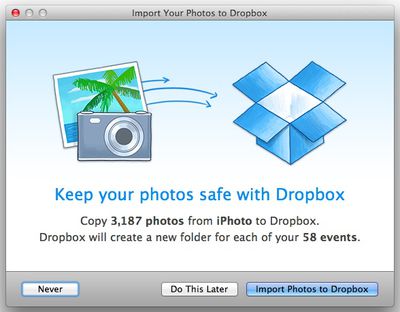
Dropbox for Mac has been updated to version 2.4.0, adding an iPhoto importer that allows iPhoto users to automatically import photos from iPhoto directly to Dropbox. The feature works with iPhoto 7.0 and later, and can be accessed via the Import tab in the Preferences menu.

With the import option turned on, photos uploaded to iPhoto will also be saved in a "Photos from iPhoto" folder within Dropbox, which also contains subfolders that correspond to events from the iPhoto library.
dropbox
In addition to an iPhoto importer, the update also includes a new feature that allows screenshots to be saved directly in Dropbox. The feature can be enabled after taking a screenshot via the standard keyboard shortcuts for the Mac (Command + Shift + 3 or Command + Shift + 4) after the updated has been installed.

Starting today, all the screenshots you take can automatically be saved straight to your Dropbox. And on top of that, Dropbox will also create a link to your screenshot and copy it to your clipboard — so your picture's instantly good to share. Whether you’re capturing screenshots of websites, favorite dog videos, or video calls with your buddy in São Paulo, now Dropbox can help keep your computer a little more organized.

While Dropbox's Camera Uploads feature allow iOS users to automatically upload screenshots in a similar fashion, screenshot-only upload functionality is unavailable. A similar solution can be achieved via the IFTTT (If This Then That) app, creating a recipe that uploads screenshots to a distinct Dropbox folder.

Dropbox for Mac can be downloaded from the Dropbox website for free.

Top Rated Comments

168 months ago
Consumers don't want Dropbox. Consumers want the benefits of iCloud seamless integration that nobody comes close to matching.

Too little too late from Dropbox.

The most insane statement I've read all day. Give me iPhoto in iCloud, then we'll talk.
Score: 12 Votes (Like | Disagree)
Parasprite Avatar
168 months ago
In addition to an iPhoto importer, the update also includes a new feature that allows screenshots to be saved directly in Dropbox.*

I think I missed the point of uploading screenshots to dropbox having any sort of utility save for niche workflows, perhaps I'm not thinking abstractly enough.


Consumers don't want Dropbox. Consumers want the benefits of iCloud seamless integration that nobody comes close to matching.

Too little too late from Dropbox.

The two services have some overlap, but honestly iCloud helps very little as far as syncing things that aren't for iOS and aren't photos.
Score: 4 Votes (Like | Disagree)
nitro912gr Avatar
168 months ago
I don't understand why dropbox changed the notification icon to require more clicks to do the same things as before...
I could do everything with one click now I need 3...

What's wrong with UI designers those days? First dropbox, then Youtube, they all try to make us to have to do more clicks to do what we did in the past.
Score: 4 Votes (Like | Disagree)
168 months ago
What's wrong with UI designers those days? First dropbox, then Youtube, they all try to make us to have to do more clicks to do what we did in the past.
In one word: advertisement! They pay "per click" ;)

----------

That's where you're wrong. As an Android user, Dropbox is ESSENTIAL to syncing my photos automatically to iPhoto.
to iPhoto? From what I understood Dropbox now exports the photos from iPhoto and puts them into a Dropbox folder (so it gets sync'ed).

There was no word that when you would place a photo into said Dropbox folder that it would automagically get imported into iPhoto - was there?

----------

Unfortunately it wants to duplicate my multiple GB of photos from iPhoto to the local Dropbox folder in order to sync them.
You mean... just as Apple does when you share your photos with Photo Stream? :confused:

----------

Consumers don't want Dropbox. Consumers want the benefits of iCloud seamless integration that nobody comes close to matching.
I want ACCESS from every damn device I own, to every damn file there is on my FILESYSTEM, with every damn APPLICATION which pleases me!

I don't want to be restricted and have my files locked in into some "flat hierarchy file bag" where only the application which created the file has access to it!

Apple fail! Dropbox win (ironically, it was exactly the announcement of iCloud storage which made me aware of Dropbox at that time ;))
Score: 3 Votes (Like | Disagree)
168 months ago
Ain't nobody got space for that!

----------

Consumers don't want Dropbox. Consumers want the benefits of iCloud seamless integration that nobody comes close to matching.

Too little too late from Dropbox.
Not I. iCloud won't work on a school computer or with any iWork that isn't brand new or with Excel or Xcode or Eclipse; that says it all. iCloud also doesn't let you host purely direct public links like the Dropbox accounts created before a certain cutoff date do, and even new accounts let you send those "shared links". Extremely useful.

However, for iPhoto, I don't see Dropbox being very useful.

----------

Unfortunately it wants to duplicate my multiple GB of photos from iPhoto to the local Dropbox folder in order to sync them. As if my hard drive wasn't full enough already. :P

That's stupid. Can't it do some kind of filesystem link?
Score: 3 Votes (Like | Disagree)
168 months ago
Unfortunately it wants to duplicate my multiple GB of photos from iPhoto to the local Dropbox folder in order to sync them. As if my hard drive wasn't full enough already. :P
Score: 3 Votes (Like | Disagree)

Popular Stories

Apple Event Logo

Apple Working on All-New Operating System

Wednesday July 29, 2026 11:39 am PDT by
Apple is developing an all-new operating system that is essentially a mix of tvOS, watchOS, and iOS, according to Bloomberg's Mark Gurman. In a report this week, he said the operating system will feature a grid of icons, widgets, and apps, along with customizable clock faces. The new software platform is intended for Apple's long-rumored smart home hub. With built-in facial recognition,...
Four iPhone 18 Pro Colors Mock Feature

iPhone 18 Pro and iPhone Ultra: Pre-Orders and Release Date

Thursday July 30, 2026 6:12 am PDT by
Apple has yet to reveal when the iPhone 18 Pro and iPhone Ultra will be announced and released, but the dates usually follow a familiar pattern. Labor Day is September 7 this year. The last time the holiday fell on that day was in 2020, but the iPhone event that year was delayed until October due to the COVID-19 pandemic. So, the last time Labor Day was on September 7 in a normal year was in ...
Dynamic Island iPhone 18 Pro Feature

iPhone 18 Pro: Twelve Changes Coming to Apple's Next Flagship

Thursday July 30, 2026 3:43 am PDT by
We're less than two months out from the launch of Apple's premium next-generation smartphone lineup, and while we're not expecting a dramatic change in terms of functionality, there are still several enhancements rumored to be coming to the iPhone 18 Pro and iPhone 18 Pro Max. One thing worth noting is that Apple is reportedly planning a major change to its iPhone release cycle this year,...

🔗 Related Apple News & Rumors

Stay updated with the latest Apple ecosystem news and verified rumors












































