

New Chat-Like OS X Email App 'Unibox' Enters Public Beta - MacRumorsOpen MenuShow RoundupsShow Forums menuVisit ForumsOpen Sidebar
Skip to Content

New Chat-Like OS X Email App 'Unibox' Enters Public Beta

by

Unibox, a new Messages-style email client that was first announced in August of 2012, is now available for download as part of a public beta test.

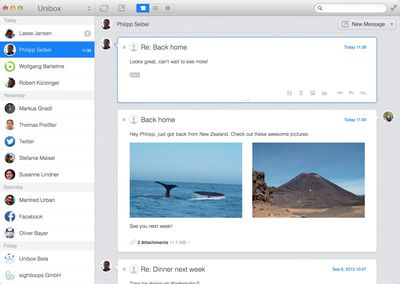
The app is designed to make email more "personal" by organizing emails into a contact-centric view. Unibox's interface is divided into two main panes, with the left side displaying contacts and the right side displaying all messages that have been received/exchanged with a particular person or website.
uniboxemail1
According to Unibox, this chat-like design significantly reduces email clutter by grouping incoming messages from contacts into a single list.

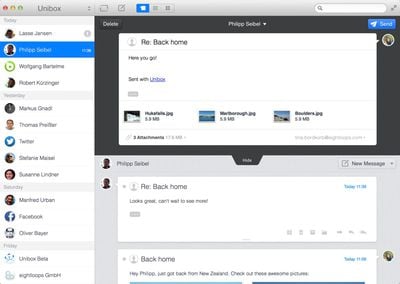
Composing emails with the app is done in a single window, which eliminates separate compose windows utilized by existing apps like Mail. All attachments sent to and received from contacts are readily available, and attached media is presented in a grid view.
unibox2
Unibox supports all IMAP accounts and works with both Mountain Lion and Mavericks. The full Mac app is expected to be released at the end of September, and ahead of release, users can sign up for the beta on the company's website. Beta will last until the Mac app debuts.


Top Rated Comments

pgiguere1 Avatar
170 months ago
Seems like a weird timing considering personnal email addresses are getting less and less used for human-to-human communication, and more and more for advertising or various automatic notifications from websites.

Of course I can't speak for everyone but it seems to me that social networks and text messages are where most human-to-human communication is done nowadays. This could have been a good concept 10 years ago.
Score: 4 Votes (Like | Disagree)
Michael Goff Avatar
170 months ago
installed and used it for 1 minute. uninstalled and got back to airmail. email shouldn't be listed by contact, but by subject. sparrow died so airmail is the new king.

Am I the only one who just uses the mail.app?

What makes airmail so much better?
Score: 3 Votes (Like | Disagree)
seamer Avatar
170 months ago
It doesn't support Exchange
Google's IMAP is detected properly

I have two accounts configured in mine, and there's no way to quickly see which mailbox I'm looking at. There's a lack of folders... And I can't drag mail from one box to another
Score: 2 Votes (Like | Disagree)
170 months ago
Does it support mail threads? Without that, we cannot really use in a business environment as emails may have multiple people involved.

Anyway, mail.app is the only email client I'm using on Mac. It works fine for me since 2007 when I started using Mac. Just the vanilla app. No plugins.
Score: 1 Votes (Like | Disagree)
170 months ago
Seems like a weird timing considering personnal email addresses are getting less and less used for human-to-human communication, and more and more for advertising or various automatic notifications from websites.

Of course I can't speak for everyone but it seems to me that social networks and text messages are where most human-to-human communication is done nowadays. This could have been a good concept 10 years ago.

Sometimes email is the right medium, sometimes not. I have conversations with people across various media (email, texts, Facebook messages, the occasional Twitter DM).

What I'd like is a single app or system or something that can work across multiple streams so that you click on a contact and see everything from that person, regardless of how it was sent.
Score: 1 Votes (Like | Disagree)
170 months ago
Looks great for those with at most ~10-20 contacts.

It groups things by day first, then by contact. So you'll see all the emails that you received from John The Boss today, then the ones you received from him yesterday, etc. I suppose if you receive 500 emails from 200 different people each day, then this isn't the organizational system for you. But for those who work on small teams, I can definitely see the upside.

When I'm working on a project, I find I'm paying closest attention to the people directly involved, while others remain in the periphery. So I enjoy knowing right off the bat that I've received 5 emails from my boss and 3 emails from the Assistant Director. It's a lot easier than trying to read back over endless threads of text.

But I also need to file emails accordingly, beyond just the sender. Like if something is a receipt, it needs to go under purchasing, regardless of the sender. After using the program this morning, I didn't see an obvious way to do that. I also found I have to right click each time I want to delete a message (pressing the Delete key won't do it.) And if it's one thing busy office workers hate, it's extra clicks.

Overall, the idea has significant upside, but the execution isn't 100% there yet.

Score: 1 Votes (Like | Disagree)

Popular Stories

Home Hub Command Center with Dome Base Feature

Apple Smart Home Hub to Feature iMac G4-Style Design

Wednesday September 30, 2026 4:36 am PDT by
Apple's long-rumored smart home hub will have an iMac G4-style design and a host of unique features, Bloomberg's Mark Gurman reports. The smart home hub is said to feature a square 6-inch display, with variants that can be placed on a countertop or mounted on a wall. It features a single FaceTime camera on the front, with microphones and speakers in its connected base. Gurman described the...
HomePod minis on gradient feature 1 1

Three New Apple Smart Home Products Coming on October 13

Wednesday September 30, 2026 4:04 am PDT by
Apple plans to introduce a series of new smart home products on Tuesday, October 13, according to Bloomberg's Mark Gurman. Apple reportedly plans to debut its long-awaited smart home hub device, a new HomePod mini, and a new Apple TV on the date. The new HomePod mini and Apple TV are set to retain their existing designs, but tout faster chips to support Siri AI. The new HomePod mini will...
Apple TV Sans Remote Feature

New Apple TV 4K Leaked

Friday September 25, 2026 8:16 am PDT by
MacRumors contributor Aaron Perris has uncovered an image file from Apple for an unreleased Apple TV 4K, suggesting that a new model will finally be released soon. The image is specifically for an "Apple TV 4K (4th generation)" model. Apple TV 4K (4th generation) image (on a gradient) The image reveals that the Apple TV will have the same external design as the current model, with all of its...
Latest Stories
Apple TV Just Updated Its Selection of 'Bonus' Movies
3 minutes ago
iPhone 18 Pro Colors Buyer's Guide: Which Should You Choose?
10 minutes ago
Early Prime Big Deal Days: Best Discounts on Accessories, TVs, and More at Amazon
32 minutes ago
MacBook Pro With OLED Touch Screen Rumored to Launch in October or November
2 hours ago
Apple's All-New Home Hub Rumored to Launch in These Four Colors
2 hours ago
iPhone 18 Pro Aperture Control Goes Fully Manual in Halide 3.2
4 hours ago
Apple Stores Receive 'Do Not Open' Boxes Ahead of Smart Home Products Launch
4 hours ago
iPhone 18 Pro Sales Jump in China Ahead of iPhone Duo Launch
5 hours ago
Apple TV Still Down for Some Users Following Apple Services Outage
5 hours ago
PSA: Apple Mail on Mac May Stop Syncing Microsoft 365 Accounts Today
6 hours ago
Apple's Smart Home Hub: Everything We Know So Far
16 hours ago
Apple's Home Hub Borrows From the iPhone Duo's StandBy Mode
17 hours ago
Apple Invites App Updated With Three New Features
21 hours ago
Apple Event on October 13?
22 hours ago
Apple Watch SE 3 vs. Series 12 Buyer's Guide: Which Should You Buy?
1 day ago
iPad Mini 8 to Offer These 10 New Features
1 day ago
DoorDash Unveils AI Food Ordering Through Apple's Messages App
1 day ago
Amazon Takes Up to $150 Off Select M5 MacBook Air Models
1 day ago
Apple Still Plans to Release a New Full-Sized HomePod
1 day ago
Apple Working to Expand HomeKit
1 day ago
Apple Smart Home Hub to Feature iMac G4-Style Design
1 day ago
Three New Apple Smart Home Products Coming on October 13
1 day ago
Apple Pay Now Available in India With Axis Bank Cards
2 days ago
OpenAI Launches Always-On 'Dots' Agents to Rival Meta's Muse
2 days ago
AirPods 5 Teardown: Batteries Removable, Case Still Tough
2 days ago
iPhone 18 Pro Owners Complain of Speaker Crackling or Popping
2 days ago
You Can 'Get Ready' for iPhone Duo Pre-Orders on October 12
2 days ago
Apple Pay Reportedly Launching in India Today
2 days ago
Apple Releases New AirPods Beta Firmware
2 days ago
Apple Shares New Guide for Using iOS 27 Parental Controls
2 days ago

🔗 Related Apple News & Rumors

Stay updated with the latest Apple ecosystem news and verified rumors






































