Apple Releases OS X Mountain Lion Developer Preview 3 - MacRumorsOpen MenuShow RoundupsShow Forums menuVisit ForumsOpen Sidebar
Skip to Content

Apple Releases OS X Mountain Lion Developer Preview 3

Just over a month after the arrival of the previous build, Apple today seeded registered members of the Mac Developer Program with the third developer preview version of OS X Mountain Lion.

mountain lion dev 3
The new version arrives as Build 12A178q, up from the earlier 12A154q version. Changes included in the new version have yet to be discovered, but those with access to the build will undoubtedly be searching for Apple's latest tweaks as the company continues to work on the next-generation operating system.

Apple does list a number of known issues with the current build:

- On systems with FileVault enabled, canceling the restart to the Mountain Lion Developer Preview 3 Installer may leave your system unable to present a password dialog at boot time. You can repair the problem by holding down command-R to boot to the Recovery OS and then using Disk Utility to unlock and Repair your volume.
- Installing OS X 10.8 over 10.7.2 or earlier with FileVault turned on may fail
- Pre-Lion FileVault user accounts are not supported in this Developer Preview
- Some Apple menu items such as Restart may not work when a sandboxed app is in the foreground
- iTunes no longer syncs Notes
- Mail's photo browser cannot access the iPhoto library
- Back to My Mac doesn't work for the first 5 minutes after rebooting
- DVD Player may not launch after inserting a DVD on some systems
- Most help topics are unavailable in this Developer Preview
- In the Recovery HD:
     - Some icons may be missing
     - Network Utility's Lookup pane does not work
     - Time Machine restoration via a AFP share does not work
     - Restoring from a Time Machine backup via AFP does not work
- Migration from a Time Machine backup that excludes paths such as /System may yield an unusable system
- Brightness settings may change unexpectedly after reboot
- Display brightness may be dim after sleep or reboot
- If Mail is hidden at logout time, it may not be correctly relaunched during a subsequent login but will appear to be running
- Java applets may not work in Safari
- QuickTime screen recordings may produce corrupted videos or cause an exception when run on machines with NVDIA graphics

Apple also appears to be continuing to put a fair amount of effort into getting Game Center up and running on OS X with the new build.

OS X Mountain Lion is Apple's next major operating system version and is scheduled for release in "late summer". The release will offer greater integration with iCloud, as well as a number of new feature including some drawn from iOS.


Popular Stories

American Express Gold Apple Pay Feature

American Express Announces New Apple Pay Feature

Tuesday June 30, 2026 10:27 am PDT by
American Express today announced that you can now redeem Membership Rewards points when checking out with Apple Pay on the web and in apps on the iPhone and iPad. When checking out with Apple Pay on iOS 18 or iPadOS 18 or later, tap on your eligible American Express card (Platinum, Gold, Green, and others) and select the Membership Rewards points option. You can use points to cover all or...

Apple Acquires Award Winning App Play Feature

Apple Acquires Award-Winning App 'Play'

Monday June 29, 2026 7:39 am PDT by
In February, Apple notified the European Commission that it would be acquiring certain assets from and have the right to hire certain employees from Rabbit 3 Times, the company behind the award-winning app design tool Play. The notification was published on the European Commission's website this week, following a four-month waiting period. Play was a Mac and iPhone app that allowed designers ...
series 10 apple watch titanium digital crown

Report: Apple Watch Redesign Coming Next Year With New Band System

Tuesday June 30, 2026 8:45 am PDT by
A "major overhaul" of the Apple Watch's design is due to arrive next year with a new system for connecting bands, according to a known Weibo leaker. In a set of recent posts, the leaker known as "Instant Digital" linked the new claim to older rumors about an "Apple Watch X" model, which was said to introduce a fresh design and break compatibility with the existing watch band system. Citing...

Top Rated Comments

wikus Avatar
185 months ago
Mission Control needs refinement.

Please give us an option in system preferences to turn OFF grouping of windows when Mission Control is activated. A simple OPTION would satisfy so many people and would have ZERO effect on all those that negate this request.

If you have 3 windows open in Illustrator and another 3 open in Photoshop and you want to drag an object from illustrator to photoshop, you need to do the following;

1) Click and hold the desired object in Illustrator
2) Hit a hot corner to activate mission control (show all windows, grouped by app)
3) Hover and hold over the group of windows in Photoshop
4) Hit another hot corner to show all windows from within Photoshop
5) Hover and hold over desired open document in Photoshop
6) Let go of the object and it gets pasted in

STEPS 3 AND 4 RIGHT THERE ARE WHY MISSION CONTROL IS A FAILURE.

Expose allowed everyone to go DIRECTLY into the desired open document window of any specific application, bypassing steps three and four. Lion DID NOT make things easier, it made workflow SLOWER.
Score: 29 Votes (Like | Disagree)
Consultant Avatar
185 months ago
Mission Control needs refinement.

Please give us an option in system preferences to turn OFF grouping of windows when Mission Control is activated. A simple OPTION would satisfy so many people and would have ZERO effect on all those that negate this request.

Write to apple.com/feedback
Score: 26 Votes (Like | Disagree)
wikus Avatar
185 months ago
Nobody likes nazies. Unless they are zombies as well.

You spelled 'Nazis' wrong.
Score: 15 Votes (Like | Disagree)
wikus Avatar
185 months ago
Just to be more accurate, it would have a (negligible, but) non-zero effect on those who negate the request. After all, it would be an additional checkbox for eyes to scan over, it takes up physical pixels, etc.

If it were truly zero negative effect, then all software and operating system problems could be solved by adding more checkboxes in the settings. But who wants to use software that has really complicated settings pages?
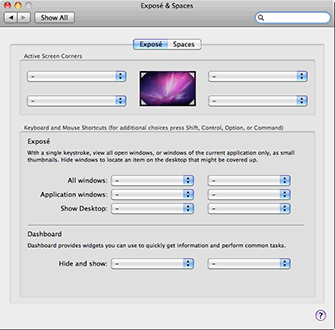
A single checkbox in System Preferences isnt somehow going to make things any different. Here's how it looks like in OS X Lion currently;

apple releases os x mountain lion developer preview 3 image

Heres how it is in Snow Leopard;

apple releases os x mountain lion developer preview 3 image

Anyone that knows how to use System Preferences wont find the single extra checkmark any more confusing. The options in OS X change regularly anyway, but Apple has failed miserably to give multitaskers some proper options with Mission Control, that is to say, Expose was fantastic, seeing ALL my open windows ALL AT ONCE by hitting a hot corner gave me the ability to quickly go from Illustrator to Photoshop without hitting any keys or using a trackpad and, this is the big one; without releasing any objects i've selected in Illustrator. Direct drag and drop via Expose is now GONE.
Score: 13 Votes (Like | Disagree)
afin Avatar
185 months ago
I hope they take as much time as they need to smooth things out.
Score: 12 Votes (Like | Disagree)
185 months ago
Sorry to be the Grammar Nazi, but it should be a "number of new features."

Nobody likes nazies. Unless they are zombies as well.
Score: 11 Votes (Like | Disagree)

🔗 Related Apple News & Rumors

Stay updated with the latest Apple ecosystem news and verified rumors