

Since Lion's release, we've been collecting tips on reverting changes found in Lion back to behavior found in Snow Leopard. Now some might argue its better to get used to the stock installation, but if that's not you, here are the tips we've seen.
scroll1
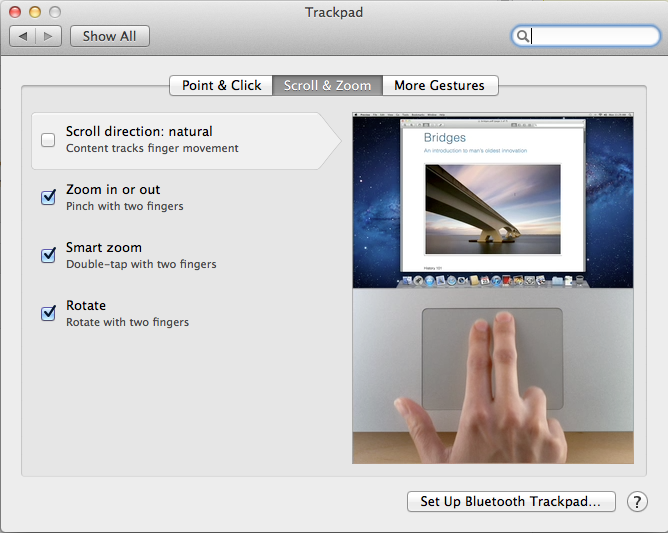
Natural Scroll: This change seems to have generated the most outcry. In Lion, Apple has reversed the normal scrolling direction for trackpads and scroll wheels. In the past, the metaphor has been that swiping down has caused the page to scroll up. Now, swiping down means scrolling down. It takes a few days to get used to, but if you can't there's an option to revert back.

Key Repeat: @mikeindustries (requires Terminal):

To turn off Lion's stupid ban on key repeating, quit apps and type "defaults write -g ApplePressAndHoldEnabled -bool false" in Terminal.

New Window Animations: @tomasf (requires Terminal):

Want to turn off window opening animations in Lion? defaults write NSGlobalDomain NSAutomaticWindowAnimationsEnabled -bool NO

Don't Save: @tomasf (requires Terminal):

Restore ⌘D to mean "Don't Save" in Lion! defaults write NSGlobalDomain NSSavePanelStandardDesktopShortcutOnly -bool YES

Resume: Disable resume in Lion.

Spaces: Assigning apps to one space or all spaces.
classic mail
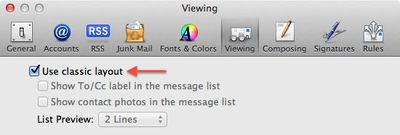
Classic Mail: Lion's Mail takes on a distinct iOS look, but the classic Mac OS X Mail look is available through a checkbox preference in Mail.

Front Row: Mad Hatter has instructions on how to re-enable FrontRow on Lion, though we've heard some mixed results about it working. - Use at your own risk, we've heard it has caused problems.

LimeiBook86 posts some instructions which duplicate ones we have shown here, but also includes restoring Finder Window's Path and Status Bar as well as turning off Dashboard as a space.


Top Rated Comments

Tastydirt Avatar
190 months ago
Anyone figure out how to make the mouse wake the computer from sleep? This is a major annoyance for me.

Just requires a click instead of mouse movement for me, IMO this is much better as it greatly reduces the chance of accidentally waking your Mac up.
Score: 23 Votes (Like | Disagree)
ChrisH3677 Avatar
190 months ago
The most stupidest things that i ever hear is articles "how make new thing work like old". Apple always was company with advanced technology. If Apple change something they always know why and because.

The most stupidest things that i ever hear is people who blindly accept everything Apple does as the best way.

Just because Apple "know why and because" they've made a change, doesn't make it right. And certainly not right for everyone.

Check your EULA. There is no condition of owning Apple products that you must agree with and like everything Apple does.
Score: 19 Votes (Like | Disagree)
kolax Avatar
190 months ago
"Turn off Lion's stupid ban on key repeating"?? I you kidding me?? :eek: This is the one of the small and useful function, than F.. Windows will never had.

It's a reasonable thing that people would want to turn again.

"Disable resume in Lion"! :eek: Sure! Thank Steve, that you add disable function for your new great OS, now all people around the world can turn it off!! Btw who can tell me how to disable stupidest touchscreen on my iPad?

Resume might be useful to some, but I don't want my last used things to reappear when I re-open that app. Might have personal stuff there, or open a document that you don't want to work on, so you end up having to close it anyway.

So, dear Mac users, if you are true :apple: user remember - all new functions is always look strange (because they new), but after some time, you will accustomed and THIS new functions became a great canyon between your Mac and others pfsht.

I'm not a 'true' Apple user by your definition, but I'm a power user. And small changes like ones described here can really interrupt my workflow. Whether I have to "re-learn" isn't always the case, I've got my workflow adapted to how previous OS X versions worked. Lion has changed a lot of that, some for the better, some of the worse.
Score: 17 Votes (Like | Disagree)
GSPice Avatar
190 months ago
Here's an idea, rather than make Lion act like Snow Leopard. Stick to Snow Leopard.
Answers like this don't require any critical thinking or intellectual honesty. It's the kind of stuff people skip over in google's search results.
Score: 14 Votes (Like | Disagree)
AAPLaday Avatar
190 months ago
Some people really don't like change, now do they?

Only if its for the better ;)
Score: 13 Votes (Like | Disagree)
John.B Avatar
190 months ago
If you have slow Mac don't install Lion! Or upgrade the Mac
Maybe you didn't get the memo, but there are seriously cool security enhancements in Lion as well as that whole iCloud thing coming in iOS 5 in September, not to mention document revisions and a very cool new implementation of FileVault. Just to name a few.

I'll never understand people who insist on dictating how others should use their computers... :rolleyes:
Score: 12 Votes (Like | Disagree)

Popular Stories

Aston Martin CarPlay Ultra Screen

Apple's CarPlay Ultra to Expand to These Vehicle Brands Later This Year

Sunday February 1, 2026 10:08 am PST by
Last year, Apple launched CarPlay Ultra, the long-awaited next-generation version of its CarPlay software system for vehicles. Nearly nine months later, CarPlay Ultra is still limited to Aston Martin's latest luxury vehicles, but that should change fairly soon. In May 2025, Apple said many other vehicle brands planned to offer CarPlay Ultra, including Hyundai, Kia, and Genesis. In his Powe...
Apple Logo Black

Apple's Next Launch is 'Imminent'

Sunday February 1, 2026 12:31 pm PST by
The calendar has turned to February, and a new report indicates that Apple's next product launch is "imminent," in the form of new MacBook Pro models. "All signs point to an imminent launch of next-generation MacBook Pros that retain the current form factor but deliver faster chips," Bloomberg's Mark Gurman said on Sunday. "I'm told the new models — code-named J714 and J716 — are slated...
Apple MacBook Pro M4 hero

New MacBook Pros Reportedly Launching Alongside macOS 26.3

Sunday February 1, 2026 5:42 am PST by
Apple is planning to launch new MacBook Pro models with M5 Pro and M5 Max chips alongside macOS 26.3, according to Bloomberg's Mark Gurman. "Apple's faster MacBook Pros are planned for the macOS 26.3 release cycle," wrote Gurman, in his Power On newsletter today. "I'm told the new models — code-named J714 and J716 — are slated for the macOS 26.3 software cycle, which runs from...
iOS 26

iOS 26.3 and iOS 26.4 Will Add These New Features to Your iPhone

Tuesday February 3, 2026 7:47 am PST by
We are still waiting for the iOS 26.3 Release Candidate to come out, so the first iOS 26.4 beta is likely still at least a week or two away. Following beta testing, iOS 26.4 will likely be released to the general public in March or April. Below, we have recapped known or rumored iOS 26.3 and iOS 26.4 features so far. iOS 26.3 iPhone to Android Transfer Tool iOS 26.3 makes it easier...
14 inch MacBook Pro Keyboard

Apple Changes How You Order a Mac

Saturday January 31, 2026 10:51 am PST by
Apple recently updated its online store with a new ordering process for Macs, including the MacBook Air, MacBook Pro, iMac, Mac mini, Mac Studio, and Mac Pro. There used to be a handful of standard configurations available for each Mac, but now you must configure a Mac entirely from scratch on a feature-by-feature basis. In other words, ordering a new Mac now works much like ordering an...














