

Lion: Assigning Apps to All Desktops in Mission Control - MacRumorsOpen MenuShow RoundupsShow Forums menuVisit ForumsOpen Sidebar
Skip to Content

Lion: Assigning Apps to All Desktops in Mission Control

by

alldesktops
With the introduction of Lion, Apple moved -- or removed entirely -- numerous options and settings.

For more advanced users, the old Expose & Spaces preference panel included controls to adjust what "Spaces" -- now called Desktops -- apps would appear in. For example, I had my Mail program set to display in Space 2, while iTunes would only appear in Space 4. With Expose & Spaces gone, it was tricky to figure out how to adjust where apps would appear.

It's easy, once you know where to look.

Update: Make sure you have multiple desktops open before doing this or else you won't see anything. Enter Mission Control. In the top-right of the screen is a button to create a new desktop. Click that button and create as many desktops as you wish. To delete a desktop space, option-click one of the desktops.

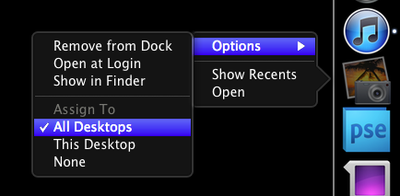
Now, simply right-click (control-click, two-finger-click) on an application icon in the Dock. In the Options menu, you'll see three choices related to Spaces:

- Assign To All Desktops
- This Desktop
- None

Play around with the choices until you get a feel for how they work. I put my instant messaging program into "All Desktops" so I can chat from wherever I'm working at the moment. Safari goes in the first desktop and my RSS reader stays in the second. With the advent of full-screen apps, I no longer need dedicated spaces for Mail and iTunes. They simply go full-screen and it accomplishes the same task.

Thanks Kbmb for the tip about needing multiple desktops!

Top Rated Comments

HackerJL Avatar
198 months ago
I used spaces with my mac pro and 4 Monitors. Now, since full screen apps dont allow for multiple monitors, ill never use that feature. The entire full-screen system is broken and not well though out in regards to more than one monitor. I understand the awesomeness of it if you just have one monitor, but with 2 or 4, a full screen app is a waste. Hope they fix that.

</oldnews>
Score: 4 Votes (Like | Disagree)
bushido Avatar
198 months ago
why can't we just simply drag and drop the desktops in mission control to rearrange them, is it too much to ask or am i missing something. do we really have to close all the apps if we want to get them in a different order?

like ... lets say i have safari open on my main desktop, i open iMail and it moves to the 2nd, itunes moves to the 3rd but now i open safari in fullscreen mode and it jumps behind the other two. in order to get it right after my main desktop i have to close iMail and iTunes in order for Safari to move to the 2nd spot???
Score: 3 Votes (Like | Disagree)
198 months ago
As a real Professional Mac user since 1987 it pisses me off that Apple is only thinking of the consumer market and forgetting some of us are Pro's.
After upgrading (Really?) to Lion, I open Illustrator CS5 and it keeps crashing. What does a Power User do? Look for the com.adobe.illustrator preference in the Home folder... But where the hell is it? Like a consumer is going to mess with the folder and screw up the whole OS... Yeah, right... :roll eyes:

As a "real professional Mac user since 1987" you should have known better than to upgrade to a dot-zero OS on release day when you rely on third party applications to get your job done. There are always compatibility issues with pro apps after a major OS upgrade, there is no reason this should have been a surprise for you.

It bothers me that some features are set by default. Like the stupid move content in the direction of the finger... Apple ass-umes that you have a mac book and a track pad or a magic mouse. I don't... Luckily I was able to turn the thing off...

I'm sure they'll remember to bury new features where no one can find them in the next OS upgrade. It really makes no sense to make them accessible by default. There might be someone out there using old equipment who could be grievously inconvenienced by having to make 4 clicks on their mouse.

I also have 2 monitors. Most things are designed for just one. Again, thinking of iMacs and Mac Books but then they want to sell u an overpriced Mac Display but the dual monitor support is crippled.

I use two monitors as well (non-Apple monitors on a Mac Mini), I also have a MacBook Pro that I use on its own. Full screen apps are awesome on the MacBook Pro. Swiping back and forth from one app to another is remarkably efficient on a laptop, no doubt about it.

On my desktop, with dual monitors, I don't use the full screen app feature. It doesn't make sense in that scenario. Instead, I open up Mission Control and assign multiple desktops. Each desktop supports both monitors. I can then swipe back and forth between desktops running multiple apps on my trackpad.

This is again, remarkably efficient. Anyone who uses their dual screen Mac for multitasking between apps will love it. Yes, it is designed with the trackpad in mind--which is available for your desktop, and will work alongside your mouse. The preference for multitouch trackpads was made quite evident in all of the pre-launch publicity. If you refuse to use one, then you won't see these benefits. That's your decision to make.

I was really looking forward to AutoSave. Great, but it only works with Apple Apps. Doesn't work with any Adobe or non-Apple stuff... Bad, and sort of false advertising.

False advertising? When did Apple make the claim that autosave would work out of the "box" with anything other than their apps? The API's were made available for all developers to use. If Adobe or others haven't taken advantage of that yet, you surely can't blame Apple. Considering that Adobe hasn't yet updated their very popular (on the Mac) pro apps to support Lion at all, this shouldn't be much of a surprise. Adobe is a software company. It's their job to write and update their applications as needed, which they have apparently not done yet.

I like some of the features but others are just useless for people like me, who use the computer to work... :confused:

None of the features are "useless" for people who use their computer to work. There are lots of different ways to do work on computers, and lots of different computers to do work on. You are simply frustrated because you updated your OS before your work apps were updated and are venting that frustration in the wrong direction.

For your workflow, using dual screens, you're right that full-screen apps don't do much of anything for you. Instead of trying to shoe-horn that feature into your workflow (which it was clearly not designed for) try taking advantage of some of the other new things. Multiple desktops in Mission Control is phenomenal. Yes, you'll need a trackpad to really benefit from it, but I promise--once you try it, you'll never go back.

I'm personally frustrated right now because we use Pro Tools on our studio Mac Pro. There's no way it's ready to work with Lion yet. Being able to swipe from one desktop running PT to another running our email, calendars and web browser, to another running our iWork apps will be a huge help for us. Being able to Airdrop files to artists MacBooks in the studio will be a huge help as well. Unfortunately, we have to wait to use Lion at work. Fortunately I don't have those issues for my home office setup or my laptop.
Score: 2 Votes (Like | Disagree)
InnerSongs Avatar
198 months ago
I find it annoying that you lost the functionality of dragging windows to the edge of the desktop to change which space they were in. That was a nice feature.

Also, if you close desktops in mission control to "clean up" you lose the settings you have assigned to apps. In other words, it won't open a non existent desktop for your app.

You can do that in the following way:

On your current screen have the App or Window you want to move.
Go to Mission Control mode.
Select and hold on the App or Window you want to move and drag it to the Desktop of choice.
Score: 2 Votes (Like | Disagree)
198 months ago
I find it annoying that you lost the functionality of dragging windows to the edge of the desktop to change which space they were in. That was a nice feature.

Also, if you close desktops in mission control to "clean up" you lose the settings you have assigned to apps. In other words, it won't open a non existent desktop for your app.
Score: 2 Votes (Like | Disagree)
198 months ago
You have to have the desktops already open before you can add anything to it. Go create a desktop, THEN follow these steps.
Score: 2 Votes (Like | Disagree)

Popular Stories

Home Hub Command Center with Dome Base Feature

Apple Smart Home Hub to Feature iMac G4-Style Design

Wednesday September 30, 2026 4:36 am PDT by
Apple's long-rumored smart home hub will have an iMac G4-style design and a host of unique features, Bloomberg's Mark Gurman reports. The smart home hub is said to feature a square 6-inch display, with variants that can be placed on a countertop or mounted on a wall. It features a single FaceTime camera on the front, with microphones and speakers in its connected base. Gurman described the...
HomePod minis on gradient feature 1 1

Three New Apple Smart Home Products Coming on October 13

Wednesday September 30, 2026 4:04 am PDT by
Apple plans to introduce a series of new smart home products on Tuesday, October 13, according to Bloomberg's Mark Gurman. Apple reportedly plans to debut its long-awaited smart home hub device, a new HomePod mini, and a new Apple TV on the date. The new HomePod mini and Apple TV are set to retain their existing designs, but tout faster chips to support Siri AI. The new HomePod mini will...
Apple TV Sans Remote Feature

New Apple TV 4K Leaked

Friday September 25, 2026 8:16 am PDT by
MacRumors contributor Aaron Perris has uncovered an image file from Apple for an unreleased Apple TV 4K, suggesting that a new model will finally be released soon. The image is specifically for an "Apple TV 4K (4th generation)" model. Apple TV 4K (4th generation) image (on a gradient) The image reveals that the Apple TV will have the same external design as the current model, with all of its...
Latest Stories
MacBook Pro With OLED Touch Screen Rumored to Launch in October or November
16 minutes ago
Apple's All-New Home Hub Rumored to Launch in These Four Colors
52 minutes ago
iPhone 18 Pro Aperture Control Goes Fully Manual in Halide 3.2
2 hours ago
Apple Stores Receive 'Do Not Open' Boxes Ahead of Smart Home Products Launch
3 hours ago
iPhone 18 Pro Sales Jump in China Ahead of iPhone Duo Launch
3 hours ago
Apple TV Still Down for Some Users Following Apple Services Outage
4 hours ago
PSA: Apple Mail on Mac May Stop Syncing Microsoft 365 Accounts Today
4 hours ago
Apple's Smart Home Hub: Everything We Know So Far
15 hours ago
Apple's Home Hub Borrows From the iPhone Duo's StandBy Mode
16 hours ago
Apple Invites App Updated With Three New Features
20 hours ago
Apple Event on October 13?
21 hours ago
Apple Watch SE 3 vs. Series 12 Buyer's Guide: Which Should You Buy?
23 hours ago
iPad Mini 8 to Offer These 10 New Features
23 hours ago
DoorDash Unveils AI Food Ordering Through Apple's Messages App
1 day ago
Amazon Takes Up to $150 Off Select M5 MacBook Air Models
1 day ago
Apple Still Plans to Release a New Full-Sized HomePod
1 day ago
Apple Working to Expand HomeKit
1 day ago
Apple Smart Home Hub to Feature iMac G4-Style Design
1 day ago
Three New Apple Smart Home Products Coming on October 13
1 day ago
Apple Pay Now Available in India With Axis Bank Cards
2 days ago
OpenAI Launches Always-On 'Dots' Agents to Rival Meta's Muse
2 days ago
AirPods 5 Teardown: Batteries Removable, Case Still Tough
2 days ago
iPhone 18 Pro Owners Complain of Speaker Crackling or Popping
2 days ago
You Can 'Get Ready' for iPhone Duo Pre-Orders on October 12
2 days ago
Apple Pay Reportedly Launching in India Today
2 days ago
Apple Releases New AirPods Beta Firmware
2 days ago
Apple Shares New Guide for Using iOS 27 Parental Controls
2 days ago
Apple Creator Studio and Final Cut Camera Get New Features
2 days ago
Apple Explains Why It Removed ICE Tracking Apps Last Year
2 days ago
Amazon Expands $779.99 Apple Watch Ultra 4 Deal to More Models
2 days ago

🔗 Related Apple News & Rumors

Stay updated with the latest Apple ecosystem news and verified rumors











































