How to Replace the iPhone Enclosure - MacRumorsOpen MenuShow RoundupsShow Forums menuVisit ForumsOpen Sidebar
Skip to Content

How to Replace the iPhone Enclosure

by

Matt McK took the time to write up this detailed step-by-step guide on how to replace the back casing of the iPhone with a black one. His tutorial follows...

Ever since the iPhone was originally announced I've always wished it was black.

When i picked one up the first weekend they were released I even thought about powdercoating my back to make it black. Luckily, CNN.cn came out with replacement silver and black metal housings to save me the trouble. Well, not entirely, as I'm sure many people have seen already in the earlier thread how the results look, but no where offers a "how-to "do it!

There are a handful of sites that show how to take the iPhone apart, but no one actually shows how to remove all the delicate pieces from the rear housing. I've swapped housings on a number of different phones, but have never run into one as complicated and delicate as the iPhone.

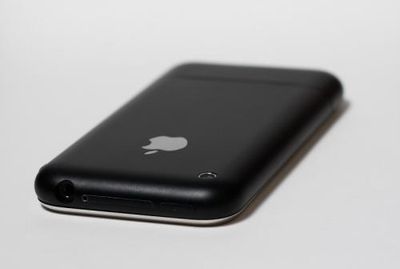
So everyone doesn't ruin their new toy, I'll try to walk you through the process here. I'm going to jump right into the housing assuming that you've already taken it off. If you don't know how to do that, google search and read one of the half dozen sites that show you how (Youtube video). This is the end result:
IMG 4449 vi 500
Parts you will need:

- new housing
- super tiny philips screwdriver. (The one I found at Ace hardware didn't even have a number on it. All I know is that '0' was not small enough.)
- small flat head screwdriver
- adhesive remover
- super glue/adhesive
- pen/paper
- patience!

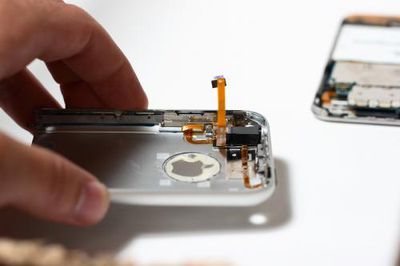
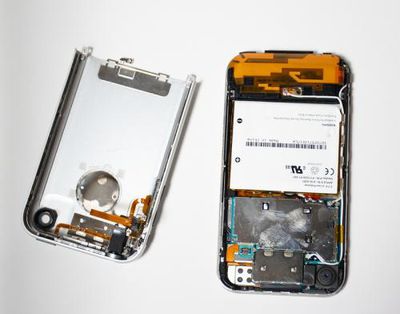
Once you get the back off you'll be looking at this:
IMG 4423 vi 500

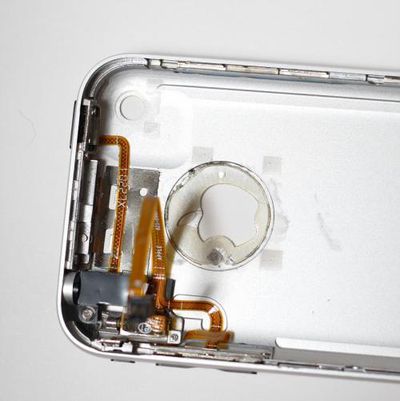
Note the location of screws and where things are glued to. I would suggest labeling all the tiny screws so you know exactly where they go because they are NOT all the same size. I took a lot of pictures throughout the process so i could reference exactly where everything went when i was ready to put it all back together.
IMG 4427 vi 500

IMG 4426 vi 500

IMG 4428 vi 500

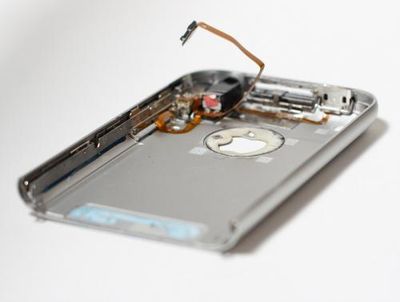
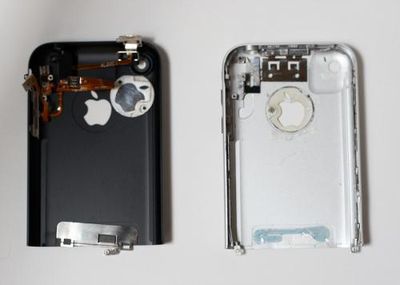
Once you remove all the screws and electronic components you'll be left with the metal skeleton of the original housing. Quite honestly, this is the hardest part about the swap.
IMG 4431 vi 500

The skeleton is glued on by some crazy hard cement type glue. I couldn't seem to find anything to take it off so i finally went to Home Depot and picked up the strongest adhesive remover i could fine. This one removes concrete and flooring so i thought it'd do the trick!

IMG 4439 vi 300

Next, pour the solvent on the skeleton ensuring you get it in all the cracks. Let it sit for about 20 -30 minutes. After it's done its job and using the smallest flat blade screwdirver you have slowly pry away the skeleton. Be careful as these parts are extremely brittle. I cracked quite a few parts of it before i got this solvent and realized the 'proper' way to do it.

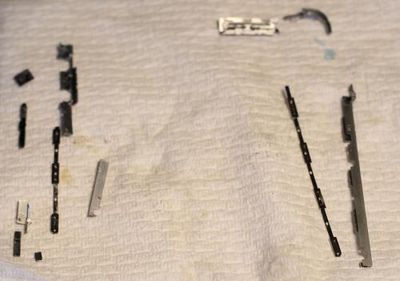
When you're finished you're left with this:
IMG 4440 vi 500

Actually, i think there are a few pieces missing from that pic, but you get the idea.

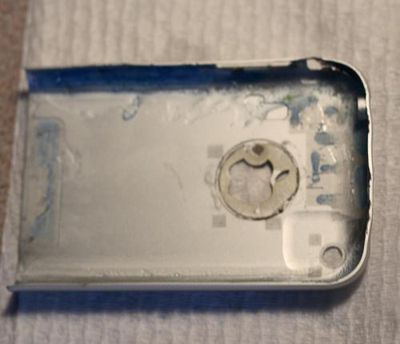
The housing will then be stripped bare with nothing left on it:
IMG 4441 vi 500

As you can see, before I went the "super strong solvent" route, I tried prying the crap out of the parts which bent a number of points of my original housing. No turning back now!

Once everything is taken apart, cleaned, and dried, it's time to put it back together. I referenced the photos i took earlier to ensure everything was put back in the proper place. i used superglue, but you could really use anything you wanted to hold everything in place. If you've gotten this far, you should realize how to put it back together.
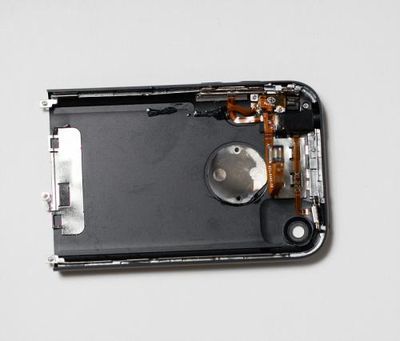
IMG 4447 vi 500

Then it's simply a matter of putting the housing back on the phone and... Voila! An all black iPhone. For the SIM card cover i sprayed SEM trim black paint so it matched the housing.
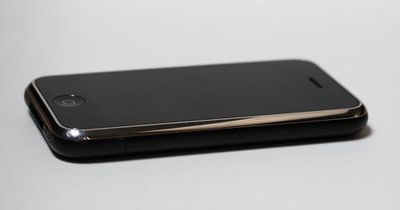
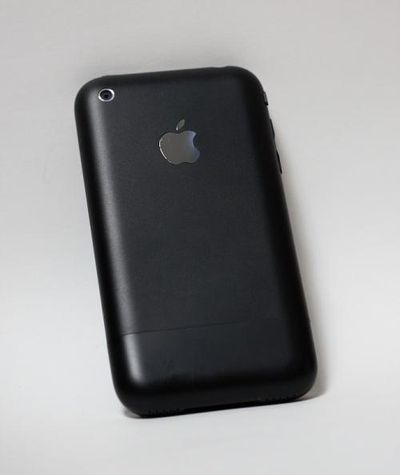
IMG 4449 vi 500

IMG 4450 vi 500

IMG 4460 vi 500

Just a few of the many... out with the old, in with the new.
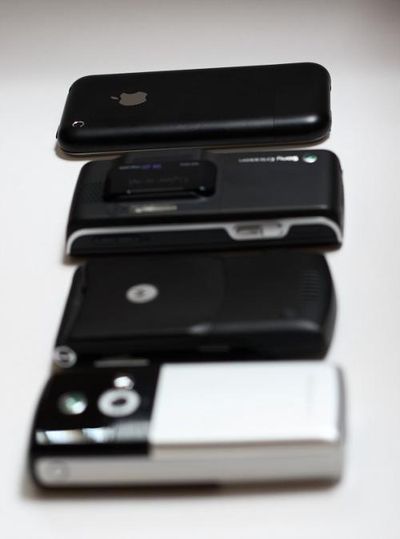
IMG 4469 vi 500

In Hexproject's thread he mentions it took him 3 hours and people balked at him thinking it should only take 30 minutes. Those people have no idea what they're talking about. I spanned this out over two days before/after work and finals. I'm sure it took me close to 3 hours as well. Plus, I had to run back and forth a few times to get the right parts.

The end result is just what i was looking for! I did, however, mess up one part and that was the silent/ring switch. I must not have noted which position it was on when i took it all apart and now it's stuck on vibrate! Frustrating, but i guess i'll have to deal with it. i really don't feel like taking the phone apart again. Anyone know if there's anyway to turn on the ringer another way than that damn switch?!

Other than that, i hope the post was helpful. Comments are always welcome.

Related Forum: iPhone

Popular Stories

Home Hub Command Center with Dome Base Feature

Apple Smart Home Hub to Feature iMac G4-Style Design

Wednesday September 30, 2026 4:36 am PDT by
Apple's long-rumored smart home hub will have an iMac G4-style design and a host of unique features, Bloomberg's Mark Gurman reports. The smart home hub is said to feature a square 6-inch display, with variants that can be placed on a countertop or mounted on a wall. It features a single FaceTime camera on the front, with microphones and speakers in its connected base. Gurman described the...


HomePod minis on gradient feature 1 1

Three New Apple Smart Home Products Coming on October 13

Wednesday September 30, 2026 4:04 am PDT by
Apple plans to introduce a series of new smart home products on Tuesday, October 13, according to Bloomberg's Mark Gurman. Apple reportedly plans to debut its long-awaited smart home hub device, a new HomePod mini, and a new Apple TV on the date. The new HomePod mini and Apple TV are set to retain their existing designs, but tout faster chips to support Siri AI. The new HomePod mini will...
Apple TV Sans Remote Feature

New Apple TV 4K Leaked

Friday September 25, 2026 8:16 am PDT by
MacRumors contributor Aaron Perris has uncovered an image file from Apple for an unreleased Apple TV 4K, suggesting that a new model will finally be released soon. The image is specifically for an "Apple TV 4K (4th generation)" model. Apple TV 4K (4th generation) image (on a gradient) The image reveals that the Apple TV will have the same external design as the current model, with all of its...
Latest Stories
Early Prime Big Deal Days: Best Discounts on Accessories, TVs, and More at Amazon
17 minutes ago
MacBook Pro With OLED Touch Screen Rumored to Launch in October or November
2 hours ago
Apple's All-New Home Hub Rumored to Launch in These Four Colors
2 hours ago
iPhone 18 Pro Aperture Control Goes Fully Manual in Halide 3.2
3 hours ago
Apple Stores Receive 'Do Not Open' Boxes Ahead of Smart Home Products Launch
4 hours ago
iPhone 18 Pro Sales Jump in China Ahead of iPhone Duo Launch
4 hours ago
Apple TV Still Down for Some Users Following Apple Services Outage
5 hours ago
PSA: Apple Mail on Mac May Stop Syncing Microsoft 365 Accounts Today
5 hours ago
Apple's Smart Home Hub: Everything We Know So Far
16 hours ago
Apple's Home Hub Borrows From the iPhone Duo's StandBy Mode
17 hours ago
Apple Invites App Updated With Three New Features
21 hours ago
Apple Event on October 13?
22 hours ago
Apple Watch SE 3 vs. Series 12 Buyer's Guide: Which Should You Buy?
1 day ago
iPad Mini 8 to Offer These 10 New Features
1 day ago
DoorDash Unveils AI Food Ordering Through Apple's Messages App
1 day ago
Amazon Takes Up to $150 Off Select M5 MacBook Air Models
1 day ago
Apple Still Plans to Release a New Full-Sized HomePod
1 day ago
Apple Working to Expand HomeKit
1 day ago
Apple Smart Home Hub to Feature iMac G4-Style Design
1 day ago
Three New Apple Smart Home Products Coming on October 13
1 day ago
Apple Pay Now Available in India With Axis Bank Cards
2 days ago
OpenAI Launches Always-On 'Dots' Agents to Rival Meta's Muse
2 days ago
AirPods 5 Teardown: Batteries Removable, Case Still Tough
2 days ago
iPhone 18 Pro Owners Complain of Speaker Crackling or Popping
2 days ago
You Can 'Get Ready' for iPhone Duo Pre-Orders on October 12
2 days ago
Apple Pay Reportedly Launching in India Today
2 days ago
Apple Releases New AirPods Beta Firmware
2 days ago
Apple Shares New Guide for Using iOS 27 Parental Controls
2 days ago
Apple Creator Studio and Final Cut Camera Get New Features
2 days ago
Apple Explains Why It Removed ICE Tracking Apps Last Year
2 days ago

🔗 Related Apple News & Rumors

Stay updated with the latest Apple ecosystem news and verified rumors