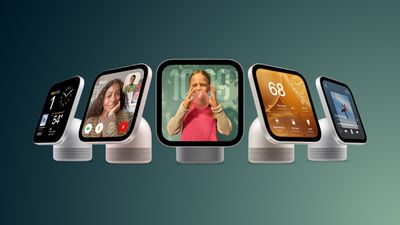
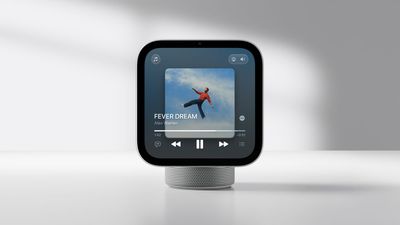
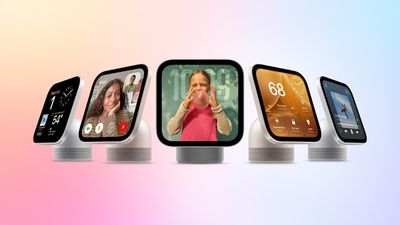
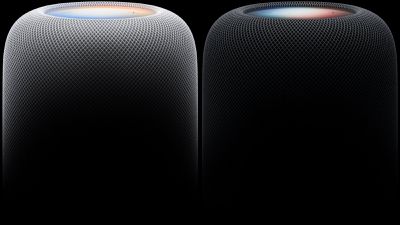
Apple plans to launch the HomeView on November 13, so we have a month to go until we can learn more about it. Right now, we're limited to the information Apple has shared and what members of the media learned during limited hands-on time.
We've rounded up some interesting HomeView tidbits you might have missed.
Recipe walkthroughs - HomeView makes Safari recipes easier to follow by pulling out the ingredients and steps. You can tap on a "Start Cooking" button to get step-by-step instructions you can use as you cook. The device also supports multiple voice-activated timers.
Siri access - You can say Siri (English only) or Hey Siri for hands-free access, but there are also options for activating Siri with a swipe down from the top of the display or using Type to Siri.
Apple Intelligence - HomeView has some Apple Intelligence features built in. You or members of your household can use Siri AI for general knowledge questions if you don't have an Apple Intelligence iPhone or iPad, but you do need one for any requests involving personal context.
Guests - Personal data is private, but guests can control smart home accessories, check the weather, set timers, and play music. Visitors can also AirPlay audio to the HomeView using peer-to-peer discovery.
Adaptable interface - HomeView can tell when someone is approaching and parts of the interface will change based on proximity. If someone is across the room, it shows less information in a larger view. As the person approaches, the view can change to show more information.
Faces - HomeView has multiple customizable faces similar to watch faces. Apple says some faces can "wake with you in the morning, wind down with you at night." The Snoopy face, for example, has different animations based on time of day, weather, and holidays.
Third-party apps - There's no App Store, but the HomeView has CarPlay-like software capabilities. It can show CarPlay audio and video apps from a linked iPhone. There are no CarPlay video apps except for Apple TV, so app developers will need to add support.
Handoff - You can transfer songs, podcasts, calls, videos, and recipes from the iPhone to the HomeView.
Live Activities - HomeView supports Live Activities, so if you have a timer running or get an incoming Intercom message, content will be visible while you use other apps.
Sensors and HomeKit - The HomeView has temperature and humidity sensors that can be used in Home app scenes and automations. It also serves as a home hub for controlling HomeKit and Matter devices when you're away from home.
HomeView is available for pre-order now, and it will launch on November 13. It is priced at $299 and comes in either a tabletop version with a speaker base or a wall-mounted version.
Apple today closed with a market capitalization above $5 trillion, making it the second company to do so after Nvidia.
As noted by The Wall Street Journal, Apple's market cap has exceeded $5 trillion six times before today during intraday trading, but this is the first time the company stayed above the mark at closing.
Apple closed at $342.96, for a market cap of $5.005 trillion. The new valuation comes just over a month after John Ternus took over for Tim Cook as Apple CEO, and two days ahead of iPhone Duo pre-orders.
While Apple surpassed Nvidia to briefly become the most valuable company in the world in July, Nvidia has since retaken the title and continues to hold the top spot with a market cap of $5.33 trillion.
There's been some confusion about which of Apple's new and existing home devices will support Siri AI and when, because Siri AI isn't going to be available at launch on some products.
Devices With Siri AI
HomeView - Available at launch (November 13)
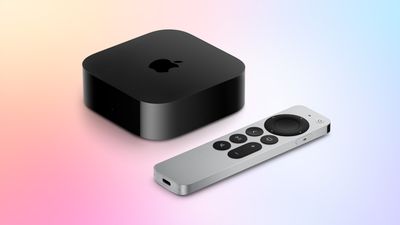
Apple TV 4K (4th generation) - Available at launch (November 13)
Apple TV 4K (3rd generation) - Available in tvOS 27.2
Apple TV 4K (2nd generation) - Available in tvOS 27.2
HomePod mini 2 - Ships October 30, Siri AI coming in a future software update
Despite a report from CNET suggesting the first HomePod mini would support Siri AI, Apple has since confirmed that's not the case.
On the HomePod and Apple TV 4K models that support Siri AI, the home owner in the Home app must have an Apple Intelligence-enabled iPhone or iPad on the latest version of the software. Siri AI has to be turned on, and it has to be set to a supported language. Other members of the household don't need an Apple Intelligence-enabled device once Siri AI is turned on, except for personal requests.
HomeView does not require an Apple Intelligence-enabled iPhone or iPad for Siri AI, except for requests that use personal context.
Siri AI for HomeView, Apple TV 4K, and HomePod mini 2 is English only and is limited to the United States, Australia, Canada, India, New Zealand, Singapore, South Africa, and the UK at launch.
EU Restrictions
Siri AI is not available in the EU on the iPhone and iPad, so Siri AI won't be available for home devices that support it. HomeView isn't even launching in the EU.
Siri AI Beta
Apple is still calling Siri AI a beta, and it will be in beta when it's available on HomeView, Apple TV 4K, and HomePod mini 2.
Apple's new HomeView underwent regulatory testing in October 2024, and it was running what would now be known as HomeView software version 18, according to an FCC document uncovered by MacRumors contributor Aaron Perris.
The document provides the clearest evidence yet that the HomeView was held up due to Siri AI's delayed launch. Apple initially previewed the more intelligent version of Siri at WWDC 2024, but in March 2025 the company announced that it needed more time to get it ready. Siri AI finally launched this September.
Apple plans to bring Apple Intelligence to China in iOS 27.3 after two years of regulatory delays, reports Bloomberg. The launch will include basic Apple Intelligence features for things like photo editing, but Siri AI won't be available. Image Playground and the newer version of Genmoji will be missing, plus text generation tools will be limited.
The South China Morning Post today reported that China's Ministry of Industry and Information Technology recently gave Apple network access permits to add Alibaba's Qwen and Tongyi Wanxiang models to the iPhone Duo, iPhone 18 Pro, and earlier iPhones, paving the way for an Apple Intelligence debut.
Apple introduced the first Apple Intelligence features in iOS 18.1, but they have been missing from China since launch. Apple received initial clearance to launch Apple Intelligence in China in July, but needed additional clearance for a consumer launch.
China restricts foreign AI technology, which meant Apple had to partner with Alibaba and Baidu to launch Apple Intelligence in the country. Apple also has to allow the Chinese government to approve ongoing updates to the AI models.
Competing smartphone makers in China like Huawei have long offered artificial intelligence features, and Apple has been at a disadvantage without comparable tools.
iOS 27.3 is expected in December.
Note: This discussion thread is located in our Political News forum with special rules.
The free Apple Invites app for the iPhone was updated today with two new features: hosts can now more easily manually add guests to an event and mark their RSVP status, and the app's Home Screen widget now supports the extra large size option.
Released in February 2025, the Apple Invites app makes it easy to invite people to events, such as birthday parties and baby showers. The ability to create an event in the app requires subscribing to an iCloud+ plan with at least 50GB of storage for $0.99 per month, but anyone who receives an event link can RSVP for free on any device.
Apple's full release notes for version 1.12.1 of the app:
• Hosts can now more easily manually add guests to the event and mark their RSVP status, so your guest list stays accurate even when someone confirms outside the app.
• Invites widget now supports the extra large size to give you more options to countdown on your Home Screen.
• This update contains bug fixes and performance improvements.
OpenAI today suggested Apple could be using its trade secrets, the very thing Apple is already suing OpenAI for. In a court filing, OpenAI accused an ex-employee of giving sensitive data about an unreleased product to Apple.
The unnamed employee joined OpenAI from Apple and then returned after six months. OpenAI claims the person sent "over a hundred highly confidential files" to personal accounts, including manufacturing data and detailed images of at least one unreleased product. The former employee allegedly "made a presentation" on OpenAI product plans for Apple's senior leadership "months ago," and OpenAI is worried Apple could use that information to further its work on AI devices.
OpenAI is very concerned that its trade secret and confidential information is now circulating inside Apple, where Apple engineers can shape Apple's upcoming products based on OpenAI's confidential and innovative work. OpenAI has raised these issues directly with Apple, but to date, Apple has not provided OpenAI with the requested assurances that Apple is not in possession of, and has not used, OpenAI's trade secret and confidential information.
OpenAI asked the court for permission to investigate and pursue counterclaims if necessary. Apple told Reuters it has found no evidence to support OpenAI's claims and it has policies in place to ensure new employees do not use confidential information from previous employers.
Apple and OpenAI have been involved in a tense legal battle since Apple sued OpenAI in July. Apple says OpenAI employees Chang Liu and Tang Tan stole trade secrets from Apple to develop new AI hardware. OpenAI called the lawsuit "careless, aggressive and oddly personal," stating that it does not "have, nor want, any of their trade secrets" because it is "much more interested in building innovative products and technologies that push the frontier."
Yesterday, the court partially granted Apple's request for expedited discovery. OpenAI has up to two weeks to hand over forensic evidence as well as materials used when interviewing former Apple employees. Liu, Tan, and Alyssa Peng, Liu's former Apple colleague, will need to sit for depositions after Apple gets the requested information.
Judge Edward Davila, who is overseeing the case, said during a hearing today that he is "highly likely" to grant a preliminary injunction prohibiting OpenAI from using Apple's allegedly stolen trade secrets. Bloomberg says an injunction would "mark a potential setback" for OpenAI's hardware development efforts.
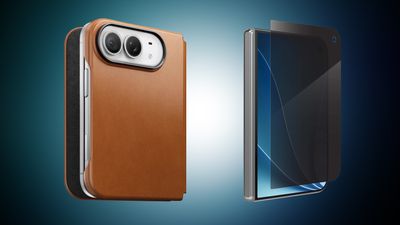
iPhone Duo pre-orders kick off this Friday, and in anticipation of the event we've gathered all of the best cases and screen protectors you can get for your new iPhone Duo. This includes accessories from popular brands like OtterBox, Speck, ZAGG/Mophie, and more.
Note: MacRumors is an affiliate partner with some of these vendors. When you click a link and make a purchase, we may receive a small payment, which helps us keep the site running.
Most of these retailers aren't offering discounts on iPhone Duo cases yet, but at ZAGG you can get 20 percent off your order when you purchase any two items, including iPhone Duo accessories. This is a perfect opportunity to get a case and screen protector for the smartphone at a discounted rate.
Otherwise, you'll find the full list of retailers offering accessories for the iPhone Duo below. Shoppers should note that some of these devices are up for pre-order right now and will launch in November or later, but many are shipping cases for the Duo right now.
Amazon - iPhone Duo cases from Spigen, Speck, ZAGG, and more
AT&T - Discounts on iPhone Duo cases and screen protectors from Speck, Spigen, and more
Best Buy - iPhone Duo cases from Dbrand, OtterBox, Spigen, Kate Spade, and more
Burton Goods - Save on leather cases for iPhone Duo
ESR - iPhone Duo Silicone Leather case with Flex Stand
Target - iPhone Duo cases from ZAGG, Case-Mate, and Kate Spade
ZAGG - Save 20% when you buy 2 items from ZAGG, including iPhone Duo cases and screen protectors
If you're on the hunt for more discounts, be sure to visit our Apple Deals roundup where we recap the best Apple-related bargains of the past week.
Deals Newsletter
Interested in hearing more about the best deals you can find as we head into the holidays? You can sign up for our Deals Newsletter and we'll keep you updated so you don't miss the biggest deals of the season!
Apple Del Amo in Torrance (Los Angeles area) has been temporarily closed for a few days, and Apple has now added the following notice to the store's page: "We'll be right back. Our store is temporarily closed due to events beyond our control."
According to Reddit comments, the store allegedly suffered extensive water damage following a roof leak in the shopping mall.
Update – 10:30 a.m. Pacific Time:CNET has corrected its article and now says only the HomePod mini 2 will support Siri AI. Original article follows.
Siri AI will apparently not be limited to the new HomePod mini 2, with support also coming to the first-generation HomePod mini in a software update later this year, according to a report today from CNET's Jeff Carlson.
"The HomePod Mini 2 also gets a faster S10 processor, which should help with processing Siri AI requests," he said. "However, the current S5-powered HomePod Mini will also get Siri AI compatibility later this year, along with updates to iOS 27.2."
Fine print on Apple's website does not mention this detail, at least as far as we have seen, so we have reached out to the company for comment.
For the Apple TV 4K, Apple's fine print did mention that Siri AI support will extend back to the second-generation Apple TV 4K from 2021, but we have not found any explicit fine print mention about Siri AI coming to the HomePod mini (1st generation).
Apple said setting up Siri AI on the HomePod mini 2 will require a paired iPhone or iPad model with Apple Intelligence support.
A paired device iPhone or iPad with Apple Intelligence support is also required for any requests involving a user's personal context, according to Apple. However, once Siri AI is enabled on the HomePod mini, the company said that even users without an Apple Intelligence-enabled iPhone or iPad can access Siri AI's broad world knowledge, richer and more natural conversations, and improved music discovery.
HomePod mini 2 launches on Friday, October 30, with pre-orders underway. It has an S10 chip, up from the S5 chip in the previous model.
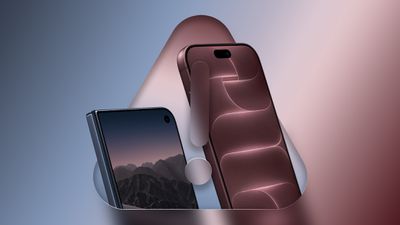
Apple's $1,999 iPhone Duo asks buyers to pay more for a folding screen while accepting almost 40 compromises compared with the iPhone 18 Pro and iPhone 18 Pro Max, spanning camera capabilities, everyday usability, and ownership costs.
At equivalent storage capacities, the iPhone Duo costs $800 more than the iPhone 18 Pro and $700 more than the Pro Max. Its main attraction is a radically different design: a 5.4-inch outer display opens into a 7.6-inch inner display, providing more space for reading and viewing content, with the ability to use apps side by side.
All three devices share a number of key features, including the A20 Pro chip, ProMotion displays with refresh rates up to 120Hz, a 48-megapixel Ultra Wide camera, MagSafe, and USB-C with USB 3 speeds. However, choosing the foldable means giving up some familiar features and accepting differences in how the phone feels, works, and fits into a daily routine.
General Compromises
The general compromises concern the phone's controls, displays, dimensions, battery life, and cost. Some change interactions that iPhone owners perform throughout the day, while others affect particular preferences or longer-term ownership expenses. When choosing the iPhone Duo over an iPhone 18 Pro or Pro Max, users must be prepared to give up:
Face ID: Facial authentication is replaced by Touch ID in the side button, changing how users unlock their phone and authenticate purchases and apps.
The Action button: The iPhone Duo drops the customizable button used for functions such as Silent mode, the flashlight, Focus modes, and Shortcuts. Camera Control remains available, but there is no dedicated physical mute control.
MagSafe wallet compatibility: Apple lists MagSafe cases and wireless chargers as compatible with the iPhone Duo, but omits the wallet compatibility it lists for the Pro models due to the device's shape.
Physical SIM support in some markets: The iPhone Duo is eSIM-only worldwide. Pro models sold in markets such as the UK and Australia retain a nano-SIM slot, giving buyers the option of using physical SIM cards.
A larger screen without unfolding: The iPhone Duo's outer display measures 5.4 inches, compared with 6.3 inches on the iPhone 18 Pro and 6.9 inches on the Pro Max. Accessing its larger 7.6-inch screen requires opening the device.
The Pro displays' pixel density on the larger screen: The iPhone Duo's inner display has a density of 430 pixels per inch, compared with 460 ppi on both Pro models. Its outer display retains 460 ppi.
A crease-free display: The iPhone Duo's folding screen has a crease that remains visible in certain lighting, despite Apple's efforts to minimize it. The Pro models have a conventional display without a fold through the center.
Simpler display maintenance: The iPhone Duo's outer screen has Ceramic Shield 2, while the inner screen uses a different construction with a polymer cover layer. That layer is replaceable if it wears or becomes damaged, introducing an additional service item absent from the Pro models. In the U.S., a cover-layer replacement costs $49 without AppleCare+ coverage or $19 with coverage.
A thinner, narrower, and lighter phone: Although shorter when closed, the iPhone Duo is 84.1mm wide and 11.3mm thick, compared with widths of 71.9mm and 78mm and a thickness of 8.75mm on the Pro models. At 254 grams, it is also 43 grams heavier than the Pro and five grams heavier than the Pro Max.
The Pro Max's longer typical-use battery life: The iPhone Duo is rated for up to 24 hours of typical use, matching the smaller Pro but falling short of the Pro Max's 30 hours.
Longer video playback when using the larger display: With its inner screen, the iPhone Duo is rated for up to 31 hours of video playback and 26 hours of streaming, compared with 36 and 33 hours on the Pro and 45 and 40 hours on the Pro Max. Using the outer display improves those figures to 44 and 37 hours, exceeding the smaller Pro's ratings.
Faster wired charging: The iPhone Duo reaches up to 50% charge in around 20 minutes, compared with around 15 minutes on both Pro models.
Higher sustained-performance: Apple quotes up to 35% better sustained performance than the iPhone 17 Pro for the iPhone Duo, compared with up to 40% for the iPhone 18 Pro models.
More color choices: The iPhone Duo comes in Night Sky and Star White. The Pro models offer Black, Silver, Glacier, and Burgundy.
A higher proportion of recycled content: The iPhone Duo contains 35% recycled content, compared with 40% on the Pro models.
A lower purchase price: The iPhone Duo costs $800 more than the iPhone 18 Pro and $700 more than the Pro Max at equivalent storage capacities. Its $1,999 starting price buys 256GB, while a 1TB Pro Max costs $1,899.
Lower single-device AppleCare premiums: In the U.S., AppleCare+ with Theft and Loss costs $19.99 per month or $199.99 annually for the iPhone Duo, compared with $14.99 per month or $149.99 annually for either Pro model.
Lower covered screen-repair fees: Under U.S. AppleCare coverage, accidental damage to the iPhone Duo's inner display carries a $99 service fee, compared with $29 for screen-only damage on the Pro models. The iPhone Duo's outer-display damage fee remains $29.
Lower repair fees without AppleCare+ coverage: Apple's U.S. estimates include $999 for inner-display damage, compared with screen-repair fees of $329 for the Pro and $379 for the Pro Max. "Other damage" is estimated at $1,499, compared with $849 and $899 respectively. Back-glass repair is also more expensive, at $199 rather than $159 for either Pro model.
Lower battery replacement costs: Apple's U.S. out-of-warranty battery service fee is $229 for the iPhone Duo, compared with $129 for either Pro model.
These differences vary considerably in importance. Losing Face ID or the Action button may be more disruptive to an established routine than having fewer color choices, while the wider, thicker body is something buyers will encounter every time they pick up the closed phone. Buyers moving from a Pro Max also need to consider whether the larger inner display is worth giving up its longer typical-use battery life.
The financial differences extend beyond the initial purchase. Higher AppleCare premiums, repair fees, and battery replacement costs can increase the expense of owning the iPhone Duo over several years, so buyers should consider how they intend to maintain and protect the device alongside its purchase price.
Camera and Capture Compromises
The camera compromises range from fewer zoom options and simpler front cameras to the loss of professional capture formats. Some affect everyday photography, while others matter primarily to users with specific editing and production workflows. When buying the iPhone Duo over an iPhone 18 Pro or Pro Max, customers must be prepared to forgo:
A dedicated Telephoto camera: The iPhone Duo lacks the Pro models' 48-megapixel 4x Telephoto camera, including its tetraprism design and 3D sensor-shift stabilization, and the 12-megapixel optical-quality 8x crop it enables. Its longest optical-quality zoom setting is a 2x crop from the Main camera. Digital photo zoom tops out at 10x rather than 40x, while video zoom reaches 6x rather than 24x.
A variable aperture: The iPhone Duo's Main camera has a fixed f/1.6 aperture. The Pro models offer f/1.48, f/1.8, f/2.8, and f/4.0 settings, giving users more control over light capture and depth of field.
The Pro Main camera's stabilization and focusing hardware: The iPhone Duo uses sensor-shift optical image stabilization and Hybrid Focus Pixels, compared with second-generation sensor-shift stabilization and 100% Focus Pixels on the Pro models.
Wider Main-camera framing: The iPhone Duo's Main camera has a 26mm equivalent focal length rather than 24mm, producing a slightly tighter view. Its 2x crop is also tighter, at 52mm rather than 48mm.
A LiDAR Scanner: The iPhone Duo omits the depth-sensing hardware available on both Pro models for photography, augmented reality, and scanning experiences.
Adaptive True Tone flash: The iPhone Duo has a standard True Tone flash instead of the Pro models' adaptive version.
Pro Controls: The iPhone Duo does not have the Pro models' full suite of aperture, shutter speed, white balance, and histogram controls.
ProRAW photography: The iPhone Duo does not offer Apple's ProRAW capture, including on its front camera.
Apple Reference Image capture: The iPhone Duo cannot capture the signed reference images used to help establish whether a photo has been altered.
Spatial photos and videos: The iPhone Duo cannot capture spatial photos or spatial video. Both Pro models support spatial video recording at 1080p at 30 fps.
ProRes and ProRes RAW recording: These professional video formats are unavailable in the iPhone Duo's native camera feature set, including for front-facing capture. The Pro models support ProRes recording up to 4K at 120 fps from the rear camera and 4K at 60 fps from the front camera with external recording.
Apple Log 2 and ACES: The iPhone Duo omits Apple Log 2 and Academy Color Encoding System support for rear and front-camera recording, limiting the professional color workflows otherwise available on the Pro models.
Genlock: The iPhone Duo lacks the Pro models' support for synchronizing video capture with other cameras using supported accessories.
Studio-quality four-mic array: Apple specifies four studio-quality microphones for the Pro models, but does not list the same specification for the iPhone Duo. The foldable still supports Spatial Audio recording, wind noise reduction, and Audio Mix.
A higher-resolution outer front camera: The iPhone Duo's outer Center Stage camera is 12 megapixels with a smaller f/2.2 aperture, compared with 18 megapixels and f/1.9 on the Pro models.
A fully featured front camera when unfolded: The inner under-display camera is limited to 1080p video at 30 or 60 fps and lacks Night mode, portrait photography, and Photographic Styles. The Pro models' front camera supports 4K Dolby Vision recording and these photography features.
The missing Telephoto camera is a practical limitation even for buyers who never use professional formats, since it reduces the options for photographing subjects they cannot get close to. The variable aperture adds another form of control over how a scene is captured. For users who already rely on ProRAW, ProRes, or Log recording, the iPhone Duo also changes what they can capture and how they can edit it afterward.
Are the Compromises Worth It?
The iPhone Duo can justify these compromises if its inner display meaningfully improves things you already do on your phone. Reading long articles, reviewing documents, comparing information in two apps, editing photos, or watching video could all become much more comfortable with a larger screen. If those are activities you would regularly unfold the device for, its defining feature could be more valuable to you than several of the capabilities it lacks.
It is therefore important for prospective customers to assess what they plan to use the iPhone Duo's internal display for and how often they would do so. A handful of activities you repeat throughout the day makes a stronger case for the foldable than an occasional task you would usually handle on an iPad or Mac.
Hands-on demo time should also be helpful, and include time using the phone closed. Check whether you are comfortable with its width, thickness, weight, outer display, and Touch ID button, then unfold it and try the activities you expect to benefit from the larger screen. The device needs to suit both the quick interactions that make up much of phone use and the longer sessions that take advantage of its inner display.
The large number of compromises alone should not determine your decision. If you never record ProRes video, losing it may have no consequence, while giving up a telephoto camera you use every day could be decisive.
There is also value in being enthusiastic about Apple's radically new take on the iPhone. Wanting to explore a folding design and new ways of using familiar apps is a reasonable part of the buying decision, even without a specific productivity benefit.
The iPhone Duo makes the most sense for buyers who expect to use its inner display frequently, enjoy adapting to the new form factor, and are comfortable with the features and money they give up to get it. For buyers who expect to spend most of their time on the outer display, or who place greater importance on camera versatility, the iPhone 18 Pro models may be a stronger fit at a lower price.
iPhone Duo pre-orders open on Friday, October 16, with availability starting on October 23.
We just published Apple's list of iPhone Duo repair fees for customers without AppleCare+ coverage, and we want to bring extra attention to two of the fees in particular: a new cover layer costs $49, and a replacement battery is $229.
Apple's vice president of hardware engineering Kate Bergeron revealed that the iPhone Duo's nano-texture cover layer above the inner display can be removed and replaced. A new one is $19 with AppleCare+ and $49 without.
Apple today listed its estimated repair fees for the iPhone Duo without AppleCare+ coverage, with the maximum fee in the U.S. for "other damage" set at $1,499.
If you only damage certain parts of the iPhone Duo, the fees are more manageable. For example, the repair fee for damaged back glass is set at $199.
If you eventually want to replace the battery in your iPhone Duo, that will cost you $229.
As we previously reported, Apple said the iPhone Duo's nano-texture cover layer above the inner display can be removed and replaced, and now we know that Apple will be charging $49 for a cover layer replacement without AppleCare+ coverage.
Here is Apple's full list of iPhone Duo repair fees without AppleCare+ coverage:
Cover layer damage: $49
Back glass damage: $199
Battery service: $229
Rear camera damage: $229
Outer display damage: $379
Outer display and back glass damage: $509
Inner display damage: $999
Other damage: $1,499
iPhone Duo repair fees with AppleCare+ coverage were already known, but the fees without AppleCare+ coverage were finally disclosed today.
Apple's new HomeView smart home hub is available for pre-order ahead of its launch on November 13. The device lets users control all of their HomeKit gadgets directly from its 7-inch Liquid Retina display, or via Siri AI. In anticipation of the HomeView launch, we've gathered some of the most notable (and discounted) HomeKit and Matter-enabled smart home devices below, all of which you'll be able to control via the home hub.
Note: MacRumors is an affiliate partner with some of these vendors. When you click a link and make a purchase, we may receive a small payment, which helps us keep the site running.
You can check out everything we know about the HomeView in our announcement post. Some of the best deals this time around can be found on Philips Hue lights, switches, and bridges, with up to 35 percent off currently available on select products on Amazon.
If you're on the hunt for more discounts, be sure to visit our Apple Deals roundup where we recap the best Apple-related bargains of the past week.
Deals Newsletter
Interested in hearing more about the best deals you can find as we head into the holidays? You can sign up for our Deals Newsletter and we'll keep you updated so you don't miss the biggest deals of the season!
Apple's fine print for HomePods as default Mac speakers says "compatible with HomePod mini 2 and HomePod (2nd generation) with support on all Mac desktops and laptops with Wi-Fi 6E or later."
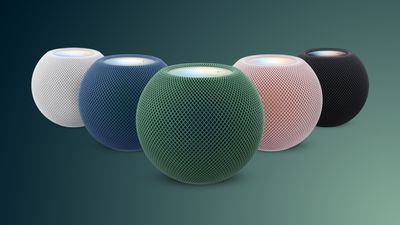
Apple this week introduced the HomePod mini 2, and we have rounded up all of the new features and changes that we have uncovered so far below.
HomePod mini 2 can be pre-ordered now and launches Friday, October 30, but Siri AI support will not be available until a future software update.
Here is what is new with the HomePod mini 2:
Siri AI support is coming in a future software update, with an Apple Intelligence-enabled iPhone or iPad required for requests involving your personal context.
S10 chip, up from the S5 chip for the previous model. It is unclear if this chip upgrade enables computational audio improvements.
Wi-Fi 6E support, up from Wi-Fi 4 for the previous model.
Bluetooth 6 support, up from Bluetooth 5 for the previous model.
Popular Meta chat app WhatsApp today gained guest calling, a feature that lets users invite anyone to join a voice or video call, even if the invitee doesn't have a WhatsApp account.
WhatsApp says everyone has access to free, end-to-end encrypted calls with no time limits and support for up to 32 people at once.
A guest joining a call needs permission from the call host, and guests will show up in a waiting room until the host lets them in. Guests cannot see other participants' phone numbers, send messages, or add others to the call, and hosts can remove them from the call at any time. Guests have access to screen sharing for reviewing materials, thumbs up and heart emoji reactions, and a raised hand to ask a question.
WhatsApp users can start a guest call through the Calls tab. Tap "+" to create a call link and then send the link to anyone. WhatsApp calls can be joined in a computer browser with a WhatsApp call link.
WhatsApp says that it plans to roll out calendar integrations later this year for creating a WhatsApp call from a Google or Outlook calendar.
With the option to join a call from a browser, WhatsApp is matching a feature that Apple started offering for FaceTime with iOS 15. Anyone can join a FaceTime call with a FaceTime link.


 Apple's new
 Note: MacRumors is an affiliate partner with some of these vendors. When you click a link and make a purchase, we may receive a small payment, which helps us keep the site running.

 We just published Apple's list of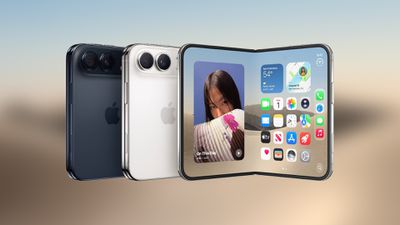
 Note: MacRumors is an affiliate partner with some of these vendors. When you click a link and make a purchase, we may receive a small payment, which helps us keep the site running.
 An addendum to our report about the