

Got a tip for us?Let us know
Upgrade to watchOS 11
With the release of watchOS 11 in September 2024, watchOS 10 is no longer the most recent major version of Apple's iPhone operating system. While Apple may continue to release minor security updates to watchOS 10 for users who don't wish to immediately upgrade, the roundup below is no longer being updated.
watchOS 10
Contents
watchOS 10 is the newest version of watchOS, the operating system that runs on the Apple Watch. Introduced at WWDC in June 2023, watchOS 10 saw a public release on September 18 just ahead of the launch of new Apple Watch models.
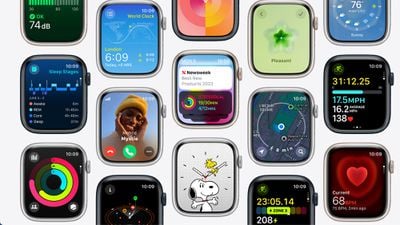
The watchOS 10 update overhauls the Apple Watch interface with a focus on widgets to get you access to more information at a glance. There are also redesigns to important apps, updated watch faces, new workout features, and more.
watchOS 10 adds the Smart Stack, which houses a selection of widgets that display the information you need most. The Apple Watch learns over time which apps you use and when, customizing what you see. At the start of the day, for example, you might see the daily weather, followed by your first event of the day. Smart Stack is easily accessible with a turn of the Digital Crown, and you can flip through all of the available widgets by continuing to scroll.
Apple intends for Smart Stack to be used in tandem with simpler watch faces that do not offer as many complications. Many apps have been entirely revamped with a simpler, information-forward design. Weather, for example, shows the temperature and conditions of your current location, with a quick scroll offering an hourly forecast so you no longer have to tap to get more information.
Apps including Home, Maps, Messages, World Clock, Activity, and Stocks have the refreshed design with more glanceable information, and Apple is making the new design language available to third-party app developers.
There are two new watch faces: Palette and Snoopy. Palette shows the time in a variety of colors with three overlapping layers with shifting colors, while the Snoopy face features characters from the popular Peanuts cartoon.
For cyclists, Apple is adding advanced metrics, views, and experiences. Cycling workouts show up as a Live Activity on iPhone, providing a full-screen view of information that includes Heart Rate Zones, Elevation, Race Route, and Cycling Speed. This view is useful for those who mount their iPhones to their bikes.
The Apple Watch is now able to connect to Bluetooth-enabled cycling accessories to measure cycling power and cadence, plus it supports Workout Views like Power Zones. With new algorithms that combine data from connected sensors, the Apple Watch can estimate Functional Threshold Power, or the highest level of cycling intensity that a rider could theoretically maintain for an hour.
For hikers, there's a Last Cellular Connection Waypoint option in the Compass app that estimates the last place that you had cellular reception, which is useful for backtracking to a location with service for checking messages or making a call. Last Emergency Call Waypoint estimates where your device last had connection to any carrier network for an emergency call.
An updated Elevation view in the Compass app uses altimeter data to offer a three-dimensional view of saved waypoints. In Apple Maps in the U.S., the Apple Watch is able to display a topographic map that includes contour lines, hill shading, elevation information, and points of interest. Users can locate nearby trails and trailheads with data that includes trail length, type, and difficulty.
In the Mindfulness app, Apple added a feature for logging moods and emotions as a way to offer an overview of mental health and help users determine how breathing exercises, workouts, and sleep impact mood. Data collected from the Apple Watch is shown in the Health app. The Medications app can now send follow-up reminders if a medication is not logged 30 minutes after its scheduled time with the new critical reminders feature.
For children who have an Apple Watch, the Apple Watch can measure time spent in daylight through the ambient light sensor to ensure that kids are spending at least 80 to 120 minutes outdoors, which cuts down on the risk of myopia or nearsightedness.
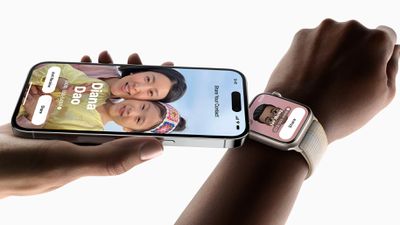
NameDrop, a new SharePlay feature, lets you share your contact info with someone by holding the Apple Watch near a person's iPhone. There's an Apple Watch to Apple Watch sharing feature through the Share button in the Contacts app too, so you don't even need a phone to transfer contact info.
Apple brought Offline Maps to iPhone, and the offline maps can be viewed on an Apple Watch connected to an iPhone. Group FaceTime audio calls are now supported on Apple Watch, and FaceTime video messages can be viewed on the watch too.
If you subscribe to Apple Fitness+, you can use Custom Plans to get a custom workout or meditation schedule based on day, duration, and workout type, plus there is a Stacks option for choosing multiple workouts to do, and an Audio Focus mode that prioritizes either the volume of the music or the trainers' voices.
For developers, there are new APIs for detecting rapid velocity and acceleration such as when swinging a golf club or tennis racket, which can be incorporated into apps. Developers can create custom workouts that can be imported into the Workout app, and there are APIs for accessing speed, cadence, and power metrics for cycling.
watchOS 10 is now available for all users with Apple Watch Series 4 and later.
Note: See an error in this roundup or want to offer feedback? Send us an email here.
Current Version
The current version of watchOS is watchOS 10.6, an update that was released in July. watchOS 10.6 added security improvements.
Interface Redesign
watchOS 10 features the first major redesign to the Apple Watch operating system in several years. There's a new focus on glanceable information, with Apple introducing both a new widget-based function and updated Apple Watch apps that provide more data without having to scroll or tap.
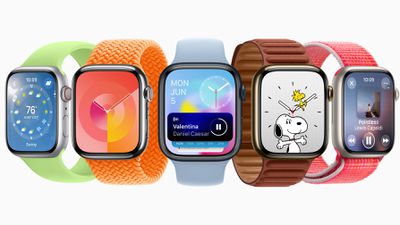
Apps have been refreshed to take up the entire Apple Watch display, especially on the latest models with slimmer bezels. The major new feature is the "Smart Stack" of widgets that is activated when you rotate the Digital Crown.
Pressing on the Digital Crown continues to bring up the Home Screen, while a double press brings up the recently used apps list that used to be activated through the Side button.
Widgets
The Smart Stack is similar to the Siri Watch Face, displaying widgets that are relevant to your day. The Smart Stack varies based on the time of day and how you use your watch.
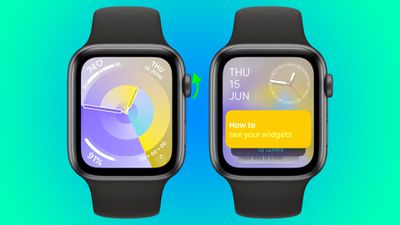
It shows upcoming appointments, your Activity wheel, relevant news, the day's weather, and more. If you have music or a podcast playing, you'll see controls at the top of your Smart Stack.
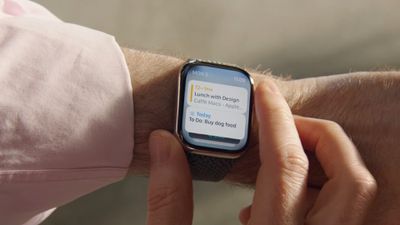
What's shown in the Smart Stack can be customized by long pressing on the Apple Watch display. Eligible Smart Stack apps include Activity, Alarms, Astronomy, Audiobooks, Calendar, Compass, Heart Rate, Medications, Mindfulness, Music, News, Noise, Now Playing, Podcasts, Reminders, Shortcuts, Sleep, Stocks, Stopwatch, Timers, Tips, Wallet, Weather, Workout, and World Clock, plus third-party apps.
Control Center
Activating Control Center can now be done by pressing the side button either on the Home Screen or in any app, so getting to your key controls can be done more quickly.
New Watch Faces
There are two new watch faces in watchOS 10, Palette and Snoopy.
Palette shifts through different colors throughout the day, with three distinct overlapping layers that change regularly. With the Palette face, you can select from a dual color palette with two shades in the same family or choose one of several pre-designed quad color palettes. Four complications are supported.
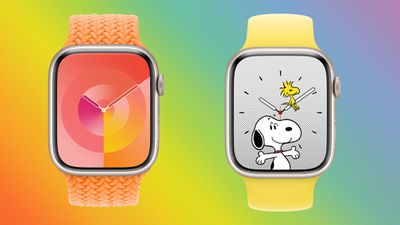
The Snoopy watch face features characters from the popular Peanuts cartoon, including Snoopy and Woodstock. There are four designs for the clock, and multiple color options for the background. Snoopy interacts with Woodstock and the hands of the watch face throughout the day, with different animations based on time of day, weather and more.
On Sundays, the color of the background changes color each hour to pay homage to Sunday comic strips.
App Updates
Apps that include Weather, Stocks, Home, Maps, Messages, and World Clock have been updated to use more of the Apple Watch display to provide glanceable information that is useful to users with minimal interaction.
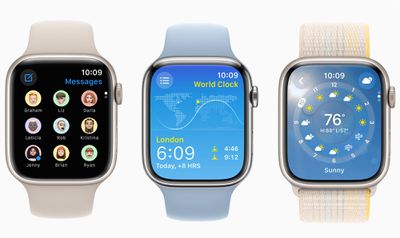
Developers can use the new watchOS design language, allowing third-party apps to have the same updated look.
Apps With Interface Changes
- Activity - You can swipe through the different views in the Activity app to see detailed information on your calories burned, workout minutes, and stand hours. There's also a larger view of steps taken and distance traveled, and access to weekly movement summaries, awards, and sharing.
- Alarms - The Alarms app has largely the same look, but it takes up more of the display and each on-screen element is larger.
- App Store - The Search option has been relocated to the upper left corner of the app, and images and titles are more integrated with one another to make swapping through categories quicker.
- Calendar - The colors of the app have shifted slightly and the button for adding a new event is at the bottom of the app instead of the top.
- Contacts - The options for adding a new contact and accessing "My Card" have been relocated to the top of the app, allowing you to get to your actual contacts more quickly. My Card also now works with the NameDrop sharing feature on Apple Watch.
- Heart Rate - The Heart Rate app now features a pulsating heart that takes up much of the interface, along with your current BPM. Swiping down shows additional info like daily range, resting rate, and walking average.
- Home - In the Home app, camera feeds are shown first, and there are more appropriately sized buttons for individual accessories. The majority of the app design is the same.
- Mail - The Compose button has been relocated to the bottom of the display, putting more of a focus on reading mail on the watch rather than composing.
- Messages - The Messages app shows icons for your contacts so you can better see who a message is from at a glance.
- Music - The Listen Now button is now more prominent, and it links to playlists from friends, radio stations you might like, your own playlists, and more so you can get something playing faster.
- News - News images and headlines are larger, and navigation is done by scrolling up and down rather than swiping left or right.
- Noise - There's a larger decibel meter in the Noise app, along with a checkmark to denote whether the sound level is appropriate or not. The app also has a background that matches the noise meter color.
- Now Playing - Album art is smaller and the music controls are larger, plus the AirPlay icon has been relocated to the top of the interface.
- Photos - Featured and Favorites are shown in the Photos app.
- Podcasts - The app opens to your most recently played episode, along with "You Might Like" suggestions and other quick access links for discovering new content.
- Remote - More devices fit on the watch face so you can access the one you're looking for faster, and there is quick access button for playback controls.
- Sleep - The Sleep app shows your recent sleep data rather than your sleep schedule. You can tap on the alarm icon to get to sleep schedule if it's needed.
- Stopwatch - Stopwatch opens right to the stopwatch interface rather than asking you to pick a style.
- Timers - Timers has a range of quick select buttons for pre-chosen times plus a large "+" button for setting a custom timer.
- Weather - The Weather app background shows the current conditions, such as rain or sun, along with a color-guided chart so you can tell how the temperature will change throughout the day at a glance. Tapping cycles through chance of rain, UV index, air quality, wind speed, and humidity.
- Workout - The Workout app has new colors and other slight design tweaks, such as open-ended workouts now listed as "Open" instead of "Open Goal."
- World Clock - World Clock opens to the time at your current location, with sunrise and sunset times listed. Tapping on the icon with three lines shows the time in other locations, and the background of the app matches the time of day in the location you are viewing.
Workout
Most of the updates to the Workout app this year are for cyclists and hikers. The Apple Watch can now connect to Bluetooth accessories designed for cyclists, so information like cadence, speed, and power can be seen in the Workout View.

When a power meter is connected to Apple Watch, the Apple Watch is able to estimate Functional Threshold Power, or the highest level of intensity that can be maintained for an hour. This enables Power Zones, showing users the zone they're in and how much time needs to be spent in each zone to improve performance.
For hikers, the Apple Watch now sends elevation alerts to let you know when you've passed a certain elevation, along with new updates in the Maps and Compass apps.
Other Workout Updates
- Cycling Metrics on iPhone - When a cycling workout is in progress on Apple Watch, it also shows up as a Live Activity on the phone, encompassing the entire display to make it easier to see metrics while riding.
- Apple Fitness+ Custom Plans - Apple Fitness+ subscribers can access custom plans to create a workout plan that includes workout days, workout duration and type, trainers, and music. Multiple workouts and meditations can be stacked up so subscribers can move from one workout to the next with no pause.
- Developer APIs - There are new workout APIs that allow developers to create apps that take advantage of Apple Watch sensors that can detect rapid changes in direction and acceleration. Apple says this is useful for golf and tennis apps.
Compass
The Compass app now shows elevation, and there is an option to set target elevation so you can be alerted when you reach that level. Tapping on the elevation button displays an overview of the waypoints that you have tagged.
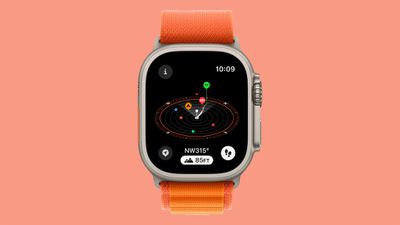
Apple also updated the Compass app to automatically generate a Last Cellular Connection Waypoint that shows the last place where reception was available, and a Last Emergency Call Waypoint to estimate where on a route an emergency call can be made from any carrier's network.
Maps
The Maps app has been entirely overhauled, and opening up the app shows a map of your current location with quick access search buttons and an option to swipe to see the areas around you.
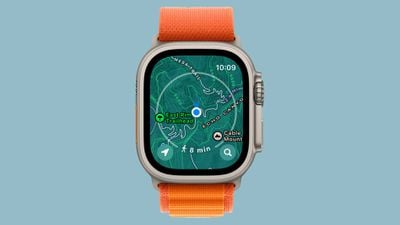
The app displays topographic maps with mountains, valleys, lakes, and rivers clearly detailed, plus it displays trails, contour lines, elevation, and points of interest, all functionality useful for hikers. Nearby trail information is included, with name, length, time, elevation gain, difficulty, and photos provided. Topographic maps are limited to the United States at the current time.
The Maps app also supports offline map viewing for maps that have been downloaded on a connected iPhone.
FaceTime
Group FaceTime audio calls are now supported on the Apple Watch. Apple Watch can also play recorded FaceTime videos and audio messages.
Health Features
The Health app can help cut down on myopia in children by tracking how much time is spent outdoors each day. Watches worn by children with Family Sharing use the ambient light sensor to determine how much time is spent in daylight each day, with that information relayed to a parent's iPhone.
Medications
Follow-up medication reminders can let you know if you've forgotten to log a scheduled medication, and Critical Alerts ping you even if you have a Focus mode on that turns off notifications.
Mindfulness
The Mindfulness app now includes a "State of Mind" feature for mood tracking, and it can be used to note current emotion in the moment or for the day. Information is relayed to the Health app on iPhone.
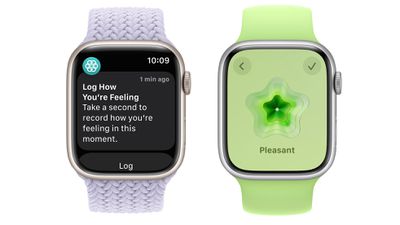
Apple has also designed notifications and complications to encourage people to use the mood tracking function.
AirDrop Updates
With a new NameDrop feature for iPhone and Apple Watch, contact information can be shared with someone else by opening up the My Card complication and bringing the Apple Watch next to another Apple Watch or an iPhone. NameDrop was introduced in watchOS 10.1.
Lockdown Mode
Lockdown Mode is available on the Apple Watch in watchOS 10. Introduced in iOS 16, Lockdown Mode is an optional security setting that is designed for journalists, activists, government employees, and others who may be at risk of targeted cyberattacks from companies creating state-sponsored spyware.
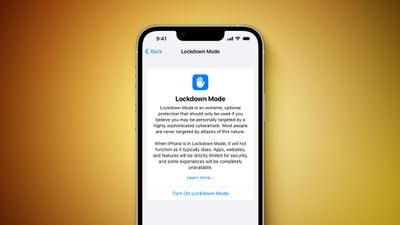
With watchOS 10, when Lockdown Mode is initiated on an iPhone running iOS 17, it extends the feature to a paired Apple Watch. Lockdown Mode limits features like message attachments, incoming FaceTime calls from unknown callers, complex web technologies, shared albums in the Photos app, and more.
Release Date and Compatibility
watchOS 10 was released to the public on September 18, 2023. It is compatible with the Apple Watch Series 4 and later.
What's Next for watchOS
Apple is working on watchOS 11, the next-generation version of watchOS. The update was introduced at WWDC 2024 in June, and Apple is testing it ahead of an upcoming September release.
A rundown on the features that are coming in watchOS 11 can be found in our watchOS 11 roundup.
watchOS 10 Timeline
March2026
February2026
January2026
December2025
November2025
