SwitchEasy CoverBuddy for iPad Pro Review - MacRumorsOpen MenuShow RoundupsShow Forums menuVisit ForumsOpen Sidebar
Skip to Content

Review: SwitchEasy's CoverBuddy Protects Your iPad Pro and Holds an Apple Pencil [Updated]

by

Apple offers protection for the iPad Pro in the form of a Smart Cover and a Silicone Case for the back of the device, but Apple's products are priced rather high at $59 and $79 respectively, for a total price of $138 for complete iPad Pro coverage.

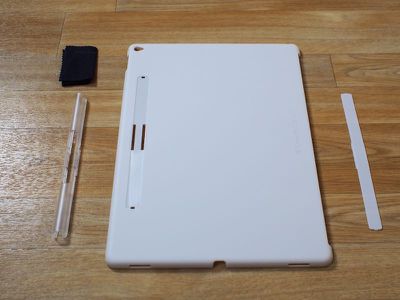
Luckily, third-party manufacturers have already started coming out with some clever cases and covers for the iPad Pro, and one of the first available rear shells comes from popular accessory maker SwitchEasy. The iPad Pro CoverBuddy is SwitchEasy's first product for Apple's tablet, and it's designed to work alongside Apple's own Smart Cover and Smart Keyboard.
coverbuddypieces
SwitchEasy funded the iPad Pro CoverBuddy through Indiegogo, but now it's ready to ship out to customers. While the Indiegogo campaign was still ongoing, SwitchEasy sent me a prototype CoverBuddy to check out, which I've been using for the last week.

coverbuddynoapplepencil
Made of a thin but rigid polycarbonate, the CoverBuddy snaps onto the back of the iPad Pro. Since it's only 1.5mm thick, it adds very little additional weight and bulk. The polycarbonate of the CoverBuddy is textured and it's super grippy. The grip on the CoverBuddy is probably my favorite aspect of the case because it makes the unwieldy iPad Pro a lot easier to hold on to.

CoverBuddy's polycarbonate material isn't going to protect the iPad Pro from serious damage, but it feels sturdy enough to protect it from the scratches, dings, and minor drops that occur from day-to-day use and travel.

coverbuddyapplepencil
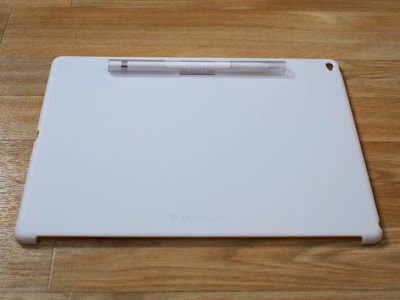
The CoverBuddy leaves all of the ports and the rear camera accessible with precise cutouts, and it has a Lightning port cutout that's able to accommodate the Apple Pencil for charging purposes. On the back, there's a removable plastic Apple Pencil holder, which is actually quite versatile.
coverbuddyapplepencilinside
It keeps the Apple Pencil in place on the back of the iPad Pro so it doesn't get lost, and when used on a desk or a lap, it props the iPad Pro up at a slight angle that's ideal for drawing or playing games. SwitchEasy's calling this "Sketch Board" mode, and I found it to be useful for writing and sketching.

coverbuddyangle
It's fairly easy to get the Apple Pencil in and out of the built-in holder to use it because it's open at the middle. A quick slide with a finger is enough to remove it, and putting it back is as easy as sticking it into the holder.

When an Apple Pencil isn't in use, the Pencil holder snaps off of the back of the CoverBuddy and can be replaced with a thin strip of plastic that covers the holder. The holder itself can be used on a standalone basis to keep the Apple Pencil safe in a bag, but it's not the most elegant solution when not attached to the case.

coverbuddysmartcovernopencil
Having an additional piece of plastic that covers the Apple Pencil cutout area is a bit of an imperfect solution because it's easy to misplace or lose. I'm fairly well organized, but I still have a tendency to misplace the odds and ends that accessories sometimes ship with. I also had some trouble getting the plastic cover to stay in place, but SwitchEasy has told me small manufacturing issues like this will be ironed out with the final release of the CoverBuddy.
coverbuddywithkeyboard2
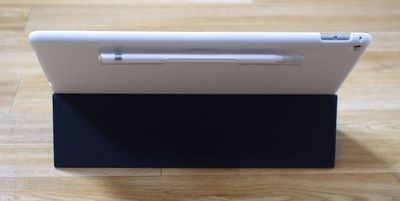
Along with leaving the ports uncovered, the CoverBuddy also has an opening on the left side that's designed to work with the iPad Pro Smart Cover or the Smart Keyboard. The cutout is sized perfectly for the Smart Keyboard that I have, and the CoverBuddy worked well alongside it. The CoverBuddy doesn't get in the way of the keyboard and it keeps the Apple Pencil out of the way at the top.
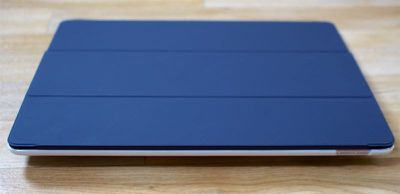
coverbuddyfront
The CoverBuddy is designed to stay on the iPad Pro at all times, but it's easy enough to take it off if you want to use the iPad Pro sans case. It snaps off at the corners and takes only a couple seconds to remove. Given the rigidity of the material I worry that it could crack from the force of removing it, but that didn't happen during the time that I tested it.
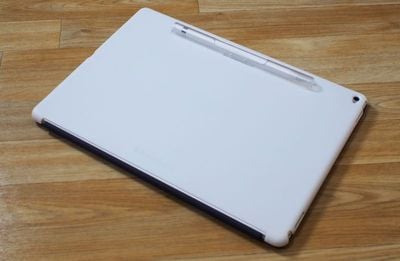
coverbuddysmartcoverback
I tested an opaque white version of the CoverBuddy designed to match the white Apple Smart Cover, but it also comes in translucent black to match the charcoal Smart Cover and the charcoal Smart Keyboard and a clear translucent color that's perfect for the gold iPad Pro.

Bottom Line

SwitchEasy's CoverBuddy isn't quite as premium as Apple's own Silicone Case for the iPad Pro, but it offers full rear protection for the tablet in a slim form factor that preserves its thin design. At $39, the CoverBuddy is reasonably priced and it works well with existing Apple accessories.

The add-on Apple Pencil holder is useful because it keeps the $99 accessory close at hand and it provides a comfortable drawing angle when used in a lap or on a desk. I do wish SwitchEasy produced a version without the Apple Pencil holder for those totally uninterested in it, but the existing CoverBuddy is convertible and suitable for use with or without an Apple Pencil.
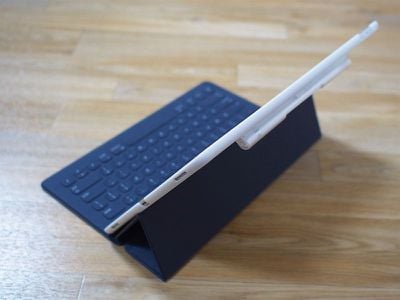
coverbuddywithkeyboard
If you're looking for a rear shell solution that's more affordable than what Apple offers, the CoverBuddy is definitely worth checking out.

It's worth noting the CoverBuddy is a product that's been around for awhile, so it's not something that's untried and untested. SwitchEasy has been making CoverBuddy cases for Apple's iPad lineup for some time, and it's received largely positive reviews from media outlets and buyers.

Pros:

  • Slim design
  • Adds grip
  • Holds Apple Pencil
  • Works with Smart Keyboard/Smart Cover

Cons:

  • Plasticky - not as high quality as Apple's products
  • Swappable components are easy to lose
  • Flap to cover Apple Pencil slot doesn't stay in place well
  • Apple Pencil slot is unattractive when not used with Apple Pencil holder

How to Buy

The CoverBuddy for iPad Pro can be pre-ordered from the SwitchEasy website for $39.99. Orders are expected to ship on December 14.

Update 5/3/2016: SwitchEasy also makes a CoverBuddy designed for the 9.7-inch iPad Pro, available in Translucent Black, Translucent Clear, Space Gray (rubber coated), and Rose (a pink shade designed to make the Rose Gold iPad Pro pinker. It's priced at $29.99 and can be purchased from the SwitchEasy website.

Note: MacRumors received no compensation for this review.

Top Rated Comments

jclo Avatar
142 months ago
I can't take a review seriously that offers a giveaway and a direct link to buy the product. The omission of the regular "pros" and "cons" list is suspicious too.
Sorry. I've been working on a lot of reviews lately and I left out a pros/cons list on accident. Wasn't intentional. Thanks for pointing out the oversight -- I've added it in. Review was written before SwitchEasy offered to give some of the cases away, and I agreed to the giveaway because it's always nice to offer you guys free stuff when we can. My reviews are always unbiased regardless of whether or not a review includes a giveaway. I'm not compensated by the company offering the review product and I have nothing to gain. By the way, we always offer links to purchase in all of our reviews because it's convenient for people who might like the product.

Add to that this quote and I find it even more suspicious:

I also had some trouble getting the plastic cover to stay in place, but SwitchEasy has told me small manufacturing issues like this will be ironed out with the final release of the CoverBuddy.
It's true that I had a prototype unit, and SwitchEasy told me up front that it was rougher than the finished units. I chose to take them at their word because this is a seasoned manufacturer that has produced CoverBuddy cases for previous iPad generations that have been well received and positively reviewed. I'm happy to get a production unit CoverBuddy and update the review. The plastic cover for the Apple Pencil slot is definitely fiddly (it takes some patience to get it in place), and as I mentioned, I don't really like the look of it. I would much prefer a CoverBuddy that didn't have this feature for people who don't plan to use an Apple Pencil.


Score: 2 Votes (Like | Disagree)
142 months ago
The single biggest issue I have with my Ipad Pro, which I like very much, is that there is no place to put the pencil. The pencil is incredibly annoying to carry around. It is very expensive and easier to lose than your average pen. Mine currently has a paper clip scotched taped to it. Microsoft said in the Surface Pro 4 launch that users complained there was no place for their pen. That will be a large complaint of iPad Pro users too. Its really maddening they made the pencil far less usable by not including some way to attach it to a pocket or a case.

This coverbuddy is that like an answer to prayer :p.
Score: 1 Votes (Like | Disagree)
142 months ago
I can't take a review seriously that offers a giveaway and a direct link to buy the product. The omission of the regular "pros" and "cons" list is suspicious too.
Add to that this quote and I find it even more suspicious:

I also had some trouble getting the plastic cover to stay in place, but SwitchEasy has told me small manufacturing issues like this will be ironed out with the final release of the CoverBuddy.
Score: 1 Votes (Like | Disagree)

Popular Stories

iPhone Duo Display Cracking

Apple Alerts Stores to iPhone Duo's Display Cracking Issue

Friday October 30, 2026 3:20 pm PDT by
In a memo shared with Apple Stores and Apple Authorized Service Providers this week, and later obtained by MacRumors, Apple provided technicians with guidance on how to diagnose and address the iPhone Duo's inner display cracking issue. If a customer reports the issue, Apple advised technicians to inspect the iPhone Duo and repair or replace it in accordance with their standard procedures....
iPad mini OLED feature 1

Apple Executive Comments on New iPad Mini Lacking 120Hz Display

Thursday October 29, 2026 1:47 pm PDT by
While the new iPad mini has an OLED display, the device does not support ProMotion, meaning the display's refresh rate is limited to 60Hz instead of 120Hz. ProMotion support would have allowed for the iPad mini's refresh rate to automatically adjust from 10Hz to 120Hz depending on the content being displayed, but evidently Apple has kept the feature exclusive to the iPad Pro among iPad...
Pinched iPad Mini

Apple Avoids Showing Pinched Fingers on iPad Mini Page in South Korea

Thursday October 29, 2026 11:52 am PDT by
In the U.S. and most other countries, Apple's website shows the new iPad mini being held by pinched fingers, but this is not the case in South Korea. The new iPad mini shown with pinched fingers on Apple's website in the U.S. On its South Korean website, Apple simply shows an image of the iPad mini on its own. The new iPad mini shown without pinched fingers on Apple's website in South Korea ...
Latest Stories
Apple Watch Ultra 4 Hits All-Time Low Price With Amazon's $99 Discount
18 hours ago
Reminder: Apple's Big Discount on Beats 360 Ear Cushions Ends Today
18 hours ago
Here's a New Tour of Apple's HomeView Software
19 hours ago
Apple Reveals New iPad Mini's Battery Capacity
20 hours ago
Top Stories: Apple's Big MacBook Pro, iPad mini and iMac Updates
21 hours ago
'Pluribus' Season 2 Reportedly Starts Production Today
1 day ago
iPhone 18 Pro Sales Surge in China, Offsetting Decline in U.S. and Japan
1 day ago
HomeView Software 27.2: Wallpapers, Control Center, and More
1 day ago
Apple Alerts Stores to iPhone Duo's Display Cracking Issue
2 days ago
iOS 27.3 Will Enable These Apple Intelligence Features in China
2 days ago
Apple Says iOS 27.3 Beta Coming Next Week
2 days ago
Apple's Flash Storage Suppliers Are Finally 'Getting Their Revenge'
2 days ago
14 New Things Your iPhone Can Do in iOS 27.2
2 days ago
iPhone Duo Review: One Week Later
2 days ago
Samsung Mocks iPhone Duo Display Cracks in New Ad Campaign
2 days ago
The MacRumors Show: OLED MacBook Pro, iPad Mini 8, and More
2 days ago
MacBook Pro With Touch Display: 15 More Details Revealed
2 days ago
Russia Places Apple on State Surveillance Registry
2 days ago
Halloween Weekend Brings Discounts on Apple Accessories and Pre-Orders
2 days ago
Apple Has Released More Than 25 New Products in the Past Two Months
2 days ago
Local Code Launches as Free, Private AI Assistant Tool for Mac
2 days ago
Apple Acquires Ascend.io
2 days ago
HomePod Mini 2 Launches Today: All the New Features
2 days ago
AirTag 2 4-Pack Drops to New Low Price of $69.99
2 days ago
Rian Johnson's iPhone Camera App Goes Viral
2 days ago
Where Did All the iPhone Duos Go? Mostly to Apple's Stores
2 days ago
Apple's Touchscreen MacBook Pro Could Ship 1.5M Units in 2027
2 days ago
New Apple TV 4K and iPad Mini: RAM Amounts Revealed
2 days ago
Apple Executive Comments on New iPad Mini Lacking 120Hz Display
3 days ago
Here's a Hands-On Look at HomePod Mini 2's New Two-Tone Colors
3 days ago

🔗 Related Apple News & Rumors

Stay updated with the latest Apple ecosystem news and verified rumors