

Satechi has offered a few options for iMac stands over the past few years, allowing customers a chance to elevate their iMac for a more ergonomic workspace, and gain access to a limited number of ports.
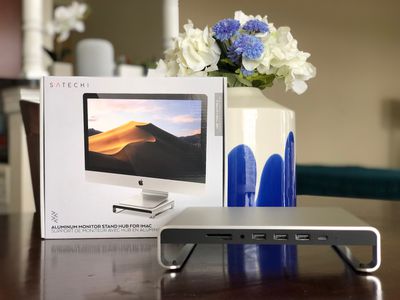
Now Satechi has released the Type-C Aluminum Monitor Stand Hub for iMac, an all-new iMac stand that is a bit of a combination of the two previous accessories, offering a greater number of useful ports and some added height under your iMac.
Design
Satechi's new iMac stand is designed with a brushed aluminum finish and unibody construction, perfectly matching any modern iMac with a silver aluminum finish. The front plate of the stand is matte black, mirroring the silver and black colors of the iMac, and this area is where you'll find the stand's seven ports. There's also a very faint white LED to the right of the ports that indicates a successful connection to the iMac.
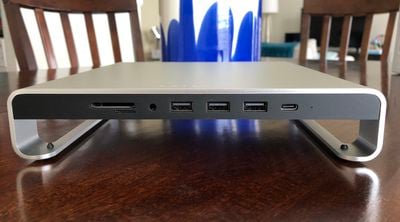
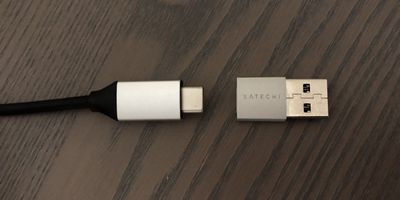
In total, there is a microSD card slot, SD card slot, audio jack, three USB-A ports, and one USB-C data port (not meant for fast charging). The stand itself has a USB-C cable to connect to Thunderbolt 3-enabled iMacs, and it comes with a small USB-C to USB-A dongle adapter so it's essentially compatible with any iMac. As a note, I have a late 2015 27-inch Retina iMac, and have not faced any issues with the adapter and ports on the Satechi stand.
In terms of height, Satechi's accessory sits about 1.63 inches tall, with small rubber feet that ensure your entire workstation is stable after placing the iMac on the stand (max load being 50 lbs). There aren't any storage compartments or drawers in Satechi's stand, but the small amount of empty space created between your desk and the underneath of the stand does provide a little hidey hole perfect for external storage, flash drives, and other small devices.
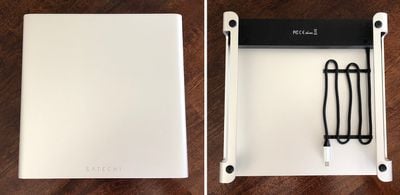
There is also no locking mechanism to keep the base of the iMac in place on top of the stand. The iMac still sits securely in place given how heavy it is, but if you were to provide force against the iMac it does brush pretty easily along the silver aluminum of Satechi's stand. Some sort of rubberized coating at the center of the top of the stand could have alleviated this a bit.
Port Use
I've been in the market for a USB hub for my workstation for a few months now, mainly because the angle of my iMac to a nearby wall makes it difficult to gain access to the computer's rear-facing ports. Satechi's device has solved this in one go, providing more than enough ports for my day-to-day use.
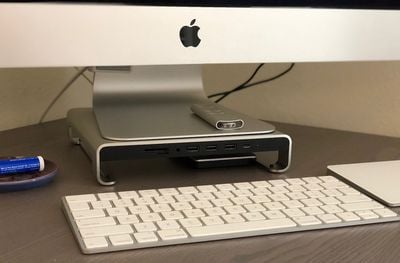
All three USB-A ports worked as expected during my testing, registering on my iMac desktop just as they would when plugged into the back of the computer. The USB-C port is aimed only at data transfers and is not meant for charging, although I was able to charge my iPhone X with a USB-C to Lightning cable. Still, this was not fast charging as that method of charging is not supported through Satechi's accessory, because the device doesn't support the USB-C power delivery protocol.
The Satechi stand is perfect for adding some charge onto your iPhone while you work via the USB-A ports, and you can expect typical refuel times through basic Lightning to USB-A cables. The USB ports provide up to 5 Gbps of speed, so the accessory is great for basic needs but anyone looking for faster USB connections might be left disappointed.
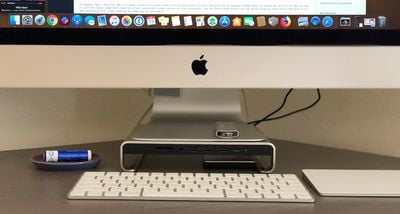
A big drawback to the stand's design is that all of this port access will immediately clutter your workspace if your keyboard sits directly in front of it. Any flash drive inserted into the stand, or charging cable tied to your nearby iPhone, will easily come into contact with your keyboard.
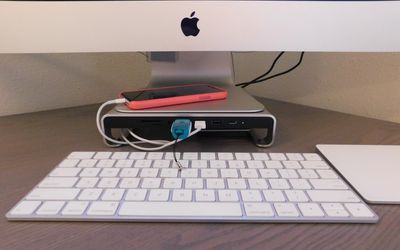
It's easy enough to reorient the stand to your benefit, pushing it back to clear up space for a flash drive and tucking some cable into the space underneath the stand, but it's definitely a downside for anyone who dislikes visual clutter on their desk.
Satechi vs. Twelve South
I've been using Twelve South's original HiRise iMac Stand essentially the entire time I've had my 2015 iMac, and there was barely any adjustment period going from the HiRise to the Satechi stand. Twelve South's HiRise is just under 3.5 inches tall and has adjustable brackets for numerous height levels, so it provides more options for my iMac compared to the Satechi stand.
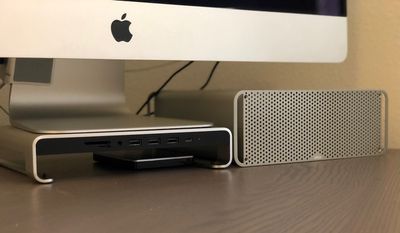
But, going too tall for your computer monitor isn't a good idea, and I had my Twelve South HiRise sitting at around the middle bracket, which was nearly the exact height of the Satechi dock, just a bit taller. In general, a good rule of thumb to follow for an ergonomic workspace is to place your monitor so that the top of the display is about level with your eyes, and your neck is bent slightly to read the middle of the screen.
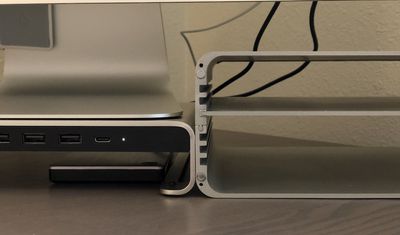
Following this rule, Satechi's stand was essentially perfect for my height. It's felt comfortable to work on the past few weeks, and I haven't once felt neck strain due to the position of my monitor (which I would prior to owning the HiRise). The downside is that Satechi doesn't allow you to customize the height, so the accessory might not exactly be for everyone of all height levels, but its default position should hit the sweet spot for most people.
The main thing I miss when not using the HiRise is its enclosed compartment, where I could hide flash drives, external storage, an Apple TV remote, and some of my favorite Apple Watch bands. The trade off of having USB ports on the Satechi stand is something that will likely benefit me more in the long run, so as of now I've decided to keep the Satechi dock under my iMac for the near future.
Bottom Line
The Satechi Type-C Stand for iMac is a great, versatile accessory with plenty of easy access to useful USB ports and an ergonomic height bonus for anyone who works on an iMac all day. It lacks the hidden compartment organization and customizable height options of rival accessories like the Twelve South HiRise, but the option of having front-facing USB ports on an iMac workstation will likely outweigh the negatives for many users.
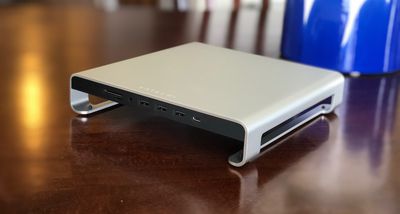
You can buy the Satechi Type-C Stand for iMac in Silver or Space Gray for $89.99 on the company's website.
Note: Satechi provided MacRumors with a Silver Type-C Stand Hub for iMac for the purposes of this review. No other compensation was received. MacRumors is an affiliate partner with Satechi. When you click a link and make a purchase, we may receive a small payment, which helps us keep the site running.


















































Top Rated Comments
Mmmm, however - isn't it basically square? What about just rotating it 90 degrees, maybe to the left since the cable appears to come off that side and then it could be routed right off the new "back"? That also would put the card slots towards the back and the USB ports toward the front, which probably get the most use anyway.
Maybe try that and tell us about the downsides? Or, is the weight distributed differently and it really shouldn't be rotated?
I bought one back then and have to say I really like it as a product. I would have liked it even more if it had had some ports on the back, too (I still have to have another USB port that I keep tucked behind) - but since the main purpose is to expose ports (in some cases mirroring them) on the front I'm ok with that.
However, just a small warning. I ordered from the UK. There doesn't seem to be a UK distributor yet so I bought it direct from Satechi's site. It gleefully fulfilled my order, for an extra $25 for the international shipping. That's a significant extra, but understandable. So I agreed to it.
It arrived a week or two later. All fine. Set it up. Happy with it.
Another week later I get a demand for another £25 (about $32) for customs.
I know this is a thing but had forgotten when I ordered. There was no mention on the site that this was a possibility - and the first I heard of it was once I already had the goods. It also seemed like a particularly large extra. The total cost, to me, was over $150!
So just beware. If and when it officially arrives in the UK it will be interesting to see what the cost will be.