

Olloclip has been making lenses for the iPhone since 2011, expanding the range of tools at an iPhone photographer's fingertips. For the iPhone 7 and the iPhone 7 Plus, Olloclip has redesigned its product lineup, offering the same lenses in a new package that better fits the latest iPhones and provides more utility, like a stand.
I've been using Olloclip to spice up my iPhone photographs since the iPhone 5, so I was eager to try out Olloclip's latest products with the iPhone 7 Plus, which has two rear cameras instead of one.
Olloclip sent me its Core Lens Set, priced at $100, its Macro Pro Lens Set, priced at $80, and its Active Lens Set, priced at $120.
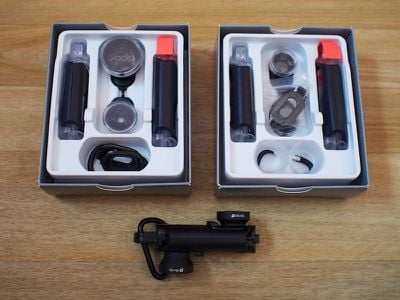
The Core Lens Set features a fisheye lens, a 120 degree wide-angle lens, and a 15x macro lens, while the Macro Pro Lens Set includes three macro magnifications at 7x, 14x, and 21x. The Active Lens Set, Olloclip's most expensive, offers a 2x telephoto lens and a 155 degree ultra-wide lens.
All of the lenses are compatible with both the rear and front-facing cameras of the iPhone 7 and the iPhone 7 Plus, snapping right on for quick access. Each one is interchangeable, so if you own multiple lens sets, you can create your favorite combination to have on-hand at all times.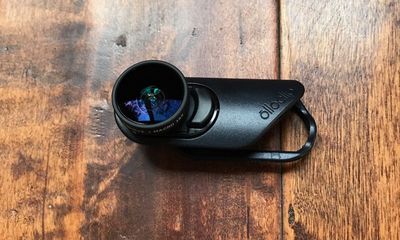
Olloclip also sent me its Pivot Mobile Video Grip, which can be used to capture steady video while filming with the lenses attached.
Lens Design
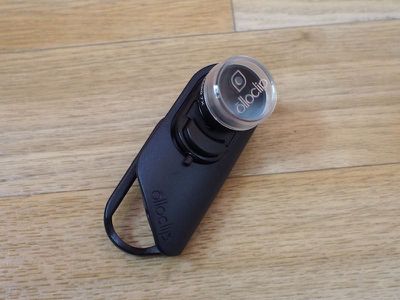
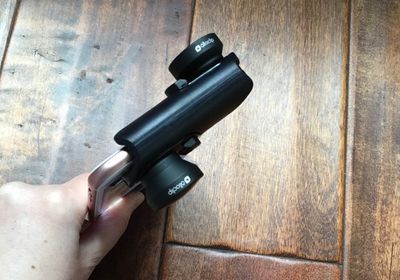
All of the Olloclip lenses share the same two-sided design. The lenses fit into opposite sides of a black plastic enclosure that's meant to slide over the top of the iPhone. The enclosure is sized so one lens can fit over the front-facing camera and one lens can fit over the rear-facing camera, with the ability to pop it off and flip it over at will, so you can change lenses in just a few seconds.
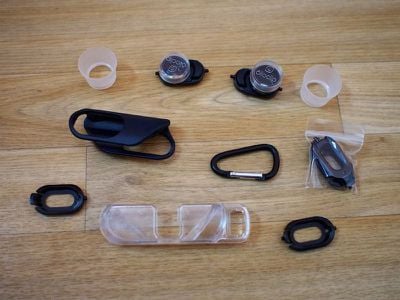
Each lens is attached to a base with springs to fit snugly into the lens enclosure. With the springs, lenses can be swapped out, a handy feature if you're going to buy more than one Olloclip lens set.
On the iPhone 7 Plus, the spring can also be used to pop the lens out and swap its orientation, which allows it to line up properly with the telephoto lens on the back of the iPhone. This means all of the lenses can be paired with the standard wide-angle lens or the telephoto lens on the device, but based on my experience, you're going to want to use these mainly with the wide-angle lens, which I'll explain a bit later.
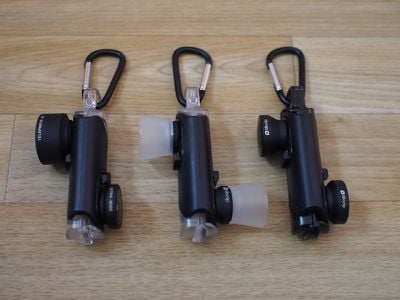
Olloclip's lenses do not work with third-party cases, so I had to remove my case every time I wanted to use it, something that's definitely a hassle. I don't use a screen protector, but if you do, it should work fine with the Olloclip so long as it isn't thicker than 0.5mm. Olloclip does make its own cases that work with the lenses if you prefer to have a case on at all times.
The Macro Pro, Core, and Active Lens Sets are all made primarily from a lightweight black plastic, which unfortunately doesn't quite match well with the Rose Gold, Silver, Gold iPhones, but pairs well with Jet Black and matte Black versions.
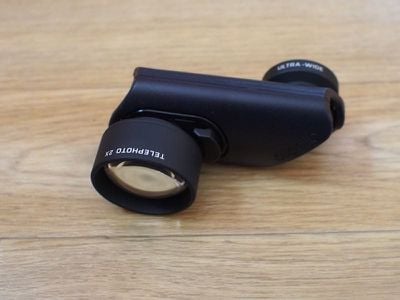
The plastic is nothing special and can even feel a bit cheap given the price of each lens set, but the lenses themselves are made from glass with a metal housing. The lenses are heavy and feel like a quality product, even if the plastic enclosure doesn't.
Since they're made of glass, they are breakable. If you drop them, they'll crack, as I learned accidentally during this review. It's best to be careful with them and put the caps on when they aren't in use to keep them safe in case of a drop.
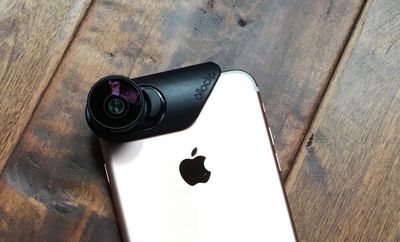
With the weight of the lenses, the plastic build helps keep the accessory at a lighter weight, and with the extra slide-in stand, the lens sets are portable and easy to carry with an included carabiner.
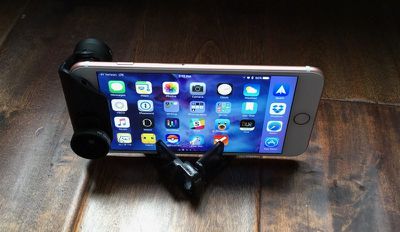
It's simple enough to snap the lenses on and off, but it's still going to take a few seconds to get everything situated and lined up, so if you don't want to miss a shot, the Olloclip will need to be on your phone most of the time. The lenses are bulky, look a little odd on the iPhone, and make it hard to fit your phone in your pocket, but they don't get in the way of standard operation.
Core Lens Set Pictures
The wide-angle lens is perhaps the most useful lens in the Core Lens Set, capturing a 120 degree field of view that's excellent for landscape shots and, attached to the front-facing camera, group selfies.
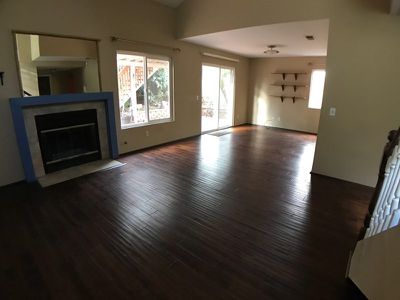
With the wide-angle lens paired with the standard lens in the iPhone 7 Plus, picture quality is excellent, but there is definite distortion at the edges of the images. This is most noticeable in an image where there are vertical or horizontal lines (like walls) at the edges of an image.

At the opposite side of the wide-angle lens, there's a fisheye lens and a 15x macro lens, accessible when you detach the fisheye lens from the Core Lens Set. Both of these lenses are self-explanatory -- one's a standard fisheye with fisheye distortion and the other lets you take ultra close shots of objects.
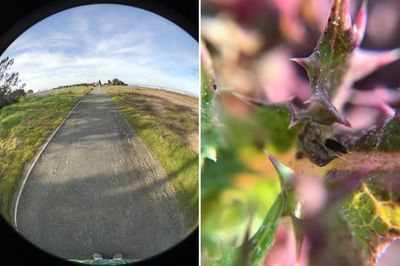
Both the wide-angle and the fisheye lens pair well with the front-facing camera too, giving you a wider field of view for selfies, but the macro lens is only for the rear-facing camera.
Macro Lens Set Pictures
The Macro Lens Set has a 21x lens on one side and a 14x lens on the other side, which can be unscrewed to reveal a 7x lens, giving you several different magnifications to work with. The Macro Lens Set is really only suitable for the rear-facing camera unless you want a super close up picture of your pores.
I've always been satisfied with the performance of Olloclip's macro lenses, and the Macro Lens Set is no exception. It can take some work getting the right distance, lighting and focus, but when everything aligns, the shots come out crisp and clear. The macro lenses come with hoods, which can be used to get the ideal distance for a solid shot. As with all Olloclip lenses, these work best in good lighting.

I don't want to downplay the effort that needs to go into the Macro Lens Set -- this is a lens that takes practice and effort to use effectively, though you can occasionally whip it out and get a lucky shot. It's the most niche of Olloclip's lenses, and may not appeal to everyone.
Active Lens Set Pictures
The 2x telephoto lens of the Active Lens Set is the largest, heaviest, and most expensive of Olloclip's lenses. It adds noticeable weight and bulk to the iPhone and makes it harder to hold, so be careful using this one.

The lens offers a 2x optical zoom, which brings optical zoom to the iPhone 7 or 4x optical zoom (in the right conditions) to the iPhone 7 Plus.

The wide-angle lens is wider than the lens that comes with the Core Lens Set at 155 degrees instead of 120 degrees. That means there's noticeable distortion in every shot, but it makes for some interesting photos.

While the wide-angle lens works well with the front-facing camera, it's less useful with the telephoto, but you can get some nicer-looking close-up selfies using the longer lens.
Using Olloclip Attachment with the iPhone 7 Plus Telephoto Lens
You can use the Olloclip lenses with the iPhone 7 Plus's 56mm telephoto lens, but it's often not worth the hassle. With Apple's default Camera app, the "2x" mode doesn't always activate the telephoto lens, depending on the lighting conditions.
For that reason, there's no guarantee you're going to get the 56mm lens when hitting "2x" mode in the Camera app, so you need to use a third-party camera app (I used Manual) to take photos with the Olloclip lenses and the telephoto lens.
The problem with Apple's telephoto lens is that it doesn't let in as much light, so it doesn't really work well unless you're in bright lighting conditions. Photos indoors often don't come out well and end up much too dark and with too much noise.
That said, the telephoto lens can pair nicely with an Olloclip macro lens or the Olloclip telephoto lens, which gives you 4x optical zoom. It's not really useful for any of the wide-angle lenses or the fisheye, because it defeats the purpose of using one of those lenses.
Actually flipping the lenses around to use them with the telephoto lens is fairly easy, but it's still takes time and the result is not always worth the effort.
The Pivot Grip
Priced at $50, Olloclip's Pivot is meant to be used with the Olloclip lenses while capturing video to keep the iPhone steady. The Pivot is made of plastic and it's not the highest quality product (the clamp squeaks!), but it works well.
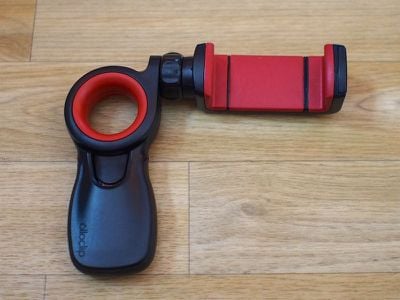
An expandable clamp adjusts to fit any size iPhone, and as the name suggests, there's a button on the side that adjusts the angle of the accessory (there's 225 degrees of articulation) so the iPhone can be positioned in landscape or portrait mode. A cold shoe mount is included if you want to attach accessories like a light or a microphone, and the handle is a good size and shape that's comfortable to hold.
I was able to use the Pivot to capture good quality, shake-free video, and it seems like a decent enough option for the price, but I wasn't a huge fan of the build quality.
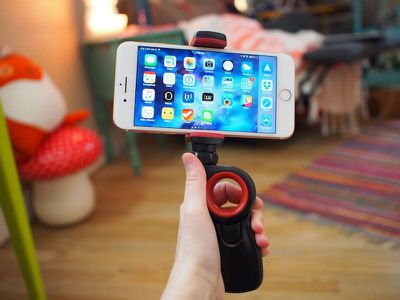
The Pivot is definitely better (and less cramp inducing) than holding the iPhone by itself to take video, but it doesn't measure up to more expensive gimbal-based options. At $50, I think it's a little expensive for what you're getting, so I'd pass on this unless there's a sale.
Bottom Line
I've used Olloclip lenses for years, and this is the first time that I'm hesitating to recommend some of Olloclip lens sets, especially for the iPhone 7 Plus. At $99.99, the Core Lens Set is pricer than other multi-lens sets from Olloclip, and at $80 and $120, the Macro and Active sets are also more expensive.
At those price points you're getting a stand and a new Connect system for quickly swapping lenses, but that doesn't seem to justify the price increase.
With the Core Lens Set in particular, there's only one macro option instead of the two that have been included on past standard sets, and the fisheye and macro lenses are more of a novelty than a utility. The wide-angle lens will get you some great shots you can't get otherwise, but at $100, I'm not sure one wide-angle lens and two situational lenses are worth it.
If you have an iPhone 7 Plus, the Active Lens Set isn't a great purchase because you have a built-in telephoto option, but on the iPhone 7, it can add optical zoom to put Apple's smaller iPhone on par with the larger model.
I've always felt that Olloclip's wide-angle and telephoto combo is one of the most useful lens sets because it can be used in almost any situation, and my opinion hasn't changed on that point. For $120, you're adding a lot of versatility to your iPhone's camera without a fisheye or macro gimmick. It's the best choice for an iPhone 7.
The Macro Pro Set is more of a niche lens for those who want to take macro shots of flowers, bugs, and other small objects. I always have fun with macro lenses, but they're not something I use on a day-to-day basis and I have a hard time recommending them to the average user for $80. If you love macro photography though, this is the set to get.
All of Olloclip's lenses suffes from the standard Olloclip drawbacks -- they don't work with the flash and they can't be used with standard cases. There's a slight drop in image quality compared to the standard iPhone camera, which is more noticeable in indoor/dim lighting. In my experience, the lenses also didn't work well with the telephoto lens in the iPhone 7 Plus.
If Olloclip's lenses were just a bit more affordable this year, I wouldn't hesitate to say go for it, but at this price point, I think potential buyers should carefully evaluate what each lens set is capable of.
That said, if the iPhone 7 or iPhone 7 Plus is your main camera and you want to add more versatility to the kinds of things you can capture, Olloclip has a lot of lenses that can meet your needs and lens quality is solid for the price.
How to Buy
Olloclip's Core Lens Set can be purchased from the Olloclip website for $99.99. The Active Lens Set is available for $119.99, and the Macro Pro Lens Set is available for $79.99.
Olloclip provided MacRumors with a Core Lens Set, a Macro Pro Lens Set, an Active Lens Set, and a Pivot Grip for the purposes of this review. No other compensation was received.

















































Top Rated Comments