

Smart lock company Nuki today launched the Keypad 2 NFC, which is the first keypad that includes support for Aliro. Aliro is a smart lock standard that supports interoperability between mobile devices and platforms, allowing smart locks to work with any smartphone or wearable device without the need for a dedicated app.
Aliro was designed by the Connectivity Standards Alliance, which includes Apple, and the Aliro 1.0 specification was released at the end of February. Nuki has one of the first Aliro-supported devices, and the Keypad 2 NFC allows a paired Nuki smart lock to be unlocked with Apple Home Key.
To use the Home Key functionality, you need the Nuki Smart Lock and the new Keypad 2 NFC, and I was able to test the setup prior to launch. The Nuki Smart Lock has Matter integration so it works with HomeKit and can be added to Apple Home without the keypad, but the Keypad 2 NFC adds Home Key for automatic unlocking with a digital key stored in the Apple Wallet app.
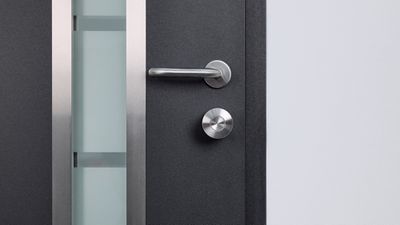
The Nuki Smart Lock has a clever design. It's meant to work with a standard deadbolt, and it uses the framework of the existing lock. I had a smart lock already, so I needed to install a regular deadbolt to test the Nuki. It's not a smart lock to smart lock upgrade, but it's a good hassle-free lock for adding digital unlocking to a lock you already have.
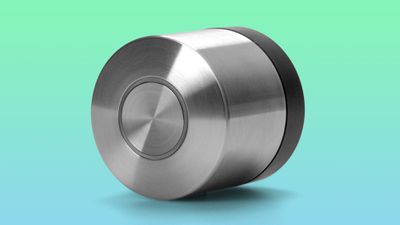
Nuki's Smart Lock reminds me of a doorknob, because it's a similar size and shape, plus you turn it like a doorknob to unlock the door. You keep your standard deadbolt outside, and the Nuki lock mechanism is on the inside. It's smaller than locks from some competing companies, and there's no big box on the door. I like the design because it looks like a normal lock on the exterior, and it's minimally distracting on the inside. I recently swapped all of my bulkier smart locks with the minimal Level Locks because I got tired of looking at boxes, and while Nuki's lock adds a little more bulk to a door than a Level Lock, it's not bad at all.
The only Nuki lock downside is the charging method. It uses a proprietary cable that attaches magnetically to the lock, and it seems easy to misplace. I even prefer Nuki's unlocking method to other smart locks, because I just turn the handle.
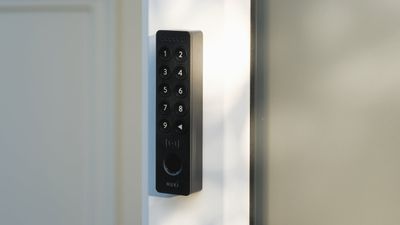
The Smart Lock has been around for a while, but the Keypad 2 NFC that adds Home Key is new. On its own, the Nuki Lock supports HomeKit, but not Home Key. The Keypad is a candy bar-shaped device that attaches to the outside of your door with adhesive. It has a touchpad that you can use to enter a code, plus a fingerprint sensor. It can be opened with NFC using Home Key, the code, or the fingerprint sensor, so it adds multiple access methods to the Nuki Smart Lock.
I didn't find the process of setting up the Keypad 2 NFC with Home Key to be the most intuitive process. I added it to the Nuki app first, then tapped on the option to associate it with a smart home platform. The app instructed me to open up Apple Home, but there were no further instructions because an associated support document was unavailable (it could be up post launch).
It turned out I was able to set up Home Key by tapping my iPhone to the keypad, which added it to my existing Home Key setup. I have Level Locks that support Home Key, so the Home Key card in my Wallet app can now control multiple locks in my home.
With Home Key, I'm able to tap my iPhone or Apple Watch on the keypad without having to unlock the iPhone or open up the Nuki app.
There are already smart locks that support Home Key, but Aliro is a standard like Matter that makes it easier for lock companies to implement one unlocking feature that works across a variety of platforms. Locks that have Aliro support going forward will be compatible with Home Key and other smart home platforms. Aliro does have Ultra Wideband support for unlocking the door as you approach, but Nuki's product doesn't include UWB.
The lock can be used with geofencing and automations in the Home app or the Nuki app for automatic unlocking, and there are settings to automatically lock the door after it's opened as well.
Using Home Key with the Keypad does require a Matter-enabled Apple hub, which includes the Apple TV, HomePod, and HomePod mini. There are also hardware requirements, and it works with the iPhone XS or later with iOS 18.6 or later or an Apple Watch Series 4 or later running watchOS 11.6 or later.
Nuki's Keypad 2 NFC supports up to 20 fingerprints so multiple people in the family can unlock the door via biometric authentication, plus users can have 200 access codes and 35 tap-to-unlock keys.
The Keypad 2 has IP54 water and dust resistance, so it can hold up to poor weather outside, but it's best to keep it in a covered location. It uses AAA batteries that are supposed to last for up to a year, and the Nuki app will provide a notification when the battery is low. There isn't a backlight, but if you're using NFC, you don't need that for the tap unlock functionality.
Nuki's Keypad 2 NFC is available from the Nuki website for $179, while the Smart Lock is priced at $199. Nuki products are also available from Amazon.
Note: Nuki provided MacRumors a Nuki Lock and Keypad 2 NFC for the purpose of this review. No other compensation was received.
















































Top Rated Comments