Nanoleaf Shapes Triangles and Mini Triangles Review - MacRumorsOpen MenuShow RoundupsShow Forums menuVisit ForumsOpen Sidebar
Skip to Content

Review: Nanoleaf's HomeKit-Connected Triangle and Mini Triangle Light Panels Offer New Design Possibilities

by

At the beginning of the year, Nanoleaf unveiled its new Shapes line, which features interconnected wall-mounted light panels in different shapes that display a rainbow of shifting colors. The Hexagon light panels, launched this summer, were the first new light panels in the lineup, and now Nanoleaf has launched the Triangles and Mini Triangles, two new shape options that connect to one another and to the Hexagons.
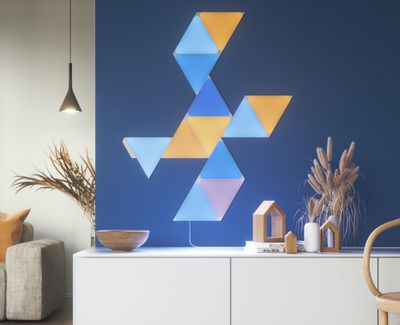
nanoleafstandardtriangles3
Nanoleaf has been making HomeKit-connected light panels since 2017 when it launched its first triangle-shaped lights, but the newest panels in the Shape line are the only ones that are interoperable and able to connect together. The Hexagons, Triangles, and Mini Triangles work together, but they do not work with the original triangle-shaped Light Panels or the square-shaped Canvas panels. The Mini Triangles are priced at $119 for five panels, while the standard Triangles are priced at $199 for seven panels.

Design

The Shapes Triangles are an iteration of the original triangles (once called the Aurora) that came out in 2017, with the new Triangles featuring a design that has more rounding at the inside edges, presumably to make them fit better with the Hexagons and Mini Triangles.
nanoleaf triangles shape
Size wise, the Shapes Triangles are similar in size to the original triangles, while the Mini Triangles are much smaller and are Nanoleaf's smallest panels yet. Standard triangles measure in at nine inches long and 7.75 inches high, while the mini triangles measure in at 4.5 inches long and 3.8 inches high.
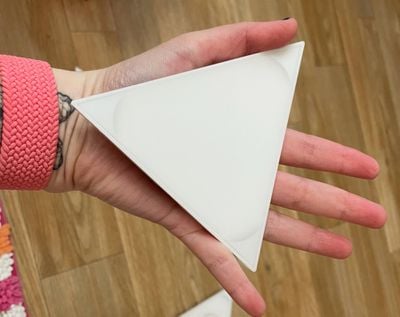
mini triangles size palm
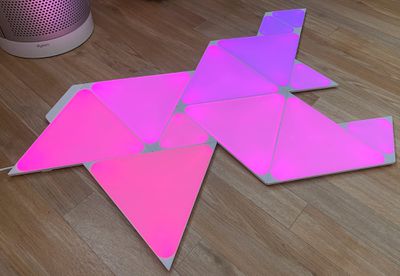
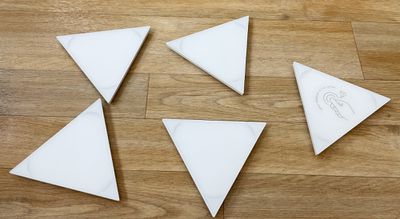
The Mini Triangles are surprisingly small and are ideal for a small wall-mounted setup behind a desk, while the standard Triangles can be used for larger lighting setups. All of Nanoleaf's products are made from a white plastic material, and some people may not like the look when the panels are turned off. The Triangles and Mini Triangles look best when lit, which is something to keep in mind when choosing a location for placement.
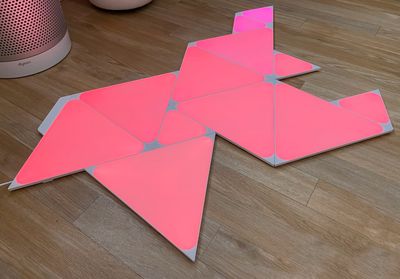
nanoleaf triangles on floor
I do want to point out that like the Hexagons, the Triangles and Mini Triangles have rounded edges so the light that is visible is not entirely triangular in shape, but I think that both versions look great. I prefer these to the original Aurora, and I love the look of different shapes mixed together. I particularly like the size of the Mini Triangles and the way they break up the color patterns of the Hexagons and larger Triangles when paired with those panels.
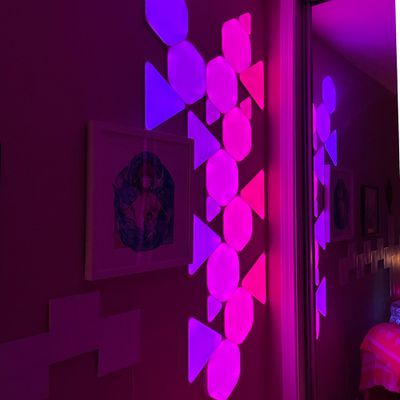
nanoleaf triangles purple
The Mini Triangles alone provide accent lighting, but with enough of them, or with Mini Triangles and standard Triangles combined, the Nanoleaf Shapes put off enough light to replace a traditional light. Depending on how many panels are used, they can be quite bright. I often set my panels to about 20 percent brightness, but at maximum, they flood my office with light.

Setup and Mounting

Like Nanoleaf's Hexagons, the Triangles and the Mini Triangles are mounted to the wall using adhesive. Adhesive strips are applied to small mounting plates on the back of the Triangles and then the Triangles and the mounting plates are stuck to the wall.
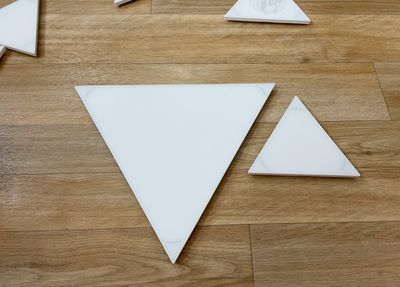
nanoleaf triangles sizes
When the Triangles need to be removed from the wall, they can be pulled from the mounting plate, making the adhesive that's on the mounting plate easier to access and remove from the wall. Earlier Nanoleaf products used adhesive directly on the panels, which could result in wall damage when removing them. The mounting plate system makes it easier to rearrange Nanoleaf panels if needed, and it's a more hassle-free setup and disassembly method than was used for prior Nanoleaf products.

Figuring out a layout can be one of the most difficult parts of setting up new Nanoleaf lights, and Nanoleaf has a Layout Assistant that lets you experiment with different arrangements. There's even an augmented reality option that lets you see the panels right on the wall before you attach them.
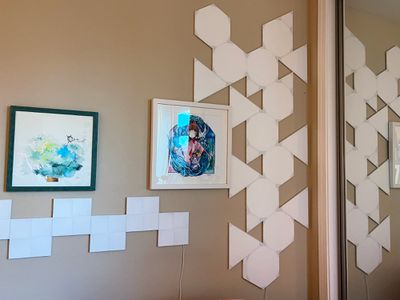
nanoleaf triangles off
Nanoleaf Triangles and Mini Triangles require a 2.4GHz wireless network to set up, which is always somewhat of a hassle. Prior to setup, your smartphone needs to be connected to a 2.4GHz network or you'll run into errors. I have a 2.4Ghz/5GHz combo network and had no problems with setup. I simply scanned the code and was up and running within a few minutes.

Connectivity and Interoperability

Connecting one Triangle or Mini Triangle to another uses snap-in tabs that are sturdier than the thinner linking tabs that were used for prior Nanoleaf tiles. Hexagons, Triangles, and Mini Triangles all use the same snap-in linking tabs and are able to work together.
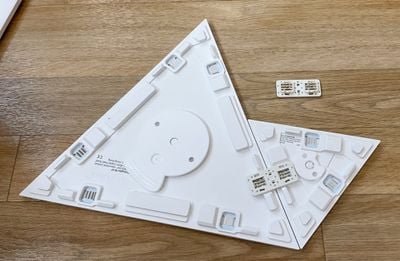
nanoleaf triangles connectors
You can create designs that use the hexagon-shaped panels, the small triangles, and the larger triangles for looks that were not possible with prior Nanoleaf panels. As I mentioned before, the Hexagons, Triangles, and Mini Triangles are not compatible with any pre-2020 Nanoleaf product because those products use a different linking tab. For mounting on the wall, standard linkers are supplied, but there are also optional Flex Linkers that can be used to make the panels bend around corners or to transition from wall to ceiling.
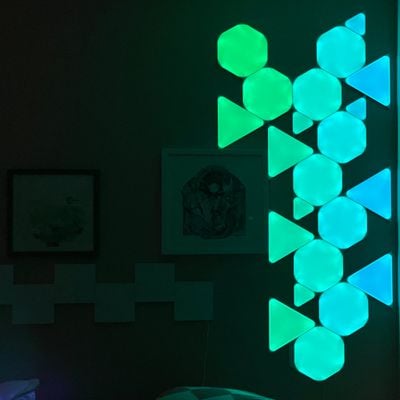
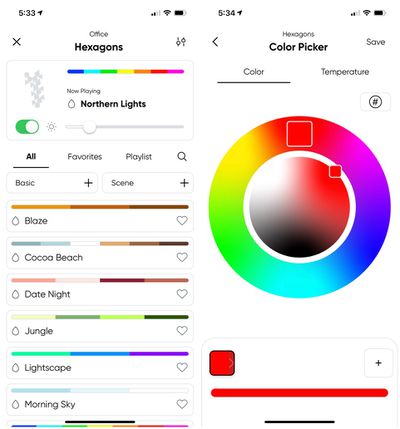
Nanoleaf setups require a power supply and a controller that ships with each boxed set. Up to 28 Triangles can be powered by a single power supply, and up to 77 Mini Triangles. These numbers vary when adding in Hexagons, so the different power needs of each product have to be taken into account for a design. Note that there is a cord coming down from the power supply that needs to be plugged in, so keep that in mind when creating a design.

Nanoleaf App and Features

Nanoleaf Triangles and Mini Triangles support 16 million colors, with different motion and pattern options available in the newly redesigned Nanoleaf app. With Nanoleaf panels, you can create bright, colorful wall art that responds to touch, movement, or voice commands.

Triangles can all be set to a single color (and there are white or color options available) or set to a different color for each panel, plus there's an option to select or create a color palette of mixed colors and then have the panels cycle through those colors using various motion settings like burst, fade, wheel, flow, and random.

nanoleaf triangles blue
With a built-in rhythm module, the Triangles can be set to change colors based on the rhythm of the music that's playing if desired, with sound-based options like fireworks, streaking notes, paint splatter, and others available. Setting up color palettes and choosing motion effects is the most fun part about owning a Nanoleaf product.

nanoleaf app interface 1
Designs can be made to suit any mood, holiday, or time of day to add a pop of color and light to a room. Triangles and Mini Triangles are touch enabled so you can run a hand over them to shift the colors or play little mini games like Whack A Mole. I like the games to show off the panels to people who haven't seen them before, but I otherwise don't use these touch features and find them to be gimmicky.

There are, however, touch gestures for controlling the lights without a smartphone. Double tap, swipe up, swipe down, swipe left, or swipe right can be set to do things like turn the panels on or off, adjust brightness, or swap between scenes. You can set one of the Triangles as the Control triangle for touch-based gestures, and it's a good idea to keep at least one in reach of your hand.


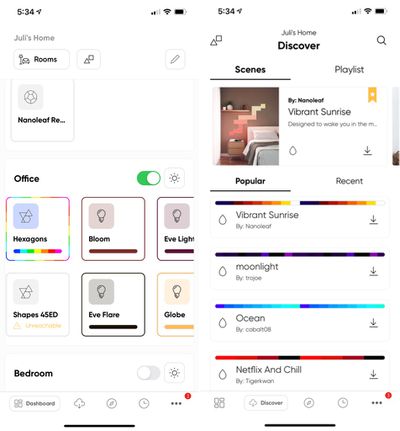
I'm not going to get too deep into the Nanoleaf app, but know that it offers an extensive control setup for the Triangles and Mini Triangles. You can create color palettes and designs, adjust brightness, turn the lights on and off, set schedules, and even download light scenes created by other people.

The app's "Discover" section is my favorite option because I don't have to invest the time in creating a scene myself when I'm just looking for a quick color change. I can find a list of popular options, newly created options, or I can search for a specific theme like "Holidays."

nanoleaf app interface 2
With the redesign, the Nanoleaf app gained a new feature that lets you control your Nanoleaf products and other lights from one interface, which is handy. I can access my Hue lights, Eve Light Strip, and Nanoleaf products all from the same app, with a long press providing access to specific per-device controls. Note that you'll need to use this long press gesture to get to all the Nanoleaf setup options for creating color palettes and motions, all of which can be saved as scenes to use with the Nanoleaf app or the Home app.

This new all-in-one app also accommodates Nanoleaf's newest products, the "Essentials" smart bulb and light strip.

HomeKit Support

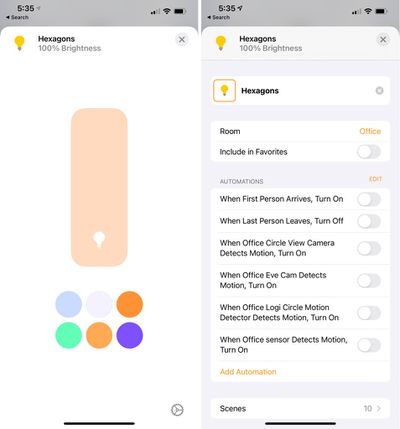
Nanoleaf's Triangles and Mini Triangles have HomeKit integration, and can be viewed in the Home app. You can turn the Triangles on or off, adjust the brightness, or set the lights to a solid color with no motion component.

homekit nanoleaf
You can also access ‌HomeKit‌ scenes pre-created in the Nanoleaf app and include the Triangles in automations and other scenes, but you need the Nanoleaf app to create custom scenes with shifting colors and motion. ‌HomeKit‌ includes Siri integration, and I find it useful to use ‌Siri‌ to turn the Triangles off or on or activate automations.

Bottom Line

I've been using Nanoleaf's products since the first Light Panels came out, and as a fan of novel lighting options, I continue to enjoy them as both accent and main lighting in my office. The Triangles and Mini Triangles are a great addition to the lineup, and being able to combine the shapes with the Hexagons allows for new design possibilities.

nanoleaf triangles pink purple
Like the Hexagons, the Triangles and Mini Triangles are bright and deeply saturated, making for impressive light art in any room. There's more versatility with the different shapes than ever before, and the addition of the Mini Triangles also provides an option for those who want a small accent light that's more affordable and doesn't take over an entire wall.

I think the Triangles, Mini Triangles, and Hexagons are Nanoleaf's best products to date, and I'm interested in seeing what new shapes come in the future. These are, of course, more art than light and are expensive, but for those who enjoy the aesthetic, I think the light panels are worth the cost.

How to Buy

Nanoleaf's Mini Triangles and Triangles can be purchased from the Nanoleaf website. Triangles are priced at $199.99 for seven full-sized panels, and Mini Triangles are priced at $119.99 for five panels. An expansion set of three Triangles is also available for $69.99, while a 10 panel Mini Triangle expansion set is available for $119.99.

Note: Nanoleaf provided MacRumors with a Mini Triangles and Triangles set for the purpose of this review. No other compensation was received.

Tag: Nanoleaf

Top Rated Comments

mattopotamus Avatar
77 months ago

I like them, but they are way too expensive in my opinion. 5 mini’s for $120? If you want to make a larger “picture” with them, it will cost easily $1000+....
expensive, and the power cable is a real buzz saw for something that is focused on being art.
Score: 9 Votes (Like | Disagree)
77 months ago
I like them, but they are way too expensive in my opinion. 5 mini’s for $120? If you want to make a larger “picture” with them, it will cost easily $1000+....
Score: 7 Votes (Like | Disagree)
tubular Avatar
77 months ago
I wake up to these every weekday with a slow fade to white -- lots better than a jolt from an alarm clock.
Score: 3 Votes (Like | Disagree)
77 months ago
I’m very happy with my Nanoleaf installations.

Attachment Image

Attachment Image
Score: 2 Votes (Like | Disagree)
maxfromdenmark Avatar
77 months ago
I have 21 panels of Hexagons since July. They are absolutely stunning. I wish I could ever expand it for more but it is impossible with one basic power brick. The power cord is neatly hidden and panels light behind my bed. They look just great. Often on sale, last time it was in Black Friday. If someone thinks it's expensive can start with a basic set and expand it with time.


Score: 2 Votes (Like | Disagree)
ryanflanders256 Avatar
77 months ago
Did Nanoleaf pay for this promotional post?
Score: 2 Votes (Like | Disagree)
Read All Comments

Popular Stories

Apple MacBook Pro with PROLED XDR Display family lineup feature

Apple Announces OLED MacBook Pro With Touch Display

Wednesday October 28, 2026 10:11 am PDT by
Apple today announced a new high-end MacBook Pro, which is available in 14-inch and 16-inch sizes. The new device has a PROLED XDR display that supports touch gestures, and a glowing rear Apple logo. Pricing on the MacBook Pro starts at $2,899 for the 14-inch model and $3,399 for the 16-inch model. Apple says the MacBook Pro has the "world's best display in a pro laptop." The PROLED...
iPhone Duo Display Cracking

Apple Alerts Stores to iPhone Duo's Display Cracking Issue

Friday October 30, 2026 3:20 pm PDT by
In a memo shared with Apple Stores and Apple Authorized Service Providers this week, and later obtained by MacRumors, Apple provided technicians with guidance on how to diagnose and address the iPhone Duo's inner display cracking issue. If a customer reports the issue, Apple advised technicians to inspect the iPhone Duo and repair or replace it in accordance with their standard procedures....
iPad mini OLED feature 1

Apple Executive Comments on New iPad Mini Lacking 120Hz Display

Thursday October 29, 2026 1:47 pm PDT by
While the new iPad mini has an OLED display, the device does not support ProMotion, meaning the display's refresh rate is limited to 60Hz instead of 120Hz. ProMotion support would have allowed for the iPad mini's refresh rate to automatically adjust from 10Hz to 120Hz depending on the content being displayed, but evidently Apple has kept the feature exclusive to the iPad Pro among iPad...
Latest Stories
Apple Watch Ultra 4 Hits All-Time Low Price With Amazon's $99 Discount
2 hours ago
Reminder: Apple's Big Discount on Beats 360 Ear Cushions Ends Today
2 hours ago
Here's a New Tour of Apple's HomeView Software
2 hours ago
Apple Reveals New iPad Mini's Battery Capacity
3 hours ago
Top Stories: Apple's Big MacBook Pro, iPad mini and iMac Updates
4 hours ago
'Pluribus' Season 2 Reportedly Starts Production Today
11 hours ago
iPhone 18 Pro Sales Surge in China, Offsetting Decline in U.S. and Japan
11 hours ago
HomeView Software 27.2: Wallpapers, Control Center, and More
18 hours ago
Apple Alerts Stores to iPhone Duo's Display Cracking Issue
19 hours ago
iOS 27.3 Will Enable These Apple Intelligence Features in China
20 hours ago
Apple Says iOS 27.3 Beta Coming Next Week
20 hours ago
Apple's Flash Storage Suppliers Are Finally 'Getting Their Revenge'
21 hours ago
14 New Things Your iPhone Can Do in iOS 27.2
22 hours ago
iPhone Duo Review: One Week Later
23 hours ago
Samsung Mocks iPhone Duo Display Cracks in New Ad Campaign
1 day ago
The MacRumors Show: OLED MacBook Pro, iPad Mini 8, and More
1 day ago
MacBook Pro With Touch Display: 15 More Details Revealed
1 day ago
Russia Places Apple on State Surveillance Registry
1 day ago
Halloween Weekend Brings Discounts on Apple Accessories and Pre-Orders
1 day ago
Apple Has Released More Than 25 New Products in the Past Two Months
1 day ago
Local Code Launches as Free, Private AI Assistant Tool for Mac
1 day ago
Apple Acquires Ascend.io
1 day ago
HomePod Mini 2 Launches Today: All the New Features
1 day ago
AirTag 2 4-Pack Drops to New Low Price of $69.99
1 day ago
Rian Johnson's iPhone Camera App Goes Viral
1 day ago
Where Did All the iPhone Duos Go? Mostly to Apple's Stores
1 day ago
Apple's Touchscreen MacBook Pro Could Ship 1.5M Units in 2027
1 day ago
New Apple TV 4K and iPad Mini: RAM Amounts Revealed
2 days ago
Apple Executive Comments on New iPad Mini Lacking 120Hz Display
2 days ago
Here's a Hands-On Look at HomePod Mini 2's New Two-Tone Colors
2 days ago

🔗 Related Apple News & Rumors

Stay updated with the latest Apple ecosystem news and verified rumors