

Nanoleaf Lines Review - MacRumorsOpen MenuShow RoundupsShow Forums menuVisit ForumsOpen Sidebar
Skip to Content

Review: Nanoleaf's HomeKit-Enabled Lines Offer Futuristic Accent Lighting

by

Nanoleaf, known for its HomeKit-enabled accent lights, recently launched its most futuristic and modern looking lighting product yet - Lines. Lines are modular LED light bars that are illuminated at the back and can be arranged into different patterns and shapes for a unique design.
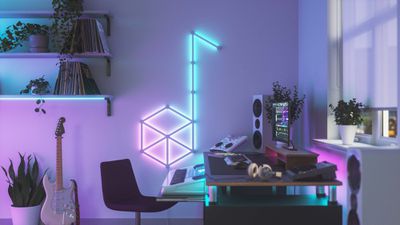
nanoleaf lines music
Prior Nanoleaf products have all been panels in various shapes with LED lights in the corners, but the Lines are something entirely different and may appeal to those who don't care for the panel look. Lines are priced starting at $200, so this is a high-end accent lighting product.
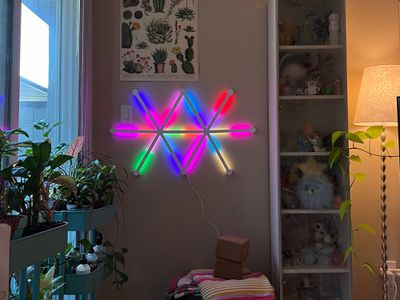
nanoleaf lines colors rainbow
Lines are white plastic light bars that are 11 inches long and .78 inches thick, and the idea is to connect lines together with hexagon-shaped connectors, creating different patterns and designs. The Nanoleaf app can be used for designing a Lines setup, and once a favorite shape has been decided on, the Lines can be mounted to the wall.
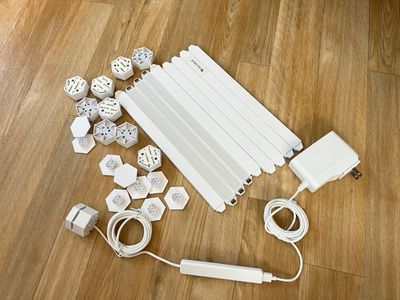
nanoleaf lines components
Mounting Nanoleaf's Lines is hassle free. Just make your design, test out the lights, and then transfer the shape to the wall using the adhesive tape. There are detachable plastic plates that hold the adhesive and pull tabs so you can remove the Lines from the wall without damage. It's probably Nanoleaf's best setup in terms of relocating/removing the hardware. I took the Lines off of the wall a couple of times to move them and had no issues.
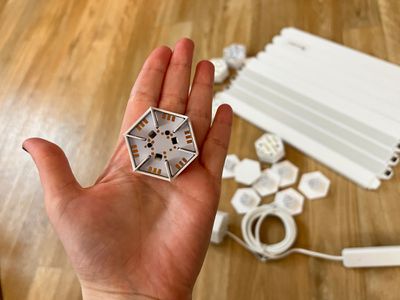
nanoleaf lines connector
Nanoleaf's products are HomeKit-enabled, so setup is as simple as opening up the Nanoleaf app and then scanning a HomeKit code. You might run into a snag if you don't have a 2.4GHz WiFi network available, but for the most part, it should be a seamless experience.
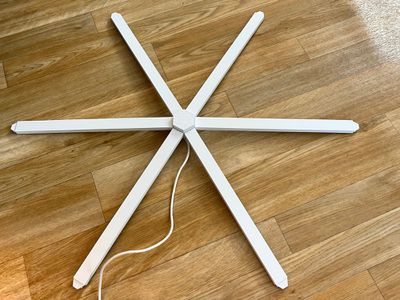
nanoleaf lines connected
Once set up, turned on, and connected, the Lines magic happens. Nanoleaf is using backlighting for the Lines, and it's a neat effect with millions of color options. Lines offer a unique look that's different from the other Nanoleaf products, and I can't get over how cool it is. Each Line can be set to two separate colors, and there's little blending, so you get these distinct shade mixes that are visually striking.
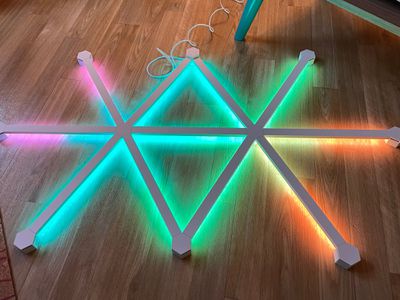
nanoleaf lines on floor
With Nanoleaf's Hexagons and Triangles, the lighting panels are bright enough to replace a traditional light, but that's not the case with Lines. Lines, like Nanoleaf's wood-colored Elements, are accent lighting and are not bright enough to work as a standard light. That said, at 100 percent brightness, they're still able to put out a decent amount of light and are bright enough that I prefer to run them at about 50 percent brightness since they're in my line of sight.
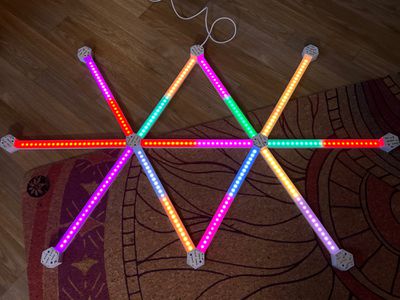
nanoleaf lines back leds
When not lit up, Nanoleaf's Lines suffer from a problem that plagues most of the other Nanoleaf products - they're not that attractive on the wall. I am not a fan of the look of the Lines when they're turned off. The Lines are made from a stark white plastic and when off, they really stand out. Nanoleaf is making covers for the Lines that turn them black or pink, and that might improve the look when they're deactivated. The skins are shipping sometime in the future, and Nanoleaf says more designs are coming.
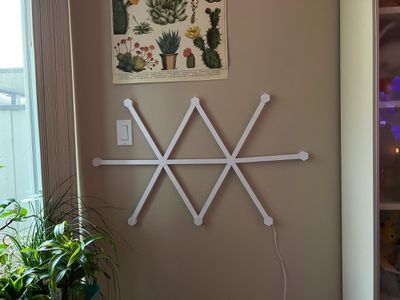
nanoleaf lines turned off
I can forgive how the lines look when not lit just because of how vibrant and eye-catching they are when activated. You can choose from tons of different colors and pick a static look, or set up scenes with rotating colors in different patterns. Nanoleaf has some preset designs and an entire Nanoleaf gallery where you can download designs other people have created.
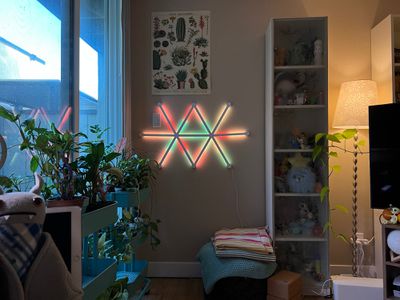
nanoleaf lines colors pastels
Nanoleaf's robust selection of lighting scenes is so convenient and one of my favorite parts of the Nanoleaf ecosystem. You can always find something fresh and interesting when browsing through the different looks that have been uploaded if you don't feel like putting the effort in to create your own designs. You can preview scenes or save them to your library and use them regularly.

The Lines are designed to be controlled through the Nanoleaf app, but you can also swap through your saved scenes using the hardware-based controller. Nanoleaf Lines support rhythm functionality as well, and you can use Rhythm scenes to set them to light up with music.
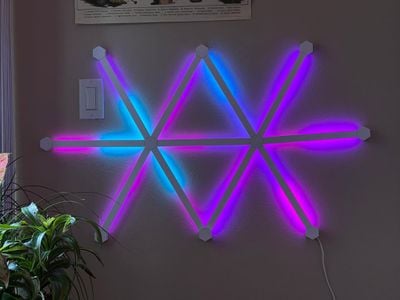
nanoleaf lines blues
Lines are ‌HomeKit‌ compatible and can be assigned to Rooms and controlled alongside other ‌HomeKit‌ devices with Siri voice commands. The Home app offers little control functionality beyond activating/deactivating the Lines or setting them to a static color, so the Nanoleaf app is the primary control method. The Nanoleaf app incorporates all of your ‌HomeKit‌ products and the interface can be confusing, but the Nanoleaf section is straightforward and has the controls for the Lines.

I didn't have connectivity issues with the Lines during my time testing them, and I did spend about a month with them before writing my review, so they feel fairly reliable. I've also been using other Nanoleaf products for years with few connectivity problems beyond needing to reset the WiFi connection every so often.
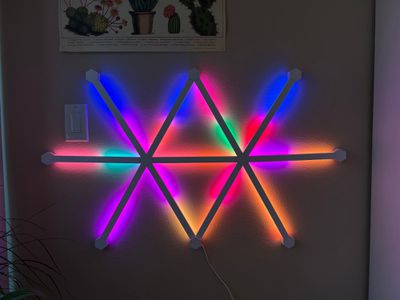
nanoleaf lines rainbow colors
Pricing is the major negative with the Lines. It's $200 for nine LED light bars, and another three costs $70, and that's not money that everyone is going to want to spend on accent lighting.

Bottom Line

If Nanoleaf's Lines fit your personal aesthetic and your budget, I don't think you're going to be disappointed picking them up. Lines are not the most attractive wall decor when not turned on, but when lit, they're colorful, futuristic, and fun.

I find the Lines to be a great addition to my home office, and I think they complement any kind of gaming room, PC setup, theater setup, or TV room, and I suspect kids would enjoy them too. I wish Nanoleaf could sell these at a more affordable price point, and I love everything about them but their high price tag.

How to Buy

Lines can be pre-ordered from the Nanoleaf website for $199. Each set includes nine Lines, with add-ons of three Lines available in expansion packs priced at $70. Nanoleaf says that pre-orders are expected to ship in late November.

Note: Nanoleaf provided MacRumors with set of Lines and a Lines expansion pack for the purpose of this review. No other compensation was received.


Top Rated Comments

65 months ago
This website is always good for a Nanoleaf review every few months.
Score: 6 Votes (Like | Disagree)
1rottenapple Avatar
65 months ago
I wish they have an internal battery. The power cord is really unsightly.
Score: 6 Votes (Like | Disagree)
nutmac Avatar
65 months ago
I realize taste is subjective, but does anyone actually like these things?

The light strips hidden under the fixture (e.g., cabinet, desk) and Nanoleaf's faux wood hexagons can look pretty good. But aside from bringing holiday cheers, I don't really see the point of paying $200 to put Lines against the wall. It looks like something one would put in a kid's room.
Score: 3 Votes (Like | Disagree)
biggest father1 Avatar
65 months ago
Even though this isn’t for me, I’m always glad to see more HomeKit products.
Score: 2 Votes (Like | Disagree)
Unity451 Avatar
65 months ago
Nanoleaf is about the coolest thing I'd never spend money on.
Score: 2 Votes (Like | Disagree)
SurferPup Avatar
65 months ago

You say that like it's a bad thing! What's wrong with kids having fun, or teens having fun, or even adults having fun?

No-one is claiming you should install these in The Parlor where the Important Guests can see them.
They're for use cases like a basement entertainment room, or a dorm room alongside posters of hot chix and Lamborghinis. Think of them as, eg, 2020's lava lamps -- in both the negative and positive aspects.
Or in the dungeon attached vertically next to the leather whips and a hexagon around the masks, illuminating in deep red. Adds to the allure of the dark recesses while your mistress hides in the shadows across the room as she awaits for you to settle in for your tier two obedience class.


Score: 1 Votes (Like | Disagree)

Popular Stories

Apple MacBook Pro with PROLED XDR Display family lineup feature

Apple Announces OLED MacBook Pro With Touch Display

Wednesday October 28, 2026 10:11 am PDT by
Apple today announced a new high-end MacBook Pro, which is available in 14-inch and 16-inch sizes. The new device has a PROLED XDR display that supports touch gestures, and a glowing rear Apple logo. Pricing on the MacBook Pro starts at $2,899 for the 14-inch model and $3,399 for the 16-inch model. Apple says the MacBook Pro has the "world's best display in a pro laptop." The PROLED...
iPad mini OLED feature 1

Apple Executive Comments on New iPad Mini Lacking 120Hz Display

Thursday October 29, 2026 1:47 pm PDT by
While the new iPad mini has an OLED display, the device does not support ProMotion, meaning the display's refresh rate is limited to 60Hz instead of 120Hz. ProMotion support would have allowed for the iPad mini's refresh rate to automatically adjust from 10Hz to 120Hz depending on the content being displayed, but evidently Apple has kept the feature exclusive to the iPad Pro among iPad...
iPhone Duo Display Cracking

Apple Alerts Stores to iPhone Duo's Display Cracking Issue

Friday October 30, 2026 3:20 pm PDT by
In a memo shared with Apple Stores and Apple Authorized Service Providers this week, and later obtained by MacRumors, Apple provided technicians with guidance on how to diagnose and address the iPhone Duo's inner display cracking issue. If a customer reports the issue, Apple advised technicians to inspect the iPhone Duo and repair or replace it in accordance with their standard procedures....
Latest Stories
Apple Watch Ultra 4 Hits All-Time Low Price With Amazon's $99 Discount
49 minutes ago
Reminder: Apple's Big Discount on Beats 360 Ear Cushions Ends Today
54 minutes ago
Here's a New Tour of Apple's HomeView Software
56 minutes ago
Apple Reveals New iPad Mini's Battery Capacity
2 hours ago
Top Stories: Apple's Big MacBook Pro, iPad mini and iMac Updates
4 hours ago
'Pluribus' Season 2 Reportedly Starts Production Today
10 hours ago
iPhone 18 Pro Sales Surge in China, Offsetting Decline in U.S. and Japan
11 hours ago
HomeView Software 27.2: Wallpapers, Control Center, and More
17 hours ago
Apple Alerts Stores to iPhone Duo's Display Cracking Issue
18 hours ago
iOS 27.3 Will Enable These Apple Intelligence Features in China
19 hours ago
Apple Says iOS 27.3 Beta Coming Next Week
19 hours ago
Apple's Flash Storage Suppliers Are Finally 'Getting Their Revenge'
20 hours ago
14 New Things Your iPhone Can Do in iOS 27.2
21 hours ago
iPhone Duo Review: One Week Later
22 hours ago
Samsung Mocks iPhone Duo Display Cracks in New Ad Campaign
23 hours ago
The MacRumors Show: OLED MacBook Pro, iPad Mini 8, and More
1 day ago
MacBook Pro With Touch Display: 15 More Details Revealed
1 day ago
Russia Places Apple on State Surveillance Registry
1 day ago
Halloween Weekend Brings Discounts on Apple Accessories and Pre-Orders
1 day ago
Apple Has Released More Than 25 New Products in the Past Two Months
1 day ago
Local Code Launches as Free, Private AI Assistant Tool for Mac
1 day ago
Apple Acquires Ascend.io
1 day ago
HomePod Mini 2 Launches Today: All the New Features
1 day ago
AirTag 2 4-Pack Drops to New Low Price of $69.99
1 day ago
Rian Johnson's iPhone Camera App Goes Viral
1 day ago
Where Did All the iPhone Duos Go? Mostly to Apple's Stores
1 day ago
Apple's Touchscreen MacBook Pro Could Ship 1.5M Units in 2027
1 day ago
New Apple TV 4K and iPad Mini: RAM Amounts Revealed
2 days ago
Apple Executive Comments on New iPad Mini Lacking 120Hz Display
2 days ago
Here's a Hands-On Look at HomePod Mini 2's New Two-Tone Colors
2 days ago

🔗 Related Apple News & Rumors

Stay updated with the latest Apple ecosystem news and verified rumors










































