Seagate's LaCie brand is well-known for its line of rugged, durable hard drives that are protected by an iconic orange bumper, and this spring, LaCie unveiled its latest accessory in the rugged lineup, the 4TB USB-C LaCie Rugged RAID Pro.


Got a tip for us?Let us know
Design
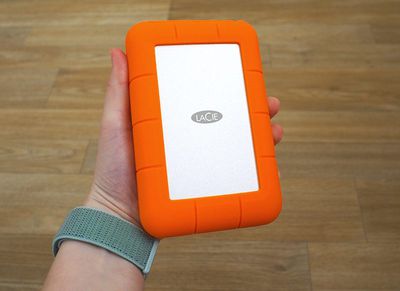
If you've seen a hard drive in LaCie's rugged collection before, the Rugged RAID Pro will look immediately familiar. It features an aluminum-encased hard drive wrapped in durable, shockproof orange rubber.
Compared to the former Rugged RAID hard drive LaCie offered, this new model is thinner and lighter. Size wise, the dimensions aren't hugely different, but it's noticeable. This new model measures in at 1.18 x 3.6 x 5.5 inches, compared to the Rugged RAID's 1.3 x 3.6 x 5.8 inch dimensions, and it weighs just about a pound.
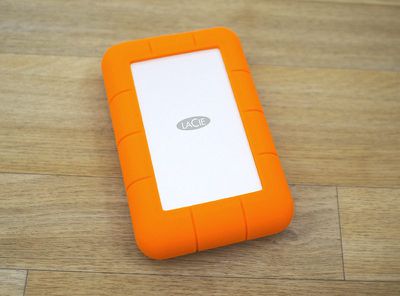
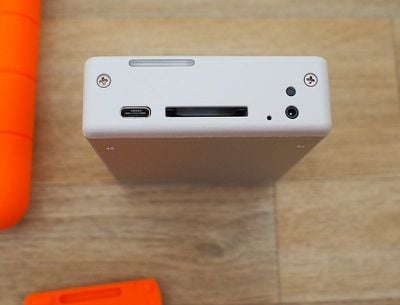
LaCie's previous Rugged hard drives have included built-in cables, but the Rugged RAID Pro uses a separate cable, which is one of the biggest design changes LaCie has introduced here. The other major change is the addition of an SD card slot, which is a fantastic addition for photographers, drone operators, and other people who often need to pull data from an SD card.
I often use an SD card reader to pull photos from my cameras, so I appreciated the addition of the SD card slot. I also prefer the removable cable to the built-in cable of the former LaCie Rugged RAID option because it offers more versatility. It's a bit messier with nowhere to wind the cord, but it overall isn't much more inconvenient.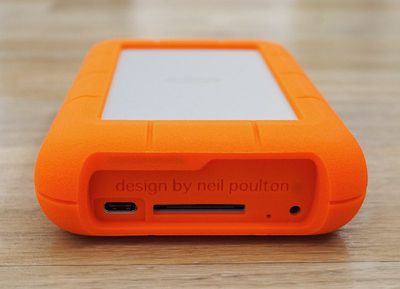
At the bottom of the Rugged RAID Pro, there's the aforementioned SD card slot and a USB-C port. LaCie has included a USB-C to USB-C cable for use with USB-C devices such as Apple's latest MacBook Pro and iMac models, and a USB-C to USB-A cable for use with older devices.
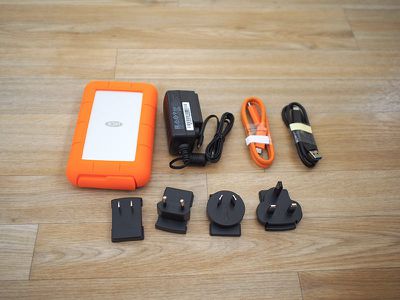
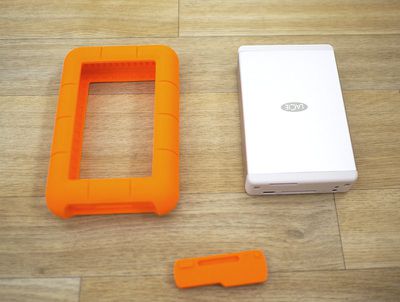
A rubber cover made out of the same material as the bumper protects these ports while in travel, and because it's a standalone piece that can be lost, LaCie includes an extra in the package. The Rugged RAID Pro hasn't left my office but I've still misplaced that port cover, so it's nice to have a backup.
The hard drive also ships with a power supply and a range of different plug heads for use when traveling. When used with a Thunderbolt device such as Apple's 2016 and later MacBook Pros, the Rugged RAID Pro is bus-powered and does not require the included power supply, but with other devices, such as the 12-inch MacBook, the power supply is necessary.
On devices where the USB ports are not providing enough power to the LaCie Rugged RAID Pro, a light on the front will flash letting you know that it needs to be plugged in to the power supply.
LaCie's Rugged RAID Pro, like all of the rugged hard drives, is designed to be resistant to dust and water, and it is designed to hold up to drops and damage. LaCie's documentation says it has drop resistance up to four feet (one foot less than the prior Rugged RAID), along with IP54 resistance to water and dust.
IP54 translates to protection from water spray from any direction, so it should hold up well in the rain, but you won't want to submerge it. It also means limited ingress protection from dust. According to LaCie, it can also withstand crushing from a 1-ton car.
I did test its drop resistance with about 10 drops from four feet with no damage inflicted (with the drive powered off, of course), but I didn't double check LaCie's crush rating.
Inside of the Rugged RAID Pro, there are two 2TB hard drives for up to 4TB of storage space depending on RAID configuration.
Software
Setting up the Rugged RAID Pro is as simple as plugging it in and opening it up. There's a "Start Here Mac" and a "Start Here Windows" file, and you just need to click the appropriate file.
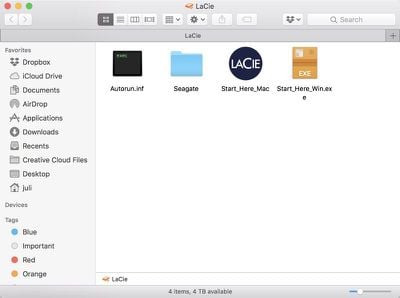
The Mac version of the software installs the LaCie Toolkit software. The Toolkit software lets you see how much storage you have available at a glance, and there's a Mirror feature that lets you set up a Mirror folder where files will sync to the Rugged RAID Pro automatically.
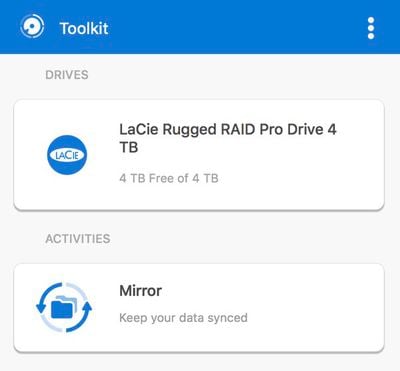
You just need to go through the menus and set up a source folder to enable this feature. Mirror is similar to something like Dropbox and can be handy if you have files that you want to keep safe on a secondary drive without having to worry about it.
If you click on the drive in the Toolkit app, there is an option to "optimize" it by reformatting it from exFAT to HFS+.
In the settings section of the app, you can also use the Toolkit to toggle on an option to import data from SD cards that are added to the drive automatically, and there's a feature to turn off the app's ability to launch when you start your Mac up.
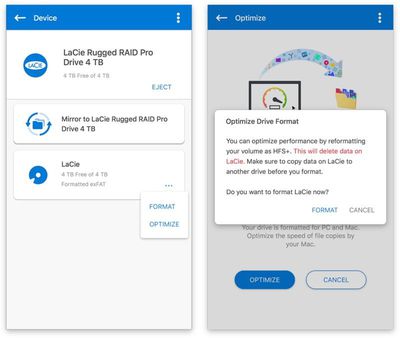
I preferred to manually import data from my SD cards rather than having it done automatically, but it's a useful option if that's what you plan to primarily use the drive for.
The LaCie Rugged RAID Pro comes configured as RAID 0 for maximum storage space and faster file transfers. If you want to reconfigure it to RAID 1 for data redundancy, you can download the LaCie RAID Manager.
RAID 0 is a setup that's going to give you the fastest file transfer speeds while also taking advantage of the full 4TB of storage space from the two included 2TB drives. RAID 1 is a setup that mirrors the two drives so that you always have a second copy of your data for extra protection.
LaCie includes a 3-year Seagate data rescue program with the Rugged RAID Pro, along with a free month of access to Adobe's Creative Cloud apps. With the rescue program, if the hard drive fails, files are accidentally deleted, or the drive is otherwise damaged, Seagate will provide data recovery services at no additional cost.
Performance
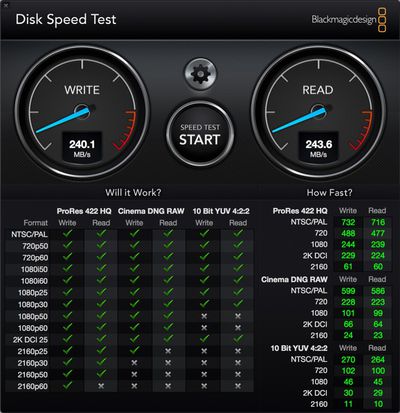
LaCie promises transfer speeds of 240MB/s over USB-C, and that is close to what I saw in my testing of the drive with a 2016 MacBook Pro. Transferring several hundred photos from an SD card in the SD card slot took just a few minutes, and file transfers from my MacBook Pro to the Rugged RAID Pro and vice versa were just as speedy.
In my experience, the Rugged RAID Pro got very hot after about a half hour of usage, so this is something to be aware of.

Bottom Line
If you're looking for more storage space for a modern USB-C Mac or PC and want a RAID configuration for redundancy, the LaCie Rugged RAID Pro is an affordable option from a trusted brand that offers a solid compromise between price point and speed.
The addition of an SD card slot makes it more convenient than ever for photographers, videographers, and others who need backup and file transfers on the go, and with its rugged enclosure, it's ideal for taking along when traveling. Seagate's data rescue program, which is included, offers additional peace of mind.
I wouldn't buy this particular hard drive for a configuration where the external power source will be required, but it's nice that the option is included along with the relevant cables if you need to transfer files to an older machine.
How to Buy
The LaCie Rugged RAID Pro retails for $350, but it can be purchased from B&H Photo for $291 or from Amazon for $330.
Note: LaCie provided MacRumors with a Rugged RAID Pro for the purpose of this review. No other compensation was received. MacRumors is an affiliate partner with Amazon and B&H Photo When you click a link and make a purchase, we may receive a small payment, which helps us keep the site running.
Popular Stories

Apple Alerts Stores to iPhone Duo's Display Cracking Issue
In a memo shared with Apple Stores and Apple Authorized Service Providers this week, and later obtained by MacRumors, Apple provided technicians with guidance on how to diagnose and address the iPhone Duo's inner display cracking issue.
If a customer reports the issue, Apple advised technicians to inspect the iPhone Duo and repair or replace it in accordance with their standard procedures....

Apple Executive Comments on New iPad Mini Lacking 120Hz Display
While the new iPad mini has an OLED display, the device does not support ProMotion, meaning the display's refresh rate is limited to 60Hz instead of 120Hz.
ProMotion support would have allowed for the iPad mini's refresh rate to automatically adjust from 10Hz to 120Hz depending on the content being displayed, but evidently Apple has kept the feature exclusive to the iPad Pro among iPad...

Apple Avoids Showing Pinched Fingers on iPad Mini Page in South Korea
In the U.S. and most other countries, Apple's website shows the new iPad mini being held by pinched fingers, but this is not the case in South Korea.
The new iPad mini shown with pinched fingers on Apple's website in the U.S.
On its South Korean website, Apple simply shows an image of the iPad mini on its own.
The new iPad mini shown without pinched fingers on Apple's website in South Korea ...















































Top Rated Comments
No, raw media does not go to the cloud (for many reasons), and cards are very infrequently being dumped to SSDs -- the huge amounts of data generated per day and the disposable nature of on-set drives that need to be sent to several post production partners and frequently delivered to clients most often precludes that option b/c of the cost. Every so often you'll hire a particularly well kitted DIT that has a SSD RAID built into their cart, but this is just for getting media off of cards quickly, when then gets transferred to spinning drives to deliver to production at the end of the day.
Can't speak for serialized content where they have the luxury of working with a single team for months or years at a time and have consistent access to and control over locations -- maybe rugged drives are irrelevant in that world, but certainly not in commercial production!
Most pro's use gear producing tens of gigabytes a shoot, wifi could not transfer this fast enough let alone safely. That's before we even start talking about the privacy issue.
[doublepost=1533283831][/doublepost]I don't think you really know what "Most modern pro's" really do when in the field do you?...