

Koogeek is one of the more interesting HomeKit accessory manufacturers, with an array of relatively low-cost and in some cases unusual products that can help users expand their Apple-focused smart home ecosystems.
The company offers HomeKit-compatible smart outlets, switches, bulbs, and sockets similar to other manufacturers, but also has some less common products like light strips, door/window sensors, environmental monitors, and even power strips.
LS1 Light Strip
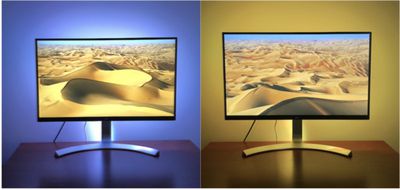
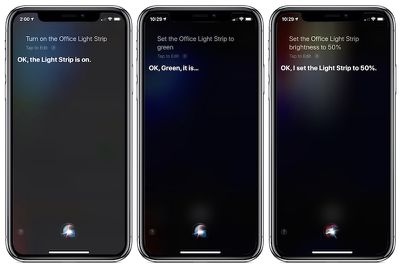
One of Koogeek's more popular HomeKit accessories is the LS1 Light Strip, a 2-meter string of LED lights that lets you choose from 16 million dimmable colors, whether you're looking for bias lighting behind your television or monitor, accent lighting in a kitchen, or any of a number of other applications. While Koogeek offers its own app for setting up and managing the LS1 Light Strip, HomeKit support means you can access it from the centralized Home app on iOS (and soon macOS Mojave) or Siri, and you can integrate it with other HomeKit devices to activate as part of a scene or other automations.
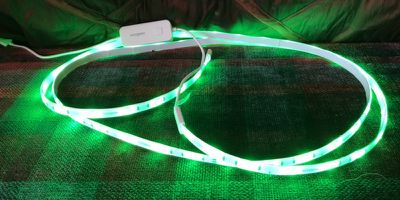
Consisting of 60 LEDs, the LS1 is a 2-meter strip with some additional cord and a single-button controller that allows you to turn the lights on and off manually. The light strip is USB-powered, which can be a benefit as it gives you some interesting flexibility in terms of mounting locations when you can use a USB port on your TV, a computer, a dock, or a power bank to run them.
On the downside, Koogeek doesn't provide a power adapter in the box, so you'll need to provide your own if you want to power it from a wall outlet. The light strip is rated for 10-watt power draw, and Koogeek recommends a 2A power adapter for maximum brightness. The power cord isn't terribly long (about 0.5 meters), so that may also be an issue depending on where you want to install the light strip.
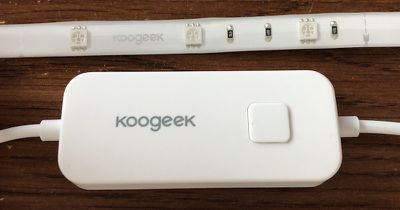
The LS1 Light Strip offers a total of 500 lumens of light output for the entire string, which is a decent amount of light but less than some competitors like Hue and LIFX Z that offer 1400–1600 lumens. Particularly for ambient lighting in darkened or semi-darkened rooms as many people are likely to use light strips, I found Koogeek's light strip plenty bright.
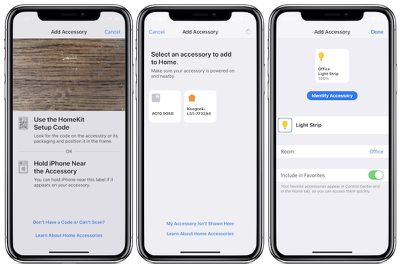
Setup of the light strip is extremely simple, requiring you to download the Koogeek app, create an account, and grant permissions for Home and location access. From there, just plug in the light strip, scan the HomeKit code on the controller or instruction manual, allow it to connect to your Wi-Fi (requires a 2.4 GHz network), and give it a name and room location. Colors can be adjusted either in the Koogeek app or the Home app, but the Koogeek app is a bit more powerful in that regard.
Overall documentation is a little bit weak, and there are a few language issues here and there in written materials, the app, and Koogeek's website. They could certainly benefit from some polish by native English speakers, but it's clear enough to let you figure out what you're doing.
Mounting the light strip is fairly straightforward, with 3M adhesive running along the entire back of the light strip portion. It's very strong, so you shouldn't have to worry about your lights falling down, although it does give me pause about whether certain surfaces might be damaged in the removal process.
As with pretty much every light strip, it's a little tricky making the LS1 conform to the exact shape you want, as it's thick enough that bends and corners become tricky. The adhesive is strong enough to help secure the light strip, but you'll want to be careful not to bend the strip too much as Koogeek says you shouldn't bend to less than a 30-degree angle. The LED portion of the light strip is rated IP65 for water and dust resistance, but Koogeek says it shouldn't be used outdoors or in a bathroom or other humid environment.
The LS1 Light Strip can be cut to shorten it to a desired length, but obviously only the portion with the controller will be functional, so the removed pieces will need to be thrown away. Unlike some other light strip brands, the LS1 is also not extendable. Hue and LIFX Z, for example, come as 2-meter strips like the LS1, but you can purchase extensions in various lengths up to a total length of 10 meters with one controller and plug. With the LS1, you'll need to use separate strips if you want to go longer than 2 meters.
While the light strip will remember your selected color when you turn it on and off, if the strip is ever unplugged or completely loses power for any other reason, it will default back to white and you'll have to set your desired color again.
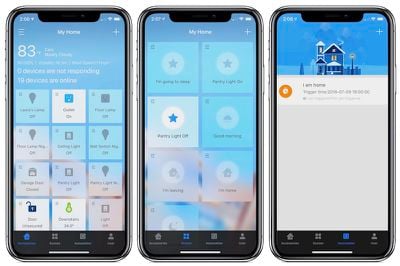
The Koogeek Home app can serve as a nearly full substitute for the Home app, as it shows all of your HomeKit devices and offers you quick access for controlling them, but I wouldn't recommend the app for regular use. While it's good enough to get your Light Strip set up, the design is certainly lacking and there are some bugs such as my thermostat's temperature being displayed in Celsius units despite Fahrenheit being selected in its options within the app. During the World Cup, the Automations tab also included an odd ad offering prizes and discounts for participating in Koogeek's contest related to the event.
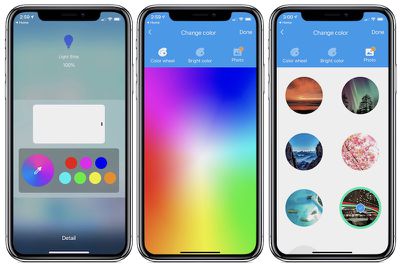
For the light strip in particular, Koogeek's app offers quick access to a brightness slider, as well as a selection of favorite colors. But you can also dig in further to customize your colors using a color wheel or temperature wheel. You can even upload photos and let the app automatically select a single color that represents the photo, and you can configure Alexa and Google Assistant integration.
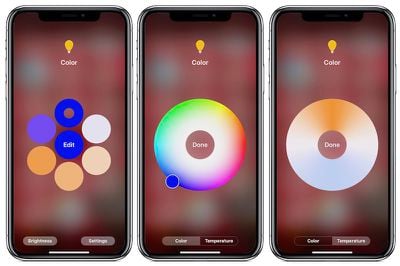
Controls in Apple's Home app are somewhat similar, with a quick tap on the light strip's tile toggling it on and off and a deeper press bringing up a brightness slider. From there, you can dive in further to choose from favorite colors or customize by color and temperature.
While Koogeek's LS1 Light Strip comes up short in the feature department compared to other strips that are brighter, can be extended, and perhaps support multiple color zones (LIFX Z) or syncing with music and movies (Hue), where it wins out is in the price department, and that's a big one. The LS1 is currently available for $35 at Amazon, compared to $90 for Hue and LIFX and more like $55–60 for Sylvania's offering. Unlike Hue, Koogeek also doesn't require a hub, making for simpler installation and less clutter attached to your router.
So if price is a significant consideration for you, the Koogeek LS1 Light Strip is definitely worth checking out as a HomeKit light strip solution. It's not as full featured as some of the other available light strips on the market, and it lacks some polish in the app and documentation areas, but if those aren't deal-breakers for you it's hard to beat the value of Koogeek's LS1.
DW1 Door & Window Sensor
Among Koogeek's other products is the DW1 Door & Window Sensor, a simple magnet-based contact sensor for letting you know whether a door or window is open or closed. We looked at similar sensors as part of the Ring Alarm kit, but other companies like Koogeek also sell standalone sensors that with HomeKit support can send you notifications when there is a change in status of the monitored door or window. You can also check on the status at any time via Siri, the Home app, or Koogeek's app.
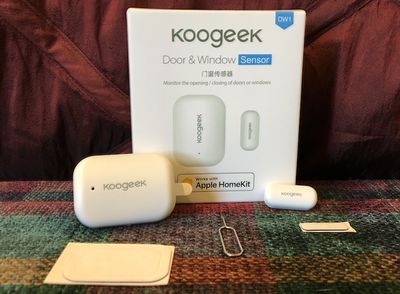
Aside from simple status checks and updates, HomeKit support allows you to integrate Koogeek's Door & Window Sensor with other HomeKit products in the form of scenes and automations. For example, you can trigger a light to come on when a door is opened, either for security purposes or to simply provide light in a dark closet or room without needing to fumble for a light switch.
Setup of the DW1 is again very simple, with the Koogeek app pulling up a Home app interface to handle the addition. Pulling the battery protection tab on the sensor turns it on, allowing it to be automatically discovered by the app via Bluetooth. Once you've scanned the HomeKit code, it'll take a minute to get fully activated, and then you'll be able to give it a name and a room location for grouping and automation purposes.
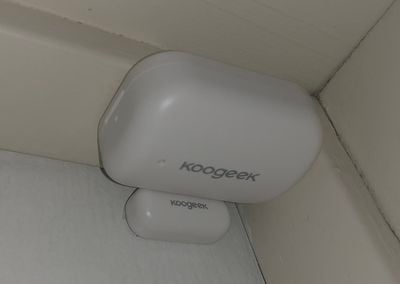
Stick the sensor and the magnet on your door or window, and you're good to go. The two pieces must be within 2 cm of each other to register the closed state, and Koogeek recommends that the lighter magnet portion be mounted on the movable door or window while the larger sensor sits on the frame. Attachment is via adhesive included on the rear of the parts, and an extra set of adhesives is included in case the initial set wears out or you decide to change locations.
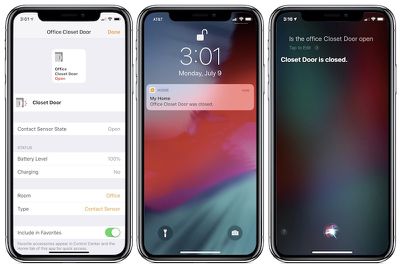
Once you're up and running, you can use Siri, the Home app, or the Koogeek app at any time to check on the status of the door or window, and you can configure notifications and see battery level in the Home app.
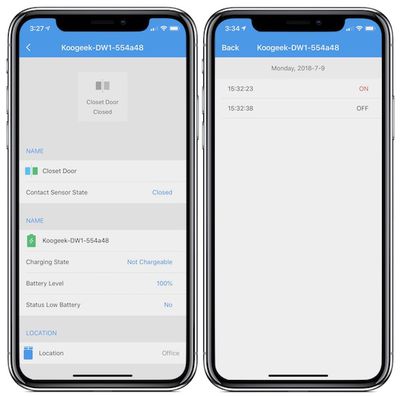
As with the LS1 Light Strip, the Koogeek app leaves a bit to be desired when it comes to managing the Door & Window Sensor. It similarly displays battery level and pertinent information like open/closed state and room location. It also has a section for "Logs Records" which shows a history of the last 100 open and close events, but date and time formatting are rudimentary and events are shown as non-intuitive "On" and "Off" states rather than "Open" and "Closed."
The DW1 Door & Window Sensor uses a replaceable CR2450 button battery, and should last up to a year on a single battery. The DW1 is currently available for $31.99 from Amazon and includes the sensor and magnet parts, an extra set of adhesives, and a SIM removal tool to access a pinhole reset button on the sensor if needed. That's a bit cheaper than the Eve Door & Window and significantly cheaper than Fibaro's Door/Window Sensor, so the Koogeek DW1 might be a good option for those looking to integrate this type of sensor into their HomeKit setups.
Note: Koogeek provided the LS1 light strip and DW1 door and window sensor to MacRumors free of charge for the purposes of this review. No other compensation was received. MacRumors is an affiliate partner with Amazon and may earn commissions on purchases made through links in this article.

















































Top Rated Comments