

Kingston Nucleum USB-C Hub Review - MacRumorsOpen MenuShow RoundupsShow Forums menuVisit ForumsOpen Sidebar
Skip to Content

Review: Kingston's Nucleum USB-C Hub Adds Much-Needed Ports to Your MacBook or MacBook Pro

by

With Apple's decision to embrace USB-C on all of its modern Macs, the company has created a need for USB-C docks so that we can continue to use all of our non-USB C peripherals as we wait for the rest of the tech industry to catch up.

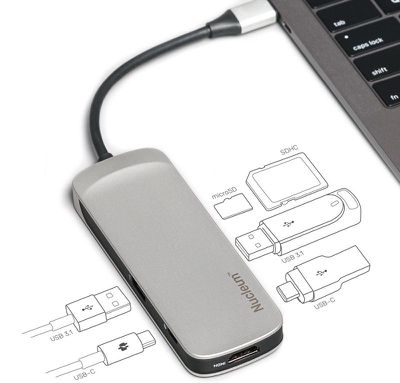
Kingston's Nucleum USB Type-C Hub is designed to meet that need, offering a selection of useful ports for MacBook, MacBook Pro, and iMac owners who still need to use the USB-A, HDMI, SD, and microSD ports that are no longer available on recent machines.
kingstonnucleum
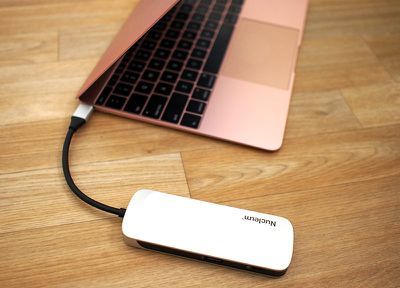
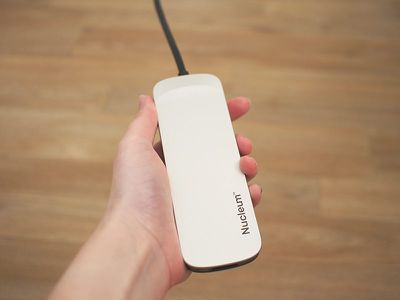
The Nucleum USB-C Hub, made from a silver Aluminum to match Apple devices, is small enough that it can be tucked into a purse or a bag, or, in a pinch, a pocket. It's narrower and shorter than an iPhone X, but a bit thicker, with a short built-in USB-C cord provided.

It's a bit larger than palm-sized, but it's still not going to take up much room during travel or when it's in use on a desk. There's a "Nucleum" logo on the top of the device, while the back features Kingston branding and necessary regulatory labels.
nucleumwithmacbook
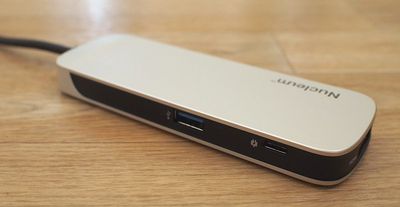
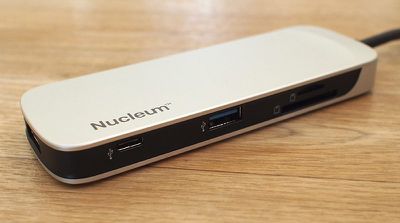
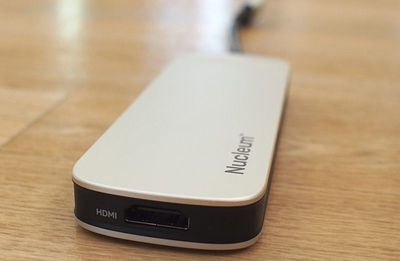
The left side of the dock features a USB-A port and a USB-C power delivery port so you can charge a MacBook or MacBook Pro while the hub is plugged in, and on the right side, there's another USB-C port for USB-C accessories, a single USB-A port, a microSD card slot, and an SD card slot. At one end, there's the aforementioned power cord, while the other end houses an HDMI port.

All in all, there are a total of seven ports available on the hub, which is not too bad for a device of this size. I don't often need more than two USB-A ports at a time, so the two-port setup worked for me, and it's nice to have access to both microSD and SD card slots for camera accessories.
nucleumsidea
This port arrangement is standard for many of the USB-C hubs that you'll find on sites like Amazon, but I've found that many of those hubs don't offer multiple USB-C ports. An extra USB-C port is surprisingly handy for my MacBook in particular (which has a single USB-C port) because I've found myself with more USB-C accessories as I transition from USB-A to USB-C.

If you have primarily USB-A accessories, you may find that the Kingston hub does not offer a sufficient number of USB-A ports. Competing (and more affordable) hubs on Amazon typically offer 3 to 4 USB-A ports, but again, Kingston has a nicer variety of ports available. Most dual USB-C hubs seem to have higher price tags.
nucleumsideb
You can use all of the hub's ports at once if so desired, and when testing multiple accessories plugged in at once, I ran into no problems. The HDMI port supports a 4K monitor (or a 1080p monitor), while passthrough charging functionality means your attached iPhones will charge up while plugged into the hub. Kingston says the Nucleum offers 5V/1.5A, which is best suited to iPhones and similar accessories. iPads will charge, but slowly.

When using the power delivery USB-C port with your USB-C cable and power adapter for charging purposes, the hub is able to deliver up to 60W of power. That is sufficient for charging the 12-inch MacBook (29W) or the 13-inch MacBook Pro (61W) but it falls a bit short of the full capacity of the 15-inch MacBook Pro (87W).
nucleuminhandsize
Still, 60W is enough to keep a 15-inch MacBook Pro topped up provided you're not doing something that's super battery intensive like rendering video or playing a graphics-heavy game. During my workday, the 60W provided by the hub was enough to keep my 15-inch MacBook Pro at 100 percent using apps like Safari, Mail, Slack, Photoshop, Pixelmator, Chrome, Tweetbot, and more all at once.

I did notice that when I unplugged my USB-C power adapter from the Nucleum or when I plugged it in, that it would cause the hub to shut off for a second. That means that any hard drives or other accessories I have attached temporarily disconnect, so you're going to want to be careful not to plug it into a power source or unplug it during file transfers.

As a side note, the Nucleum does not need to be plugged in to a power source other than the host computer for it to function. Using the passthrough charging feature is optional.

Transfer speeds were at what I'd expect for a USB-A device plugged into a USB-C hub. With a traditional Seagate Backup Plus hard drive, for example, it took about 20 seconds to transfer over 3GB of data. Speeds were a bit slower when I was utilizing all of the ports on the hub, but not unreasonably so. As a note, you can only connect USB-C and USB-A hard drives to the hub. If you have a Thunderbolt 3 drive, like I do, it is not compatible because the Nucleum does not support Thunderbolt 3.
nucleumhdmi
Moving files from an SD card and a microSD card was also relatively speedy, with it taking about 25 seconds to copy over 1GB worth of photos from an SD card to my computer, and a little under a minute to copy them back from the MacBook Pro to the card. As someone with several cameras and a drone, having access to both microSD and SD card slots is invaluable.

Bottom Line

With Apple's focus on USB-C and its decision to remove all legacy ports, the company has created a thriving third-party hub market, and it can be difficult to narrow down what's good from what's just mediocre.

Kingston's Nucleum is in the former category, providing the ports you're most likely to need in your day to day life in a slim, portable hub from a trusted manufacturer. Kingston's hub is more expensive than some options you'll find on Amazon, but reliability is often worth the extra money.



I appreciated the compact size of the Nucleum, which makes it ideal for travel, and the variety of ports that it provides was perfect for me. It offers all of the ports that I need on a daily basis (primarily USB-C, USB-A, and an SD card slot), and everything worked as expected with no surprises.

I do wish that it perhaps had one more USB-A port for people who still need to use several USB-A accessories, but I have no complaints about an extra USB-C port. I don't need dual USB-C ports on my MacBook Pro, but for my 12-inch MacBook, dual ports is a valuable addition. While I used this with Macs, it's also going to be compatible with Windows-based machines.

The one major thing to be aware of with the Nucleum that it disconnects when connected to or disconnected from a power source. It's not a huge deal, but if you purchase this hub, make sure not to change its power settings during file transfers.

How to Buy

The Nucleum USB Type-C Hub can be purchased from the Kingston website or from Amazon.com for $80.

Note: Kingston provided MacRumors with a Nucleum USB-C Hub for the purpose of this review. No other compensation was received.

Tag: USB-C

Top Rated Comments

Quu Avatar
110 months ago
Just think in a few years they may be able to build a computer that has all these ports built in! - What a world that'd be.
Score: 32 Votes (Like | Disagree)
BenTrovato Avatar
110 months ago
It wasn’t Apple’s finest move by going full USB-C and requiring 99% of the people to buy a hub. Yes I know there is always that one person who is full cloud and doesn’t need any ports. The majority of those needing ports didn’t make sense. But that’s Apple, sometimes they nail it - on this one, way off.

The saddest part is that they boosted the usb hub segment in a big way. A ten fold increase in all that plastic for millions more USB hubs that in a few years will be in a landfill. Stay tuned for the iPhone launch in September when they open the keynote with a 5 minute presentation on how much more “green” Apple is :rolleyes:


Score: 7 Votes (Like | Disagree)
soupcan Avatar
110 months ago
Sooooooo, if the ports are much needed why are we buying laptops who lack every single usable port on them? Is it because of the Apple logo on the back of it? Because that's dumb.
Score: 7 Votes (Like | Disagree)
cBraunDesign Avatar
110 months ago
Just think in a few years they may be able to build a computer that has all these ports built in! - What a world that'd be.
Once again, confirmation that the 2015 MacBook Pro is the best computer Apple has ever made.
Score: 4 Votes (Like | Disagree)
blackrabbit1000 Avatar
110 months ago
Why do all those docks need to be so big and clunky? Not to mention they don’t really play along nicely with Apple’s design language.
HooToo USB-C dock matches really well actually.
[doublepost=1528839268][/doublepost]Weird thing is, none of these work with the super drive for that occasional need for a CD or DVD. Only the official Apple USB-C to USB dongle will work with that little beast.

Attachment Image
Score: 4 Votes (Like | Disagree)
110 months ago
Lol USB Type A, HDMI, SD Card Reader, and Ethernet ports are all legacy now?

I’ll give you FireWire and the 3.5 mm jack but the others? Really?
Every pair of headphones I own begs to differ as to their 3.5mm jack's being prematurely relegated to the dustbin.
Score: 4 Votes (Like | Disagree)

Popular Stories

Apple MacBook Pro with PROLED XDR Display family lineup feature

Apple Announces OLED MacBook Pro With Touch Display

Wednesday October 28, 2026 10:11 am PDT by
Apple today announced a new high-end MacBook Pro, which is available in 14-inch and 16-inch sizes. The new device has a PROLED XDR display that supports touch gestures, and a glowing rear Apple logo. Pricing on the MacBook Pro starts at $2,899 for the 14-inch model and $3,399 for the 16-inch model. Apple says the MacBook Pro has the "world's best display in a pro laptop." The PROLED...
iPhone Duo Display Cracking

Apple Alerts Stores to iPhone Duo's Display Cracking Issue

Friday October 30, 2026 3:20 pm PDT by
In a memo shared with Apple Stores and Apple Authorized Service Providers this week, and later obtained by MacRumors, Apple provided technicians with guidance on how to diagnose and address the iPhone Duo's inner display cracking issue. If a customer reports the issue, Apple advised technicians to inspect the iPhone Duo and repair or replace it in accordance with their standard procedures....
iPad mini OLED feature 1

Apple Executive Comments on New iPad Mini Lacking 120Hz Display

Thursday October 29, 2026 1:47 pm PDT by
While the new iPad mini has an OLED display, the device does not support ProMotion, meaning the display's refresh rate is limited to 60Hz instead of 120Hz. ProMotion support would have allowed for the iPad mini's refresh rate to automatically adjust from 10Hz to 120Hz depending on the content being displayed, but evidently Apple has kept the feature exclusive to the iPad Pro among iPad...
Latest Stories
Apple Watch Ultra 4 Hits All-Time Low Price With Amazon's $99 Discount
1 hour ago
Reminder: Apple's Big Discount on Beats 360 Ear Cushions Ends Today
2 hours ago
Here's a New Tour of Apple's HomeView Software
2 hours ago
Apple Reveals New iPad Mini's Battery Capacity
3 hours ago
Top Stories: Apple's Big MacBook Pro, iPad mini and iMac Updates
4 hours ago
'Pluribus' Season 2 Reportedly Starts Production Today
11 hours ago
iPhone 18 Pro Sales Surge in China, Offsetting Decline in U.S. and Japan
11 hours ago
HomeView Software 27.2: Wallpapers, Control Center, and More
18 hours ago
Apple Alerts Stores to iPhone Duo's Display Cracking Issue
19 hours ago
iOS 27.3 Will Enable These Apple Intelligence Features in China
20 hours ago
Apple Says iOS 27.3 Beta Coming Next Week
20 hours ago
Apple's Flash Storage Suppliers Are Finally 'Getting Their Revenge'
21 hours ago
14 New Things Your iPhone Can Do in iOS 27.2
22 hours ago
iPhone Duo Review: One Week Later
23 hours ago
Samsung Mocks iPhone Duo Display Cracks in New Ad Campaign
1 day ago
The MacRumors Show: OLED MacBook Pro, iPad Mini 8, and More
1 day ago
MacBook Pro With Touch Display: 15 More Details Revealed
1 day ago
Russia Places Apple on State Surveillance Registry
1 day ago
Halloween Weekend Brings Discounts on Apple Accessories and Pre-Orders
1 day ago
Apple Has Released More Than 25 New Products in the Past Two Months
1 day ago
Local Code Launches as Free, Private AI Assistant Tool for Mac
1 day ago
Apple Acquires Ascend.io
1 day ago
HomePod Mini 2 Launches Today: All the New Features
1 day ago
AirTag 2 4-Pack Drops to New Low Price of $69.99
1 day ago
Rian Johnson's iPhone Camera App Goes Viral
1 day ago
Where Did All the iPhone Duos Go? Mostly to Apple's Stores
1 day ago
Apple's Touchscreen MacBook Pro Could Ship 1.5M Units in 2027
1 day ago
New Apple TV 4K and iPad Mini: RAM Amounts Revealed
2 days ago
Apple Executive Comments on New iPad Mini Lacking 120Hz Display
2 days ago
Here's a Hands-On Look at HomePod Mini 2's New Two-Tone Colors
2 days ago

🔗 Related Apple News & Rumors

Stay updated with the latest Apple ecosystem news and verified rumors









































