

Thunderbolt 3 docks continue to flood the market, and today I'm taking a look at IOGEAR's Thunderbolt 3 Quantum Docking Station. IOGEAR's dock offers many of the same features typically seen on other Thunderbolt 3 docks, including multiple USB ports, a Gigabit Ethernet port, headphone and microphone jacks, a DisplayPort port, and a pair of Thunderbolt 3 ports to allow for daisy chaining, all in a familiar horizontal design used by many other docks.
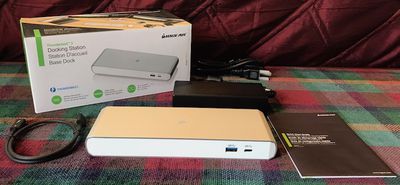
Most notably, the IOGEAR Thunderbolt 3 Quantum Docking Station looks identical to CalDigit's TS3 Lite that I reviewed a few months ago, with the exception of color and finish. While CalDigit's dock has an enclosure of brushed aluminum and black matte plastic, IOGEAR's has more of a satin matte finish that's slightly lighter in color, paired with white matte plastic. In size, shape, and port layout, however, these two docks are identical.
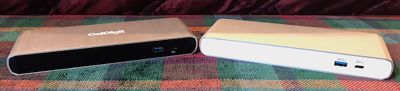
The IOGEAR dock looks decent, with its aluminum finish coming close to the silver color Apple uses on its notebooks. A fairly unobtrusive IOGEAR logo is printed on the top of the dock, and it comes with an external power brick and a 0.5-meter Thunderbolt 3 cable for connecting to a host computer at maximum speeds.
Meeting the standard for Thunderbolt 3 docks, IOGEAR's version supports up to a single 5K display over Thunderbolt 3 or dual 4K displays over a combination of Thunderbolt 3 and DisplayPort. I experienced no hiccups connecting an LG UltraFine 5K display at up to 60 Hz through one of the dock's Thunderbolt 3 ports.

In line with every other dock I've reviewed with the exception of OWC's Thunderbolt 3 Dock, IOGEAR's dock includes three USB ports, with IOGEAR opting to go with one Type-A on the rear and one each of Type-A and Type-C on the front for easy access.
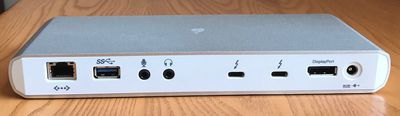
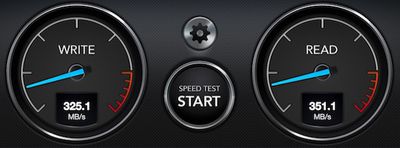
All three ports run at 5 Gbps USB 3.1 Gen 1 speeds, and the inclusion of a Type-C port is a nice benefit as peripherals start to move in that direction. The USB ports operate at expected speeds once overhead is accounted for, with a CalDigit Tuff SSD running at 325 MB/s write and 350 MB/s read over both Type-A and Type-C, in line with other Thunderbolt 3 docks featuring 5 Gbps USB ports.
As with the TS3 Lite, one of the main limitations with IOGEAR's dock is that it only supports up to 15 watts of charging power over Thunderbolt 3/USB-C, meaning it won't be able to power your MacBook Pro over the same cable used for data and video and you'll need to hook up your computer's power brick.
Attempting to power my 2016 15-inch MacBook Pro solely through the dock merely slowed the rate of battery life decrease, even under light usage. Depending on your setup such as willingness to use your Mac's power brick or having another monitor with higher charging power already connected, this might not be a deal breaker, but with many other Thunderbolt 3 docks offering 60 or even 85 watts of charging power it's an unfortunate limitation.
The real deal breaker, however, is price, unless you're very careful in shopping around. IOGEAR's dock carries a list price of $299.95, in the same range as docks with better features such as higher charging power, and a full $100 more than the essentially identical TS3 Lite from CalDigit. You can certainly find cheaper prices on IOGEAR's dock such as current $225 pricing at Amazon, but even that is still higher than the TS3 Lite.
Authorized reseller Provantage currently has it for $178, but with shipping starting at $27, the deal isn't quite as good as it first appears. Even with those deals, it's disappointing how much hunting you need to do to try find a good price on this dock.
As a result, it's hard to recommend the Thunderbolt 3 Quantum Docking Station unless you can find it at a really great price. The TS3 Lite is generally cheaper for identical features, while other docks like OWC's Thunderbolt 3 Dock with more USB ports and an SD card slot or Elgato's dock or CalDigit's TS3 with more features at the same list price offer better values.
Note: IOGEAR provided the Thunderbolt 3 Quantum Docking Station to MacRumors free of charge for the purposes of this review. No other compensation was received. MacRumors is an affiliate partner with Amazon and may earn commissions on purchases made through links in this article.

















































Top Rated Comments
The cheaper options are "USB-C hubs/docks" - that is, the connection to the computer uses USB 2, USB 3.1 and "USB-C displayport alt mode" (which physically allocates 1 - 4 of the high-speed data lanes in a USB-C cable to DisplayPort signals). The max bandwidth for peripherals is (theoretically) 10Gbs USB 3.1gen2 (but AFAIK the currently available products only use 5Gbps USB 3.1gen1) which has to be shared between the devices connected to the hub (much like an old-school USB hub). Also, to drive a 4k@60Hz display, all 4 of the high-speed data lanes have to be allocated to DisplayPort, and all that is left for other devices is 480 Mbps USB2 (which has its own pair of wires in the cable).
The more expensive "thunderbolt 3 docks" connect to the computer via Thunderbolt 3 at up to 40Gbps - they contain USB 3.1 controllers to drive their USB ports - and sometimes SATA controllers as well. Up to 2 4k@60Hz DisplayPort streams (i.e. enough to drive one 5k display) can be encoded as part of the Thunderbolt signal while still leaving bandwidth for other high-speed data.
If you're using 4k or better displays and/or want to connect high performance disc drives etc. via the dock, you really need a Thunderbolt dock. If you just need more sockets to connect mice, printers, slow backup drives and/or connect sub-4k displays, then a cheaper USB-C hub should do the job - especially if you have spare USB-C ports on your computer...
[doublepost=1504091126][/doublepost]Actually, what is frankly stupid is that Apple - when they made the courageous decision to suddenly drop all the "legacy" ports from the MBP - didn't make sure that there was at least one decent TB3 dock (not built into a $1000 5k display) available at the launch. Also, things like USB-C to DisplayPort/MiniDisplayPort cables - absent from the Apple store - which have proven a bit of a crapshoot to get from third parties.
If it were just OWC's dock turning up a day late and a dollar short then maybe you could blame OWC, but these delays and glitches have been standard operating practice for both TB3 products and earlier TB1 & 2 products from most sources so maybe, just maybe, it is harder than it looks to get it right. I'm sure Apple's resources could have helped.
Even the LG 5k Thunderbolt display looks distinctly as if Apple started to design a new display and then couldn't be bothered to produce the casing (bet it would't have had that EM shielding problem if it had been in an aluminium case...) - Apple today seem to want to live in a world where they just produce the big-ticket computers and the surrounding ecosystem take care of itself.
A single TB3 connection isn't a bottomless pit of bandwidth - especially if you're using it to drive 4k or 5k displays - and I've never met a packet-based interface that didn't start to have latency issues when running at a significant fraction of its theoretical bandwidth.
(actually, maybe not a realistic solution, but the TB2-TB3 adapter works both ways so you could add another adapter and convert the chain back to TB3 - but obviously not at 40Gbps. Not that we're knee deep in 40Gbps-capable TB3 devices at the moment, anyway.)
I now see that there are "ifs" and "buts" over whether the Caldigit and OWC can support 4k@60Hz on some displays via the DisplayPort connection (you have to download the manuals to see details), which is really annoying. Its around that point where I start wondering whether the whole idea of a TB or USB-C dock is a busted flush - just too many potential compatibility glitches.
[doublepost=1504082525][/doublepost]Perhaps in a business office, at home most users would be connecting up digital cameras so not having an SD card means those users will just pass on to a competitor.
But until then, no sale on ANY of these docks.
Not one of them offers the ports of the OWC, with the 85 watts power of the full Caldigit.
OWC haven't even bothered to explain why exactly their dock can't do 85 watts. Which given they market themselves at Apple customers, is frankly stupid. Are they really expecting Apple customers who expect the best to buy a pre-gimped product... just because?!
What a waste of time they're all turning out to be. Disappointing to say the least.