

Several months ago, accessory company Hyper introduced a set of three USB chargers designed with travel in mind, featuring compact designs based on GaN technology and interchangeable charging heads for convenient international travel.
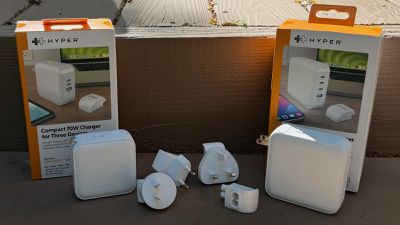
I've spent some time testing out the 70W ($59.99) and 100W ($89.99) versions of the new HyperJuice charger line, and Hyper has more recently added an even more powerful 145W version ($119.99) to the family. All three of the chargers are currently part of Hyper's spring sale that knocks 20% off the usual prices.
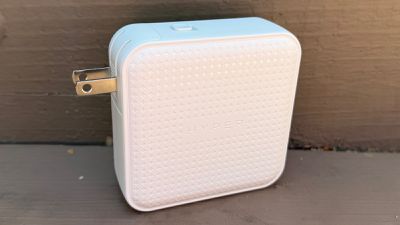
All three chargers feature essentially the same plastic design in either white or black with subtle Hyper branding and a pattern of tiny "+" icons reminiscent of the company's logo on the largest sides to provide some visual and tactile interest. A small LED beneath the USB-A port on each model shines blue to indicate when the unit has power, but it's not overly distracting in a dark room.
Charger size unsurprisingly increases as the wattage goes up, and while the 100W and 145W versions each include three USB-C ports and one USB-A port, the 70W version scales back to two USB-C ports and one USB-A port.
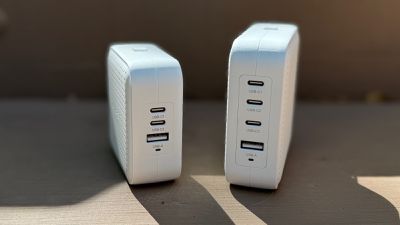
Given the wattages involved, there's also a good bit of heft to them, but the 70W model is still fairly light at just under half a pound. The 100W at three quarters of a pound is a definite step up in size and weight, while the 145W model weighs nearly a pound.
With even Apple adopting GaN technology on its higher-powered chargers over the past few years, moving to a third-party solution doesn't always deliver a lot of size or weight savings, and that's the case here. Hyper's 70W model is actually 30–40% larger and heavier than Apple's corresponding charger, while Hyper's 145W model is around 20% larger and 50% heavier than Apple's 140W charger, but unlike Apple's chargers, Hyper's deliver more than one port which is certainly an important travel consideration.
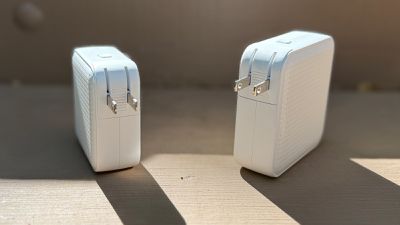
While these chargers aren't the most compact ones I've seen for their wattages, they are reasonably sized and make for solid travel companions. They come with a two-prong US-style Type A charging head with folding prongs preinstalled, which makes them great for tossing in a bag.
But for those who need other options for plugging in the charger, Hyper provides these right in the box. European-style Type C, UK-style Type G, and Australian-style Type I charging heads are included and can be swapped onto the charger in just a few seconds thanks to a quick-release button. The prongs on these heads aren't foldable as they are on the US charging head, but that's not unusual given the US design is most amenable to folding mechanisms.
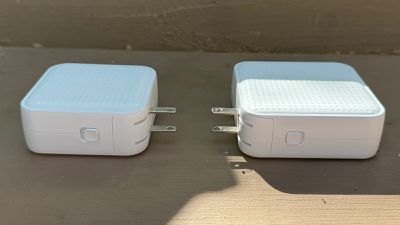
I haven't yet had the opportunity to travel internationally with these chargers, but I appreciate the inclusion of interchangeable charging heads so I'll have everything I need the next time I go abroad as this set of adapters provides for functionality in over 150 countries.
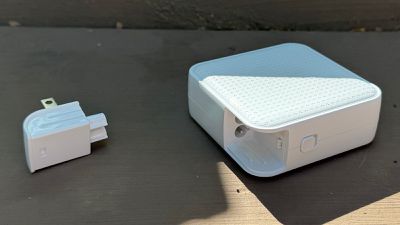
Beyond the international charging heads, there's also a C8 head included, allowing you to connect a power cable (sold separately for $5.99 or you can provide your own) if you prefer to use the charger on a desktop, somewhere you can't plug the charger directly into a socket, or in any other situation where you need some additional cable length.
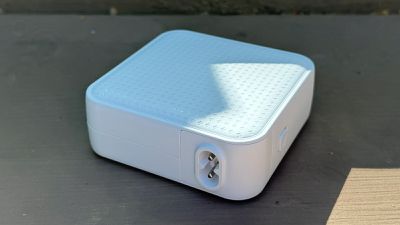
All three chargers feature intelligent power distribution, dynamically allocating power to each device based on what's been connected. For example, on the 70W model, each of the USB-C ports support up to 70 watts of charging power while the USB-A port supports up to 18 watts, but with multiple devices connected, the charger's total 70W output will be divided among the various ports.
On the 100W model, the top two USB-C ports are capable of providing the full 100 watts of power if used alone, while the third USB-C port supports up to 27 watts and the USB-A port provides up 18 watts. And on the largest 145W model, the top two USB-C ports can provide up to 140 watts with the third USB-C port supporting up to 45 watts and the USB-A port again maxing out at 18 watts.
With three or four ports on each of these chargers, there are obviously a number of different combinations of ports, and the wattage distribution varies for each scenario, but on the 70W model, using both USB-C ports simultaneously results in a split of 45 watts to port C1 and 25 watts to port C2. Adding a device to the USB-A port drops the distribution to 35 watts for C1, 20 watts for C2, and 12 watts for the USB-A port.
Ultimately, which charger model you opt for will likely depend greatly on which devices and how many of them you plan on powering. For example, if you're a MacBook Air user, the 70W model might be enough for you, as Apple provides only a 30-watt or 35-watt adapter in the box with those machines so you can charge your Mac through the C1 port on Hyper's charger and still have some power left over for some combination of iPhone, iPad, Apple Watch, or other devices. But if you're a MacBook Pro user and/or you're looking to charge lots of devices at relatively fast speeds, you'll want to step up to one of the higher-wattage models.
Note: Hyper provided MacRumors with the 70W and 100W HyperJuice chargers for the purposes of this review. No other compensation was received. MacRumors is an affiliate partner with Hyper. When you click a link and make a purchase, we may receive a small payment, which helps us keep the site running.


















































Top Rated Comments
https://www.macrumors.com/2022/09/29/hyper-charger-recall/
Personally my only experience with them was a USB-C dock that plugged into my iPad Pro. It was so glitchy that it would corrupt when sending data to a connected external SSD or SD card, sometimes rendering the external device useless until it was reformatted. Basically they make garbage products from what I've seen. I'd steer clear.
Both of these chargers are extremely unreliable and showing exactly the symptoms you are describing. Especially if charging one device and connecting another one - which is the whole purpose of a multi-port charger - there are different charging issues (especially the on-off-on-off disconnection that is not only not charging the batteries but also ruining them over night). And these issues are not isolated in any way to Lightning products - it is for all kind of products from any manufacturer (Apple, HP, Samsung, etc.).
Just the fact that this company ("Hyper", formerly known as Targus) does not even maintain products manuals online is an indication that it is not a serious enterprise. For these kind of products reliability and security are the most important factors. So I would advise anyone reading this to never ever under any circumstances buy "Hyper" products.
As a side note, there are indications that the Hyper 245W GaN Desktop Charger have hidden HUB-functionality not mentioned in any specifications on product pages from Hyper. To me this indicates that Hyper is just sourcing cheap products from wherever and selling them without any effort other than trying to make some easy money.
I ended up getting an earlier 140W version of the travel charger product shown in this Macrumors review (sponsored content?). Swapping to different countries' outlets appealed to me for travel. Some of my store credit was wasted as my original spend on the stackable chargers of course didn't translate into an exact multiple of other products and I did not want to reward Hyper with more of my money.
The Hyper 140W travel charger is a bad product:
1. Its weight is too much, with the center of balance too far from the outlet, for the clutching force of a two-prong American outlet. In other words, unless you support the charger underneath or press it against the wall with a nightstand, it will work itself out of the wall over time. Really great to wake up in a hotel and find out your phone didn't charge overnight.
2. Something about its charging protocol is bad with Lightning devices. With both USB-A and USB-C OEM Apple lightning cables, I have devices that do not reliably charge. For example, my AirPods Max will charge for a few minutes and then stop. My iPad mini 5 will not charge if you just plug it in. However, if after plugging it in you connect or disconnect a USB-C device, it will notice the iPad and start charging. However, once the iPad mini is full, it will cycle every 30 seconds or so between charging and not charging, giving you the *ding* associated with charging which means it will wake you up in the middle of the night.
Beware Hyper. They would not refund customers money even when their chargers literally caught fire. And my experience with the replacement product has been one of the lowest-quality chargers I have encountered.