

Griffin WatchStand for Apple Watch Review - MacRumorsOpen MenuShow RoundupsShow Forums menuVisit ForumsOpen Sidebar
Skip to Content

Review: Griffin's WatchStand for Apple Watch Keeps All That Extra Cable Hidden

by

With its WatchStand, accessory maker Griffin has come up with a unique take on an Apple Watch charging dock, incorporating a cord management feature that sets it apart from the many other stands on the market. Made of plastic instead of aluminum or wood, Griffin's stand is also one of the more affordable options available.

I've been testing the Griffin WatchStand for the past week and have been impressed with the level of functionality vs. the price, but there are a few drawbacks that might not make it the best stand choice depending on which Apple Watch you own.
griffinwatchstandopenbandside
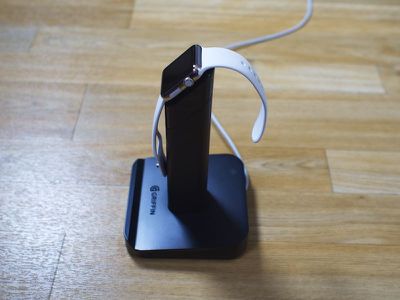
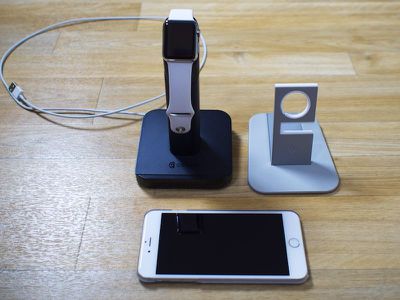
When it comes to looks, the Griffin WatchStand is not quite as attractive as some other options on the market. Its black plastic design doesn't complement the Apple Watch and other Apple devices, it feels overly tall, and it doesn't blend into a range of different decors as well as aluminum or wood.
griffinwatchstandnextotwelvesouth

Griffin WatchStand next to Twelve South HiRise for Apple Watch

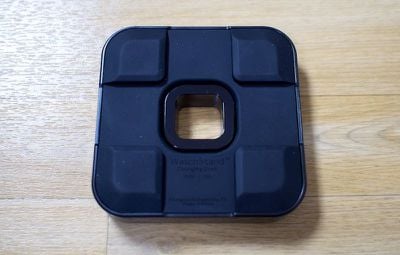
Aesthetic preferences vary heavily by person, so the form and material of the WatchStand may not be a negative for some. Though it's made of plastic, the WatchStand doesn't really look cheap and there are no flaws in its construction -- it has a wide, heavy rubber-bottomed base for stability and the part of the stand that holds the Apple Watch charger is well-designed and at an ideal viewing angle.

Size wise, the base of the WatchStand measures in at 5.5 inches by 3.15 inches, and the stand portion is nearly eight inches tall. That height feels less ideal than a shorter stand when glancing over at the watch from bed or on a desk, but it is necessary for the cable management feature. It weighs just over a pound, which makes it feel sturdy, but with its height, I was worried I might knock it over accidentally.
griffinwatchstandbasebottom
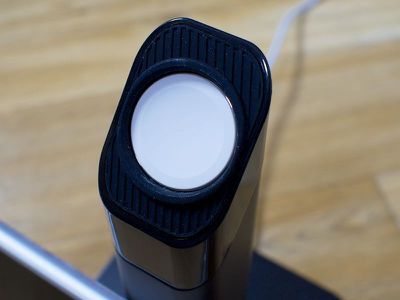
There are three components to the WatchStand: a base, the main stand with grooves for the cable, and a cable cover. The Apple Watch charging cable fits into the top of the stand, which is made from a soft rubber so the metal of the watch is never in danger of being scratched.
griffinwatchstandrubberwatchholder
If you have a stainless steel Apple Watch with a metal charger, you'll need to add in a small rubber insert to make it fit correctly. There's a hole below the circular cutout for the charger where the cable is fed through, and then excess cable can be wound around the base.
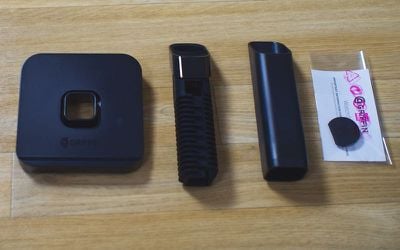
griffinwatchstandparts
The cable fits into the grooves in the rubber stand and you can wind up as much or as little as you like, depending on how much cord you need to reach a wall socket. Winding the cable up can be fiddly, because it needs to be pulled tight as you wind so there's room for the cable cover.
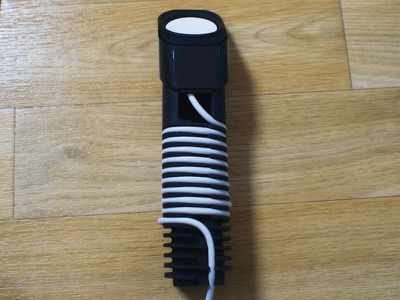
griffinwatchstandinnerpost
Being able to wind up excess cord is a great feature that other watch stands don't offer. Apple shipped the Apple Watch with a two-meter cord, resulting in a lot of excess cable for users who have sockets located in close proximity to nightstands or desks. With other watch stands, I often have a lot of unsightly cable to deal with, but it's out of sight with the Griffin stand.
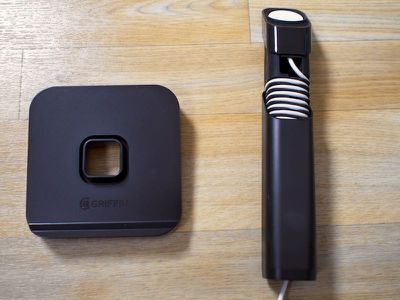
griffinwatchstandcovergoingon
After the cable's been wound, a plastic cover fits over the inner rubber stand and secures it to the base. If you didn't wind the cable tightly enough, it'll be difficult to get the cover on. Once the cover is in position, the end of the cable is fed through a hole in the base and underneath the base's rubber feet.
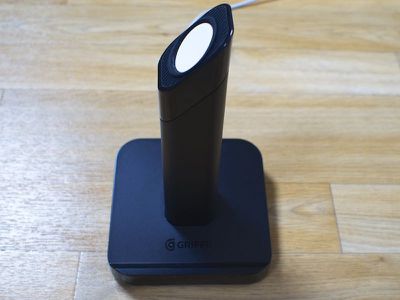
griffinwatchstandsideview (1)
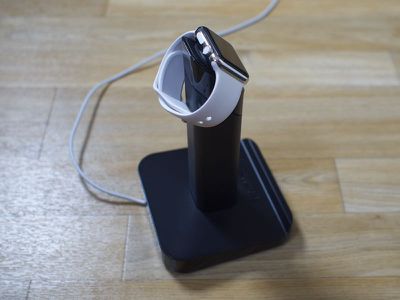
Unlike some other stands, the Griffin WatchStand does not have a slot to accommodate closed-loop bands like the Milanese Loop. Open bands sit fine on the dock, but to charge a band in the closed position, the watch needs to be put on the dock sideways. It's not a huge deal, but sideways is not an ideal viewing position
griffinwatchstandclosedband
Easy viewing at night or while charging is one of the main features that these Apple Watch stands advertise, and having to charge sideways negates that function. For that reason, I wouldn't recommend this dock to someone who plans to use it with a closed-loop band.
griffinwatchstandbackside
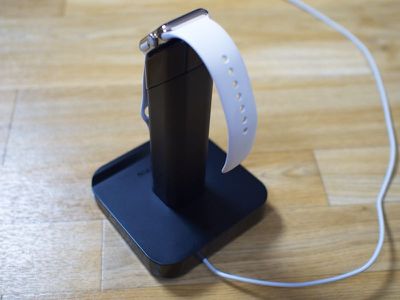
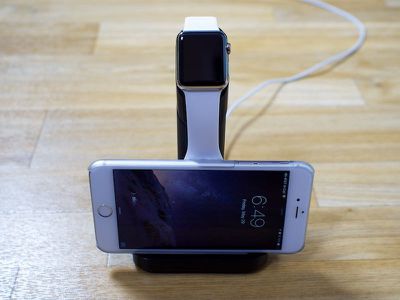
For other bands, the WatchStand works perfectly well. The angle makes it easy to glance at the watch at night, and if desired, you can also change the position of the post in the middle to face left or right rather than moving the whole stand. It's also worth noting that Griffin has designed the front of the WatchStand to hold an iPhone.
griffinwatchstandwithphone

Bottom Line

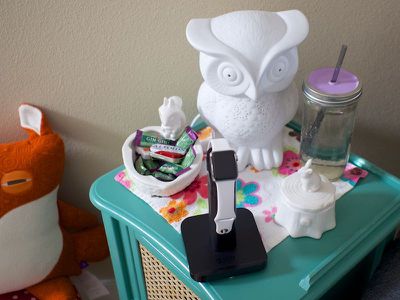
Griffin's WatchStand offers a lot of value for the price. Its cable management feature is excellent if you have excess cord to deal with, and the ability to hold an iPhone is also a nice add-on. For those of you with bands like the Milanese Loop, the WatchStand works, but it's not ideal.
griffinwatchstandontable
If you're looking for an affordable stand for an Apple Watch with an open-loop band, the Griffin is a solid choice.

Our previous Apple Watch stand reviews:
- Mophie Watch Dock
- Duet Two-in-One Apple Watch Stand
- Twelve South HiRise for Apple Watch

How to Buy

Griffin's WatchStand can be purchased from the company's website for $29.99.

Note: MacRumors received no compensation for this review.

Top Rated Comments

extricated Avatar
149 months ago
Owl lamp and gin gins FTW!
Score: 1 Votes (Like | Disagree)
jclo Avatar
149 months ago
I like the owl.

Thanks, it's a lamp!
Score: 1 Votes (Like | Disagree)
jclo Avatar
149 months ago
I imagine he's talking about the buttons on the Apple watch I think they have stickers on them.
The Digital Crown and side button on my Apple Watch are covered with WatchDots. I'm going to be sharing a review in a day or two.
Score: 1 Votes (Like | Disagree)
149 months ago
This is the stand I have. I love it. Thanks for the review!
Score: 1 Votes (Like | Disagree)
studio¹³¹ Avatar
149 months ago
Why are the buttons white?????? Custom make?
It has no buttons. It's simply a stand to feed your Apple Watch charger through.


I just picked this up the other day at Best Buy. The first night i used it, i rested my watch on it and it said and made the audible 'it's charging' sound. I go to sleep and wake up to it being still at 52%. Since then, I've noticed that sometimes when setting the watch on the stand, the watch slowly droops and settles into place, losing contact and the charge. If the charger magnet were stronger, this probably wouldn't happen -- I'm going to look for an upright solution rather than an angled one.
Score: 1 Votes (Like | Disagree)

Popular Stories

iPhone Duo Display Cracking

Apple Alerts Stores to iPhone Duo's Display Cracking Issue

Friday October 30, 2026 3:20 pm PDT by
In a memo shared with Apple Stores and Apple Authorized Service Providers this week, and later obtained by MacRumors, Apple provided technicians with guidance on how to diagnose and address the iPhone Duo's inner display cracking issue. If a customer reports the issue, Apple advised technicians to inspect the iPhone Duo and repair or replace it in accordance with their standard procedures....
iPad mini OLED feature 1

Apple Executive Comments on New iPad Mini Lacking 120Hz Display

Thursday October 29, 2026 1:47 pm PDT by
While the new iPad mini has an OLED display, the device does not support ProMotion, meaning the display's refresh rate is limited to 60Hz instead of 120Hz. ProMotion support would have allowed for the iPad mini's refresh rate to automatically adjust from 10Hz to 120Hz depending on the content being displayed, but evidently Apple has kept the feature exclusive to the iPad Pro among iPad...
Pinched iPad Mini

Apple Avoids Showing Pinched Fingers on iPad Mini Page in South Korea

Thursday October 29, 2026 11:52 am PDT by
In the U.S. and most other countries, Apple's website shows the new iPad mini being held by pinched fingers, but this is not the case in South Korea. The new iPad mini shown with pinched fingers on Apple's website in the U.S. On its South Korean website, Apple simply shows an image of the iPad mini on its own. The new iPad mini shown without pinched fingers on Apple's website in South Korea ...
Latest Stories
Apple Watch Ultra 4 Hits All-Time Low Price With Amazon's $99 Discount
16 hours ago
Reminder: Apple's Big Discount on Beats 360 Ear Cushions Ends Today
16 hours ago
Here's a New Tour of Apple's HomeView Software
16 hours ago
Apple Reveals New iPad Mini's Battery Capacity
18 hours ago
Top Stories: Apple's Big MacBook Pro, iPad mini and iMac Updates
19 hours ago
'Pluribus' Season 2 Reportedly Starts Production Today
1 day ago
iPhone 18 Pro Sales Surge in China, Offsetting Decline in U.S. and Japan
1 day ago
HomeView Software 27.2: Wallpapers, Control Center, and More
1 day ago
Apple Alerts Stores to iPhone Duo's Display Cracking Issue
1 day ago
iOS 27.3 Will Enable These Apple Intelligence Features in China
1 day ago
Apple Says iOS 27.3 Beta Coming Next Week
1 day ago
Apple's Flash Storage Suppliers Are Finally 'Getting Their Revenge'
2 days ago
14 New Things Your iPhone Can Do in iOS 27.2
2 days ago
iPhone Duo Review: One Week Later
2 days ago
Samsung Mocks iPhone Duo Display Cracks in New Ad Campaign
2 days ago
The MacRumors Show: OLED MacBook Pro, iPad Mini 8, and More
2 days ago
MacBook Pro With Touch Display: 15 More Details Revealed
2 days ago
Russia Places Apple on State Surveillance Registry
2 days ago
Halloween Weekend Brings Discounts on Apple Accessories and Pre-Orders
2 days ago
Apple Has Released More Than 25 New Products in the Past Two Months
2 days ago
Local Code Launches as Free, Private AI Assistant Tool for Mac
2 days ago
Apple Acquires Ascend.io
2 days ago
HomePod Mini 2 Launches Today: All the New Features
2 days ago
AirTag 2 4-Pack Drops to New Low Price of $69.99
2 days ago
Rian Johnson's iPhone Camera App Goes Viral
2 days ago
Where Did All the iPhone Duos Go? Mostly to Apple's Stores
2 days ago
Apple's Touchscreen MacBook Pro Could Ship 1.5M Units in 2027
2 days ago
New Apple TV 4K and iPad Mini: RAM Amounts Revealed
2 days ago
Apple Executive Comments on New iPad Mini Lacking 120Hz Display
2 days ago
Here's a Hands-On Look at HomePod Mini 2's New Two-Tone Colors
3 days ago

🔗 Related Apple News & Rumors

Stay updated with the latest Apple ecosystem news and verified rumors












































