

Griffin's Guide Magnetic Cable Management Set was first announced at CES in January of 2015, but it didn't become available for purchase until September. We went hands-on with the Guide to see if it was worth the wait as a cable management solution.
The Guide Cable Management Set is modular and consists of three weighted bases and three magnetic aluminum cable anchors that attach to the bases. Each base is made from a polished stainless steel with a shiny finish while the anchors, available in three sizes from small to large, are made from an anodized copper-colored aluminum.
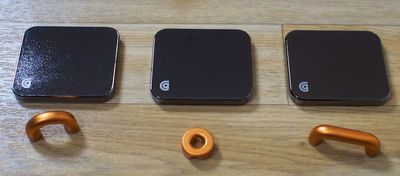
Together, the Guide system looks great on a desk, but it is only available in the polished steel and copper colorway, which doesn't match any iOS devices and while neutral, may not match all office and room decors. I liked the design of the Guide, but I did wish it was available in a wider selection of colors.
Each of the three bases is the same size, measuring in at 2.28 x 1.98 inches, but the magnetic cable anchors come in a range of sizes to fit different cords. The smallest of the three anchors is sized to fit a single iPhone cable, while the middle one can hold several iPhone-sized cables or a couple of larger cables, and the biggest anchor can hold thicker cables like those for cameras and other electronics. The weight of the Guide bases will keep them in place, but there's also a non-skid material on the bottom to provide even more traction.
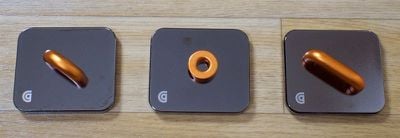
Because the anchors attach to each base using magnets, they can be arranged in multiple ways. One anchor can be used per base or multiple anchors can fit on a single base to meet various cable management needs. For my work space, I used the smaller one to hold an iPhone cable that has a pesky habit of slipping off the edge of the desk, while I used the other two to hold my MacBook cable and cables for other devices in place.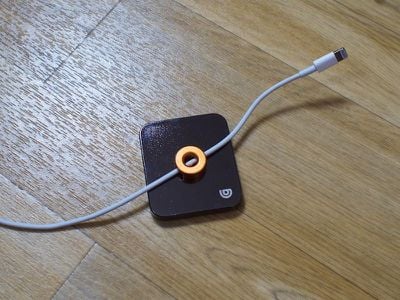
Due to their weight, the Guide bases can't realistically be mounted on walls or on the sides of desks and tables (and the Guide doesn't come with the necessary hardware) so these are going to be limited to on-the-desk organization. For that use case, the Guide is primarily going to keep your cables where you want them to be so they're not sliding all over the desk or slipping off. The Guide isn't going to hide or conceal cables and cords, but it will keep them looking more organized and streamlined.
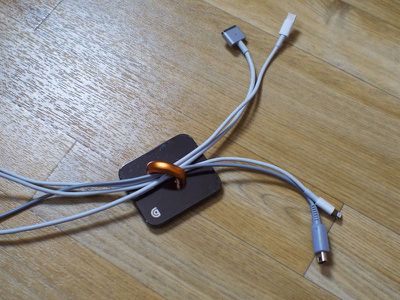
The large base size means the Guide takes up more room on a desk than simpler cable routing options, but sacrificing the extra space felt worth it to me both for the versatility of being able to rearrange the pieces at will and for the premium aesthetic. If you have multiple cables in different areas, such as on a desk and on a nightstand, the Guide can also be split up across multiple rooms. After some experimentation, I found the Guide to be more useful for me when split up, because a single larger cable anchor can hold multiple cables in place, letting me address several problem areas.
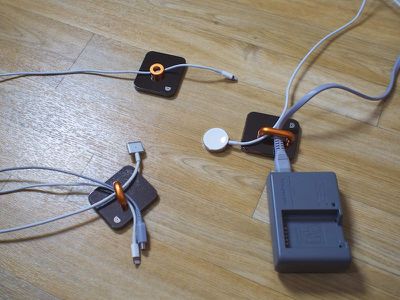
Given the usefulness of the Guide's interchangeable pieces, I'm surprised there aren't more magnetic cable management systems on the market. Before the Guide, I hadn't considered magnets as cable organizing solution, but it seems like an ideal way to wrangle cables.
Bottom Line
The magnetic Guide system is a clever way to organize cables on a desk, and because it can be used in so many ways, it's suitable for a range of cable configurations and setups. Since it's magnetic, it's easy to arrange and rearrange cables and the Guide system as necessary, and its industrial look blends in with a lot of decors.
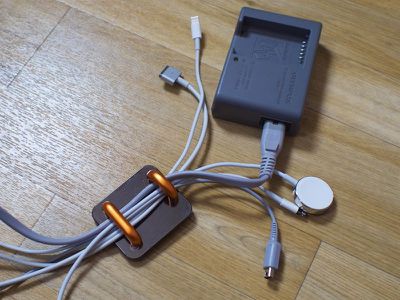
If you've got pesky cables that are continually slipping off of your desk or getting tangled and knocked out of place, the Guide is going to keep them where they belong with no problem.
The only real negative with the Guide is the price. At $40, this is a somewhat expensive solution to manage a handful of cables, and I do wish it was either more reasonably priced or had more pieces. If you don't mind shelling out $40 in the name of desktop organization, the Guide is worth picking up.
How to Buy
Griffin's Guide cable organizers can be purchased from the Griffin website for $39.99 or from Amazon.com for the same price.


















































Top Rated Comments
We are being asked to shell out $40 so we can put a hunk of metal on our desk and intentionally then run data cables through a magnetic field that is created by these other (ugly) hunks of metal?
I bought a "Cable Management System" from Staples for $9.99. It had numerous plastic holders that I could hide on the edge of my desk where it didn't get in my way and didn't look ugly. And it has lots of extra parts that I haven't yet used. And I probably still paid too much.